Geekzone: technology news, blogs, forums
Guest
Welcome Guest.
You haven't logged in yet. If you don't have an account you can register now.


tonyhughes

Hawkes Bay
8476 posts

Uber Geek
+1 received by user: 6

Retired Mod
Trusted
Lifetime subscriber

#24832 4-Aug-2008 17:22
Send private message

Known good working machine till this morning (my laptop - 8510p 2GB T7700 Vista Business).

Would not get past "Welcome" after login (i.e. no desktop).
Disabled network adapter, login to desktop fine.
Reconfirm that with any valid connection to our network, that machine will not get to desktop.
Confirm DHCP working, problem still exists with WiFi / Eth or both.
Confirm with static assigned, same as above.
If I get to desktop without network, then connect, I can access any network resource directly via IP address, but not hostname.
This includes being able to log into Citrix, RDP to other machines, browse network shares.
Can ping anything BUT the SBS.
Nothing that talks directly to SBS works on my machine.

All other clients fine.
Ubuntu Live CD on same laptop works 100% fine, can access SBS.

Any clues?


Create new topic
freitasm
BDFL - Memuneh
80646 posts

Uber Geek
+1 received by user: 41030

Administrator
ID Verified
Trusted
Geekzone
Lifetime subscriber

#154060 4-Aug-2008 17:30
Send private message

Could it be your profile is somehow damaged and the network information (Private, Public, Domain) is not ok? This could lock things out on the firewall.

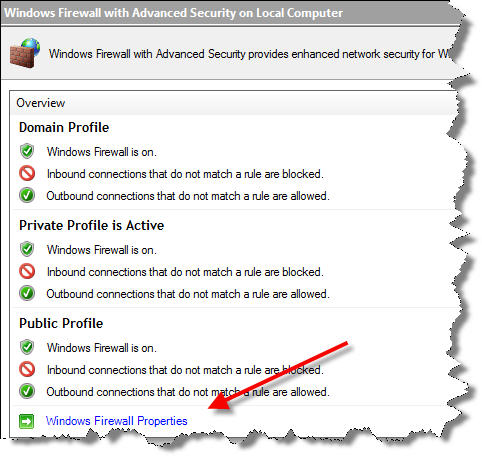
Try opening the Control Panel, Administrative Tools, Windows Firewall with Advanced Security. Then click Windows Firewall Properties and turn it Off for each Profile type:


See if it works when it's off. If you turn the Firewall Off using the Security Center you will find out it's only for the Private profile, not for the other ones. Use this method to turn it completely off.

Once you log in, right-click the network icon, select NEtwork and Sharing Center and "Customise" the connection - make it Public or Private, anything to force it change the status.

Then reboot and see if it's ok. If all ok, try turning the Firewall back on again.


Referral links: Quic Broadband (free setup code: R587125ERQ6VE) | Samsung | AliExpress | Wise | Sharesies 


Support Geekzone by subscribing (browse ads-free), or making a one-off or recurring donation through PressPatron.


chiefie
I iz your trusted friend
5877 posts

Uber Geek
+1 received by user: 151

Retired Mod
Trusted
Lifetime subscriber

  #154067 4-Aug-2008 17:51
Send private message

Is this Vista SP1? If so, Brad had the same problem, and his alternative solution is roll back to Vista Gold. Check with Brad and see what other solution he may have found?


Internet is my backyard...


«Geekzone blog: Tech 'n Chips Takeaway» «Personal blog: And then...»


Please read the Geekzone's FUG


bradstewart
4338 posts

Uber Geek
+1 received by user: 166

Retired Mod
Trusted
Lifetime subscriber

  #154626 6-Aug-2008 13:18
Send private message

We had an issue with Vista SP1 where we configured the machines for log on to the SBS, but after retsarting them and trying to log in we kept getting a trusts error. Rolling back to Vista RTM fixed the issue which seemed to be one a few people were having.

But unlike your issue the machines could communicate (partly) with the server.

Create new topic


Geekzone Live »

Try automatic live updates from Geekzone directly in your browser, without refreshing the page, with Geekzone Live now.


Are you subscribed to our RSS feed? You can download the latest headlines and summaries from our stories directly to your computer or smartphone by using a feed reader.