Geekzone: technology news, blogs, forums
Guest
Welcome Guest.
You haven't logged in yet. If you don't have an account you can register now.


Asmodeus

1015 posts

Uber Geek
+1 received by user: 39


#198754 21-Jul-2016 12:33
Send private message

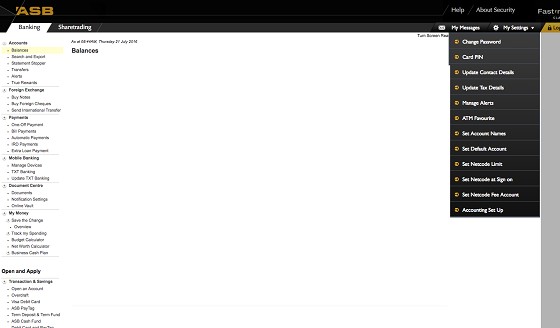
Since a week ago, every time I open Fastnet classic on a computer (pc or mac), the settings menu is always dropped down and won't retract. Also, the tree menus on the left side of the page are all expanded and won't contract. Have tried multiple browsers, OS and tried clearing cache, cookies, etc, etc (see pic below)


Any ideas or fixes?


Create new topic

This is a filtered page: currently showing replies marked as answers. Click here to see full discussion.

Asmodeus

1015 posts

Uber Geek
+1 received by user: 39


  #1600313 28-Jul-2016 18:45
Send private message

OK so Fastnet CS got straight back to me which I was impressed by. I had a screen reader turned on somehow which was causing all the menus to be permanently expanded. There was a small link on the page, partially hidden by the settings menu, to turn it off (you can just see it in the screenshot in the OP). Works fine now :)


Create new topic


Geekzone Live »

Try automatic live updates from Geekzone directly in your browser, without refreshing the page, with Geekzone Live now.


Are you subscribed to our RSS feed? You can download the latest headlines and summaries from our stories directly to your computer or smartphone by using a feed reader.
