Geekzone: technology news, blogs, forums
Guest
Welcome Guest.
You haven't logged in yet. If you don't have an account you can register now.


geek3001

349 posts

Ultimate Geek
+1 received by user: 531

ID Verified
Subscriber

#324681 12-May-2026 13:16
Send private message quote this post

I bank with ASB Bank and rarely use their website, as I can normally do what I need to with their smart phone app.


I am currently using Linux Mint 22.1 as my OS and have noticed recently that I can not logon to ASB Fastnet using Firefox or Opera.


I can log on using Google Chrome.


I don't use and don't have access to a Windows PC.


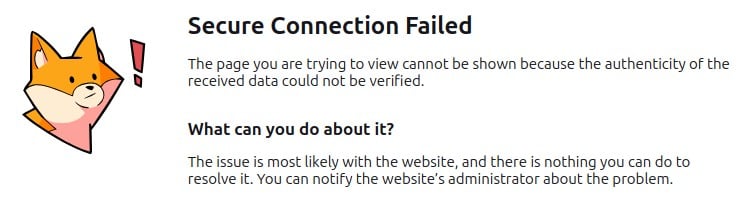
When using Firefox, I get this error message after authentication and can go no further:


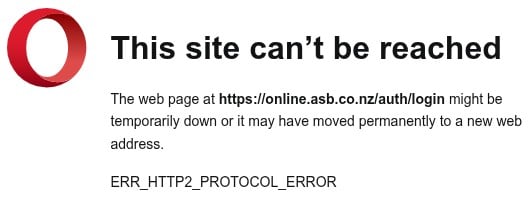
When using Opera, I get this error message after authentication and can go no further. This error message is more helpful in that it mentions a problematic URL:


ASB Bank says at https://www.asb.co.nz/help/what-internet-browsers-can-i-use-to-view-asb-websites.html that they support current version browsers. I note that their page is nearly ten years old and makes no mention of Linux as an OS.


Using Google Chrome effectively fixes this logon issue, however I'm wondering whether this is a "me" problem, or whether there are any ASB Bank users who use Linux as their OS that have seen this behaviour during logon to ASB Fastnet.


View this topic in a long page with up to 500 replies per page Create new topic
 1 | 2 | 3
openmedia
3509 posts

Uber Geek
+1 received by user: 906

Trusted

  #3490128 12-May-2026 13:47
Send private message quote this post

Working for me using Firefox on Fedora.


Generally known online as OpenMedia, now working for Red Hat APAC as a Technology Evangelist and Portfolio Architect. Still playing with MythTV and digital media on the side.


boosacnoodle
1420 posts

Uber Geek
+1 received by user: 951


  #3490131 12-May-2026 14:05
Send private message quote this post

Have you got HTTP/2.0 enabled? Are you using a web proxy?


geek3001

349 posts

Ultimate Geek
+1 received by user: 531

ID Verified
Subscriber

  #3490139 12-May-2026 14:46
Send private message quote this post

boosacnoodle:


Have you got HTTP/2.0 enabled? Are you using a web proxy?


Web proxy? No, not using one.


HTTP/2.0 enabled? If you mean in the browser, for Firefox yes, as it says true for the network.http.spdy.enabled.http2 value in about:config.


Opera has HTTP/2 enabled by default and requires a --disable-http2 directive when it starts if I interpret Google correctly.


Or am I looking in the wrong place(s)?


KiwiSurfer
1788 posts

Uber Geek
+1 received by user: 1068

ID Verified
Lifetime subscriber

  #3490141 12-May-2026 14:52
Send private message quote this post

Works fine Firefox/Win11. @openmedia says fine on Firefox/Linux so I suspect some issue local to you.


Try opening Firefox in troubleshooting mode as this disables extenstions etc to check it's not a rogue extenstion causing issues.


Are you using the most current Firefox package for your distro? Generally Linux distros either track the latest LTS versions (Debian etc) or the latest stable version (Arch etc).


Try creating a new 'test' user so which will create a a fresh Firefox/Oprea profile and see if the issue perists.


geek3001

349 posts

Ultimate Geek
+1 received by user: 531

ID Verified
Subscriber

  #3490143 12-May-2026 15:02
Send private message quote this post

Using Firefox version 150.0.2 which looks like the latest version.


No add-ons / extensions, just a vanilla browser install that I use for banking, so that there's hopefully less chance of any malicious tentacles from extensions possibly seeing banking related activity.


Thanks all for the feedback, I shall dig around a bit more as it's looking more like a "me" cause.


muppet
2688 posts

Uber Geek
+1 received by user: 1752

Trusted

  #3490145 12-May-2026 15:10
Send private message quote this post

If you look at your certificate in Chrome, is it a valid cert with a proper root certificate?  Is it only ASB that has issues?


Shop now at Mighty Ape (affiliate link).
freitasm
BDFL - Memuneh
81048 posts

Uber Geek
+1 received by user: 41955

Administrator
ID Verified
Trusted
Geekzone
Lifetime subscriber

  #3490309 12-May-2026 21:28
Send private message quote this post

This sounds like a security service is intercepting the request and redirecting to their own page.


For example, my router allows me to block some site categories (e.g. remote control). It does it by looking at the domain DNS lookup. If it decides to block, it redirects to a page with information about it. Some browsers don't like that.


Since it works on one browser but not other two I would suggesr you look at proxy configuration, DNS setup, security settings on your browser, computer and router.


Referral links: Quic Broadband (free setup code: R587125ERQ6VE) | Samsung | AliExpress | Wise | Sharesies 


Support Geekzone by subscribing (browse ads-free), or making a one-off or recurring donation through PressPatron.


snj

snj
345 posts

Ultimate Geek
+1 received by user: 253


  #3490320 12-May-2026 22:35
Send private message quote this post

geek3001:


Using Firefox version 150.0.2 which looks like the latest version.


No add-ons / extensions, just a vanilla browser install that I use for banking, so that there's hopefully less chance of any malicious tentacles from extensions possibly seeing banking related activity.


Thanks all for the feedback, I shall dig around a bit more as it's looking more like a "me" cause.


Was playing around with CachyOS the other day and still had the LiveUSB handy, threw that on my laptop and got to the ASB Fastnet login screen without issues (w/ Firefox & via Voyager). The image comes with Firefox 150.0. Would side with some sort of interception or other oddity with your connection.


Could try tethering via your phone (USB or WiFi) and see if you can replicate over your mobile data.


nzkc
1641 posts

Uber Geek
+1 received by user: 1047


  #3490321 12-May-2026 22:37
Send private message quote this post

I can log in fine, and most of the site works with Firefox. The one exception is the "Kiwisaver" section. That does not load correctly. Looks like a javascript issue. I wonder if its related to Firefox's new "ad blocker" functionality. Not dug into it. I just use Chromium for the time being.


yitz
2286 posts

Uber Geek
+1 received by user: 610


  #3490322 12-May-2026 23:16
Send private message quote this post

Path MTU size issue? Since it's distributed using Akamai you could try testing/changing between an alternate DNS resolver like Cloudflare/Google Public DNS and ISP DNS.


geek3001

349 posts

Ultimate Geek
+1 received by user: 531

ID Verified
Subscriber

  #3490362 13-May-2026 09:20
Send private message quote this post

Thanks for the further feedback. ASB is the only site I have this issue with. In terms of banking, I bank with several other NZ banks and their sites all work without issue.


Something must be weird in my set up somewhere, I have no proxy, no browser add-ons or extensions. So, hmm...


HP


Shop now for HP laptops and other devices (affiliate link).
MurrayM
2509 posts

Uber Geek
+1 received by user: 750

ID Verified
Trusted
Lifetime subscriber

  #3490449 13-May-2026 11:42
Send private message quote this post

I am running Linux Mint 22.3 and the same Firefox version as you. I'm able to log into the ASB site with no problems. I don't normally use Firefox (prefer Vivaldi) so have no extensions or have changed any settings.


barclayg
17 posts

Geek
+1 received by user: 2


  #3490665 13-May-2026 21:09
Send private message quote this post

I was experiencing the same problem (Ubuntu MATE) for the last couple of weeks.  F12 Developer tools showed that the error was NS_ERROR_NET_RESET.


Having said that, I just went to replicate it to confirm the error message and now it's working for me.  Maybe give it another go...


jm3

jm3
89 posts

Master Geek
+1 received by user: 20

ID Verified

  #3495049 25-May-2026 12:18
Send private message quote this post

Did anyone get to the bottom of this? 


I'm having the issue on Fedora with firefox and chrome. 


Fine on android through chrome.


geek3001

349 posts

Ultimate Geek
+1 received by user: 531

ID Verified
Subscriber

  #3495054 25-May-2026 12:37
Send private message quote this post

Support from the bank has proven to be very poor, especially with their puerile chat system they provide now for interaction with them. The staff behind that seem to be more interested in closing queries as quickly as possible to improve their resolution rate stats rather than providing a proper reply.


The best answer I can obtain is that Firefox is not a supported browser, we only support browsers mentioned here https://www.asb.co.nz/help/what-internet-browsers-can-i-use-to-view-asb-websites.html which is nine year old information that says Firefox and Internet Explorer are supported browsers.


Hopeless.


 1 | 2 | 3
View this topic in a long page with up to 500 replies per page Create new topic


Geekzone Live »

Try automatic live updates from Geekzone directly in your browser, without refreshing the page, with Geekzone Live now.


Are you subscribed to our RSS feed? You can download the latest headlines and summaries from our stories directly to your computer or smartphone by using a feed reader.
