Geekzone: technology news, blogs, forums
Guest
Welcome Guest.
You haven't logged in yet. If you don't have an account you can register now.


foremannz

34 posts

Geek


#79276 15-Mar-2011 20:14
Send private message

I know this has probably been asked time and time again, but has anyone made a new router that records internet usage, even if it sends reports to another computer.  So many of my customers and friends want to log their internet traffic, but the hassle of setting up a firewall appliance (I have tried smoothwall and pfsense) is just cumbersome and flakey.  I also know that you can get firmware for some older routers, but I am looking for an out of the box solution, and am even considering Zenbu for alot of my users!!!


20 20 PC Limited
Your Computer Guru

Create new topic
freitasm
BDFL - Memuneh
80646 posts

Uber Geek
+1 received by user: 41030

Administrator
ID Verified
Trusted
Geekzone
Lifetime subscriber

  #448680 15-Mar-2011 20:23
Send private message

A post from just two days ago, with lots of links: http://www.geekzone.co.nz/forums.asp?forumid=49&topicid=79148

(Search is your friend around here).


Referral links: Quic Broadband (free setup code: R587125ERQ6VE) | Samsung | AliExpress | Wise | Sharesies 


Support Geekzone by subscribing (browse ads-free), or making a one-off or recurring donation through PressPatron.



sbiddle
30853 posts

Uber Geek
+1 received by user: 9996

Retired Mod
Trusted
Biddle Corp
Lifetime subscriber

  #448683 15-Mar-2011 20:27
Send private message

There are many, many ways to accomplish this.

If you want a simple, off the shelf solution then http://www.webgauge.co.nz/ is probably your best option.

If you're got time to set up your own system than a Miktorik router will do a billiant job, and virtually all of 3rd party router firmware releases will also do this.

pfsence and smoothwall are complete overkill.


cyril7
9073 posts

Uber Geek
+1 received by user: 2499

ID Verified
Trusted
Subscriber

  #448707 15-Mar-2011 21:52
Send private message

Even less than a whole Mikrotick router solution a Mikrotick switch running switchos will let you both control port throughput and report traffic level.

Cyril


Skolink
1081 posts

Uber Geek
+1 received by user: 32


  #448720 15-Mar-2011 22:36
Send private message

I ran a Mikrotik router for 8 years, and have just switched to Gargoyle solely so that I could monitor usage! I could not figure out any way to log data usage on a Mikrotik router without software running on a PC 24/7 and even then it was not very useful.

cyril7
9073 posts

Uber Geek
+1 received by user: 2499

ID Verified
Trusted
Subscriber

  #448751 16-Mar-2011 07:44
Send private message

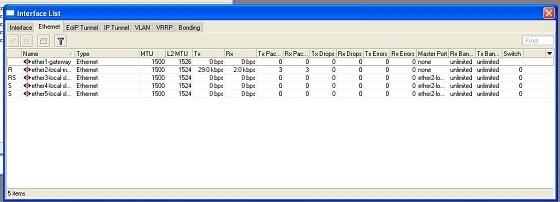
Both switchOS has a web interface with port counters that just keep rolling,

Here is an image from a routerOS session I just started (hence small numbers),


Cyril

cyril7
9073 posts

Uber Geek
+1 received by user: 2499

ID Verified
Trusted
Subscriber

  #448756 16-Mar-2011 08:25
Send private message

And here is a swos log, as you can see it provides both packet and byte count per port.


Cyril


Stream your favourite shows now on Apple TV (affiliate link).
sbiddle
30853 posts

Uber Geek
+1 received by user: 9996

Retired Mod
Trusted
Biddle Corp
Lifetime subscriber

  #448765 16-Mar-2011 08:45
Send private message

Skolink: I ran a Mikrotik router for 8 years, and have just switched to Gargoyle solely so that I could monitor usage! I could not figure out any way to log data usage on a Mikrotik router without software running on a PC 24/7 and even then it was not very useful.


There are numerous ways, ranging from simple to complex. The easiest is to simply configure a hotspot with invididual logins for each user. You can then track usage of each login.


jjnz1
1371 posts

Uber Geek
+1 received by user: 195

Lifetime subscriber

  #448776 16-Mar-2011 08:56
Send private message

Or you can use the Mangle function of the Mikrotik firewall, and set up one rule per computer, this will collect the needed stats but will not display it in a pretty graph. -Just numbers.

jjnz1
1371 posts

Uber Geek
+1 received by user: 195

Lifetime subscriber

  #448778 16-Mar-2011 08:58
Send private message

@cyril7, have you got winbox to work correctly in windows 7?

cyril7: Both switchOS has a web interface with port counters that just keep rolling,

Here is an image from a routerOS session I just started (hence small numbers),


Cyril

sbiddle
30853 posts

Uber Geek
+1 received by user: 9996

Retired Mod
Trusted
Biddle Corp
Lifetime subscriber

  #448807 16-Mar-2011 10:15
Send private message

jjnz1: @cyril7, have you got winbox to work correctly in windows 7?


I use it under Windows 7 every day and have never had any issues. What version are you using?

jjnz1
1371 posts

Uber Geek
+1 received by user: 195

Lifetime subscriber

  #448813 16-Mar-2011 10:26
Send private message

winbox 2.2.18 connecting to v5.0rc10 (rb600a).

It connects fine, but the buttons like IP, IPv6, and System etc which are suppose to expand do not.
Other buttons such as interfaces, wireless etc work fine.

Anyway, I just use it through XP mode (VM).

I haven't explored what it could be yet, as XP mode is easier but if you have any ideas of the top of your head.... 

Create new topic


Geekzone Live »

Try automatic live updates from Geekzone directly in your browser, without refreshing the page, with Geekzone Live now.


Are you subscribed to our RSS feed? You can download the latest headlines and summaries from our stories directly to your computer or smartphone by using a feed reader.