Geekzone: technology news, blogs, forums
Guest
Welcome Guest.
You haven't logged in yet. If you don't have an account you can register now.


aucklander

478 posts

Ultimate Geek
+1 received by user: 11


#299460 9-Sep-2022 16:28
Send private message

Hi all,


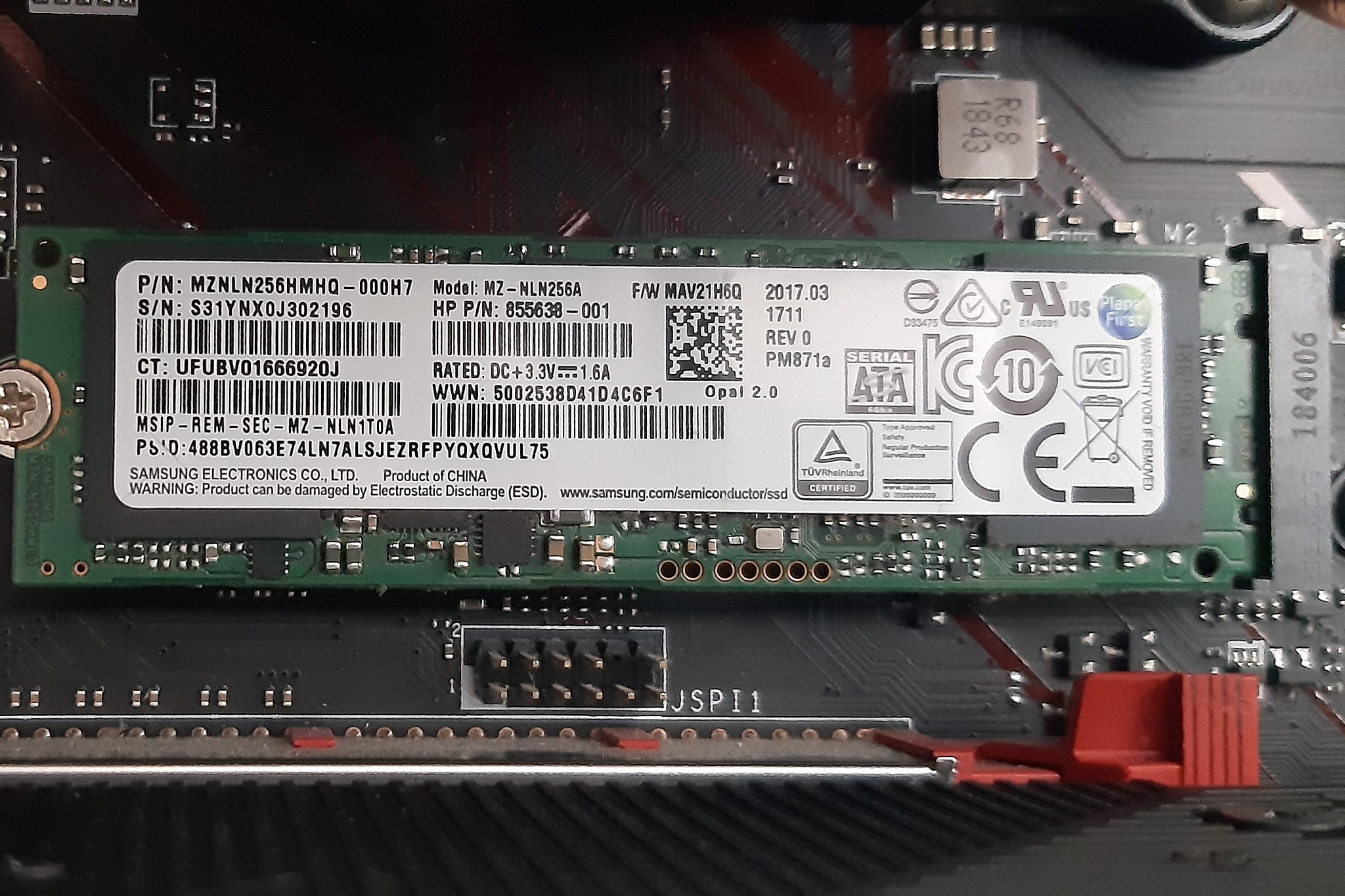
currently I have mobo B450 GAMING PLUS with one M.2 slot (M key); The slot is used by 256GB SSD SATA type. This is how I got the PC, not my choice. I did not really understand when I got it why there is no significant speed improvement at least at start-up, but I did not pay that much attention straight away... Now after I learned that M.2 does not mean "faster speeds", it means "it is capable of faster speeds if you use PCIe SSDs", I am looking to upgrade the SSD both in terms of size and technology (get one which is PCIe NMMe of course).


The options which I shortlisted (due to budget limitations, honestly), are both PCIe NVMe type:


- Crucial P2 1000GB currently $129 at PB tech but I found it somewhere else for $100, second hand from Nov 2021, with receipt, etc)


- Toshiba KXG50ZNV512G - only 512GB , $60 (label says manufactured Nov 2018), of course second hand (most likely pulled out from an HP laptop?)


various benchmark websites indicate Crucial would be better (faster than Toshiba and of course the one I am looking at is 1TB size) but then there is SOOO much talk about Crucial starting to use inferior components at a certain point without any notification to the market and using the same model numbers and there is no way to know if you get the "good stuff" or the "other one", and it is very relevant as it appears the speeds for "the other one" are roughly 4 times slower than the original drives? The only difference someone could identify was that the "new ones" (the slow ones) have the marking UK/CA" on the label which the old SSDs did not have it. Unfortunately the Crucial P2 which I am looking to get has this UK/CA on the label and this is normal, considering is a new SSD, not an old one (most of these articles date back to 2020 - 2021 so maybe if I get an old one like 2018 - 2019 then there is a chance it was built with the "good stuff"... everyone says this is "bait and switch" scam at its lowest level...


Can anyone confirm if the new Crucial P2 is indeed noticeable slower than it should be? Would you avoid this brand / model because of the switch they did to the chips (using slower OLC type instead of faster TLC, which they used originally when the product was launched and the data sheets were written and everyone was running benchmarks on their product being new on the market...).


View this topic in a long page with up to 500 replies per page Create new topic
 1 | 2
mentalinc
3391 posts

Uber Geek
+1 received by user: 1027

Trusted

  #2965164 9-Sep-2022 16:43
Send private message

I wouldn't go second hand on ssd. You're very unlikely to notice any difference moving ssd to ssd.


CPU: AMD 5900x | RAM: GSKILL Trident Z Neo RGB F4-3600C16D-32GTZNC-32-GB | MB:  Asus X570-E | GFX: EVGA FTW3 Ultra RTX 3080Ti| Monitor: LG 27GL850-B 2560x1440


Quic: https://account.quic.nz/refer/473833 R473833EQKIBX 


aucklander

478 posts

Ultimate Geek
+1 received by user: 11


  #2965166 9-Sep-2022 16:52
Send private message

but the PCIe with NVMe technology is supposed to be 4-5 times faster than SATA, and they are both used for SSDs... so changing a SSD from SATA to NVMe should end up as an improvement, right?...


mattwnz
20542 posts

Uber Geek
+1 received by user: 4813


  #2965167 9-Sep-2022 16:54
Send private message

mentalinc: I wouldn't go second hand on ssd. You're very unlikely to notice any difference moving ssd to ssd.


Can second hand SSDs contain viruses on other parts of it, as I heard they are more difficult to clean than a conventional harddrive. 


mattwnz
20542 posts

Uber Geek
+1 received by user: 4813


  #2965168 9-Sep-2022 16:56
Send private message

aucklander:


but the PCIe with NVMe technology is supposed to be 4-5 times faster than SATA, and they are both used for SSDs... so changing a SSD from SATA to NVMe should end up as an improvement, right?...


Wouldn't it depend on the speed of the SSD, as many have different ratings. So even if M2 is a faster port and SATA, it maybe getting constrained by the actual speed of the SSD. 


SirHumphreyAppleby
2950 posts

Uber Geek
+1 received by user: 1882


  #2965173 9-Sep-2022 17:10
Send private message

mattwnz:


Can second hand SSDs contain viruses on other parts of it, as I heard they are more difficult to clean than a conventional harddrive. 


Used SSDs are best avoided because they have a lifespan limited by the number of write cycles. The lifespan is many times the capacity of the SSD, but drives used for tasks handling large amounts of data, such as video editing, may not have much life left in them.


They are more difficult to clean because of wear leveling (a method to increase their lifespan), but none of that is visible to the OS. In theory, yes, there could be a virus, but executing it would require accessing data on a part of the drive that the drive is specifically designed to hide from the OS. The risk with SSDs is mostly due to the ability to leak data that you think has been erased, again due to wear leveling.


richms
29167 posts

Uber Geek
+1 received by user: 10285

Trusted
Lifetime subscriber

  #2965177 9-Sep-2022 17:15
Send private message

aucklander:


but the PCIe with NVMe technology is supposed to be 4-5 times faster than SATA, and they are both used for SSDs... so changing a SSD from SATA to NVMe should end up as an improvement, right?...


Its minimal for most use cases. Nothing like going from spinning rust to a SSD. But if you're going from a dramless drive to one with ram you should see a significant improvement regardless of interface type. My endevours with dramless ones had the PC lagging out more than a same spec one with a spinner in it for the OS at times.


Richard rich.ms


Support Geekzone with one-off or recurring donations Donate via PressPatron.
fe31nz
1295 posts

Uber Geek
+1 received by user: 423


  #2965232 9-Sep-2022 23:05
Send private message

I would not ever recommend buying a second hand SSD (SATA or NVMe) unless the seller gave you a full listing of the SMART data so you could see the level of wear and the likely remaining use you would be able to get out of it.  If they have been using it to edit or record huge video files every day, it could be almost completely worn out, even if it is relatively new.


The B450 chipset motherboards have PCIe 3.0, and the two NVMe drives you listed are also PCIe 3.0 x4, so they are decent choices.  For upgrading my my mother's MythTV box to an Asus PRIME B450-Plus motherboard, I chose an Adata XPG SX8200 Pro 512 Gbyte NVMe drive as the fastest I could find for a decent price.  I have been impressed with its performance and would recommend that (or preferably a 1 Tbyte version for extra longevity).


https://www.pbtech.co.nz/product/HDDADA82020/ADATA-SX8200-Pro-512GB-M2-NVMe-SSD-ultra-fast-PCIe


https://www.pbtech.co.nz/product/HDDADA82030/ADATA-SX8200-Pro-1TB-M2-NVMe-SSD-Ultra-fast-PCIe-G


I posted the links to PB Tech, but do a proper search as you can often get things cheaper than at PB Tech.


Be aware that B450 based motherboards have limited PCIe lanes and using an NVMe SSD may well cause the motherboard to turn off the two highest numbered SATA ports to get the necessary 4 lanes for use with the x4 NVMe port.  That is what happens on the Asus PRIME B450-Plus motherboard - check your motherboard manual.


My mother's SSD is currently showing 7% of life used, with 16.9 Tbtyes written so far over 14,494 power on hours (604 days = 1.65 years).  So in theory it should be good for another 8023 days (21.9 years) if the use pattern remains the same.


Here is the SMART data from my mother's SSD:


root@crw-pvr:~# smartctl -a /dev/nvme0n1
smartctl 7.1 2019-12-30 r5022 [x86_64-linux-5.4.0-125-generic] (local build)
Copyright (C) 2002-19, Bruce Allen, Christian Franke, www.smartmontools.org


=== START OF INFORMATION SECTION ===
Model Number:                       ADATA SX8200PNP
Serial Number:                      2K1120095744
Firmware Version:                   42A4SANA
PCI Vendor/Subsystem ID:            0x1cc1
IEEE OUI Identifier:                0x000000
Controller ID:                      1
Number of Namespaces:               1
Namespace 1 Size/Capacity:          512,110,190,592 [512 GB]
Namespace 1 Utilization:            122,513,645,568 [122 GB]
Namespace 1 Formatted LBA Size:     512
Local Time is:                      Fri Sep  9 22:43:00 2022 NZST
Firmware Updates (0x14):            2 Slots, no Reset required
Optional Admin Commands (0x0017):   Security Format Frmw_DL Self_Test
Optional NVM Commands (0x005f):     Comp Wr_Unc DS_Mngmt Wr_Zero Sav/Sel_Feat Timestmp
Maximum Data Transfer Size:         64 Pages
Warning  Comp. Temp. Threshold:     75 Celsius
Critical Comp. Temp. Threshold:     80 Celsius


Supported Power States
St Op     Max   Active     Idle   RL RT WL WT  Ent_Lat  Ex_Lat
 0 +     9.00W       -        -    0  0  0  0        0       0
 1 +     4.60W       -        -    1  1  1  1        0       0
 2 +     3.80W       -        -    2  2  2  2        0       0
 3 -   0.0450W       -        -    3  3  3  3     2000    2000
 4 -   0.0040W       -        -    4  4  4  4    15000   15000


Supported LBA Sizes (NSID 0x1)
Id Fmt  Data  Metadt  Rel_Perf
 0 +     512       0         0


=== START OF SMART DATA SECTION ===
SMART overall-health self-assessment test result: PASSED


SMART/Health Information (NVMe Log 0x02)
Critical Warning:                   0x00
Temperature:                        34 Celsius
Available Spare:                    100%
Available Spare Threshold:          10%
Percentage Used:                    7%
Data Units Read:                    5,991,796 [3.06 TB]
Data Units Written:                 33,028,440 [16.9 TB]
Host Read Commands:                 98,596,433
Host Write Commands:                1,032,679,676
Controller Busy Time:               11,373
Power Cycles:                       68
Power On Hours:                     14,494
Unsafe Shutdowns:                   21
Media and Data Integrity Errors:    0
Error Information Log Entries:      0
Warning  Comp. Temperature Time:    0
Critical Comp. Temperature Time:    0
Temperature Sensor 2:               34 Celsius
Temperature Sensor 3:               42 Celsius
Temperature Sensor 4:               30 Celsius
Temperature Sensor 5:               30 Celsius
Temperature Sensor 6:               34 Celsius
Thermal Temp. 1 Transition Count:   3
Thermal Temp. 2 Transition Count:   3
Thermal Temp. 1 Total Time:         213
Thermal Temp. 2 Total Time:         70


Error Information (NVMe Log 0x01, max 256 entries)
No Errors Logged


timmmay
20900 posts

Uber Geek
+1 received by user: 5381

Trusted
Lifetime subscriber

  #2965275 10-Sep-2022 09:33
Send private message

The main advantage of SSD over hard drive is much lower latency, and in many cases higher bandwidth. The advantage of M2 over SATA seems to mostly be higher peak bandwidth, and maybe slightly lower latency again. I'm not sure you'll notice much / any difference moving from SATA to M2. I also would avoid second hand. I'd take the larger M2 SSD even if the specs aren't quite as good - taking into account account the comment about RAM above. I tend to only buy Samsung SSDs because I know from experience they work well.


Mehrts
1112 posts

Uber Geek
+1 received by user: 984

Trusted

  #2965323 10-Sep-2022 09:45
Send private message

timmmay:


The advantage of M2 over SATA...


Please stop referring to NVMe drives as "M2, or M.2". It only adds to the massive confusion that people experience.

M.2 is is simply the form factor, and drives that use SATA and PCIe protocols exist in this form factor even though they're two entirely different beasts with differing levels of performance.


richms
29167 posts

Uber Geek
+1 received by user: 10285

Trusted
Lifetime subscriber

  #2965429 10-Sep-2022 14:26
Send private message

Usually the warnings about the M.2 slot disabling the sata ports is if you put a sata M.2 drive into there. I am yet to have one of the satas disable when a nvme drive has been put in. But that can on some boards make one of the chipset connected PCIe slots lose some lanes to it.


Richard rich.ms

fe31nz
1295 posts

Uber Geek
+1 received by user: 423


  #2965808 11-Sep-2022 00:08
Send private message

richms:


Usually the warnings about the M.2 slot disabling the sata ports is if you put a sata M.2 drive into there. I am yet to have one of the satas disable when a nvme drive has been put in. But that can on some boards make one of the chipset connected PCIe slots lose some lanes to it.


Not in the case of the B450 chipset - it supports only four SATA ports from the chipset.  The other two SATA ports on the MSI B450 GAMING PLUS motherboard are connected to the CPU.  To quote from the manual "SATA5 and SATA6 ports will be unavailable when installing an M.2 device in M.2 slot.":


https://download.msi.com/archive/mnu_exe/mb/E7B86v1.2-GSE-LITE.pdf


For my mother's Asus PRIME B450-PLUS motherboard, the manual says "The M.2 Socket shares bandwidth with th SATA_5/6 ports, and therefore the SATA_5/6 ports cannot be used when an M.2 device is installed."  And they mean that - I tried using them and they do not work with an M.2 NVMe drive installed.  I had to add an old SAS card (PCIe 2.0 x8 interface) to get two more SATA ports.


My guess is that most B450 chipset motherboards will work like this.


Move to New Zealand's best fibre broadband service (affiliate link). Free setup code: R587125ERQ6VE. Note that to use Quic Broadband you must be comfortable with configuring your own router.
aucklander

478 posts

Ultimate Geek
+1 received by user: 11


  #2965845 11-Sep-2022 10:19
Send private message

Mehrts:


Please stop referring to NVMe drives as "M2, or M.2". It only adds to the massive confusion that people experience.

M.2 is is simply the form factor, and drives that use SATA and PCIe protocols exist in this form factor even though they're two entirely different beasts with differing levels of performance.


can you get NVMe drives in anything else than M2 form factor?


SirHumphreyAppleby
2950 posts

Uber Geek
+1 received by user: 1882


  #2965846 11-Sep-2022 10:31
Send private message

aucklander:


can you get NVMe drives in anything else than M2 form factor?


Yes.


Mehrts
1112 posts

Uber Geek
+1 received by user: 984

Trusted

  #2965847 11-Sep-2022 10:32
Send private message

aucklander:

can you get NVMe drives in anything else than M2 form factor?


Yes, the U.2 form factor which is commonly found in enterprise solutions.

Read this for more info regarding NVMe drives.


aucklander

478 posts

Ultimate Geek
+1 received by user: 11


  #2965850 11-Sep-2022 10:51
Send private message

OK, agree with all comments about second hand.


I am looking to get this one: https://extremepc.co.nz/samsung-980-500gb-pcie-3-0-nvme-m-2-ssd-up-to-3-500-mb-s-sequential-read-and-3-000-mb-s-write/


The question which remains: will I experience an improvement over the current SATA M2 256GB currently installed? (picture below)


I expect faster response which should be noticeable but one response commented there will be no noticeable speed increase between SATA and NVMe drive (which confused me lots as I was convinced the 3000MB/s speed sounds definitely faster than 600MB/sec for SATA III)


the manual for my mobo states the M2 slot supports PCI3 3.0 x4; Reading about the PCIe, I see that rev 3.0 x4 is limited to 4GB/sec ; I do not find this relevant in my situation as both options (NVMe or SATA drives form factor M2) would be below this value. The only question from me, was if it is worth replacing the M2 SATA SSD with and M2 PCIe NVMe SSD.


from what I am reading about SSDs reviews, some NVMe perform worse than SATA (under certain conditions) but the Samsung 980 I am looking to get should be very decent upgrade for me I would say?


I can confirm that the mobo manual states that SATA-5 and SATA-6 ports are disabled if you install an M2 drive. This is Ok, I would not need those ports.


 1 | 2
View this topic in a long page with up to 500 replies per page Create new topic


Geekzone Live »

Try automatic live updates from Geekzone directly in your browser, without refreshing the page, with Geekzone Live now.


Are you subscribed to our RSS feed? You can download the latest headlines and summaries from our stories directly to your computer or smartphone by using a feed reader.