Geekzone: technology news, blogs, forums
Guest
Welcome Guest.
You haven't logged in yet. If you don't have an account you can register now.


Sideface

9682 posts

Uber Geek
+1 received by user: 15712

Trusted
DR
Lifetime subscriber

#300543 16-Sep-2022 17:53
Send private message

I am a router geek, currently using various MikroTik routers on a Voyager fibre connection. 


I have a lot of Synology NAS gear, and love their user interface and build quality.


Synology routers have received rave reviews about their user interface and security features.


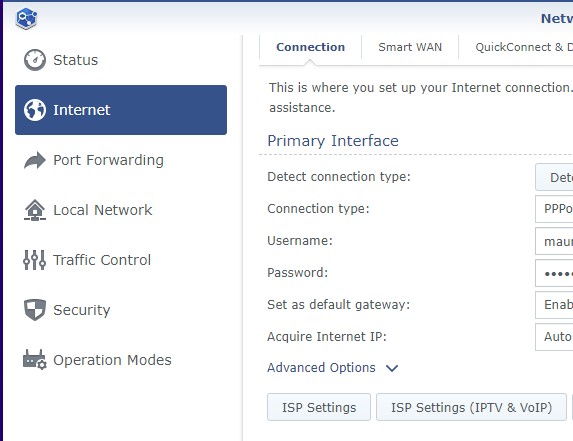
Voyager uses PPPoE with VLAN 10.  Synology routers did not support this, until recently.


I have just purchased a Synology MR2200ac router, after waiting for two years for (advertised) VLAN tagging functionality.


I want to use the MR2200ac as a stand-alone wireless router, NOT as part of a mesh network.


VLAN tagging is now supposedly possible with the new version 1.3 Synology Router Manager (SRM) operating system - which I have installed.


Synology instructions don't even mention PPPoE VLAN tagging, and this is not offered as an option during the (versiion 1.3) router setup sequence.


Do any Geekzoners have experience with this?


Or have I bought a well-built, secure "lemon"?



Sideface


Create new topic
Spyware
3825 posts

Uber Geek
+1 received by user: 1374

Lifetime subscriber

  #2969278 16-Sep-2022 18:11
Send private message


Spark Max Fibre using Mikrotik CCR1009-8G-1S-1S+, CRS125-24G-1S, Unifi UAP, U6-Pro, UAP-AC-M-Pro, Apple TV 4K (2022), Apple TV 4K (2017), iPad Air 1st gen, iPad Air 4th gen, iPhone 13, SkyNZ3151 (the white box). If it doesn't move then it's data cabled.


freitasm
BDFL - Memuneh
80772 posts

Uber Geek
+1 received by user: 41296

Administrator
ID Verified
Trusted
Geekzone
Lifetime subscriber

  #2969296 16-Sep-2022 18:56
Send private message

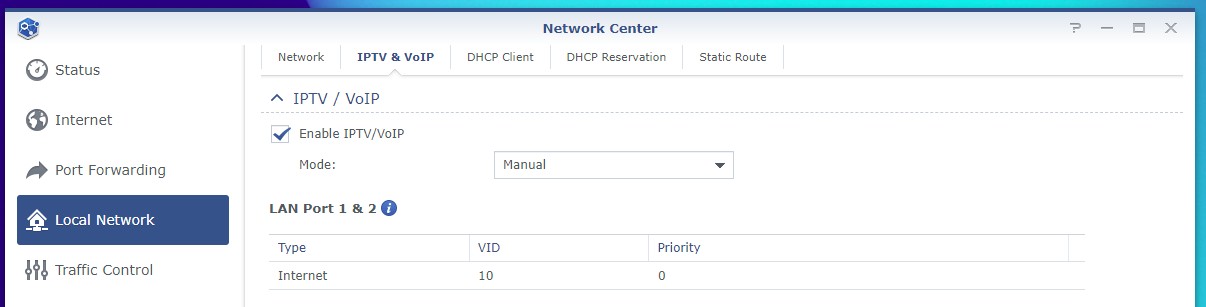
Synology routers supported VLAN since the start. 


Click ISP Settings (IPTV & VOIP):


Referral links: Quic Broadband (free setup code: R587125ERQ6VE) | Samsung | AliExpress | Wise | Sharesies 


Support Geekzone by subscribing (browse ads-free), or making a one-off or recurring donation through PressPatron.


Sideface

9682 posts

Uber Geek
+1 received by user: 15712

Trusted
DR
Lifetime subscriber

  #2969311 16-Sep-2022 19:57
Send private message


freitasm:  Synology routers supported VLAN since the start. 


Click ISP Settings (IPTV & VOIP):


I suspect that your screen shot is from a Synology RT2600ac


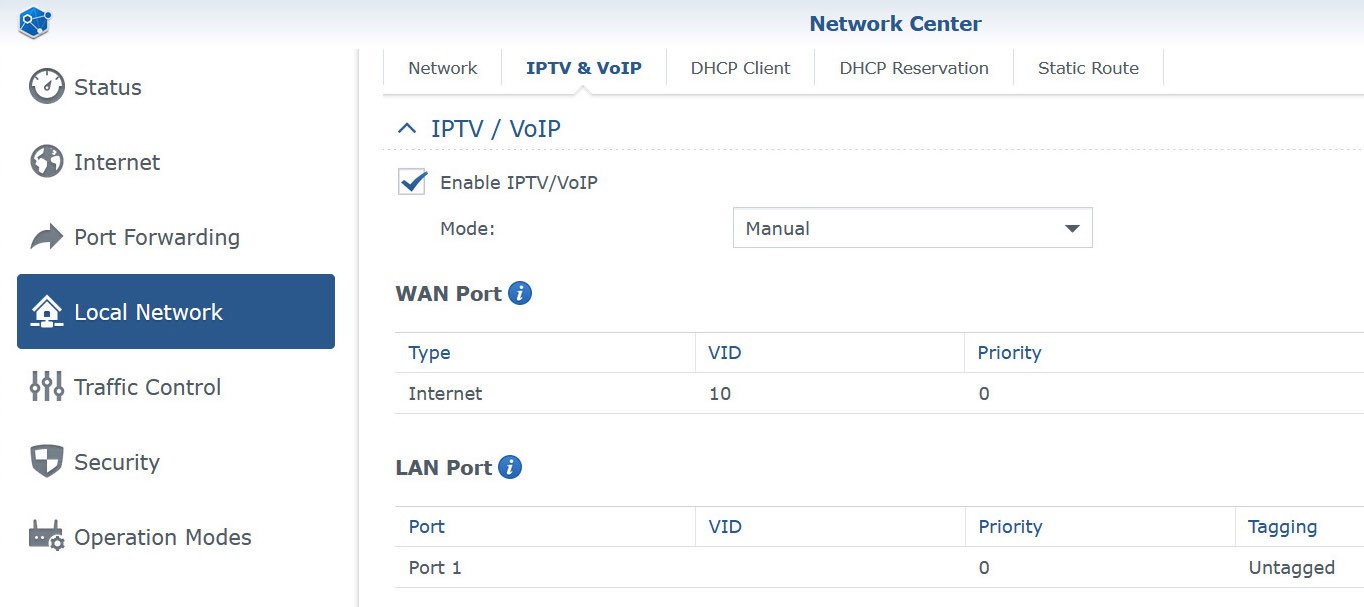
The MR2200ac has only two Ethernet ports - LAN and WAN - and the interface looks like this:


I get a good WiFi connection to the router, but no Internet connection with this setting.


Sideface


freitasm
BDFL - Memuneh
80772 posts

Uber Geek
+1 received by user: 41296

Administrator
ID Verified
Trusted
Geekzone
Lifetime subscriber

  #2969313 16-Sep-2022 19:59
Send private message

The setting is correct. Do you need a PPPOE login for your ISP? Is it correct?


Referral links: Quic Broadband (free setup code: R587125ERQ6VE) | Samsung | AliExpress | Wise | Sharesies 


Support Geekzone by subscribing (browse ads-free), or making a one-off or recurring donation through PressPatron.


Sideface

9682 posts

Uber Geek
+1 received by user: 15712

Trusted
DR
Lifetime subscriber

  #2969409 17-Sep-2022 10:47
Send private message

Problem solved!  🙃


I reset the router and did a fresh install, using exactly the same settings - but this time with the firewall turned off during the install.


I am very impressed with the MR2200ac, and the wi-fi performance as a stand-alone wireless router is excellent.


It is sitting in a cupboard in the middle of a single-storey house, and out-performs my old UniFi system with 3 access points!


(and it cost less than one UniFi access point!)


It only has one LAN Ethernet port, but I prefer to use a separate smart switch anyway.


Happy camper!  🙂


My thanks to @Spyware and @freitasm


Sideface


freitasm
BDFL - Memuneh
80772 posts

Uber Geek
+1 received by user: 41296

Administrator
ID Verified
Trusted
Geekzone
Lifetime subscriber

  #2969411 17-Sep-2022 10:50
Send private message

Good. I have the new RT6600ax and it is excellent.


Referral links: Quic Broadband (free setup code: R587125ERQ6VE) | Samsung | AliExpress | Wise | Sharesies 


Support Geekzone by subscribing (browse ads-free), or making a one-off or recurring donation through PressPatron.


Create new topic


Geekzone Live »

Try automatic live updates from Geekzone directly in your browser, without refreshing the page, with Geekzone Live now.


Are you subscribed to our RSS feed? You can download the latest headlines and summaries from our stories directly to your computer or smartphone by using a feed reader.