Geekzone: technology news, blogs, forums
Guest
Welcome Guest.
You haven't logged in yet. If you don't have an account you can register now.


AeonD

11 posts

Geek


#310561 1-Nov-2023 15:01
Send private message

Hi Gz people.

I have a situation... I have 900Mbps fibre from Electric kiwi. At least I do when I use their Orbi RBR350, a basic and fairly common ax1800 router. The throughput on wifi is average to poor (nothing unexpected here).

To make better use of the fibre bandwidth around my home I bought 2 Asus rt-ax3000 routers. The wifi performance is noticeably better. But now, when I test the internet speed on the primary router (within the web interface) I only get 3-400Mbps.

I've tried lots before posting. Electric Kiwi couldn't help beyond the very basic instructions for setup on their website.

If I go back to the Orbi, the internet speed tests well.

When I swap back to the Asus the internet speed test poorly but my devices have faster connections (actually noticeable when streaming and gaming), but I don't think it's working as well as it could.

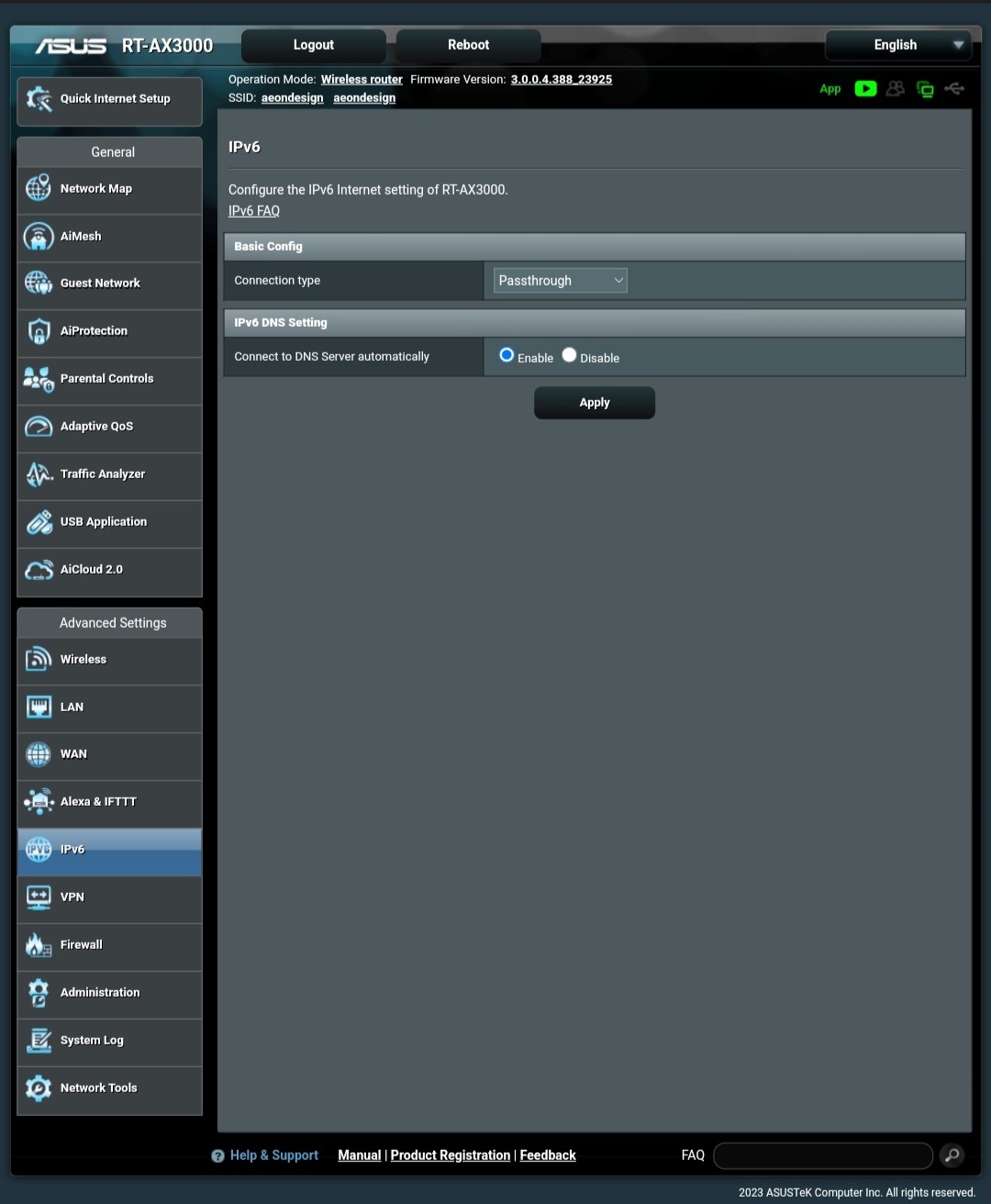
IPv6 isn't working on the Asus either. It's fine on the Orbi. I can use ip4toip6, there doesn't appear to be any difference though.

Any AIMesh enthusiasts out there that can help optimise this setup?

Or, perhaps Electric Kiwi customers with byo routers that are working optimally?

Or, a recommendation for an ISP that works well with your Asus AImesh?


View this topic in a long page with up to 500 replies per page Create new topic
 1 | 2
Spyware
3818 posts

Uber Geek
+1 received by user: 1366

Lifetime subscriber

  #3154436 1-Nov-2023 15:08
Send private message

No logical connection between wifi performance and ISP at all.


Spark Max Fibre using Mikrotik CCR1009-8G-1S-1S+, CRS125-24G-1S, Unifi UAP, U6-Pro, UAP-AC-M-Pro, Apple TV 4K (2022), Apple TV 4K (2017), iPad Air 1st gen, iPad Air 4th gen, iPhone 13, SkyNZ3151 (the white box). If it doesn't move then it's data cabled.


TG09
244 posts

Master Geek
+1 received by user: 16


  #3154485 1-Nov-2023 15:21
Send private message

Connect a device with RJ45 connect in to the router and test the speed. If its a good speed, then the router is ok and the internet.


Then test the WiFi, change the channel of the WiFi and use 5hz range and test the speed again close by and then further away.


WiFi will only go as fast as the slowest device on that network,  you can not compare the speed of a wired device to a WiFi device.


AeonD

11 posts

Geek


  #3154488 1-Nov-2023 16:01
Send private message

Thank you for the early responses.

To clarify though: testing of the ISP speed has been done on the routers themselves. Most modern routers have this facility. They test through Oogla, and it's not bottle necked through wifi. I could connect to a RJ45 port but don't need to as the router itself can carry out the test.


The Asus routers' wan connection is testing at half the speed of the ISP provided Orbi router does.

Clients connected via Wifi to the Asus can do so faster than the Orbi. But for some reason the Asus isn't getting the same internet speed as the Orbi. I suspect it could with some optimised settings - which I'm hoping for here. Unfortunately my current ISP hasn't been much help.


Talkiet
4819 posts

Uber Geek
+1 received by user: 3934

Trusted

  #3154493 1-Nov-2023 16:12
Send private message

There are a whole heap of confusing factors here. The main one is that the ookla clients built into routers are NOT all the same and some routers are incapable of running gigabit level tests due to their generally weak CPU performance. They can usually route full speed gig because that's either not using the CPU, or is using an optimised fast path in software.


As above, plug an ethernet connected PC into the ASUS routers and test from there - then plug that PC/mac into an eth port on the Orbi and repeat the tests (Select the same speedtest server each time).


Until you do that, there's not much anyone can really do to help.


Cheers - N


I just noticed you say the internet feels better with the Asus units than with the Orbi... This supports what I am suggesting above.


Please note all comments are from my own brain and don't necessarily represent the position or opinions of my employer, previous employers, colleagues, friends or pets.


AeonD

11 posts

Geek


  #3154685 1-Nov-2023 20:21
Send private message

Okay. I've tested with windows laptop on ethernet and the speed tests are consistent with what the router tests delivered. Full speed on Orbi, half speed on the Asus.

Electric Kiwis internet appears to be provided by Voyager (can anyone confirm?). The only setting they prescribe on their website or from their customer support is:

WAN Connection Type: DHCP (Automatic IP/Dynamic IP/IP over Ethernet)
802.1Q: Enabled
VLAN ID (802.1Q): 10
802.1P (Priority): 0
IP Version: IPv4 or IPv6
MTU Size: 1492 or 1500
NAT: Enabled

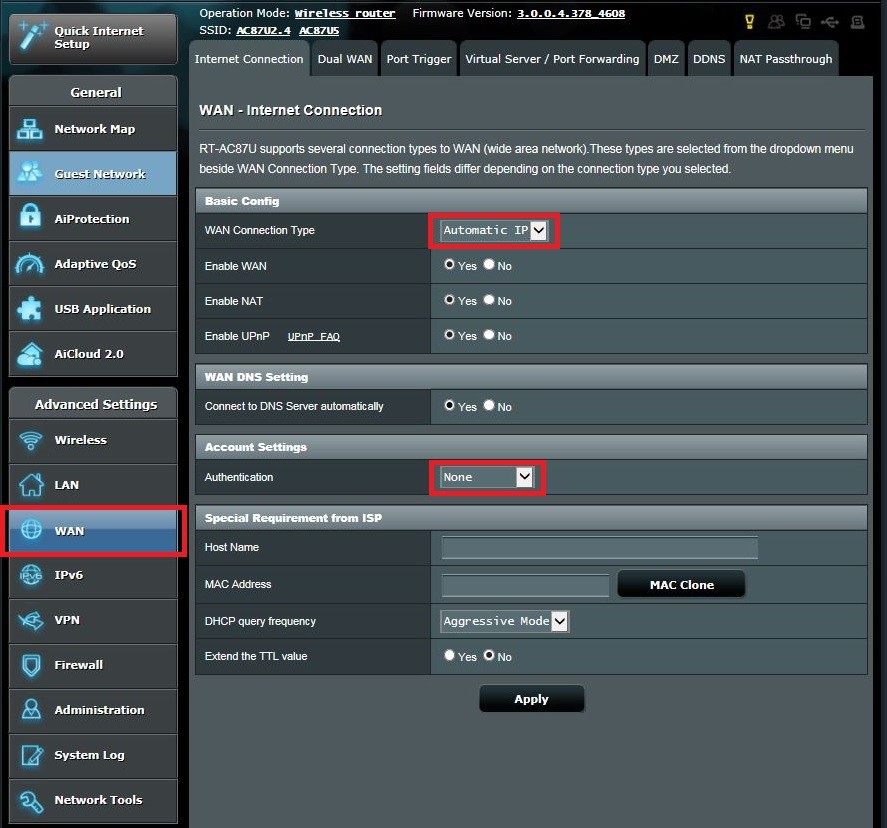
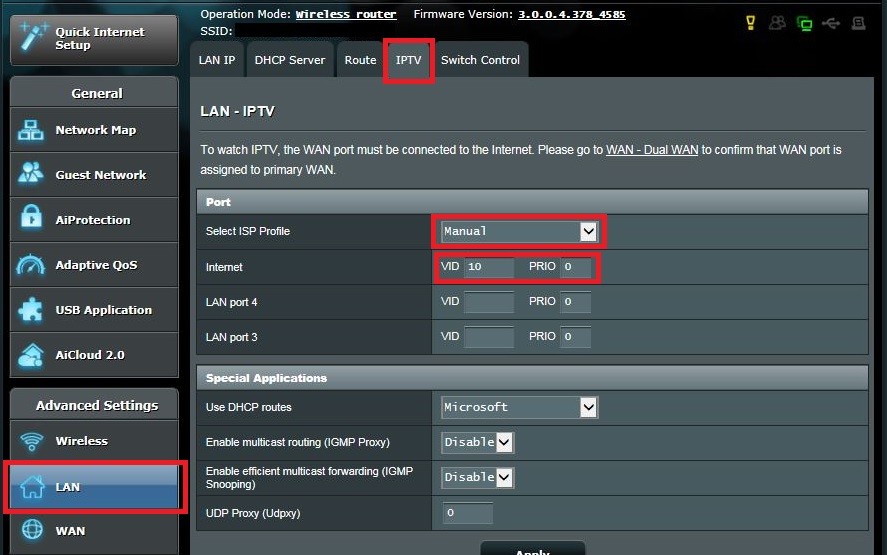
PB Tech give the following instructions specific to this series of Asus routers to connect to ISPs such and Orcon and Voda/One (not specific to Electric Kiwi, but similar).


I've done exactly what is in the screenshots from PBTech show. I've looked hard but can't see anywhere to apply 801.1Q, MTU size, and the NAT has multiple options (all enabled at present).

IPv6 won't connect as it does with the Orbi either. Possibly related.

Can I ask this only of people familiar with the Asus AImesh system please.

I like the idea of expanding and upgrading the AImesh network but banging my head as to how to get full speed fibre connection.


Spyware
3818 posts

Uber Geek
+1 received by user: 1366

Lifetime subscriber

  #3154735 1-Nov-2023 20:49
Send private message

Have you configured IPv6 section with DHCP??


Spark Max Fibre using Mikrotik CCR1009-8G-1S-1S+, CRS125-24G-1S, Unifi UAP, U6-Pro, UAP-AC-M-Pro, Apple TV 4K (2022), Apple TV 4K (2017), iPad Air 1st gen, iPad Air 4th gen, iPhone 13, SkyNZ3151 (the white box). If it doesn't move then it's data cabled.


Shop on-line at New World now for your groceries (affiliate link).
Talkiet
4819 posts

Uber Geek
+1 received by user: 3934

Trusted

  #3154736 1-Nov-2023 20:55
Send private message

Have you connected the 2 Asus units together with ethernet, or using the wireless mesh as backhaul?


Cheers - N


Please note all comments are from my own brain and don't necessarily represent the position or opinions of my employer, previous employers, colleagues, friends or pets.


stick
357 posts

Ultimate Geek
+1 received by user: 113


  #3154744 1-Nov-2023 21:19
Send private message

AeonD: Okay. I've tested with windows laptop on ethernet and the speed tests are consistent with what the router tests delivered. Full speed on Orbi, half speed on the Asus.

Electric Kiwis internet appears to be provided by Voyager (can anyone confirm?).


Electric Kiwi uses 2degrees/Orcon for their network


nzkc
1634 posts

Uber Geek
+1 received by user: 1041


  #3154755 1-Nov-2023 21:57
Send private message

Check to see if any QoS settings are enabled on the Asus routers. Feels like something like that is limiting the throughput (intentionally).


dpf81nz
71 posts

Master Geek
+1 received by user: 34


  #3154758 1-Nov-2023 22:20
Send private message

also check if any of the aiprotection stuff is enabled on the asus routers.  If so turn that off and try testing again as that can sometimes affect thruput


AeonD

11 posts

Geek


  #3154764 1-Nov-2023 23:34
Send private message

Have you configured IPv6 section with DHCP

- yes, unsure of what the exact setting should be. It appears in two places. IPv6 has its own advanced side tab, as well as having options in the LAN (have tried manual settings in there- no difference - same speed, still fails IPv6 test). Asus guides say to use passthrough if the connection is automatic, I've tried native and static options with adguards IPv6 DNS server, but no dice. Ip4toip4 kinda worked but no performance gain. I suspect the IPv6 isn't the problem, but a is symptom of the problem.


Have you connected the 2 Asus units together with ethernet, or using the wireless mesh as backhaul?

- Wireless mesh


Electric Kiwi uses 2degrees/Orcon for their network

-Thank you for confirming.

Side note: I switched from 2Degress a year ago because their 300Mbps service degraded to sub 40Mbps downstream and getting through to their customer support line was 2 -3 hour wait times.

I had thought EK was using Voyager but it appears 2D has since acquired them.


Shop now on Samsung phones, tablets, TVs and more (affiliate link).
Talkiet
4819 posts

Uber Geek
+1 received by user: 3934

Trusted

  #3154765 1-Nov-2023 23:39
Send private message

Just for the sake of troubleshooting - I would try only connecting one router (leave the other powered off) - have you tried that? The wireless mesh works, but it unavoidably uses up bandwidth that could be used for clients. If you can run an eth cable, do that (I understand that's not always possible)


Cheer s- N


Please note all comments are from my own brain and don't necessarily represent the position or opinions of my employer, previous employers, colleagues, friends or pets.


AeonD

11 posts

Geek


  #3154766 2-Nov-2023 00:32
Send private message

I did that last week earlier in my troubleshooting. Honestly, the AImesh is the only solid thing I've found with the Asus system. Smart connect (frequency steering) I found to be rubbish, it just sent all the clients to 2.4g. I wasted hours on it with multiple setting only to find turning off worked best to utilise the 5g band more. Ethernet backhaul isn't an option right now, but I definitely want do this in our next home.

If I can't get the primary RT-AX3000 to accept the 900Mbps from Electric Kiwi these are my contingencies:

1. Go back to the Orbi and get an additional satellite node (EK provide them for a pretty fair price ($110)), and drop the (almost) gigabit fibre down to 300Mbps because the ax1800 Orbi system can't throughput any more than that over wifi (unless you're pointlessly close to it).

2. Try the Asus's on another ISP hoping for 900Mbps to the primary router and keep the +650Mbps transfer speeds I've currently got over wifi between the two rt-ax3000's

Hopefully someone has encountered this or a similar issue before and knows the fix.


AeonD

11 posts

Geek


  #3154767 2-Nov-2023 00:58
Send private message

nzkc:

Check to see if any QoS settings are enabled on the Asus routers. Feels like something like that is limiting the throughput (intentionally).


dpf81nz:

also check if any of the aiprotection stuff is enabled on the asus routers.  If so turn that off and try testing again as that can sometimes affect thruput


I did have QoS and AIprotection enabled. I've tested with these completely deactivated but no difference in download speed.

Probably worth noting is that the upload speeds are maxed out at the plans' 500Mbps. It dips at times but looks that it's just busy times of day.

nzkc
1634 posts

Uber Geek
+1 received by user: 1041


  #3154788 2-Nov-2023 08:21
Send private message

Ive become a bit lost how youre testing the speed.


Can you confirm that the download speeds you are seeing are from tests where:


  • The router is plugged directly into the ONT
  • You use a device connected via a LAN to that router directly
  • Wifi is not involved at all (no mesh) with the speedtests

You do keep bringing up wifi speeds which is why Im (re)asking the above. As others have correctly pointed out you get all kinds of interference with wifi and you're extremely unlikely to get 900Mbps over it. Especially with a mesh system.


Assuming you are testing over a wired lan connection with the router directly connected to the ONT make sure all traffic management settings in the ASUS router are turned off. See this for a list of them: https://www.asus.com/networking-iot-servers/wifi-routers/asus-wifi-routers/rt-ax3000/techspec/. You said you disabled QoS and the AI thing...but there are a couple of others. I also remember there being some kind of gaming setting - claimed to improve throughput...but disable that too. It might be ensuring there's some "headroom" in speeds so pings are not adversely affected.  I used to have an Asus RT-AC68U and those settings affected throughput quite a lot (it also couldnt quite manage 900Mbps but I believe the AX3000 should).


Switching ISPs isn't going to help you with the ASUS speeds.


A third option you have, opposed to the two above, is you make the Asus routers APs only and plug those into the Orbi (having disabled wifi on the Orbis). Then you should get your full 900Mbps speed + your best wifi option (as you have stated).


 1 | 2
View this topic in a long page with up to 500 replies per page Create new topic


Geekzone Live »

Try automatic live updates from Geekzone directly in your browser, without refreshing the page, with Geekzone Live now.


Are you subscribed to our RSS feed? You can download the latest headlines and summaries from our stories directly to your computer or smartphone by using a feed reader.