Geekzone: technology news, blogs, forums
Guest
Welcome Guest.
You haven't logged in yet. If you don't have an account you can register now.


geekIT

2483 posts

Uber Geek
+1 received by user: 3807


#322731 17-Sep-2025 11:27
Send private message

The HG659 has worked fairly well in my new fibre setup, but its WiFi is basic and it's technology must be aging, so I'm thinking of getting a new modem\router.


Computer Dynamics has a couple of units that could be suitable, so I'm wondering which these might suit me best.


CUDY AX3000 Gigabit Dual Band Wi-Fi 6 Mesh Router with 1.3 GHz Dual Core CPU. 4-Stream Dual-Band Wi-Fi 6, 2402Mbps & 574Mbps, 4x 10/100/1000Mbps Ports, 200x Device VPN Client, Covers 130m, CUDY App
$78 plus gst/freight


CUDY BE3600 2.5G Dual-Band Wi-Fi 7 Router with Broadcom 2 GHz Quad Core CPU. 4-Stream Dual-Band Wi-Fi 7, 2882Mbps & 688Mbps, 1x 2.5Gbe & 4x 10/100/1000Mbps Ports, VPN Client, Covers 130m, CUDY App
$157 plus gst/freight.


Advice appreciated.


Trump crowned? No faux King way!


View this topic in a long page with up to 500 replies per page Create new topic
 1 | 2
cddt
2012 posts

Uber Geek
+1 received by user: 1953


  #3415570 17-Sep-2025 11:30
Send private message

Cannot speak for CUDY devices specifically as I have never heard of them, but I doubt you will need a Wifi 7 / 2.5 Gb device. 


My referral links: BigPipeMercury


snj

snj
310 posts

Ultimate Geek
+1 received by user: 224


  #3415593 17-Sep-2025 12:08
Send private message

Depends on if you want something supported or not, the 'easiest' solution if you've got such an old modem, and with Spark/Skinny/One/2degrees/etc would be to see if you can re-contract and get an updated router thrown in (like the Spark Smart Modem 3).


Otherwise, I'd probably side with the more common established brands, ASUS (does have quirks though, plenty of threads about that), Netcomm, Netgear, TP-Link, etc. Never heard of Cudy so aftermarket support in NZ might be hit and miss?)


mrgsm021
1556 posts

Uber Geek
+1 received by user: 314

ID Verified
Trusted

  #3415610 17-Sep-2025 12:58
Send private message

What fibre speed are you on? Barring hyperfibre speeds over 1Gbps, either options will be fine but would agree to go for a mainstream brand.


I personally have gigabit fibre running off a mikrotik router and have couple of Asus XT8 nodes running off the mikrotik in AP mode with Ethernet backhaul.


If looking at a mesh solution, I'd recommend going for something that has tri-band support, with one of those band as a dedicated wireless backhaul (if running Ethernet around the house is not possible/feasible) so the remaining two bands can just be for wireless bandwidth.


If you have existing cabling in place, then dual band mesh will be fine as long as you have ethernet between the mesh units as ethernet backhaul.


geekIT

2483 posts

Uber Geek
+1 received by user: 3807


  #3415612 17-Sep-2025 13:26
Send private message

Thanks, guys. These CUDY units just happened to show up in CompuDyn news letter, thought the prices looked reasonable.


PBTech have plenty of other brands, but the main reason I asked for guidance is that I have no idea what features I should be looking for in a modern device. As I said, the Huawei has been adequate up to now, but we've added a few more phones and tablets and I'd like better wifi to support them. 


EDIT: Just read mrgsm021's post, thanks also. Speed seems to be 927 Mbps download and 362 Mbps upload.(Just rechecked with OOKLA)


Re my LAN, I have extensive cabling and several switches for wired devices so it's just the wifi for phones and tablets I'd like to boost.


Trump crowned? No faux King way!


KiwiSurfer
1743 posts

Uber Geek
+1 received by user: 1011

ID Verified
Lifetime subscriber

  #3415627 17-Sep-2025 14:15
Send private message

May be worth keeping your router, disabling the WiFI on it and getting a WiFi mesh kit like the Netgear Orbi. The router is probably fine for ethernet switching/routing but poor for WiFi so the easiest fix might be to just fix the WiFi side of it.


Most mesh kits support either wired or wireless backhaul so you can get up and running with good WiFi quickly.


cddt
2012 posts

Uber Geek
+1 received by user: 1953


  #3415633 17-Sep-2025 14:43
Send private message

geekIT:


Re my LAN, I have extensive cabling and several switches for wired devices so it's just the wifi for phones and tablets I'd like to boost.


In this case just disable the wifi on the HG659 and get a dedicated wireless AP (or two if you have a large house). E.g. GWN7660. If you already have cabling and switches you should be able to place them in optimal locations (will need PoE). 


My referral links: BigPipeMercury


Stream your favourite shows now on Apple TV (affiliate link).
noroad
1031 posts

Uber Geek
+1 received by user: 689

Trusted

  #3415635 17-Sep-2025 15:02
Send private message

geekIT:


The HG659 has worked fairly well in my new fibre setup, but its WiFi is basic and it's technology must be aging, so I'm thinking of getting a new modem\router.


Computer Dynamics has a couple of units that could be suitable, so I'm wondering which these might suit me best.


CUDY AX3000 Gigabit Dual Band Wi-Fi 6 Mesh Router with 1.3 GHz Dual Core CPU. 4-Stream Dual-Band Wi-Fi 6, 2402Mbps & 574Mbps, 4x 10/100/1000Mbps Ports, 200x Device VPN Client, Covers 130m, CUDY App
$78 plus gst/freight


CUDY BE3600 2.5G Dual-Band Wi-Fi 7 Router with Broadcom 2 GHz Quad Core CPU. 4-Stream Dual-Band Wi-Fi 7, 2882Mbps & 688Mbps, 1x 2.5Gbe & 4x 10/100/1000Mbps Ports, VPN Client, Covers 130m, CUDY App
$157 plus gst/freight.


Advice appreciated.



Just make it easy on yourself, entry level mesh that you entirely setup with the mobile app and it just works. If you want more wifi coverage get the pair (you can add more later). More money = faster wifi if that is important to you (X20, x50, x55 or BE series). 


https://www.pbtech.co.nz/product/NETTPL9611/TP-Link-Deco-X10-Dual-Band-AX1500-WiFi-6-Whole-Hom


https://www.pbtech.co.nz/product/NETTPL9612/TP-Link-Deco-X10-Dual-Band-AX1500-WiFi-6-Whole-Hom


geekIT

2483 posts

Uber Geek
+1 received by user: 3807


  #3416360 19-Sep-2025 14:06
Send private message

Guys, thanks for the add-on suggestions but all involve me retaining the aging HG659 modem-router and spending several hundred dollars more just to improve my wifi. As I said, the HG659's wifi works, but it's sluggish. Seems to me I'd be better off to buy one of the Cudy units that I noted in my first post, at a cost of around $90 or $180 for the cheaper two of the three, giving me much better wifi and all-round performance, while shelving the HG659 for backup or just as a switch.


Regarding the Cudy brand, their gear gets good raps online and is reasonably priced. 


Trump crowned? No faux King way!


michaelmurfy
meow
13616 posts

Uber Geek
+1 received by user: 10984

Moderator
ID Verified
Trusted
Lifetime subscriber

  #3416362 19-Sep-2025 14:24
Send private message

PLEASE do not buy those cheap routers, seriously.


I would not trust those things from a security perspective at all even if they look legit. I get they're cheap but those often skimp on security.


Instead, take a look on Facebook Marketplace for either a Spark Smart Modem 3 or a Futura Modem as they have great WiFi and can be purchased for next to nothing.


Michael Murphy | https://murfy.nz
Referral Links: Quic Broadband (use R122101E7CV7Q for free setup)

Are you happy with what you get from Geekzone? Please consider supporting us by subscribing.
Opinions are my own and not the views of my employer.


geekIT

2483 posts

Uber Geek
+1 received by user: 3807


  #3420754 2-Oct-2025 16:31
Send private message


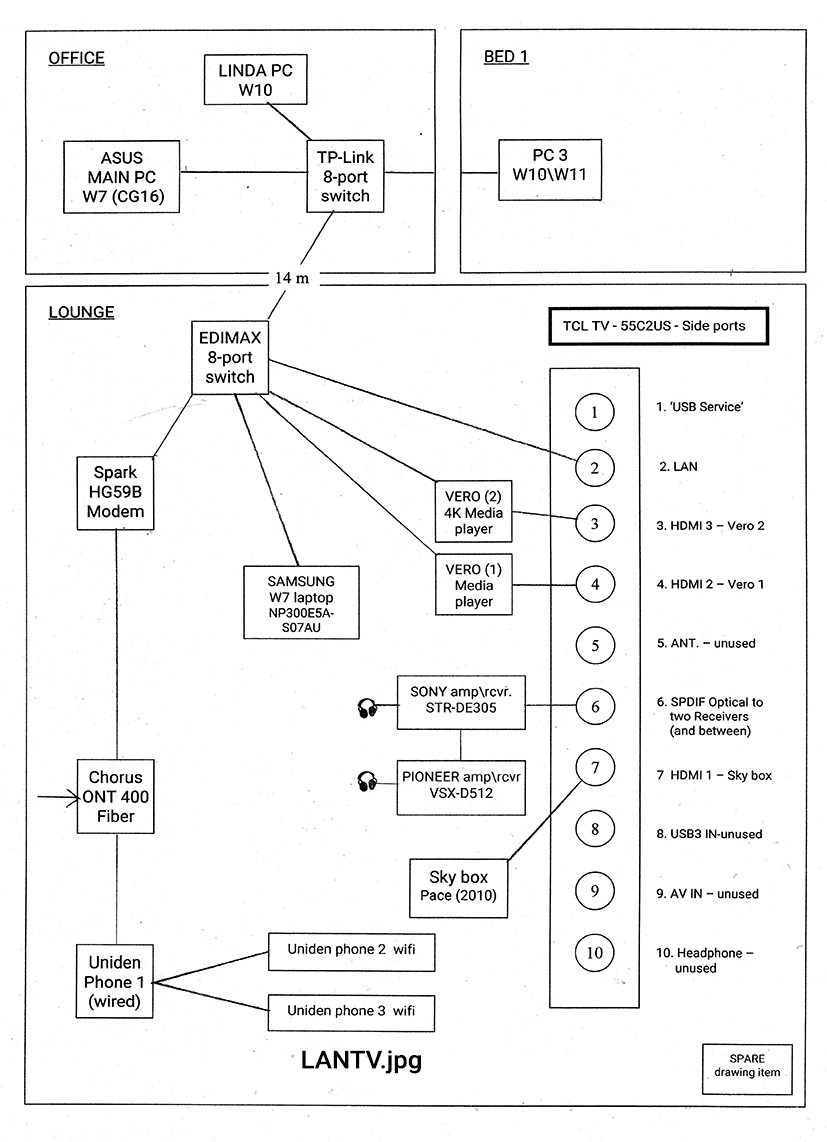
Okay, I'm beginning to understand how a Mesh device could solve my sluggish wireless problem. How would it be if I installed one Mesh unit into the office (top left in the diagram) and connected it to the TPLink 8-port switch in that room?


As I said, my wired setup works perfectly but the HG659B's wireless is extremely slow. I guess I'd need to disable its WIFI before connecting the Mesh unit?


Trump crowned? No faux King way!


shk292
2919 posts

Uber Geek
+1 received by user: 2040

Lifetime subscriber

  #3420755 2-Oct-2025 16:40
Send private message

That’s similar to what I have, with three Deco M5 mesh units distributed in the house and connected to the main router via Gb Ethernet and switches.  A network purist will say you shouldn’t daisy chain switches but I’ve never noticed any adverse affects.


 You don’t strictly need to turn off the hg659 wifi but might as well


 I thing the HG has other limitations including quite a low device limit, so I’d swap it out as recommended above. Most mesh units will work as a router so you can just plug one into the ONT.


 No modem needed on fibre internet


Shop now for Lego sets and other gifts (affiliate link).
robjg63
4170 posts

Uber Geek
+1 received by user: 1440

Subscriber

  #3420775 2-Oct-2025 16:52
Send private message

Havent looked at the current offerings, but I upgraded from a single HG659 to a pair of TP-Link Deco M4 units several years ago(I think they have might have been replaced now, but PBtech have a 3 pack showing as being orderable on their site (3 pack for $229)):


https://www.pbtech.co.nz/product/NETTPL9403/TP-Link-Deco-M4-AC1200-Dual-Band-WiFi-5-Whole-Home


We have a 2 story house and I was amazed how much better the wifi was when I just plugged the first unit in. Even upstairs - ONT and primary unit were downstairs.


So you just plug one of the units in where the HG659 went. Each of the Deco M4 units has 2 x 1Gigabit ethernet ports.


One port on the first unit will go into the ONT leaving you one free for a switch or single device nearby.


Configure the connection using the TP-Link app and setup your wifi SSID etc.


You plug the additional unit(s) into the power somewhere else within wifi range and use the TP-Link app to link them using the mesh network to the first unit.


Of course the second (or third unit) have 2 x ethernet ports if you need them.


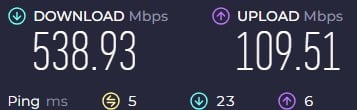
I have a desktop connected by cable to the upstairs unit and if I run a speedtest on it it shows this on a 500/100 connection: 


The wifi seems pretty solid and fast. I have a similar number of devices to your diagram.


You could probably get by without the switches - depending on how obstructive your walls are.


Nothing is impossible for the man who doesn't have to do it himself - A. H. Weiler


geekIT

2483 posts

Uber Geek
+1 received by user: 3807


  #3422740 7-Oct-2025 14:41
Send private message


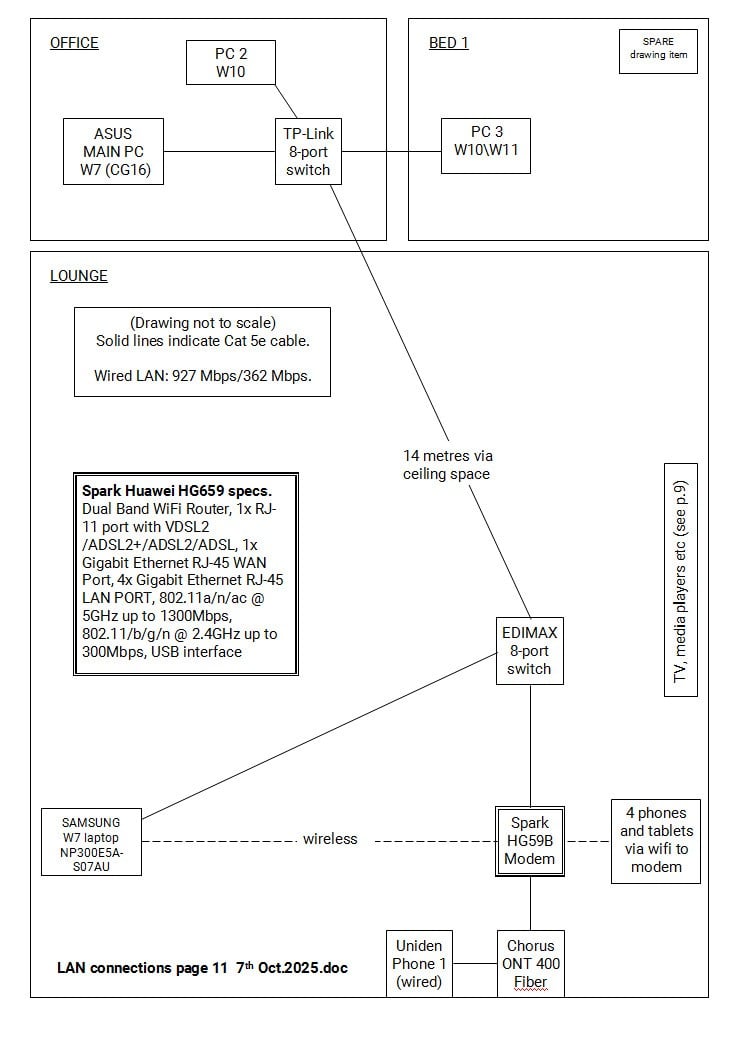
Before I change any hardware, I made this simplified LAN diagram to try and understand the issues with my slow wifi. But the picture illustrates a more basic question: If I remove the wired connection from the Samsung laptop, it's still able to communicate, albeit very, very slowly, with the main Asus computer in the office at top left. But how? None of the three desktop machines in the office have any wifi capability, whether onboard or via PCIE card. 


Trump crowned? No faux King way!


Jase2985
13755 posts

Uber Geek
+1 received by user: 6236

ID Verified
Lifetime subscriber

  #3422742 7-Oct-2025 14:53
Send private message

It talks to the HG659, and then the data goes to the PC's via Ethernet (659 > Switch > Switch > PC's)


Remove the HG659, replace it with a Deco or similar mesh setup (2 units) the master replaces the 659, does the routing for the internet, and supplies Wi-Fi to the lounge area, then you connect the second unit into the switch in the office, and it supplies Wi-Fi to the office and bedroom.


That will give you faster Wi-Fi, and more coverage throughout the house


geekIT

2483 posts

Uber Geek
+1 received by user: 3807


  #3423673 10-Oct-2025 12:50
Send private message

Thanks, Jase. I guess this is really basic stuff but I've never taken the time to understand it properly. So the Samsung laptop can talk to the HG659b in either wifi or regular language, depending on which connection is used? 


Trump crowned? No faux King way!


 1 | 2
View this topic in a long page with up to 500 replies per page Create new topic


Geekzone Live »

Try automatic live updates from Geekzone directly in your browser, without refreshing the page, with Geekzone Live now.


Are you subscribed to our RSS feed? You can download the latest headlines and summaries from our stories directly to your computer or smartphone by using a feed reader.