Geekzone: technology news, blogs, forums
Guest
Welcome Guest.
You haven't logged in yet. If you don't have an account you can register now.


avaiki

44 posts

Geek
+1 received by user: 17


#324593 2-May-2026 13:11
Send private message quote this post

. . 


kia ora all,


been awhile, but a recent response from an ISP has left me somewhat dumbfounded. I know modem/router firmware updates are a long running saga but interested in seeing how common this sort of experience is:


An adoptive niece got a new Netcomm NF18 modem after the old one decided five years of 24/7 service was more than long enough and began bricking itself. Good enough I thought, unboxing the new modem, and taking a quick look at a reassuringly modern looking interface shown in an install-guide printed on card. However? 


From offline to online, the aKshUL modem interface was nothing like shown. Dated AF. Sigh. Version = NF18MESH-NC.VocusNZ-R6B023.EN .. cross checking that against the Netcomm site (without the vocusnz bit) shows that the R6B023 version does not show up there anymore, with the latest firmware versions showing as R6B031 from 2021 and, most recently, R6B032 from January 2026, see: https://support.netcommwireless.com/products/NF18MESH


However when I checked with the ISP concerned, I was told that I should not update to the latest firmware, as per email: 


"Thanks for your email regarding your concern that the newly delivered Netcomm NF18 modem is running older firmware compared with what is listed on the Netcomm website, and thank you for checking the version details so thoroughly.


"I understand why this would be concerning, especially when you are thinking about security and parental control features, and want to clarify this for you.


"The firmware currently installed on your Netcomm NF18 modem is not out of date for use on the [REDACTED] network, as it is a customised version that allows the modem to be preconfigured specifically for our services, which helps ensure a stable connection and allows us to support and troubleshoot the modem effectively if any issues arise.


"To answer your questions directly, we do not recommend installing the firmware from the Netcomm website, as doing so will remove the [REDACTED] configuration and the modem will then behave as a third party router, meaning it would need to be manually configured to work on our network and we would no longer be able to provide full support for it.


"As a helpful tip, if parental controls are your main concern, the existing firmware still supports basic control features, and using device level controls on individual devices can also be a practical option without affecting your modem’s configuration."


Basic .. does not even begin to describe it. Question:


Running ancient firmware seems to be accepted enough to be openly shared with customers, yet how is this not a YUGE security risk? Have ISPs got some sort of super-duper mitigation platform that keeps us all safe? 


They did refer to manual configuration but did not respond to a request for more details. I'm not naming the particular brand as yet, more interested in how widespread this sort of practice is in New Zealand, and whether the tech news headlines about security risks from unupdated modems is all fear mongering clickbait? 


thanks heaps ay,


jason


. . . 


... Journalism is not a crime ...


View this topic in a long page with up to 500 replies per page Create new topic
 1 | 2
RunningMan
9259 posts

Uber Geek
+1 received by user: 4891


  #3486526 2-May-2026 13:20
Send private message quote this post

Firstly, you've already effectively named them more than once in the post, so not sure why redacted in other parts.


Secondly, you would need to check the changelog between versions to establish what, if any, differences there are in respect of security patches. Just because one firmware has a newer version doesn't mean it is inherently more secure - it may have had a feature added that makes it less secure due to a bug in that new feature.


Don't get newer confused with more secure. Bug fixes should mean more secure, but features may mean less secure.


SirHumphreyAppleby
2948 posts

Uber Geek
+1 received by user: 1881


  #3486527 2-May-2026 13:28
Send private message quote this post

Being ancient doesn't necessarily make the firmware a security risk. Likewise, having the latest firmware doesn't mean additional security vulnerabilities haven't been introduced.


If the manufacturer explicitly states vulnerabilities have been addressed in the new firmware, then I'd agree it needs updating, but otherwise if it works and there are no remotely exploitable vulnerabilities in their or third-party code (see above about introducing new vulnerabilities), then I don't think it's a big deal.


Why fix what isn't broken?


I typically run stock or update firmware at the time of purchase and never touch it it again. I also don't update my server software very often unless an exploit is published. In that case, I will typically upgrade even if the particular issue doesn't apply to my configuration, but that's more due to the fact that incremental configuration changes are easier than having to do major upgrades on short notice.


gehenna
8672 posts

Uber Geek
+1 received by user: 3894

Moderator
Trusted
Lifetime subscriber

  #3486528 2-May-2026 13:43
Send private message quote this post

It's only a risk if there is an exploitable vulnerability. If you're worried, buy your own one and manage it yourself. 


michaelmurfy
meow
13601 posts

Uber Geek
+1 received by user: 10953

Moderator
ID Verified
Trusted
Lifetime subscriber

  #3486530 2-May-2026 13:54
Send private message quote this post

Just think of how many of these are out there.


On a local network - yeah, it's likely got some vulnerabilities that could be exploited on that network. But these routers are normally quite well locked down to the internet and the chances of exploitation are incredibly low.


There are other routers out there like the Grandstream GWN7062E that Quic sell for oddly the best price I can find right now that is a good replacement if you're concerned: https://www.quic.nz/product/gwn7062e-wifi-6-router/ 


Michael Murphy | https://murfy.nz
Referral Links: Quic Broadband (use R122101E7CV7Q for free setup)

Are you happy with what you get from Geekzone? Please consider supporting us by subscribing.
Opinions are my own and not the views of my employer.


taneb1
548 posts

Ultimate Geek
+1 received by user: 217

ID Verified
Trusted
Mercury

  #3486540 2-May-2026 14:31
Send private message quote this post

Speaking on my own personal opinion. 


Most ISP's that offered (or still offer) Netcomm routers run their own custom firmware which was designed for their Network (WAN/ATA configuration, ACS servers, DNS, etc) - These firmwares most often included a number of bug fixes/changes without matching same version numbering as the public firmware as was developed separately - Some also chose to keep the classic UI. 


While you could update to the latest public firmware off the Netcomm website, as mentioned it is not recommended as this also will remove any default ISP configuration and make it more difficult to set up rather than it just working out of the box. If you are using an ISP provided VoIP service that uses the ATA port on the Netcomm, flashing the public firmware would also break this entirely / you cannot configure this yourself. 


As Michael said, they are pretty locked down, most often don't use default passwords and unless your publicly exposing the routers admin interface to the internet (Which no-one should ever really do), the chances of it getting exploited are very low. While the Netcomm's serve their purpose, if you aren't using an voice service via the router and need to keep it - There are plenty more better options out there. 


Any comments made are my personal views and does not represent those of my employer


avaiki

44 posts

Geek
+1 received by user: 17


  #3486546 2-May-2026 14:46
Send private message quote this post

gehenna:


It's only a risk if there is an exploitable vulnerability. If you're worried, buy your own one and manage it yourself. 


So am I getting this right? If your average punter out there in punterland - aunty Jo and uncle Blow - hire a car, the brakes fail and they crash, they should just hire a better car that .. doesn't crash? Okay! 


Meanwhile:


" .. vulnerabilities affect NetComm router models NF20MESH, NF20, and NL1902 that are running software versions earlier than R6B025"


Doesn't mention NF18 but my concern is that the numbers suggest the same base code? I dunno, no techie, but: 


"Research performed against the NF20MESH router revealed an unauthenticated remote code execution vulnerability that affects devices running firmware prior to version R6B025. The following devices have been confirmed by the vendor to be vulnerable:


  •  


    • NF20
    • NF20MESH
    • NL1902

It's possible that other devices may also be affected.


To be fair to your response, I had read stuff in passing about this previously, and I should have explained that in my post, with links such as above. Apologies for lack of clarity. 


. . .


... Journalism is not a crime ...


Want to support Geekzone and browse the site without the ads? Subscribe to Geekzone now (monthly, annual and lifetime options).
Lias
5658 posts

Uber Geek
+1 received by user: 3980

ID Verified
Trusted
Lifetime subscriber

  #3486802 2-May-2026 17:59
Send private message quote this post

IMHO ISP's shouldn't provide custom firmware unless they are willing to also provide the complete source code. 


I'm a geek, a gamer, a dad, a Quic user, and an IT Professional. I have a full rack home lab, size 15 feet, an epic beard and Asperger's. I'm a bit of a Cypherpunk, who believes information wants to be free and the Net interprets censorship as damage and routes around it. If you use my Quic signup you can also use the code R570394EKGIZ8 for free setup. Opinions are my own and not the views of my employer.


bfginger
1335 posts

Uber Geek
+1 received by user: 193


  #3486898 3-May-2026 06:58
Send private message quote this post

If you're connecting everything via wifi one trick you could employ is to use the "guest" ssid feature as that should in theory firewall "guest" devices away from the wired lan/router interface should there be some kind of security failure in the router interface and connected devices. Some routers might not let guest devices see each other though.


michaelmurfy:


There are other routers out there like the Grandstream GWN7062E that Quic sell for oddly the best price I can find right now that is a good replacement if you're concerned: https://www.quic.nz/product/gwn7062e-wifi-6-router/ 


I don't want to derail the thread but for another $43 Grandstream has just released the GWN7062M with higher aerial gain, 2.5gbit WAN/LAN, 2 extra ethernet ports, and VLAN support. Can anyone tell me if their NZ market Grandstream supports 160Mhz 5GHz wifi channel width on both channels 50 and 114?


openmedia
3466 posts

Uber Geek
+1 received by user: 884

Trusted

  #3487004 3-May-2026 13:09
Send private message quote this post

Lias:


IMHO ISP's shouldn't provide custom firmware unless they are willing to also provide the complete source code. 


Legally under the GPL they should as almost all these routers run Linux in some form. Sadly due to the OEM/ODM origin of most devices it is very hard to get a release. 


Generally known online as OpenMedia, now working for Red Hat APAC as a Technology Evangelist and Portfolio Architect. Still playing with MythTV and digital media on the side.


gehenna
8672 posts

Uber Geek
+1 received by user: 3894

Moderator
Trusted
Lifetime subscriber

  #3487066 3-May-2026 14:22
Send private message quote this post

avaiki:


So am I getting this right? If your average punter out there in punterland - aunty Jo and uncle Blow - hire a car, the brakes fail and they crash, they should just hire a better car that .. doesn't crash? Okay! 


I could also reinforce my position with hyperbole and a catastrophised example that isn't related in any way to the situation, but I have to go update my UDM. 


Tinkerisk
4840 posts

Uber Geek
+1 received by user: 3719


  #3487086 3-May-2026 14:47
Send private message quote this post

Last October, instead of providing an update, Zyxel recommended simply disposing of the models affected by security vulnerabilities.


As long as router and AP manufacturers do not establish fundamentally more secure development processes, regularly updating and isolating the network infrastructure remains the most important line of defense for businesses and private users alike. 🙂


  • Qui nihil scit, omnia credere debet. - He who knows nothing must believe everything.
  • Firewalls do NOT stop dragons! Really!
  • I avoid Big Tech. They try hard to dictate technology and „culture“ across borders.
  • In effect we have everything to hide from someone, and no idea who „someone“ is.


Move to New Zealand's best fibre broadband service (affiliate link). Free setup code: R587125ERQ6VE. Note that to use Quic Broadband you must be comfortable with configuring your own router.
Handle9
11974 posts

Uber Geek
+1 received by user: 9768

Trusted
Lifetime subscriber

  #3487104 3-May-2026 15:51
Send private message quote this post

avaiki:


gehenna:


It's only a risk if there is an exploitable vulnerability. If you're worried, buy your own one and manage it yourself. 


So am I getting this right? If your average punter out there in punterland - aunty Jo and uncle Blow - hire a car, the brakes fail and they crash, they should just hire a better car that .. doesn't crash? Okay! 


No you’re not getting it right. 


The supplier of the router has advised you that the supplied firmware is up to date. If you choose not to accept their word for reasons then you have the option to buy your own and manage it. 


You either accept their word or don’t. They have stated their firmware is up to date and as it’s custom firmware the versions will never match publicly available firmware. It’s up to you what you choose to do. 


openmedia
3466 posts

Uber Geek
+1 received by user: 884

Trusted

  #3487115 3-May-2026 16:33
Send private message quote this post

Handle9:


No you’re not getting it right. 


The supplier of the router has advised you that the supplied firmware is up to date. If you choose not to accept their word for reasons then you have the option to buy your own and manage it. 


You either accept their word or don’t. They have stated their firmware is up to date and as it’s custom firmware the versions will never match publicly available firmware. It’s up to you what you choose to do. 


The big problem is there is no requirement for basic home router manufacturers to provide uptodate firmware versions with security fixes. This is why so many of them end up being hacked and used for bots.


Generally known online as OpenMedia, now working for Red Hat APAC as a Technology Evangelist and Portfolio Architect. Still playing with MythTV and digital media on the side.


Tinkerisk
4840 posts

Uber Geek
+1 received by user: 3719


  #3487116 3-May-2026 16:33
Send private message quote this post

The ISP router customware I've encountered so far has predefined modem parameters for its network, remote access, and limited user options/menus. They aren't necessarily more secure than the disastrous firmware that comes pre-installed by the manufacturer. I'd avoid those like the plague.


  • Qui nihil scit, omnia credere debet. - He who knows nothing must believe everything.
  • Firewalls do NOT stop dragons! Really!
  • I avoid Big Tech. They try hard to dictate technology and „culture“ across borders.
  • In effect we have everything to hide from someone, and no idea who „someone“ is.

muppet
2655 posts

Uber Geek
+1 received by user: 1678

Trusted

  #3487126 3-May-2026 17:05
Send private message quote this post

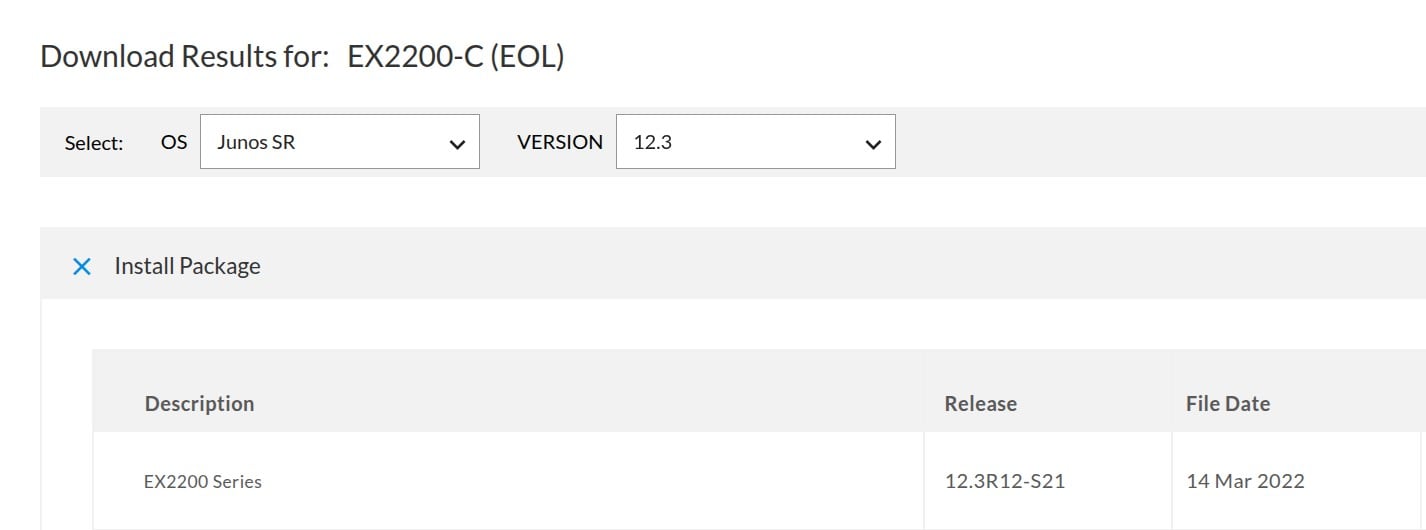
Juniper's Junos version 12.3 was originally released in 2013.


12.3 was patched up until 14th March 2022.  Still base release 12.3


Maybe the 2Degress firmware is patched as of two weeks ago? Maybe it hastn't been patched in 3 years. You can't use the firmware string as evidence either way, just because later versions exist (Junos 22 existed in 2022) - You need a build date.


Lots of router vendors patch old versions of software with fixes/security updates. ISPs don't always want new features because a) customers aren't asking for them and b) rolling out a new firmware might cause issues.  Keeping the base version the same minimises the risk of issues.


You can't know based off the information you have - and the ISPs told you it's up to date. To suggest it's a "YUGE security risk" is to tilt at windmills.


 1 | 2
View this topic in a long page with up to 500 replies per page Create new topic


Geekzone Live »

Try automatic live updates from Geekzone directly in your browser, without refreshing the page, with Geekzone Live now.


Are you subscribed to our RSS feed? You can download the latest headlines and summaries from our stories directly to your computer or smartphone by using a feed reader.