Geekzone: technology news, blogs, forums
Guest
Welcome Guest.
You haven't logged in yet. If you don't have an account you can register now.


Suckerpunch

125 posts

Master Geek
+1 received by user: 25


#230566 1-Mar-2018 19:32
Send private message

Hey all,

I'm after ideas and inspiration for a Comms Cupboard.
So I'd love to see photos of your setup - from your in-wall cabinets, to dedicated rooms/cupboards or under your desk setups. This will be a judgement free zone. :-)

I'd also love to hear your do's, do nots and regrets.

Thanks heaps!
Phil.

Filter this topic showing only the reply marked as answer View this topic in a long page with up to 500 replies per page Create new topic
 1 | 2 | 3 | 4 | 5 | 6 | ... | 8
DarthKermit
5346 posts

Uber Geek
+1 received by user: 3317

Trusted

  #1966759 1-Mar-2018 19:37
Send private message

Click to see full size


michaelmurfy
meow
13579 posts

Uber Geek
+1 received by user: 10910

Moderator
ID Verified
Trusted
Lifetime subscriber

  #1966760 1-Mar-2018 19:40
Send private message

@DarthKermit That Switch is just hanging by a thread.


One of my friends (@asmallchild) had me help with his setup:


Home Network by Simeon W, on Flickr


He has however updated it with a UniFi Switch, USG Pro and other shiny things. I've asked him to take a new photo.


Michael Murphy | https://murfy.nz
Referral Links: Quic Broadband (use R122101E7CV7Q for free setup)

Are you happy with what you get from Geekzone? Please consider supporting us by subscribing.
Opinions are my own and not the views of my employer.


DarthKermit
5346 posts

Uber Geek
+1 received by user: 3317

Trusted

  #1966764 1-Mar-2018 19:48
Send private message

I have supported the network switch better since the pic was taken. I woulda liked more space available so I didn't have to shove things in there like I did.


froob
698 posts

Ultimate Geek
+1 received by user: 233

Lifetime subscriber

  #1966767 1-Mar-2018 19:56
Send private message

Mine is quite vanilla in comparison. My regret is that I didn’t drill more paths for cables in the framing before the gib went on. I don’t think I could squeeze more cables in for extra ports at this point.

We’re doing some more renovations soon and I think I might have to put a second cabinet in the top of a cupboard. Will watch the suggestions on here with interest.

Click to see full size


Starscream122
568 posts

Ultimate Geek
+1 received by user: 101
Inactive user


  #1966777 1-Mar-2018 20:33
Send private message

we don't have one


rogercruse
644 posts

Ultimate Geek
+1 received by user: 211

ID Verified
Lifetime subscriber

  #1966784 1-Mar-2018 21:25
Send private message

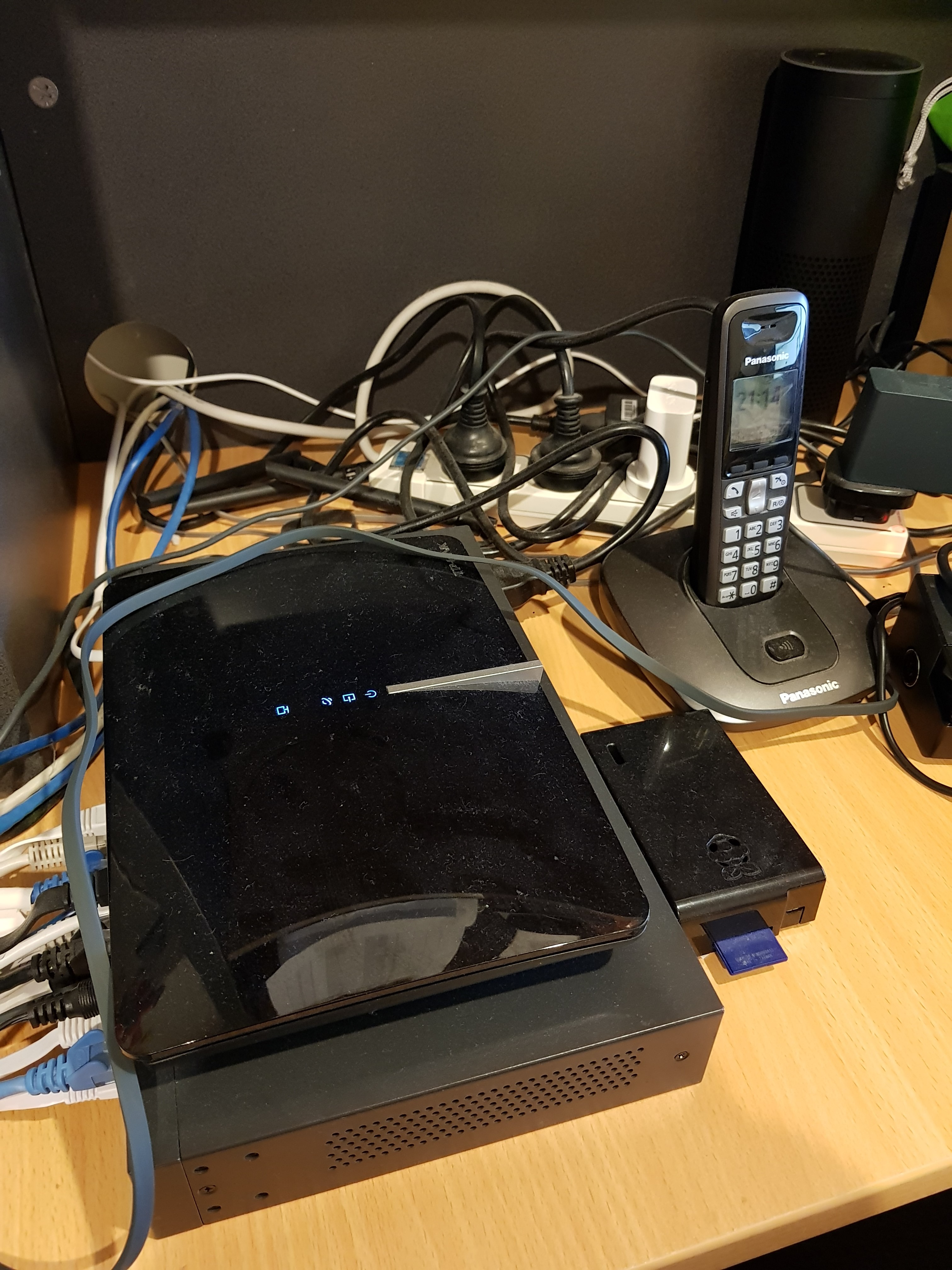
I don't have a comms cupboard... but could do with one!


My router and switch plus dust!


HP


Shop now for HP laptops and other devices (affiliate link).
rogercruse
644 posts

Ultimate Geek
+1 received by user: 211

ID Verified
Lifetime subscriber

  #1966787 1-Mar-2018 21:31
Send private message

Wow! 


Didn't expect the photo to be so big and so full of detail... and dust!


I might have to tidy up this weekend, look at that dust!!!!


ZollyMonsta
3009 posts

Uber Geek
+1 received by user: 379

ID Verified
Trusted

  #1966792 1-Mar-2018 21:56
Send private message

Click to see full size


And there is another two cabinets full of patch panels and splitters. One in the attic and another in the home studio.


Check out my LPFM Radio Station at www.thecheese.co.nz - Now on iHeart Radio, TuneIn and Radio Garden


As per the usual std disclaimer.. "All thoughts typed here are my own."


SumnerBoy
2079 posts

Uber Geek
+1 received by user: 306

ID Verified
Lifetime subscriber

  #1966805 1-Mar-2018 22:39
Send private message

Click to see full size


Bit of a mess compared to some on here - nice work.


michaelmurfy
meow
13579 posts

Uber Geek
+1 received by user: 10910

Moderator
ID Verified
Trusted
Lifetime subscriber

  #1966823 2-Mar-2018 01:40
Send private message

Here's my friends new setup:


Server Cabinet by Simeon W, on Flickr


UniFi USG Pro, UniFi Switch 24, 2x oDroid HC1's, a Synology NAS, UPS and a bunch of cables. He uses a UniFi AC-Pro as his access point too. Almost everything that can be connected via Ethernet is.


Michael Murphy | https://murfy.nz
Referral Links: Quic Broadband (use R122101E7CV7Q for free setup)

Are you happy with what you get from Geekzone? Please consider supporting us by subscribing.
Opinions are my own and not the views of my employer.


michaelmurfy
meow
13579 posts

Uber Geek
+1 received by user: 10910

Moderator
ID Verified
Trusted
Lifetime subscriber

  #1966824 2-Mar-2018 01:53
Send private message

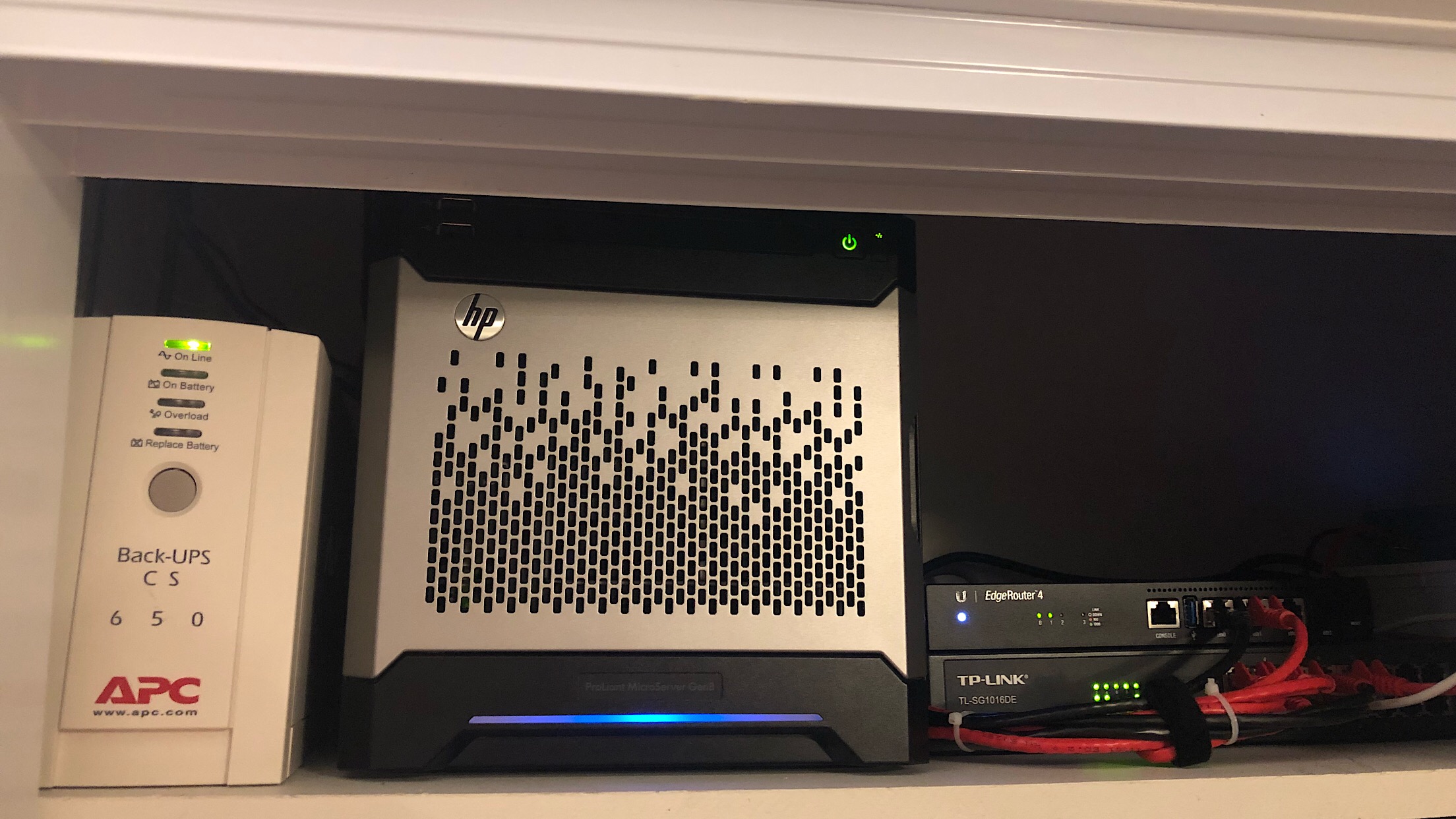
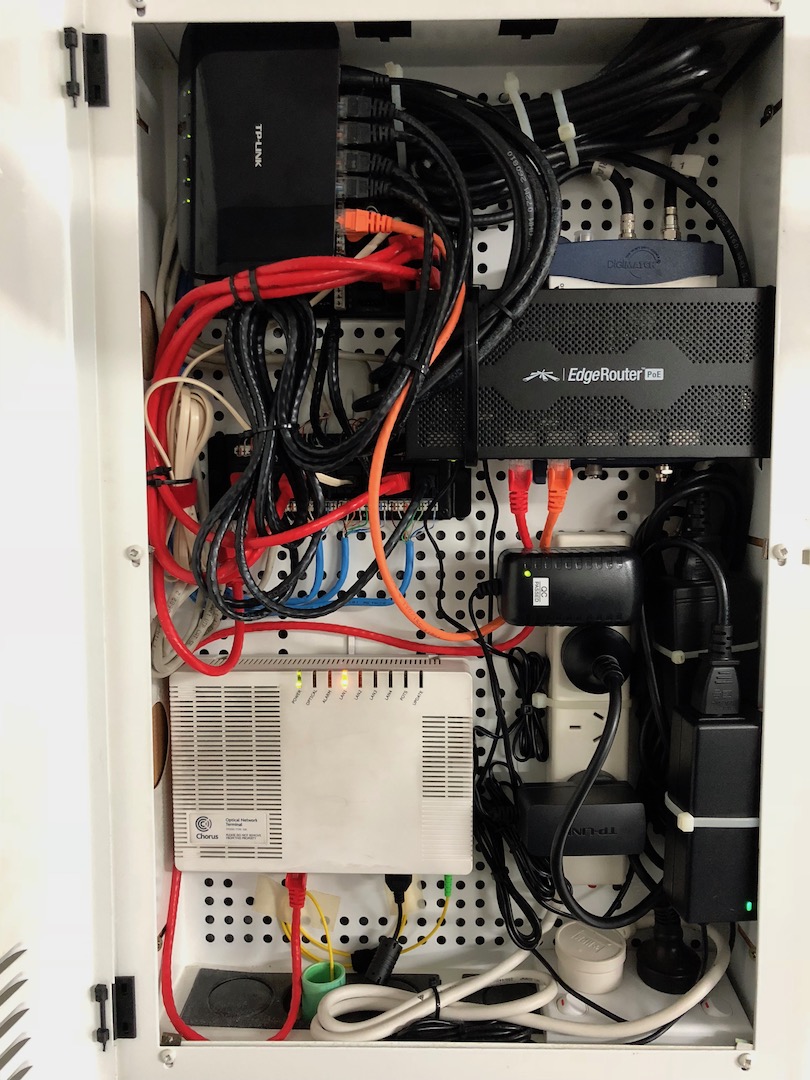
And here is mine:


Click to see full size Click to see full size Click to see full size


So basically in the cupboard is:
Router - Edgerouter 4
Server - HPE Microserver Gen8
Switch - TP-Link 16pt Smart Switch
Access Point - Cambium E600 (highly rate this)

Also got a Philips Hue Bridge, UPS and Fingbox. Service is 2degrees Gigabit UFB. My router has got a site to site VPN to my friends USG Pro (above this post) which runs at our upload speed (~460Mbit).


Michael Murphy | https://murfy.nz
Referral Links: Quic Broadband (use R122101E7CV7Q for free setup)

Are you happy with what you get from Geekzone? Please consider supporting us by subscribing.
Opinions are my own and not the views of my employer.


Shop now at Mighty Ape (affiliate link).
BlackHand
135 posts

Master Geek
+1 received by user: 19


  #1966825 2-Mar-2018 02:04
Send private message


A sacrifice of blood and bone, A bridge for you to cross, You will emerge a shadow ~ The Black Hand


nickb800
2735 posts

Uber Geek
+1 received by user: 829

Trusted

  #1966863 2-Mar-2018 08:06
Send private message

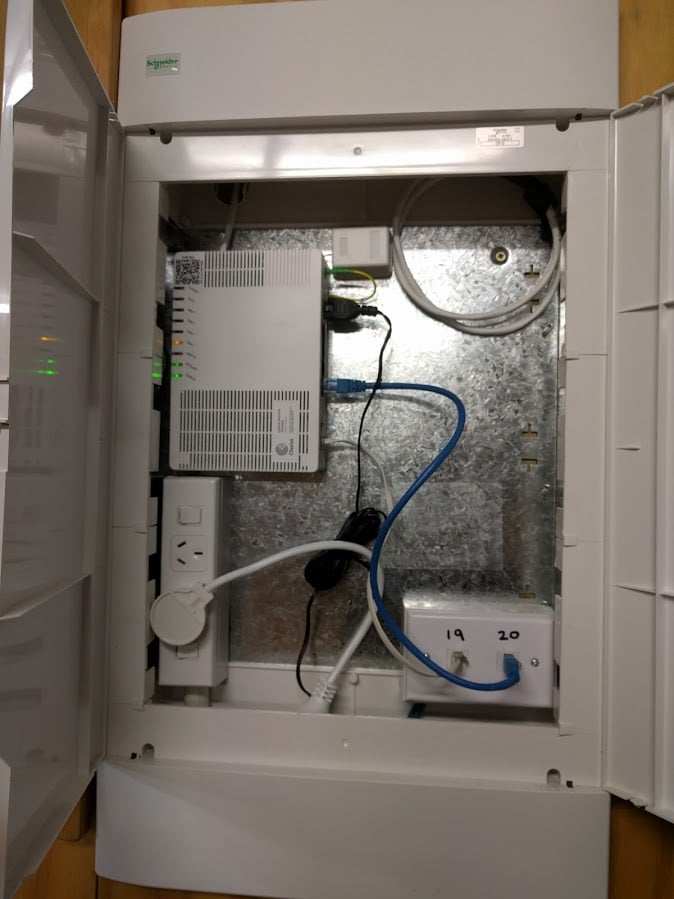
Here's my old one


Click to see full size


And one for my folks (didn't leave enough room for ONT, so had to add the second one when fibre arrived


Click to see full size


Click to see full size


davidcole
6099 posts

Uber Geek
+1 received by user: 1465

Trusted

  #1966864 2-Mar-2018 08:09
Send private message

I have the following:


My main Computer:


Click to see full size


Which is on a platform above my gateway and voip ata:


Click to see full size


Then from the gateway round to my switch and patch panel:


Click to see full size


This was my first ever effort so it looks a little messy (the patch panel/switch). 


If I was doing it again, I'd probably put it above the computer (but that came second) as it might be easier to work on, I'd also clean up the cable entry and tie them together, and the run off just tends to coil in the bottom of the rack.  And lastly, I'd probably switch to an unloaded patch panel so I could easily adds runs via keystone rather than having to try and extract the whole patch panel module to add a cable to the back.


The fans on top of the switch are controlled via a raspberry pi/openhab to come on when a temp sensor in there gets over 25 degrees.


Previously known as psycik

Home Assistant: Gigabyte AMD A8 Brix, Home Assistant with Aeotech ZWave Controller, Raspberry PI, Wemos D1 Mini, Zwave, Shelly Humidity and Temperature sensors
Media:Chromecast v2, ATV4 4k, ATV4, HDHomeRun Dual
Server
Host Plex Server 3x3TB, 4x4TB using MergerFS, Samsung 850 evo 512 GB SSD, Proxmox Server with 1xW10, 2xUbuntu 22.04 LTS, Backblaze Backups, usenetprime.com fastmail.com Sharesies Trakt.TV Sharesight 


Suckerpunch

125 posts

Master Geek
+1 received by user: 25


  #1966878 2-Mar-2018 08:48
Send private message

Nice! Thanks guys, keep them coming!


 1 | 2 | 3 | 4 | 5 | 6 | ... | 8
Filter this topic showing only the reply marked as answer View this topic in a long page with up to 500 replies per page Create new topic


Geekzone Live »

Try automatic live updates from Geekzone directly in your browser, without refreshing the page, with Geekzone Live now.


Are you subscribed to our RSS feed? You can download the latest headlines and summaries from our stories directly to your computer or smartphone by using a feed reader.