Geekzone: technology news, blogs, forums
Guest
Welcome Guest.
You haven't logged in yet. If you don't have an account you can register now.


ctv

ctv

45 posts

Geek
+1 received by user: 8


#289714 24-Sep-2021 15:55
Send private message

I had a static IP enabled today and since it's been enabled I have not been able to connect to the internet. I've restarted everything multiple times, factory reset the UDM Pro, and am still not able to connect. Internet was working fine before then, tried calling and waited 45 minutes and was told "we can see an active connection on our end since x hrs ago" and since it's not a 2d modem they weren't able to help any further. From my understanding, I should not have to do anything in regards to the settings for it to work. The only thing I may have to do is restart the UDM-Pro to get the new IP. Is there something I am missing?


Create new topic

This is a filtered page: currently showing replies marked as answers. Click here to see full discussion.

ctv

ctv

45 posts

Geek
+1 received by user: 8


  #2783796 24-Sep-2021 17:54
Send private message

Jiriteach:


ctv:


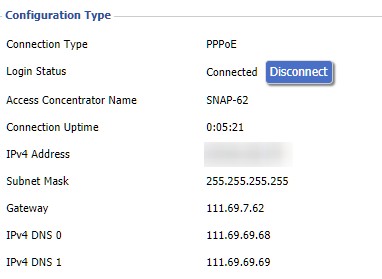
Thanks guys. I do not have a Fritz!Box. I've just tried a TP-Link Archer c9 (old router) and that did connect to PPPoE (It grabbed the IP / Gateway / DNS servers) but still no internet. 


Here's a picture of the assignments. The IP assigned is correct (with what they sent in the email). Maybe the gateway / DNS servers are wrong? Hopefully, it will help.


So based on fact that you are getting a connection assignments look OK - I would say you need to chat with the helpdesk again and have them look at your static ip allocation as it looks like a backend issue.


I called them again, had to wait for 1hr30m in queue but eventually got through. The guy removed the static IP and the internet started working, then added a different one back and it was working fine. Seemed to be a backend issue, hope no one else has to deal with that.


Create new topic


Geekzone Live »

Try automatic live updates from Geekzone directly in your browser, without refreshing the page, with Geekzone Live now.


Are you subscribed to our RSS feed? You can download the latest headlines and summaries from our stories directly to your computer or smartphone by using a feed reader.