Geekzone: technology news, blogs, forums
Guest
Welcome Guest.
You haven't logged in yet. If you don't have an account you can register now.


taless

23 posts

Geek
+1 received by user: 1


#205262 6-Nov-2016 00:46
Send private message

Hi there, I've recently moved to a property, as a new owner. From speaking to the previous owner, I am sure that there was ADSL.


As it will take quite a while to install Fibre, 2degrees and I decided to have an interim copper connection (get ADSL/VDSL installed, then upgrade to Fibre). Interestingly, 2degrees told me there was only VDSL (no ADSL), and reassured me that Chorus says I have VDSL, so we went for that. (Spark also gives me VDSL/Fibre when searching online, Voyager only gives me ADSL/Fibre).


I got the usual Text message saying that my connection is now up & running (there was no technician visits). However, upon plugging in my Fritzbox, the Phone/DSL keeps on flashing.


Having spoken to 2degrees, they now booked a timeslot for Chorus to fix my issue, and suggested a visit to my property will be necessary. They also gave me the usual "if there is a fault on my side there may be a charge of $295", which makes me worried - do I have any wiring issues? It can't be right, as the previous owner has ADSL ok?


Having searched and read multiple forum posts, my questions are:


1. What do you think is the likely problem here?


2. I only have 3 phone jacks in the property, I have tried all 3 and all didn't work.


3. Was it because no Master Filter was installed?


All I really wanted is an interim connection of some sort (can be ADSL), until Fibre is installed. What would you suggest?


Thanks so much for your advice guys :)


Filter this topic showing only the reply marked as answer View this topic in a long page with up to 500 replies per page Create new topic
 1 | 2
Linux
12173 posts

Uber Geek
+1 received by user: 8469

Trusted
Lifetime subscriber

  #1664450 6-Nov-2016 04:57
Send private message

Check out the 500+ other threads on the same subject

1) Post xDSL line stats from modem
2) Get a master filter installed

Linux


scottjpalmer
6032 posts

Uber Geek
+1 received by user: 790

Moderator
ID Verified
Trusted
Lifetime subscriber

  #1664474 6-Nov-2016 08:30
Send private message

Find the demarc (where the line from the street joins the house wiring, usually a little white box on the outside of the house) and connect your modem at that point (disconnect house wiring, crimp on a plug) . If it works, house wiring is your problem otherwise it's for Chorus.

Linux
12173 posts

Uber Geek
+1 received by user: 8469

Trusted
Lifetime subscriber

  #1664478 6-Nov-2016 08:48
Send private message

Is it a Naked or Clothed connection?

Linux


taless

23 posts

Geek
+1 received by user: 1


  #1664517 6-Nov-2016 11:26
Send private message

Thank you guys. It is a naked VDSL.

I found a white box with Telecom embossed on it. At the bottom part, there is a 'pipe' joined to it. That box is sealed with screws. Is this something I should unscrew and open up? Will I see a RJ12 or RJ45 in there?

Thanks!

froob
698 posts

Ultimate Geek
+1 received by user: 233

Lifetime subscriber

  #1664518 6-Nov-2016 11:32
Send private message

No, you won't see either. You will see some wires joined together with gel crimps. Here's a random thread from this site with some photos of an example: http://www.geekzone.co.nz/forums.asp?forumid=49&topicid=112494


You will want to be confident in what you are doing before you start changing things around in the ETP box.


Sideface
9649 posts

Uber Geek
+1 received by user: 15596

Trusted
DR
Lifetime subscriber

  #1664528 6-Nov-2016 12:08
Send private message

taless:


Hi there, I've recently moved to a property, as a new owner. From speaking to the previous owner, I am sure that there was ADSL.


<snip>


IF the previous owner had ADSL AND IF a master filter is already installed, AND IF you have multiple telephone jackpoints, then you may find that only one of these connects to VDSL.


Have you tried connecting your modem to all of the jackpoints?


Sideface


Shop now for Lego sets and other gifts (affiliate link).
overkill
222 posts

Master Geek
+1 received by user: 42


  #1664584 6-Nov-2016 15:07
Send private message

If you have another line cord floating around from one of your now obsolete landline phones, change it out from the white one that the Fritzbox comes with, you might just get BB before a technician comes out. I deal with DSL faults every day and at present go to an average of x2 a week where the line cord has been the problem with a batch of Fritzboxes. The pins seem to be countersunk a little too much and when "clicked" into place, do not make contact with the the pins in the jackpoint.


"Setting the Standard in Quality and Commitment"

RunningMan
9184 posts

Uber Geek
+1 received by user: 4834


  #1664606 6-Nov-2016 16:28
Send private message

overkill: [snip] The pins seem to be countersunk a little too much and when "clicked" into place, do not make contact with the the pins in the jackpoint.


Similar thing happens when an RJ11 is plugged into a RJ45 - pins get bent, connection becomes unreliable.


hio77
'That VDSL Cat'
13036 posts

Uber Geek
+1 received by user: 3896

ID Verified
Trusted
Lizard Networks
Subscriber

  #1664644 6-Nov-2016 18:46
Send private message

overkill: If you have another line cord floating around from one of your now obsolete landline phones, change it out from the white one that the Fritzbox comes with, you might just get BB before a technician comes out. I deal with DSL faults every day and at present go to an average of x2 a week where the line cord has been the problem with a batch of Fritzboxes. The pins seem to be countersunk a little too much and when "clicked" into place, do not make contact with the the pins in the jackpoint.


I must make comment here, Please don't recommend people do this! its a beautiful device after all.


fritzbox has a rj45 port for a reason, jamming any old phone cord in there certainly may work but it will also likely bend the pins in the firtz too.. 


#include <std_disclaimer>


Any comments made are personal opinion and do not reflect directly on the position my current or past employers may have. 


overkill
222 posts

Master Geek
+1 received by user: 42


  #1664668 6-Nov-2016 20:08
Send private message

RunningMan:

overkill: [snip] The pins seem to be countersunk a little too much and when "clicked" into place, do not make contact with the the pins in the jackpoint.


Similar thing happens when an RJ11 is plugged into a RJ45 - pins get bent, connection becomes unreliable.


Yep you are right, but if it gets their internet going, excellent. If it doesn't, it was worth the try.


"Setting the Standard in Quality and Commitment"

overkill
222 posts

Master Geek
+1 received by user: 42


  #1664672 6-Nov-2016 20:11
Send private message

hio77:

overkill: If you have another line cord floating around from one of your now obsolete landline phones, change it out from the white one that the Fritzbox comes with, you might just get BB before a technician comes out. I deal with DSL faults every day and at present go to an average of x2 a week where the line cord has been the problem with a batch of Fritzboxes. The pins seem to be countersunk a little too much and when "clicked" into place, do not make contact with the the pins in the jackpoint.


I must make comment here, Please don't recommend people do this! its a beautiful device after all.


fritzbox has a rj45 port for a reason, jamming any old phone cord in there certainly may work but it will also likely bend the pins in the firtz too.. 


If it gets their internet going, excellent they can then contact their service provider for a replacement. If it bends the outside pins, can you tell me what they are used for for future reference of this router?


"Setting the Standard in Quality and Commitment"


Shop now on AliExpress (affiliate link).
RunningMan
9184 posts

Uber Geek
+1 received by user: 4834


  #1664675 6-Nov-2016 20:21
Send private message

overkill:
Yep you are right, but if it gets their internet going, excellent. If it doesn't, it was worth the try.


But if the $3 cable causes permanent damage to the $300 router, not so excellent. Much better to use the correct connectors, not just whatever is laying around.


RunningMan
9184 posts

Uber Geek
+1 received by user: 4834


  #1664676 6-Nov-2016 20:26
Send private message

overkill:
If it gets their internet going, excellent they can then contact their service provider for a replacement. If it bends the outside pins, can you tell me what they are used for for future reference of this router?


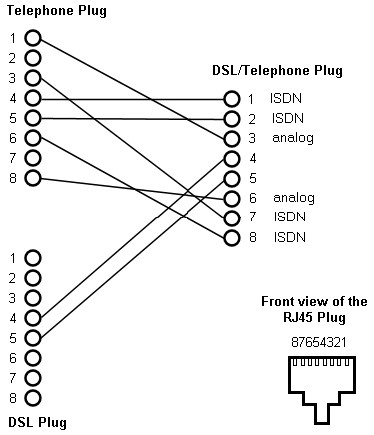
The Fritz devices can take xDSL and POTS signals on different pins of that connector simultaneously, once the pins are damaged, you no longer have this functionality.


hio77
'That VDSL Cat'
13036 posts

Uber Geek
+1 received by user: 3896

ID Verified
Trusted
Lizard Networks
Subscriber

  #1664678 6-Nov-2016 20:31
Send private message

overkill:
hio77:


overkill: If you have another line cord floating around from one of your now obsolete landline phones, change it out from the white one that the Fritzbox comes with, you might just get BB before a technician comes out. I deal with DSL faults every day and at present go to an average of x2 a week where the line cord has been the problem with a batch of Fritzboxes. The pins seem to be countersunk a little too much and when "clicked" into place, do not make contact with the the pins in the jackpoint.


I must make comment here, Please don't recommend people do this! its a beautiful device after all.


fritzbox has a rj45 port for a reason, jamming any old phone cord in there certainly may work but it will also likely bend the pins in the firtz too.. 


If it gets their internet going, excellent they can then contact their service provider for a replacement. If it bends the outside pins, can you tell me what they are used for for future reference of this router?


That is an expensive way to 'test'.. Not to mention i'm sure the provider wouldn't be that happy to replace it because you rammed the wrong thing into the hole!


DSL is default, on the two inner pins, Pots is accepted on the next set and then all ISDN It's actually rather useful, although not 100% functional for a NZ line (particularly with CID, breaking all devices on the loop too) nor did snap themselves teleperment this feature when bringing fritz's in.


RunningMan:


overkill:
If it gets their internet going, excellent they can then contact their service provider for a replacement. If it bends the outside pins, can you tell me what they are used for for future reference of this router?


The Fritz devices can take xDSL and POTS signals on different pins of that connector simultaneously, once the pins are damaged, you no longer have this functionality.


Not to mention the horrible cases i have seen on cables being jammed on an angle or the sorts where the contacts are not correctly aligning..


'working' and actually being used as intended are totally different cases, the later should always be the case! afterall, who's fault is it when the connection doesnt work? can guarantee first blame will be the ISP not the cable shoved in there on an angle causing loose contacts!


#include <std_disclaimer>


Any comments made are personal opinion and do not reflect directly on the position my current or past employers may have. 


overkill
222 posts

Master Geek
+1 received by user: 42


  #1664681 6-Nov-2016 20:52
Send private message

hio77:

overkill:
hio77:


overkill: If you have another line cord floating around from one of your now obsolete landline phones, change it out from the white one that the Fritzbox comes with, you might just get BB before a technician comes out. I deal with DSL faults every day and at present go to an average of x2 a week where the line cord has been the problem with a batch of Fritzboxes. The pins seem to be countersunk a little too much and when "clicked" into place, do not make contact with the the pins in the jackpoint.


I must make comment here, Please don't recommend people do this! its a beautiful device after all.


fritzbox has a rj45 port for a reason, jamming any old phone cord in there certainly may work but it will also likely bend the pins in the firtz too.. 


If it gets their internet going, excellent they can then contact their service provider for a replacement. If it bends the outside pins, can you tell me what they are used for for future reference of this router?


That is an expensive way to 'test'.. Not to mention i'm sure the provider wouldn't be that happy to replace it because you rammed the wrong thing into the hole!


DSL is default, on the two inner pins, Pots is accepted on the next set and then all ISDN It's actually rather useful, although not 100% functional for a NZ line (particularly with CID, breaking all devices on the loop too) nor did snap themselves teleperment this feature when bringing fritz's in.


RunningMan:


overkill:
If it gets their internet going, excellent they can then contact their service provider for a replacement. If it bends the outside pins, can you tell me what they are used for for future reference of this router?


The Fritz devices can take xDSL and POTS signals on different pins of that connector simultaneously, once the pins are damaged, you no longer have this functionality.


Not to mention the horrible cases i have seen on cables being jammed on an angle or the sorts where the contacts are not correctly aligning..


'working' and actually being used as intended are totally different cases, the later should always be the case! afterall, who's fault is it when the connection doesnt work? can guarantee first blame will be the ISP not the cable shoved in there on an angle causing loose contacts!


I see your point, but it also the lesser of two evils for me than advise anyone who has not worked on the Chorus network to "open up the ETP and play with the wires", if it proves in from the POE and the wiring has been "bodged" inside the ETP, this guy could face a significant charge. Once that PDR goes through to Chorus, who knows what the amount of $$$ will be charged, $25.30 odd per quarter of an hour and the visit fee can add up. Against plugging another (albeit wrong type) cable that if installed straight won't damage the only pins that actually will EVER be used.


"Setting the Standard in Quality and Commitment"

 1 | 2
Filter this topic showing only the reply marked as answer View this topic in a long page with up to 500 replies per page Create new topic


Geekzone Live »

Try automatic live updates from Geekzone directly in your browser, without refreshing the page, with Geekzone Live now.


Are you subscribed to our RSS feed? You can download the latest headlines and summaries from our stories directly to your computer or smartphone by using a feed reader.