Geekzone: technology news, blogs, forums
Guest
Welcome Guest.
You haven't logged in yet. If you don't have an account you can register now.


Finch

2862 posts

Uber Geek
+1 received by user: 195


#311497 21-Jan-2024 13:12
Send private message

Hi there,


I'm just checking Task Manager and it says I have 38 Google Chrome Tabs (Apps?) open, which is using a chunk of ram.


On Chrome itself, I only have 6 tabs open currently.


Why is this happening, and how can I stop it?


Thanks!


View this topic in a long page with up to 500 replies per page Create new topic
 1 | 2
Bung
6744 posts

Uber Geek
+1 received by user: 2932

Subscriber

  #3184769 21-Jan-2024 13:49
Send private message

How many Chrome windows do you have? The other tabs may be in a different window.


Oblivian
7350 posts

Uber Geek
+1 received by user: 2118

ID Verified

  #3184770 21-Jan-2024 13:52
Send private message

You can't?.

It's multi threading and processes (handles logins, plugins and account sync as well as tabs) pleasing everyone who wants speeeeeed.

So it opens lots of threads/processes ready, and sleeps your inert tabs etc.


And scripts if you have FB open will chew a lot.

rscole86
5001 posts

Uber Geek
+1 received by user: 463

Moderator
Trusted
Lifetime subscriber

  #3184771 21-Jan-2024 13:53
Send private message

Does Windows task manager also report add-ons/extensions as individual instances of Chrome?


Oblivian
7350 posts

Uber Geek
+1 received by user: 2118

ID Verified

  #3184777 21-Jan-2024 14:08
Send private message

Selecting chrome and going shift-esc appears to suggest yes.


gzt

gzt
18846 posts

Uber Geek
+1 received by user: 7975

Lifetime subscriber

  #3184782 21-Jan-2024 14:19
Send private message

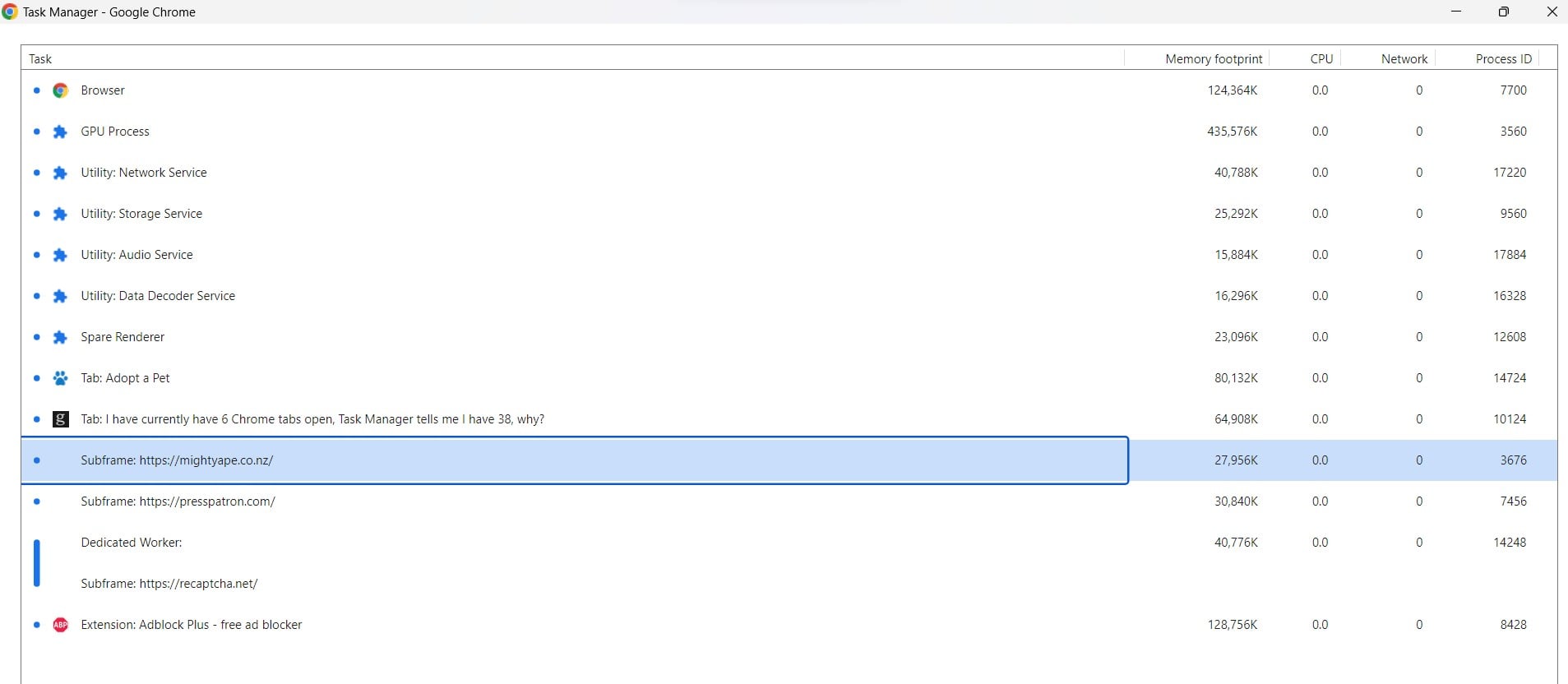
Chrome > More Tools > Task Manager

.. shows the relationships between pages/extensions and process memory use

ANglEAUT
altered-ego
2449 posts

Uber Geek
+1 received by user: 852

Trusted
Lifetime subscriber

  #3184894 21-Jan-2024 20:09
Send private message

Maybe this?


There's an option in Chrome's settings to leave it running in the background if any apps or extensions require it


Please keep this GZ community vibrant by contributing in a constructive & respectful manner.


Shop now for Dyson appliances (affiliate link).
Finch

2862 posts

Uber Geek
+1 received by user: 195


  #3186889 26-Jan-2024 14:00
Send private message

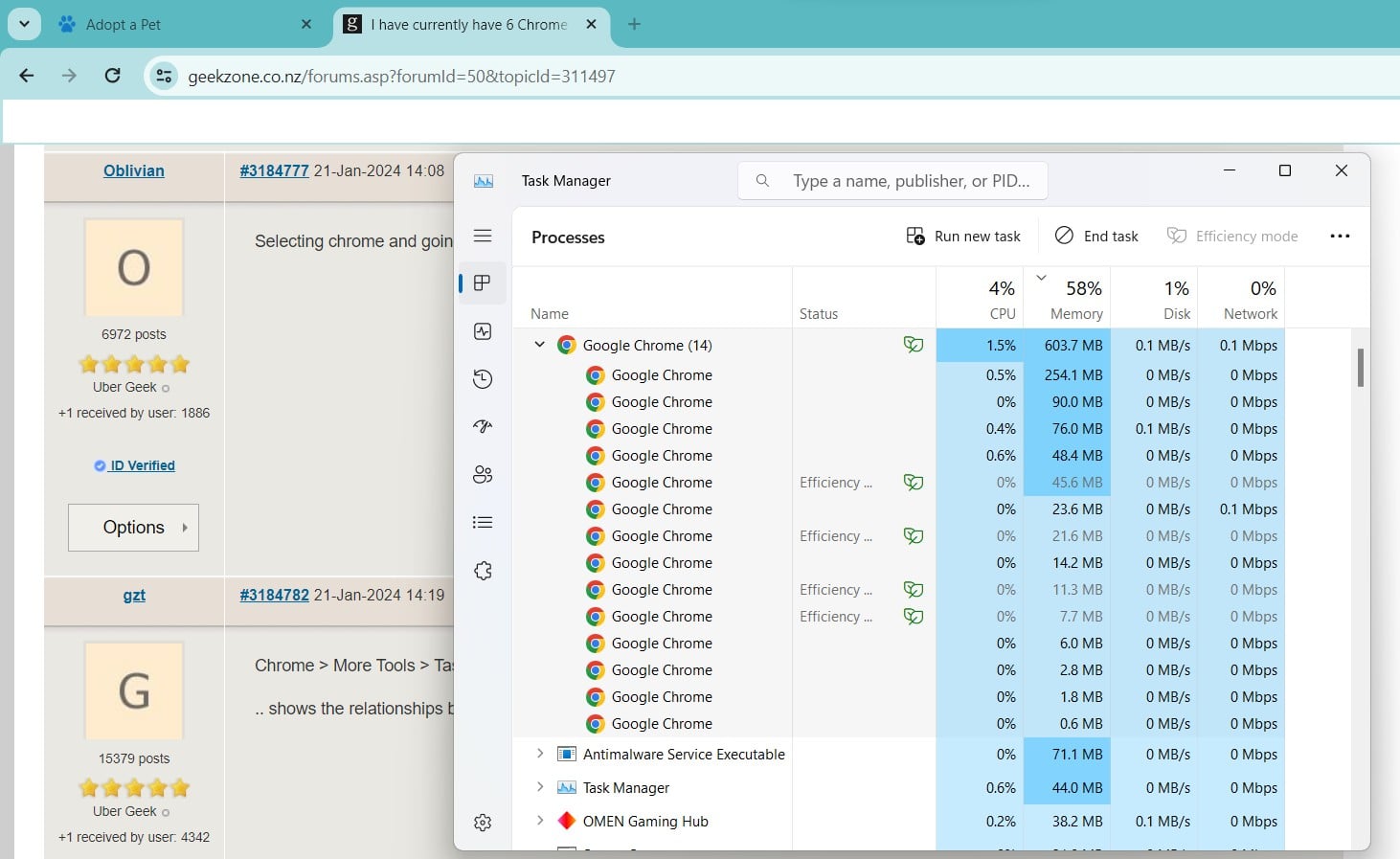
Just getting back to this now, you can see in the Task Manager it says Chrome has 14 tabs (?) open, but all I have is SPCA website and now Geekzone to write this. Heading into the Windows Task Manager via Chrome - More Tools - Task Manager sheds some more details. I don't have MightyApe open, not sure why it's showing that? Also haveno idea what PressPatron website is, nor recaptcha.net


snj

snj
310 posts

Ultimate Geek
+1 received by user: 224


  #3186897 26-Jan-2024 14:28
Send private message

Chrome splits up various tasks (such as rendering) into their own system processes, the idea is, if something goes wrong with a subcomponent it doesn't take down the whole browser. That's what all those jigsaw icons for instance are.  In addition, extensions/etc often end up in their own processes.


It's not always a 1:1 tab to process either, I have quite a few tabs open, and often tabs from the same site end up in the same process.


Generally not something to worry too much about.


Finch

2862 posts

Uber Geek
+1 received by user: 195


  #3186907 26-Jan-2024 14:47
Send private message

Cheers mate,


So basically it is what it is, nothing is wrong and just carry on?


Oblivian
7350 posts

Uber Geek
+1 received by user: 2118

ID Verified

  #3186909 26-Jan-2024 15:02
Send private message

So pretty much my first reply ;)

gzt

gzt
18846 posts

Uber Geek
+1 received by user: 7975

Lifetime subscriber

  #3186910 26-Jan-2024 15:05
Send private message

Multiple Windows desktops?


Stream your favourite shows now on Apple TV (affiliate link).

gzt

gzt
18846 posts

Uber Geek
+1 received by user: 7975

Lifetime subscriber

  #3186911 26-Jan-2024 15:06
Send private message

On the far left of Chrome there is a down button list searchable of all open tabs. Do any of those sites show there?

Jase2985
13754 posts

Uber Geek
+1 received by user: 6236

ID Verified
Lifetime subscriber

  #3186931 26-Jan-2024 16:13
Send private message

the (14) is not tabs but processes that chrome runs, nothing to worry about here


Finch

2862 posts

Uber Geek
+1 received by user: 195


  #3194325 12-Feb-2024 13:58
Send private message

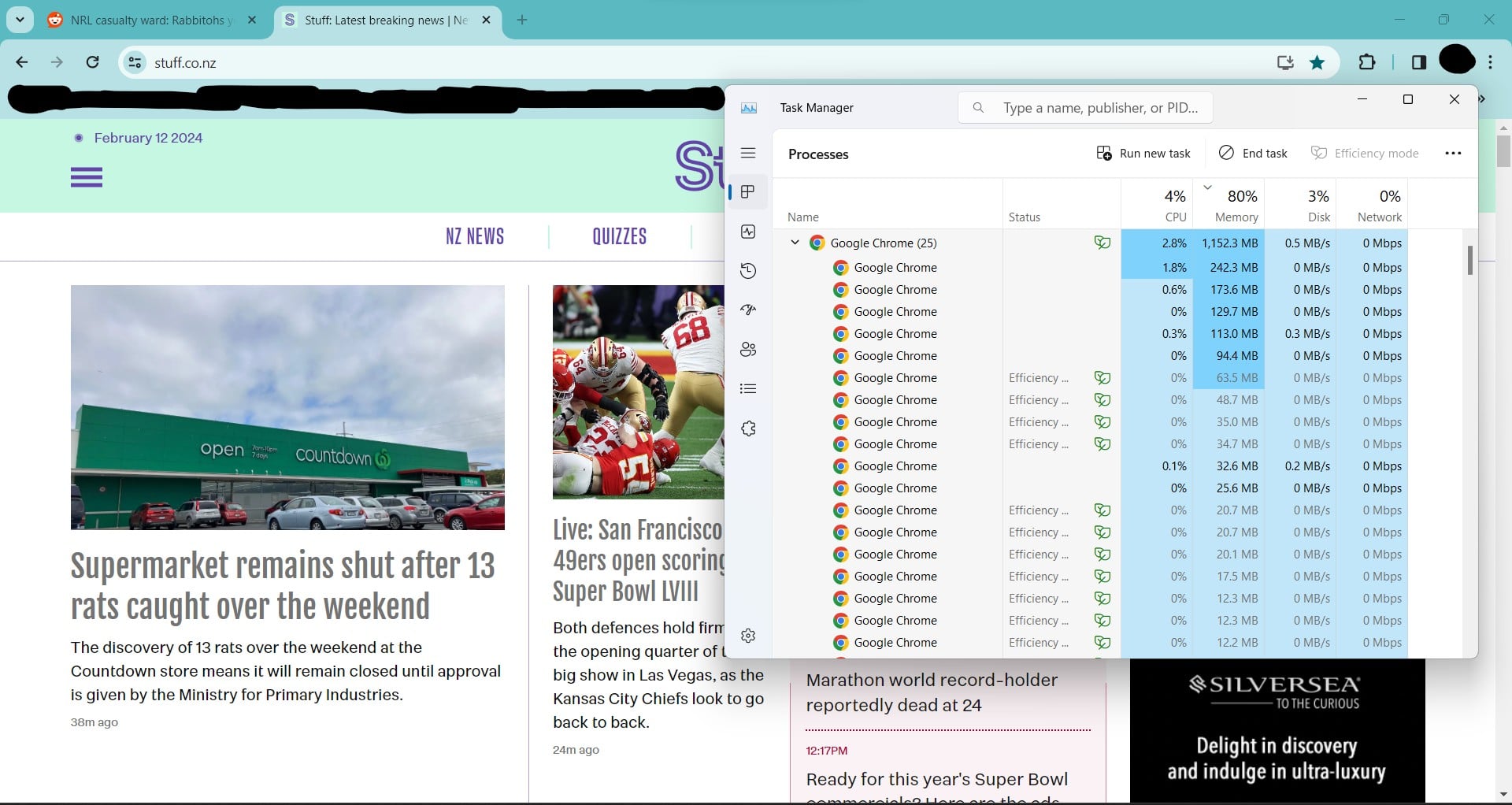
Are we 100% sure there's nothing to worry about? I literally have two tabs open, one for a page on Reddit, and Stuff.


My memory is at over 80%, with the bulk of this being Chrome? 100% certain it's normal? Just seems weird, but then again I don't know what's happening BTS as has been explained here.


Jase2985
13754 posts

Uber Geek
+1 received by user: 6236

ID Verified
Lifetime subscriber

  #3194363 12-Feb-2024 15:23
Send private message

don't know how much memory you have in your system or what % is chrome from that image. so its hard to say. 


1.15Gb is not much, I'm currently using 4.4Gb in Firefox with 23 tabs, one being live TV one being YouTube, the test geekzone.


 1 | 2
View this topic in a long page with up to 500 replies per page Create new topic


Geekzone Live »

Try automatic live updates from Geekzone directly in your browser, without refreshing the page, with Geekzone Live now.


Are you subscribed to our RSS feed? You can download the latest headlines and summaries from our stories directly to your computer or smartphone by using a feed reader.