Geekzone: technology news, blogs, forums
Guest
Welcome Guest.
You haven't logged in yet. If you don't have an account you can register now.


SomePostman

139 posts

Master Geek
+1 received by user: 27


#192138 28-Feb-2016 19:03
Send private message

I moved into my new (never been lived in) house yesterday and can't get my internet working and in need of help.

I'm currently on the wait list for a spark fibre install, so got given a modem that could do both fibre and DSL until the install.

The problem is that my house doesn't have a single phone jack, but RJ45 jacks in every room. If I plug my DSL modem into this using the Ethernet cable (not the phone cable and filter) I get the power and WAN light going, but no internet light. I don't know if means I can't use it this way or is it possible my house isn't connected at all to the communications infrastructure? (The power people couldn't do a remote connection and needed to come on site)

What am I missing? How can I test if my house is connected?

View this topic in a long page with up to 500 replies per page Create new topic
 1 | 2 | 3
RunningMan
9184 posts

Uber Geek
+1 received by user: 4834


  #1500893 28-Feb-2016 19:08
Send private message

Is there a copper line coming into the house. if so, where?


Presumably with RJ45 everywhere you have a structured cabling system of some sort (good!), so if there is a copper connection, it's likely at the patch panel where all the network cables go back to - can you post a photo of this?


richms
29098 posts

Uber Geek
+1 received by user: 10207

Trusted
Lifetime subscriber

  #1500895 28-Feb-2016 19:12
Send private message

If it is a new house, there may not even be any copper service to it. Chances are there is a panel in the garage or similar utility room all those RJ45's go back to, which may have the incoming copper connection also on a socket inside it. Find that panel and take a photo of it for more assistance.


Richard rich.ms

hyperman
418 posts

Ultimate Geek
+1 received by user: 101


  #1500896 28-Feb-2016 19:12
Send private message

A couple of missing things here


1. has Spark connected a DSL service to the house; if not there is your first problem


2. as you only have RJ45's I would be guessing you have a star wired system; somewhere there will be a cupboard with lots of connections (maybe in the garage)
you will need to connect the socket you are trying to use to connect to the phone line, then the modem RJ11 to the RJ45


 The views expressed by me are not necessarily those of my employer


Behodar
11094 posts

Uber Geek
+1 received by user: 6070

Trusted
Lifetime subscriber

  #1500897 28-Feb-2016 19:16
Send private message

Are you on a naked plan? If not, do you get a dialtone if you connect a phone? Obviously you'll need an adapter if your phone has a BT plug :)


SomePostman

139 posts

Master Geek
+1 received by user: 27


  #1500898 28-Feb-2016 19:17
Send private message

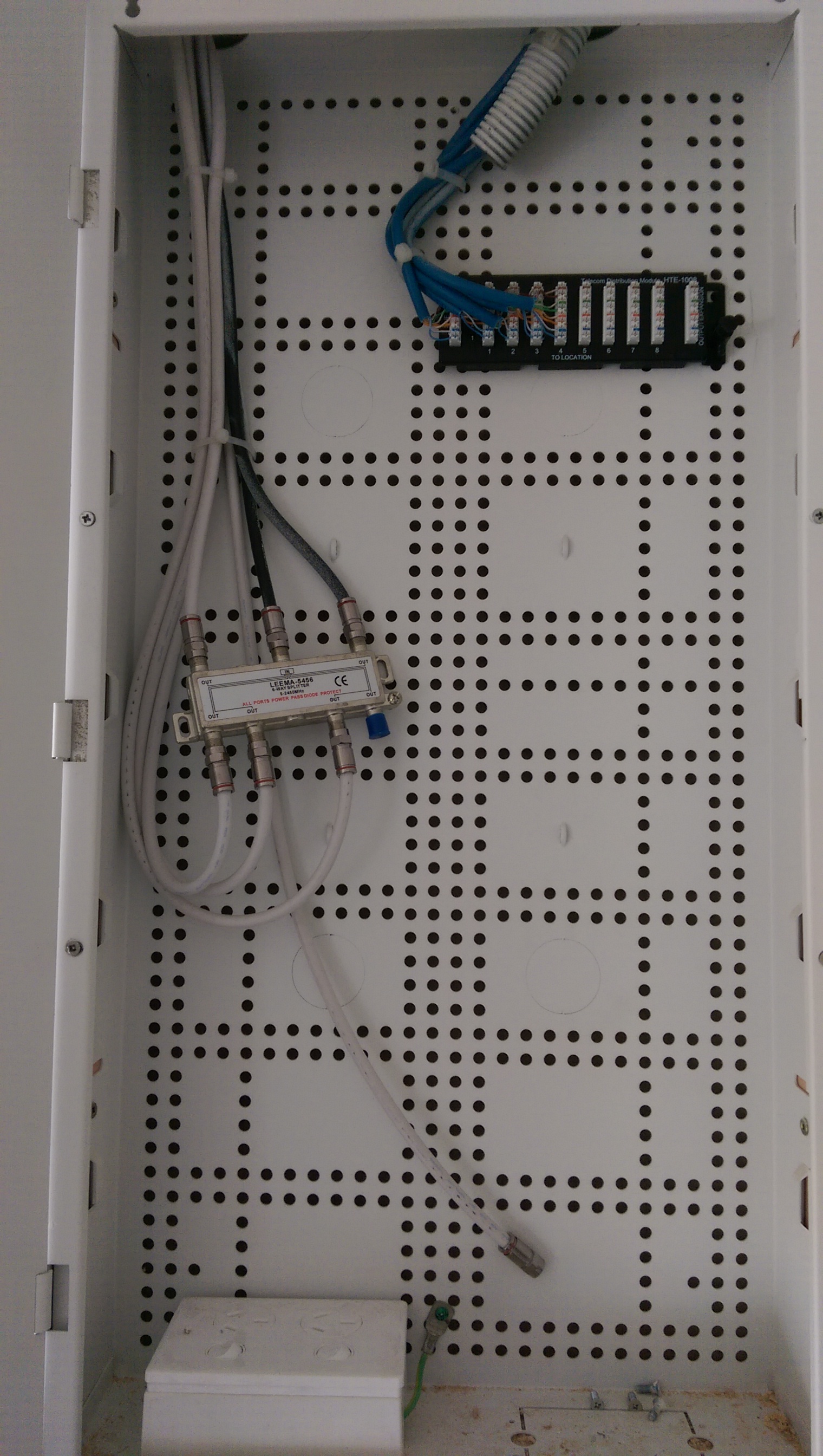
Thanks for the quick reply. It doesn't look like it... Looks like a splitter for the aerial and a patch panel for fibre?

Click to see full size

sbiddle
30853 posts

Uber Geek
+1 received by user: 9996

Retired Mod
Trusted
Biddle Corp
Lifetime subscriber

  #1500899 28-Feb-2016 19:17
Send private message

Firstly as you got a DSL connection you need to plug a cable from the wall socket into the DSL port on your router, not the Ethernet port.


I assume you didn't have a Chorus technician visit? Is your house actually connected up to copper and have a connection to the wiring cupboard which will be located somewhere?


Want to support Geekzone and browse the site without the ads? Subscribe to Geekzone now (monthly, annual and lifetime options).
SomePostman

139 posts

Master Geek
+1 received by user: 27


  #1500901 28-Feb-2016 19:24
Send private message

A couple of quick replies:
- no chorus technician has been out since I've had the house
- I'm on naked broadband
- spark texted me a few days ago to say my internet connection is live

sbiddle
30853 posts

Uber Geek
+1 received by user: 9996

Retired Mod
Trusted
Biddle Corp
Lifetime subscriber

  #1500902 28-Feb-2016 19:27
Send private message

You need to find your wiring cupboard/patch panel, ensure the incoming phone line is hooked to the RJ45 sockets throughout the house, and hook your modem up with the correct cable. Unfortunately Spark aren't going to be able to help you with this.


sbiddle
30853 posts

Uber Geek
+1 received by user: 9996

Retired Mod
Trusted
Biddle Corp
Lifetime subscriber

  #1500904 28-Feb-2016 19:28
Send private message

SomePostman: Thanks for the quick reply. It doesn't look like it... Looks like a splitter for the aerial and a patch panel for fibre?

Click to see full size


What a shocker.


You also need to find the person who wired up the house and get them to come back and install things correctly. Tell them you will not pay for this as it's been installed incorrectly. If they don't understand why it's wrong then it further emphasises what a terrible job they've done.


Assuming the first pair is the incoming phone line then using the correct cable to plug your modem in may work, but it doesn't change the fact somebody has done a terrible job wiring this up.


SomePostman

139 posts

Master Geek
+1 received by user: 27


  #1500907 28-Feb-2016 19:35
Send private message

sbiddle:

SomePostman: Thanks for the quick reply. It doesn't look like it... Looks like a splitter for the aerial and a patch panel for fibre?

Click to see full size


What a shocker.


You also need to find the person who wired up the house and get them to come back and install things correctly. Tell them you will not pay for this as it's been installed incorrectly.


Assuming the first pair is the incoming phone line then using the correct cable to plug your modem in may work, but it doesn't change the fact somebody has done a terrible job wiring this up.


I didn't build the house, I got a good deal on an earthquake rebuild. I don't know what this should look like, why is it such a bad job?

It may or may not be related but I can't even get freeview to work. Instead of what now my kids could only watch al-jazeera this morning lol

Jase2985
13730 posts

Uber Geek
+1 received by user: 6202

ID Verified
Lifetime subscriber

  #1500909 28-Feb-2016 19:39
Send private message

ultimately if the person who installed it wont come back to fix it you will probably need to pay someone to fix it for you.


Support Geekzone with one-off or recurring donations Donate via PressPatron.
freitasm
BDFL - Memuneh
80646 posts

Uber Geek
+1 received by user: 41030

Administrator
ID Verified
Trusted
Geekzone
Lifetime subscriber

  #1500910 28-Feb-2016 19:39
Send private message

@sbiddle better tell what is wrong because not everyone will know from your comments.


Referral links: Quic Broadband (free setup code: R587125ERQ6VE) | Samsung | AliExpress | Wise | Sharesies 


Support Geekzone by subscribing (browse ads-free), or making a one-off or recurring donation through PressPatron.


RunningMan
9184 posts

Uber Geek
+1 received by user: 4834


  #1500912 28-Feb-2016 19:44
Send private message

freitasm:


@sbiddle better tell what is wrong because not everyone will know from your comments.


The cables from the jacks around the house are all punched down together on the same block - essentially they are all in parallel, connected together, so can't be used as individual jacks. In the current config, they are suitable for voice only, no network capability, and xDSL would be pretty marginal as well.


The solution is each cable punched down to a separate RJ45, which you can then use patch cables to connect to a switch, or patch a phone line through to.


Yabanize
2351 posts

Uber Geek
+1 received by user: 583


  #1500913 28-Feb-2016 19:45
Send private message

Assuming you have the HG659b


It should have come with a few different cables


You need to use the VDSL cable, it has an RJ45 on one end, and a smaller RJ11 on the other end


Connect it from your wall to the DSL port on the modem, NOT the blue WAN port.


This is assuming your house has copper connected up to that distribution box


RunningMan
9184 posts

Uber Geek
+1 received by user: 4834


  #1500914 28-Feb-2016 19:46
Send private message

From the OP's pic, doesn't look like there is a copper line in. Assuming this is a new build, you'd need to check one has even been run to the house, it's possible there is no phone line at all. If it's a rebuild on a previously used site, then Chorus records may show it as having an intact line, even if it doesn't - which is why the ISP would say it is connected.


 1 | 2 | 3
View this topic in a long page with up to 500 replies per page Create new topic


Geekzone Live »

Try automatic live updates from Geekzone directly in your browser, without refreshing the page, with Geekzone Live now.


Are you subscribed to our RSS feed? You can download the latest headlines and summaries from our stories directly to your computer or smartphone by using a feed reader.