Geekzone: technology news, blogs, forums
Guest
Welcome Guest.
You haven't logged in yet. If you don't have an account you can register now.


Filter this topic showing only the reply marked as answer View this topic in a long page with up to 500 replies per page Create new topic
1 | ... | 64 | 65 | 66 | 67 | 68 | 69 | 70 | 71
Asteros
363 posts

Ultimate Geek
+1 received by user: 189


  #3401212 9-Aug-2025 10:39
Send private message

There’s a misconception that OLEDs are plateauing in brightness. This is not true at the top end of the range. The LG g4 had a huge jump in brightness, I think it was close to 50% brightness over the G3 due to MLA. The latest G5 ditched MLA and went to Tandem OLED and that’s another 50% brighter I believe. The competing QD OLED used by Samsung and others has similar brightness gains. Top of the range OLEDs are bright enough for rooms with lots of sunlight now.


bmr63
91 posts

Master Geek
+1 received by user: 47


  #3401213 9-Aug-2025 10:45
Send private message

ShinyChrome


Warranty is good for early panel failure, but if it has been used for a few thousand hours, chances are it is at the bottom of the bathtub curve and no different to any other electronics.


I agree with what you’ve said! Interestingly, I first brought an LZ1500 in 2023 (it had just become “last years model”), and was absolutely wrapped with the quality of the picture.


In my case, the TV did in fact start to fault at about 6 months old (randomly turned itself off). After the second occurrence I contacted Panasonic, and they more or less immediately replaced the set (with a MZ1500….in fact the 2023 model but basically identical). Totally happy with it, and Panasonic were great to deal with.


Steve


ermat
181 posts

Master Geek
+1 received by user: 20


  #3401220 9-Aug-2025 11:45
Send private message

Asteros:


There’s a misconception that OLEDs are plateauing in brightness. This is not true at the top end of the range. The LG g4 had a huge jump in brightness, I think it was close to 50% brightness over the G3 due to MLA. The latest G5 ditched MLA and went to Tandem OLED and that’s another 50% brighter I believe. The competing QD OLED used by Samsung and others has similar brightness gains. Top of the range OLEDs are bright enough for rooms with lots of sunlight now.


Those increased brightness numbers are crazy. I was close to buying the lg g3 last year,  I much check out the g5.


JPNZ
1735 posts

Uber Geek
+1 received by user: 866


  #3401600 11-Aug-2025 09:30
Send private message

ShinyChrome:


Still as bright as the day I got it, I actually run the "low-light" professional2 picture setting and it is plenty bright all day. Picture quality is exceptional, as expected from Panasonic.


Warranty is good for early panel failure, but if it has been used for a few thousand hours, chances are it is at the bottom of the bathtub curve and no different to any other electronics.


My Pana GZ1000 did panel maintence on the weekend so must be close to 10k hours now. I also run mine on Pro2 and its brilliant. Pro1 when its really sunny.


I don't get this race for brightness, hell I dial mine down and I have a sunny living area. 


Really want a 77" next, 65" although great could always go bigger haha


Panasonic 65GZ1000, Onkyo RZ730, Atmos 5.1.2, AppleTV 4K, Nest Mini's, PS5, PS3, MacbookPro, iPad Pro, Apple watch SE2, iPhone 15+


ShinyChrome
1603 posts

Uber Geek
+1 received by user: 686

ID Verified
Trusted

  #3401640 11-Aug-2025 11:07
Send private message

JPNZ:


My Pana GZ1000 did panel maintence on the weekend so must be close to 10k hours now. I also run mine on Pro2 and its brilliant. Pro1 when its really sunny.


I don't get this race for brightness, hell I dial mine down and I have a sunny living area. 


Really want a 77" next, 65" although great could always go bigger haha


IKR... from a technical point of view, I get it, great that OLEDs are achieving brightness parity with LCD etc; but realistically, does that translate directly into a better viewing experience? I don't think it does... but then I personally don't need the searing brightness of the sun burning my retinas for a full-screen picture haha. 


For critical watching, I would advise anyone to better light control anyway... some blinds will be cheaper and benefit your experience more than newer TVs.


My only caveat would be for a gaming use case; black frame insertion for gaming has the capability to achieve CRT-like motion clarity but not currently worth it at the cost to brightness. For future panels with higher full field brightness, it may start becoming worth it, but then also reaching higher refresh rates will accomplish the same thing though.


I'll just keep grumbling though until we get rid of sample-and-hold however.. I still want frickin' electron beams fired from a gun directly into my screen please...


Agreed, size is one area I am more interested in... although I haven't yet done the math on whether the price scaling of 83" panels is worth it over 77"


ermat
181 posts

Master Geek
+1 received by user: 20


  #3401647 11-Aug-2025 12:08
Send private message

Comparing the same brand/model tv between say 55" against and larger version, sitting at optimal distance, will the 55" be as detailed as the larger machine ? 


Shop now for Dell laptops and other devices (affiliate link).
ShinyChrome
1603 posts

Uber Geek
+1 received by user: 686

ID Verified
Trusted

  #3401671 11-Aug-2025 13:21
Send private message

ermat:


Comparing the same brand/model tv between say 55" against and larger version, sitting at optimal distance, will the 55" be as detailed as the larger machine ? 


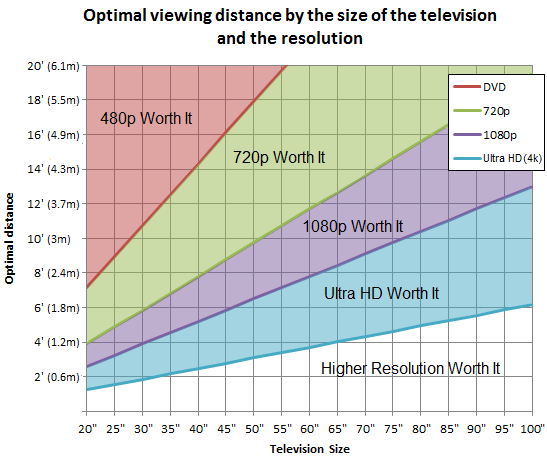
Sitting at the optimal distance for a 55", going larger means you will start being able to see less without moving your head, but the effect would only by really noticeable with a big jump i.e. going from 55" to 83" . Sitting at the optimal distance of a 65"/77" etc; you will be able to resolve more detail for that than the 55".


This is because relationship between viewing distance and size is not fixed but relational; optimal viewing distance scales by size and resolution between the limits of what you can see in your visual field (too close) or what your eyes can resolve at a distance meaning resolution becomes meaningless (too far).


RTINGS has a great write-up and calculator on it: https://www.rtings.com/tv/reviews/by-size/size-to-distance-relationship and the graph below is a great quick reference:


alavaliant
251 posts

Ultimate Geek
+1 received by user: 119

Subscriber

  #3402064 12-Aug-2025 13:42
Send private message

alavaliant:

Thanks,  since LG models do seem to be highly ranked on reviews.  After doing some comparison of models. I've ordered an      
LG B4 65" 4K OLED Smart TV.

Fingers crossed it will all work well when it arrives in a few days.


For anybody who might have been interested in my experience.    So far I'm generally happy with the LG B4 65" 4K OLED Smart TV after using it for a week.   

After updating the default settings to remain on the last input instead of the home screen.  It's consistently stayed with starting up with that input selected.

Haven't had any prompts asking me to connect to wifi/network or do firmware updates so far.

One minor thing I have noticed;   It looks like the TV is always listening for connections via bluetooth.   I've not found a way to turn it's bluetooth off.  And reading online it sounds like it's something you can't disable.  Still since that's short range only and isn't impacting me other than having the tv show in lists of available bluetooth devices.  I consider that a minor annoyance.


JPNZ
1735 posts

Uber Geek
+1 received by user: 866


  #3402073 12-Aug-2025 14:32
Send private message

alavaliant:
One minor thing I have noticed;   It looks like the TV is always listening for connections via bluetooth.   I've not found a way to turn it's bluetooth off.  And reading online it sounds like it's something you can't disable.  Still since that's short range only and isn't impacting me other than having the tv show in lists of available bluetooth devices.  I consider that a minor annoyance.


Yea thats an LG issue because I believe the magic remote uses bluetooth


Panasonic 65GZ1000, Onkyo RZ730, Atmos 5.1.2, AppleTV 4K, Nest Mini's, PS5, PS3, MacbookPro, iPad Pro, Apple watch SE2, iPhone 15+


Shindig
1626 posts

Uber Geek
+1 received by user: 364

Trusted

  #3402081 12-Aug-2025 15:05
Send private message

Loving the LG C4 65 here.


I was tempted and did hold out for the TCL C8K 75 price reduction. 


The LG price came really competitive so pulled the pin. Glad I didn't go with the 75 as I believe it would have been too big for the room.


Spent some time adjusting the settings. Dolby Vision Netflix looks tops!


Really please and suits my viewing preferences.


The little things make the biggest difference.


ermat
181 posts

Master Geek
+1 received by user: 20


  #3402627 14-Aug-2025 17:56
Send private message

ShinyChrome:


ermat:


Comparing the same brand/model tv between say 55" against and larger version, sitting at optimal distance, will the 55" be as detailed as the larger machine ? 


Sitting at the optimal distance for a 55", going larger means you will start being able to see less without moving your head, but the effect would only by really noticeable with a big jump i.e. going from 55" to 83" . Sitting at the optimal distance of a 65"/77" etc; you will be able to resolve more detail for that than the 55".


This is because relationship between viewing distance and size is not fixed but relational; optimal viewing distance scales by size and resolution between the limits of what you can see in your visual field (too close) or what your eyes can resolve at a distance meaning resolution becomes meaningless (too far).


RTINGS has a great write-up and calculator on it: https://www.rtings.com/tv/reviews/by-size/size-to-distance-relationship and the graph below is a great quick reference:


Shop now for Dyson appliances (affiliate link).
ermat
181 posts

Master Geek
+1 received by user: 20


  #3402628 14-Aug-2025 18:09
Send private message

ShinyChrome:


ermat:


Comparing the same brand/model tv between say 55" against and larger version, sitting at optimal distance, will the 55" be as detailed as the larger machine ? 


Sitting at the optimal distance for a 55", going larger means you will start being able to see less without moving your head, but the effect would only by really noticeable with a big jump i.e. going from 55" to 83" . Sitting at the optimal distance of a 65"/77" etc; you will be able to resolve more detail for that than the 55".


This is because relationship between viewing distance and size is not fixed but relational; optimal viewing distance scales by size and resolution between the limits of what you can see in your visual field (too close) or what your eyes can resolve at a distance meaning resolution becomes meaningless (too far).


RTINGS has a great write-up and calculator on it: https://www.rtings.com/tv/reviews/by-size/size-to-distance-relationship and the graph below is a great quick reference:


This poses problem for me. I have an old 55  plasma I want to upgrade. My room layout dictates I sit T 4.5m from the screen.


My screen location only allows a 60" screen between 2 windows.


Based on these parameters, I can not view a 60" at the optimal distance.


Do I just settle for a compromise ?


mortonman
288 posts

Ultimate Geek
+1 received by user: 65

Subscriber

  #3420041 30-Sep-2025 15:10
Send private message

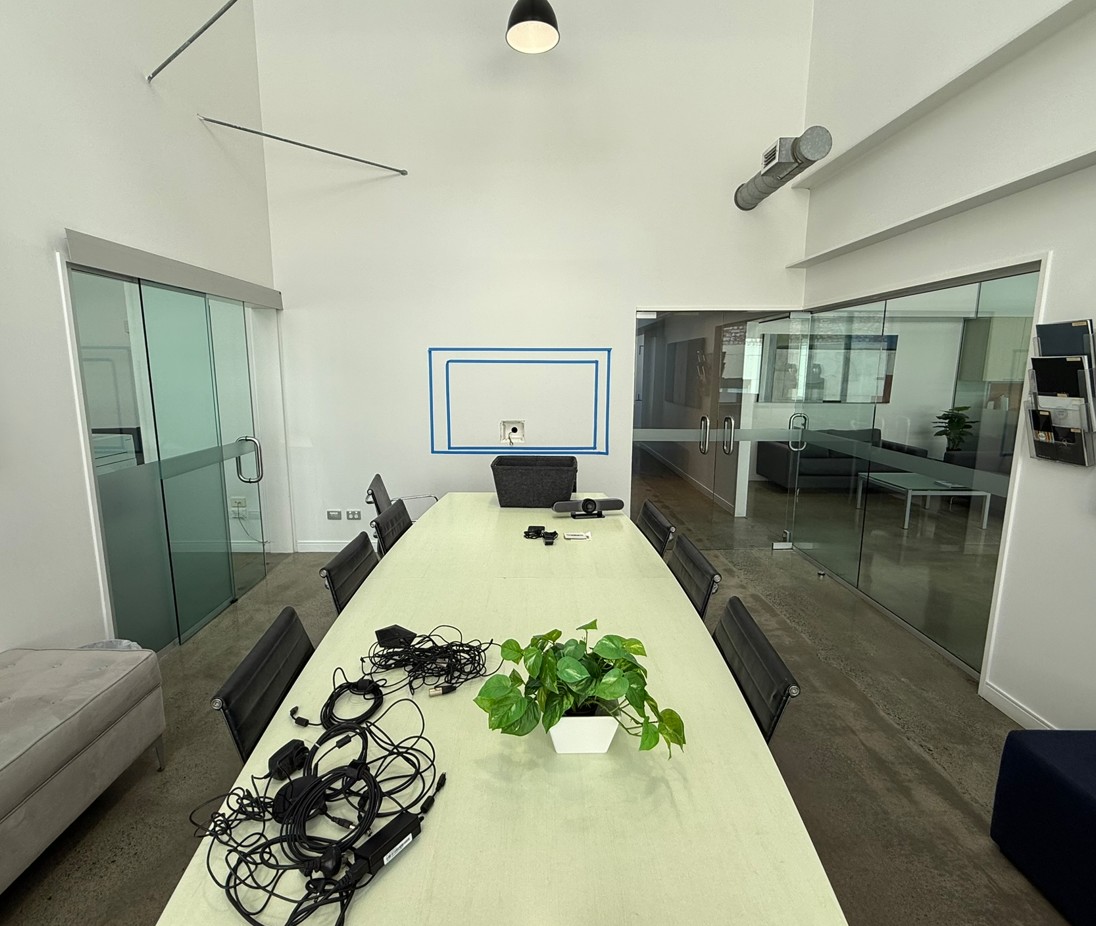
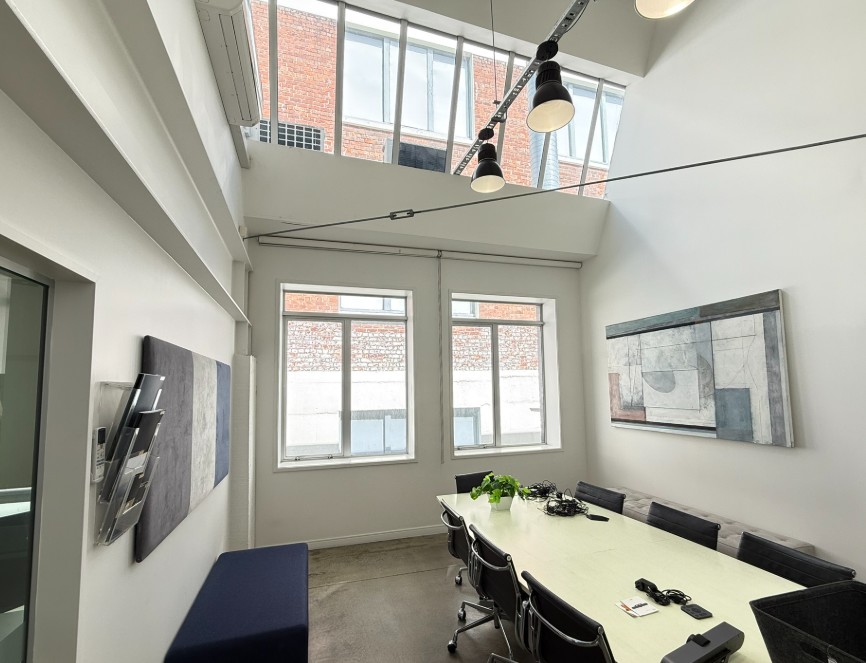
We are setting up a second video conference screen in another meeting room at work.


The room has 2 large windows facing the tv but can be covered by blinds. It also has skylights that aren't screened so the room is still quite light.


It will be connected to a mini pc to run standard MS office suite and teams meetings. 


Any recommendations for a 65" screen? Not sure on budget. As its a secondary room prob don't want to spend too much. 


Needs


  • Remains switched onto last HDMI each time its turned on
  • No susceptible to screen burn as the screens get left on frequently
  • Decent picture in bright(ish) room

Rtings recommended this OLED but I'm concerned about screen burn and its pricey. 


Samsung 65 Inch S95F OLED 4K Vision AI Smart TV - Noel Leeming


better value these seem to be bright.


TCL 65 Inch C7K Premium QD-Mini LED 4K 144Hz Google TV - Noel Leeming


LG 65 Inch NANO80A AI LED UHD 4K Smart TV - Noel Leeming


JPNZ
1735 posts

Uber Geek
+1 received by user: 866


  #3420043 30-Sep-2025 15:29
Send private message

I'd look at the cheapest 65" LED you can. 


Panasonic 65GZ1000, Onkyo RZ730, Atmos 5.1.2, AppleTV 4K, Nest Mini's, PS5, PS3, MacbookPro, iPad Pro, Apple watch SE2, iPhone 15+


lxsw20
3710 posts

Uber Geek
+1 received by user: 2190

Subscriber

  #3420053 30-Sep-2025 16:08
Send private message

Any screen and for the love of your users sanity and security something that runs Teams Rooms rather than a desktop.


1 | ... | 64 | 65 | 66 | 67 | 68 | 69 | 70 | 71
Filter this topic showing only the reply marked as answer View this topic in a long page with up to 500 replies per page Create new topic


Geekzone Live »

Try automatic live updates from Geekzone directly in your browser, without refreshing the page, with Geekzone Live now.


Are you subscribed to our RSS feed? You can download the latest headlines and summaries from our stories directly to your computer or smartphone by using a feed reader.