Geekzone: technology news, blogs, forums
Guest
Welcome Guest.
You haven't logged in yet. If you don't have an account you can register now.


Filter this topic showing only the reply marked as answer View this topic in a long page with up to 500 replies per page Create new topic
1 | 2 | 3 | 4 | 5 | 6 | 7 | 8 | 9
mattwnz
20515 posts

Uber Geek
+1 received by user: 4795


  #917814 20-Oct-2013 17:38
Send private message

Yabanize:
nathan:
nzrock: HI all

if you have a samsung laptop model NP350V5C-S09AU i would not upgrade it to win 8.1 yet. this laptop has two video cards,  a low power intel & a radon for gaming. the drivers that win 8.1 users don't cope with the 2 cards.
tried reinstalling the win 8.0 drivers, but any program that tries to use the radon card just crashes.
win 8.1 is running fine but can't use the laptop for games etc, until samsung release updated drivers.

also upgraded a desktop & 3 laptops with out any problems. the oldest laptop took about 3-4 hours & the pc about 1 hour


please run DXDIAG and send me a copy of the log file it generates and I'll find out what drivers you should be using


Microsoft NZ you really need to make it cheap or a free upgrade from Windows 7 aswell. You want people to use the new OS. Its too expensive Im 16 I cant afford it. This is the reason people pirate!   I dont see why people shouldnt be allowed to swap their windows 7 licence to a windows 8 one?


But you can afford the hardware to run it? The upgrade price is less than the price of a concert ticket, or a couple of tickets to go to a sports event, or 4 tickets to the cinema, etc,  and if you price that windows price over a few years, it is almost nothing. Its really about whether you want to afford it I think. Some software I use costs thousands and thousands to buy.


freitasm
BDFL - Memuneh
80654 posts

Uber Geek
+1 received by user: 41050

Administrator
ID Verified
Trusted
Geekzone
Lifetime subscriber

  #917831 20-Oct-2013 18:00
Send private message

Yabanize: Microsoft NZ you really need to make it cheap or a free upgrade from Windows 7 aswell. You want people to use the new OS. Its too expensive Im 16 I cant afford it. This is the reason people pirate!   I dont see why people shouldnt be allowed to swap their windows 7 licence to a windows 8 one?


Sorry you feel like that, but you don't have to run Windows 8. If you are running Windows 7 you'll be perfectly fine. 


Referral links: Quic Broadband (free setup code: R587125ERQ6VE) | Samsung | AliExpress | Wise | Sharesies 


Support Geekzone by subscribing (browse ads-free), or making a one-off or recurring donation through PressPatron.


Yabanize
2351 posts

Uber Geek
+1 received by user: 583


  #917836 20-Oct-2013 18:49
Send private message

mattwnz:
Yabanize:
nathan:
nzrock: HI all

if you have a samsung laptop model NP350V5C-S09AU i would not upgrade it to win 8.1 yet. this laptop has two video cards,  a low power intel & a radon for gaming. the drivers that win 8.1 users don't cope with the 2 cards.
tried reinstalling the win 8.0 drivers, but any program that tries to use the radon card just crashes.
win 8.1 is running fine but can't use the laptop for games etc, until samsung release updated drivers.

also upgraded a desktop & 3 laptops with out any problems. the oldest laptop took about 3-4 hours & the pc about 1 hour


please run DXDIAG and send me a copy of the log file it generates and I'll find out what drivers you should be using


Microsoft NZ you really need to make it cheap or a free upgrade from Windows 7 aswell. You want people to use the new OS. Its too expensive Im 16 I cant afford it. This is the reason people pirate!   I dont see why people shouldnt be allowed to swap their windows 7 licence to a windows 8 one?


But you can afford the hardware to run it? The upgrade price is less than the price of a concert ticket, or a couple of tickets to go to a sports event, or 4 tickets to the cinema, etc,  and if you price that windows price over a few years, it is almost nothing. Its really about whether you want to afford it I think. Some software I use costs thousands and thousands to buy.


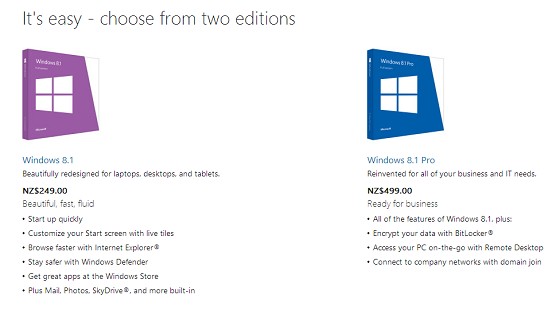
What price is that?


And has anyone seen my other post 


Yabanize:
sbiddle: So you have the evaluation version of Windows 7 running? 

Initial upgrade pricing was for everybody, it didn't matter what OS you had or when you purchased it.

If you have a full version of Windows 7 it's going to cost you $89.95 maximum to upgrade to 8.1


Full windows 7 OEM :) came with laptop, has COA sticker 
I meant ive used evaluation windows 8

$89.95? Are you sure about that? Thats not too bad :)

Oh I see what you mean, Because Im a student... http://www.microsoftstore.com/store/msnz/en_NZ/pdp/productID.288538700


B
uutttt. If you're not a student: Ouch. 
It seems these are the full versions and not upgrade versions but are there still upgrade versions available?


MaxLV

656 posts

Ultimate Geek
+1 received by user: 161


  #917839 20-Oct-2013 19:00
Send private message

nathan:
MaxLV:
nathan:
kontonnz: I've gotten used to win8, and rather gotten used to lack of a start menu etc; some of the admin side still a PIA but upgrading has been more painful then pulling teeth out(ok maybe an exaggeration, but still painful)


    • very very slow, started last night downloading the upgrade on my surface pro, and as of now still only at around 40%


    • multiple downloads for multiple systems running windows 8 (this is very much a pain on a capped internet connection) i.e. i have 3 computers my main desktop, surface (love this tablet), and hp laptop, each system is downloading just around 2.5gb each for an upgrade; what ever happened to single download and multiple upgrade paths MS stuffed this one up


out of curiosity is MS Store cached via Akamai ?


what do you mean by "what ever happened to single download and multiple upgrade paths MS stuffed this one up" ?


XXX


If I can jump in...

I have 4 computers to update to 8.1, that's four downloads I have to make at 2.8GB per computer. (=11.2GB) The desk top computers took about 45 minutes to download and update. (after I stopped trying to update when the USA were hammering the 8.1 servers.)

I'm about to start the update for my Acer W510 tablet and will probably take a lot longer what with it's ethernet connection only being 100Mbits/sec.

I'm on a 100Mbit download cable connection, and have a 100GB data cap, so the total size of the download doesn't matter to me, but an ISO image should have been made available to download, so offline updates could be done.  What happens if I (anyone) has to do a refresh or reinstall of 8.1, do we have to reload Windows 8 then go to the online store again and go through the whole download/update process again?

What about those users who have slow connections and limited data caps?  How are they going to get the update? Very slowly, and possibly having to pay their ISP for exceeding their data caps.

No, Microsoft should have had more distribution channels for this update than just the Online store...


Once you're on 8.1 you can update your recovery partition, so you can do a push button PC reset, which will restore a plain 8.1 not 8.0

I'll look into what the options are for offline install and reply back

For your Acer with 100mb instead of 1000mb it's kind of irrelevant since it won't be able to max out your internet connection anyway


Got my Acer Iconia W510 updated to 8.1 after 5 hours and two failed downloads of the update. the first 2 times it got to 50% complete stage, and said it was 'preparing the update', then went back to 0% complete, and started all over again. No error messages, stalls, etc...

After the second failure, I stopped the third attempt to try and find out what the problem was. (had to hold down the power button and turn off the tablet to stop it, cancel and pause options didn't work) 

Once restarted, I noticed that the Action Centre said there was a problem with one of the disks (a 64GB SD card) and I should run a check/repair. After that was done, I started the the upgrade again, and this time it completed OK after 90 minutes.

The end result I had to download the 2.63GB update three times to update the Tablet.

Some minor annoyances discovered with the update on all four computers so far: (not game stoppers, the computers are working mostly as expected)  

Media streaming has been disabled on 3 of the 4 computers, and cant be turned on. biggest effect is that my Sony Bluray/DVD Media browser cant access the audio, video, and Photo files on my network any more. It just says it cant turn on they Media server on the computers on the network, eve though they show as being available in the Bluray media browser and network setup screens.

The Bluray media browser can still access the backups of the audio, video, and photo files on the NAS without any problems. 

One of the desktop computers gets the touch screen keyboard popping up on the logon screen, and I haven't found any way to stop that happening yet. (The monitor isn't a touch screen, and the computer isn't a laptop or tablet)

THings I haven't checked yet:

My AV/HT receiver yet to see if it can access the MP3 library (on one of the computers) over the network.

WiFi for the tablet and My Windows Phone on the network.

Batwing
692 posts

Ultimate Geek
+1 received by user: 224

Trusted
Subscriber

  #918838 20-Oct-2013 20:48
Send private message

Quick update experience.

Phenom X4 955 BE
8GB RAM
GTX 560 Ti

First install failed - black screen then 2 more reboots before I got the prompt to do a system restore. No error message (not the 0xC1900101 - 0x40017) or similar that's been reported by a fair few people. System restored back to 8 just fine.

Tried again with no alterations and was successful - just an oddity when it came to sign in/verify account I requested a text message and in what could only seem like the strangest coincidence I got a text from a Sri Lankan number stating "Thank u v much 4 yr wishes and prayers." So I opted for email verification which worked as expected.

The few times I've had to request a text from Microsoft before (or phone call) it's never arrived, and this is the first text I've received from an unknown number in years - not sure what to make of it really.

Shoes2468
794 posts

Ultimate Geek
+1 received by user: 79


  #918855 20-Oct-2013 21:16
Send private message

MaxLV:
nathan:
MaxLV:
nathan:
kontonnz: I've gotten used to win8, and rather gotten used to lack of a start menu etc; some of the admin side still a PIA but upgrading has been more painful then pulling teeth out(ok maybe an exaggeration, but still painful)


    • very very slow, started last night downloading the upgrade on my surface pro, and as of now still only at around 40%


    • multiple downloads for multiple systems running windows 8 (this is very much a pain on a capped internet connection) i.e. i have 3 computers my main desktop, surface (love this tablet), and hp laptop, each system is downloading just around 2.5gb each for an upgrade; what ever happened to single download and multiple upgrade paths MS stuffed this one up


out of curiosity is MS Store cached via Akamai ?


what do you mean by "what ever happened to single download and multiple upgrade paths MS stuffed this one up" ?


XXX


If I can jump in...

I have 4 computers to update to 8.1, that's four downloads I have to make at 2.8GB per computer. (=11.2GB) The desk top computers took about 45 minutes to download and update. (after I stopped trying to update when the USA were hammering the 8.1 servers.)

I'm about to start the update for my Acer W510 tablet and will probably take a lot longer what with it's ethernet connection only being 100Mbits/sec.

I'm on a 100Mbit download cable connection, and have a 100GB data cap, so the total size of the download doesn't matter to me, but an ISO image should have been made available to download, so offline updates could be done.  What happens if I (anyone) has to do a refresh or reinstall of 8.1, do we have to reload Windows 8 then go to the online store again and go through the whole download/update process again?

What about those users who have slow connections and limited data caps?  How are they going to get the update? Very slowly, and possibly having to pay their ISP for exceeding their data caps.

No, Microsoft should have had more distribution channels for this update than just the Online store...


Once you're on 8.1 you can update your recovery partition, so you can do a push button PC reset, which will restore a plain 8.1 not 8.0

I'll look into what the options are for offline install and reply back

For your Acer with 100mb instead of 1000mb it's kind of irrelevant since it won't be able to max out your internet connection anyway


Got my Acer Iconia W510 updated to 8.1 after 5 hours and two failed downloads of the update. the first 2 times it got to 50% complete stage, and said it was 'preparing the update', then went back to 0% complete, and started all over again. No error messages, stalls, etc...

After the second failure, I stopped the third attempt to try and find out what the problem was. (had to hold down the power button and turn off the tablet to stop it, cancel and pause options didn't work) 

Once restarted, I noticed that the Action Centre said there was a problem with one of the disks (a 64GB SD card) and I should run a check/repair. After that was done, I started the the upgrade again, and this time it completed OK after 90 minutes.

The end result I had to download the 2.63GB update three times to update the Tablet.

Some minor annoyances discovered with the update on all four computers so far: (not game stoppers, the computers are working mostly as expected)  

Media streaming has been disabled on 3 of the 4 computers, and cant be turned on. biggest effect is that my Sony Bluray/DVD Media browser cant access the audio, video, and Photo files on my network any more. It just says it cant turn on they Media server on the computers on the network, eve though they show as being available in the Bluray media browser and network setup screens.

The Bluray media browser can still access the backups of the audio, video, and photo files on the NAS without any problems. 

One of the desktop computers gets the touch screen keyboard popping up on the logon screen, and I haven't found any way to stop that happening yet. (The monitor isn't a touch screen, and the computer isn't a laptop or tablet)

THings I haven't checked yet:

My AV/HT receiver yet to see if it can access the MP3 library (on one of the computers) over the network.

WiFi for the tablet and My Windows Phone on the network.


My Acer w510 updated just fine, took a while but that is to be expected.

HP


Shop now for HP laptops and other devices (affiliate link).
Gilco2
1556 posts

Uber Geek
+1 received by user: 134


  #918859 20-Oct-2013 21:26
Send private message

installs
HP 4530s     took 30 minutes all up.  Only 2 problems. Mainly on Geekzone when scrolling down the screen goes black. refresh and all well till next time. Downloaded latest intel drivers but no difference.  Wait for new one to show up.   Windows update has an HP 6520 printer update but it fails with Code 80070490.  Check Microsoft site and tried the suggestions but still the same.  Might try uninstalling printer driver and reinstall.

Samsung Ative XE500.  45 minutes all up.  But no wlan, sound or video drivers.  Luckily was able to find correct ones on web and install.

Acer W510. wow 2 hours.  However when finished all well no problems and it even installed my Hp Printer drivers which I never had installed on it before

Still got one to do. Overall good experience.  Cant expect to be perfect immediately as always have teething problems with such a wide variation in hardware setups


HTPC Intel Pentium G3258 cpu, Gigabyte H97n-wifi motherboard, , 8GB DDR3 ram, onboard  graphics. Hauppuage HVR 5500 tuner,  Silverstone LC16M case, Windows 10 pro 64 bit using Nextpvr and Kodi


freitasm
BDFL - Memuneh
80654 posts

Uber Geek
+1 received by user: 41050

Administrator
ID Verified
Trusted
Geekzone
Lifetime subscriber

  #918863 20-Oct-2013 21:31
Send private message

My experience: HP Folio 13 SSD running Windows 8. Installation from the MSDN ISO as an update. A couple of applications have problems (Idera, Logmein Hamachi) but I expect those to be fixed now that 8.1 is available for consumers. Other than this, working well here.


Referral links: Quic Broadband (free setup code: R587125ERQ6VE) | Samsung | AliExpress | Wise | Sharesies 


Support Geekzone by subscribing (browse ads-free), or making a one-off or recurring donation through PressPatron.


Yabanize
2351 posts

Uber Geek
+1 received by user: 583


  #918897 20-Oct-2013 23:36
Send private message

Did it delete peoples windows store apps? on the MS site it said it would

Gilco2
1556 posts

Uber Geek
+1 received by user: 134


#918908 21-Oct-2013 07:16
Send private message

no, it didnt delete any of my store apps. All were still there after upgrade.  Not sure off habd so would have to search but I think it only does if you have been using Windows 8.1 preview version then install the final version.  Going from Windows 8 to Windows 8.1 wasnt affected


HTPC Intel Pentium G3258 cpu, Gigabyte H97n-wifi motherboard, , 8GB DDR3 ram, onboard  graphics. Hauppuage HVR 5500 tuner,  Silverstone LC16M case, Windows 10 pro 64 bit using Nextpvr and Kodi


kiwifidget
"Cookie"
3640 posts

Uber Geek
+1 received by user: 1969

Lifetime subscriber

  #918921 21-Oct-2013 08:22
Send private message

Did anyone find out if the download was available as an ISO so those with multiple machines dont have to do multiple downloads?


Delete cookies?! Are you insane?!


Shop now on AliExpress (affiliate link).
askelon
942 posts

Ultimate Geek
+1 received by user: 233

ID Verified

  #918935 21-Oct-2013 09:03
Send private message

Mine upgaded perfectly on my desktop. Only issue I had was it managed to clear my network passwords which was no biggie! Still got to get around to doing it on the acer w510. Im almost tempted to just leave it since its running so well right now :)

Klipspringer
2385 posts

Uber Geek
+1 received by user: 286
Inactive user


  #918937 21-Oct-2013 09:08
Send private message

Updated my desktop over the weekend.

Upgrade was straight forward and went through fine without a glitch.

Must say, I am extremely happy.

Just one question. How do you uninstall/remove the new start button? LOL

nathan
5695 posts

Uber Geek
+1 received by user: 1630
Inactive user


  #918953 21-Oct-2013 09:25
Send private message

kiwifidget: Did anyone find out if the download was available as an ISO so those with multiple machines dont have to do multiple downloads?


It's available as an ISO if you have an MSDN or TechNet subscription, or a Volume License agreement with Microsoft, otherwise no, it installs through the Windows Store

Greaver
117 posts

Master Geek
+1 received by user: 12


  #918957 21-Oct-2013 09:34
Send private message

Gilco2: no, it didnt delete any of my store apps. All were still there after upgrade.  Not sure off habd so would have to search but I think it only does if you have been using Windows 8.1 preview version then install the final version.  Going from Windows 8 to Windows 8.1 wasnt affected


Really want to know this

I work for a large retail company and our internet pipe is restrictive at the best of times (20-50kb/s) and this is frankly ridiculous!

Some important customers were promised free upgrades to 8.1 in the week after it dropped, management never expected something like this even though we suggested it was possible -_-

Also on the machines I have done so far, no local account option, is there something I am missing here or has Microsoft truly decided to force everyone onto it?

What the hell happens for new purchasers who take these machines to the country or some internet deprived place? Unacceptable imo there simply has to be an option for a local account of some description.


Check me out at GreaverTV for Australasian Team Fortress 2 coverage


1 | 2 | 3 | 4 | 5 | 6 | 7 | 8 | 9
Filter this topic showing only the reply marked as answer View this topic in a long page with up to 500 replies per page Create new topic


Geekzone Live »

Try automatic live updates from Geekzone directly in your browser, without refreshing the page, with Geekzone Live now.


Are you subscribed to our RSS feed? You can download the latest headlines and summaries from our stories directly to your computer or smartphone by using a feed reader.