Geekzone: technology news, blogs, forums
Guest
Welcome Guest.
You haven't logged in yet. If you don't have an account you can register now.


Kookoo

869 posts

Ultimate Geek
+1 received by user: 407

Trusted

#303892 17-Mar-2023 23:07
Send private message

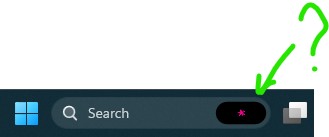
This thing popped up after one of the recent updates.


Does anyone know what it is?


Hello, Ground!

Filter this topic showing only the reply marked as answer Create new topic
SepticSceptic
2263 posts

Uber Geek
+1 received by user: 779

Trusted

  #3051388 17-Mar-2023 23:21
Send private message

HAL's forerunner?

:-)


Kookoo

869 posts

Ultimate Geek
+1 received by user: 407

Trusted

  #3051390 17-Mar-2023 23:25
Send private message

SepticSceptic: HAL's forerunner?

:-)


Makes sense. I tried asking it to open the pod doors, but it just won't do it.


On a more serious note, it just doesn't fit into the overall windows design language - it feels like a random add-on that popped up out of nowhere.


Hello, Ground!

eracode
Smpl Mnmlst
9333 posts

Uber Geek
+1 received by user: 6202

ID Verified
Trusted
Lifetime subscriber

  #3051391 17-Mar-2023 23:32
Send private message

Kookoo: 

 Makes sense. I tried asking it to open the pod doors, but it just won't do it.


Maybe because you didn’t get the instruction quite right. Try “Open the pod bay doors, Hal” - and update us how you got on.


Sometimes I just sit and think. Other times I just sit.


Kookoo

869 posts

Ultimate Geek
+1 received by user: 407

Trusted

  #3051392 17-Mar-2023 23:32
Send private message

Oh my freaking god. I just realised what it is.


I'm using my employer's Office 365 account on this PC, so Windows added its logo to the search box. I presume it means that I can search my employer's SharePoint from within the Windows search bar.


Bloody hell.


Hello, Ground!

gehenna
8667 posts

Uber Geek
+1 received by user: 3883

Moderator
Trusted
Lifetime subscriber

  #3051438 18-Mar-2023 10:49
Send private message

Suppose it depends on which Microsoft accounts you have logged in as actively. If it's a domain computer then you've got to expect it. If it's a personal computer which is just logged into an app or two with the work Microsoft account, that's different and would bother me.

Kookoo

869 posts

Ultimate Geek
+1 received by user: 407

Trusted

  #3051459 18-Mar-2023 11:34
Send private message

gehenna: Suppose it depends on which Microsoft accounts you have logged in as actively. If it's a domain computer then you've got to expect it. If it's a personal computer which is just logged into an app or two with the work Microsoft account, that's different and would bother me.


It's my personal PC, logged in with my personal account, but with Office 365 logged in using work account.


It kind of makes sense now. It's a very confusing way of showing which account you're searching. I can click on Search and in the top right corner of the bizarre pop-up box select my personal account to search with. That changes the logo to something else I don't recognise, but at least when I enter a search term it only runs against my hard drive and my personal onedrive account. Change it back to work account - get the purpose asterisk and the ability to search work Sharepoint.


Props to Microsoft for making a search function so bewilderingly confusing I guess.


Hello, Ground!

Filter this topic showing only the reply marked as answer Create new topic


Geekzone Live »

Try automatic live updates from Geekzone directly in your browser, without refreshing the page, with Geekzone Live now.


Are you subscribed to our RSS feed? You can download the latest headlines and summaries from our stories directly to your computer or smartphone by using a feed reader.
