Geekzone: technology news, blogs, forums
Guest
Welcome Guest.
You haven't logged in yet. If you don't have an account you can register now.


Gorch

58 posts

Master Geek
+1 received by user: 13

ID Verified

#293912 21-Feb-2022 22:46
Send private message

Good evening all,


Have moved recently, bigger house came with some Wi-Fi issues. 


Because of a Chorus muck-up, 2Degrees ended up sending us a new Fritz!Box 7530 router as a troubleshooting step, so we now have this and our existing Fritz!Box 7490.


I had heard about their handy mesh capability so configured it as follows:


- Mesh Master = 7530 (also modem)


- Mesh Repeater = 7490


- Upgraded Firmware on each to latest (07.29) which enabled LAN backhaul on the mesh.


- "This FRITZ!Box is a network device (IP client) in the home network of a different router. It receives an IP address from the router." selected on the 7490 per the instructions on the Fritz! support site. 


When it is working, it is great, but every 12-18 hours the 7490 will stop being a mesh repeater. Devices connected to it seem to stop getting an internal IP (our Sony TV reported "Connected no Internet" but with a Wi-Fi that was our external one). The Repeater appears in the device list in the Master, but is not able to be connected to.


Power cycling the 7490 resolves the issue, and it appears as a Mesh Repeater again. Unfortunately it seems to also reset the system log so I can't get anything meaningful from there.


Have been through the troubleshooting on the Fritz! support site, and was hoping that someone else had seen this issue before I give up and look at Orbi or similar dedicated mesh setup.


We are on VDSL currently if that gives a clue by any chance.


Cheers


Filter this topic showing only the reply marked as answer Create new topic
freitasm
BDFL - Memuneh
80646 posts

Uber Geek
+1 received by user: 41030

Administrator
ID Verified
Trusted
Geekzone
Lifetime subscriber

  #2872328 21-Feb-2022 22:52
Send private message

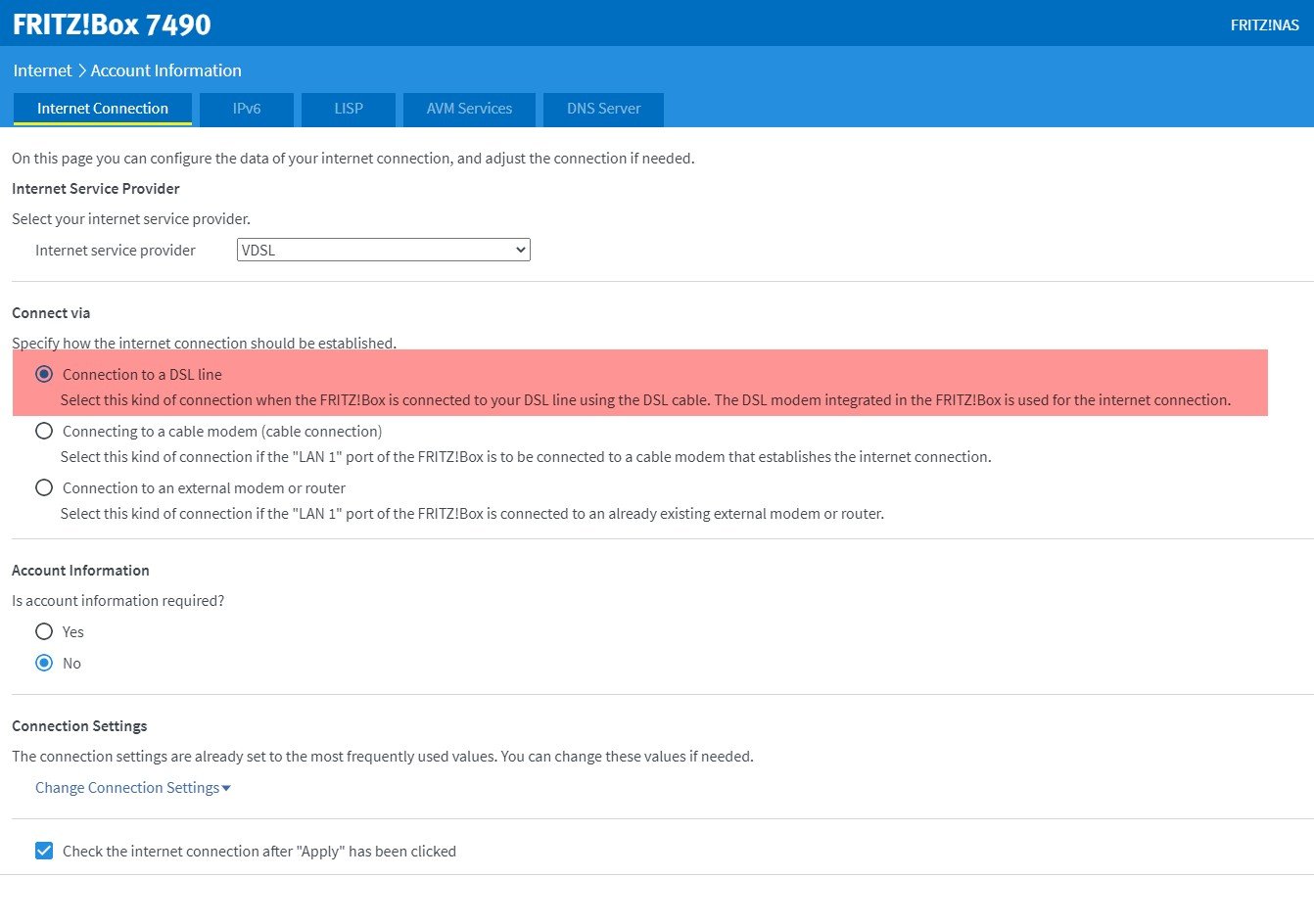
Interesting. This is what my 7490 is set for I guess the same as yours?


Referral links: Quic Broadband (free setup code: R587125ERQ6VE) | Samsung | AliExpress | Wise | Sharesies 


Support Geekzone by subscribing (browse ads-free), or making a one-off or recurring donation through PressPatron.


Gorch

58 posts

Master Geek
+1 received by user: 13

ID Verified

  #2872429 21-Feb-2022 23:19
Send private message

Aha! A screen I haven't seen before. This looks promising.


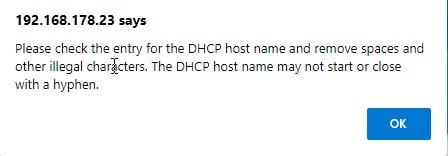
Unfortunately getting an error on page validation when I change that.


Might try disconnecting mesh, setting this then re-adopting. Thanks for the pointer, will update this post if it resolves the issue.


freitasm
BDFL - Memuneh
80646 posts

Uber Geek
+1 received by user: 41030

Administrator
ID Verified
Trusted
Geekzone
Lifetime subscriber

  #2872483 22-Feb-2022 08:39
Send private message

If you select the third option then it disables its own DHCP and other features. It may be causing some problems with the network after a few hours.


Have you changed it yet? Any results? Make sure this is only on the mesh node, not the mesh controller connected to the ONT.


Referral links: Quic Broadband (free setup code: R587125ERQ6VE) | Samsung | AliExpress | Wise | Sharesies 


Support Geekzone by subscribing (browse ads-free), or making a one-off or recurring donation through PressPatron.


Gorch

58 posts

Master Geek
+1 received by user: 13

ID Verified

  #2872497 22-Feb-2022 09:10
Send private message

Yea, I was highlighting what it was set to.


Have completed a factory reset on the Repeater this morning, and it was set to this from factory (presumably as ships reader for fibre?). Double checked all screens and I didn't get the error in my second screenshot on saving.


Then re-adopted it as a mesh repeater and it has connected nicely. Will watch this space, but looking positive.


Thanks Mauricio!


Gorch

58 posts

Master Geek
+1 received by user: 13

ID Verified

  #2873354 23-Feb-2022 16:26
Send private message

Drat, bad news.


Was running along happily yesterday, though I did have to disconnect it at one point which may have been masking issues.


Overnight it went down again, and with it I lost the ability to log into the router or have internet on some devices. Power cycled and it was working again, but got a message mid morning that it had caused the issue again, taking out internet on devices connected to the main FritzBox as well.


I am going to try turning off the LAN backhaul / link in favour of a Wi-Fi one. Will report back, though am open to other suggestions.


Gorch

58 posts

Master Geek
+1 received by user: 13

ID Verified

  #2876097 28-Feb-2022 09:33
Send private message

Update here:


As a test, re-adopted the second router as a mesh AP via Wi-Fi backhaul rather than LAN.


This has now been stable right through the weekend. Has meant we had to move the second device, but still have acceptable coverage through the house.


Maybe an issue with the older device? Either way, will do now until we can invest in some other gear.


Filter this topic showing only the reply marked as answer Create new topic


Geekzone Live »

Try automatic live updates from Geekzone directly in your browser, without refreshing the page, with Geekzone Live now.


Are you subscribed to our RSS feed? You can download the latest headlines and summaries from our stories directly to your computer or smartphone by using a feed reader.