Geekzone: technology news, blogs, forums
Guest
Welcome Guest.
You haven't logged in yet. If you don't have an account you can register now.


nzpaul

72 posts

Master Geek
+1 received by user: 4


#303347 3-Feb-2023 13:15
Send private message

I switched over to 2Degrees Fibre (865/497Mbps "peak time average speeds*").


Connecting from Christchurch to Vocus Christchurch on Speedtest.net I get ~880/470 consistently.


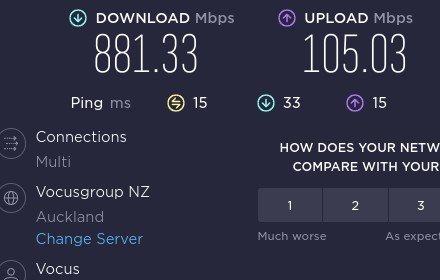
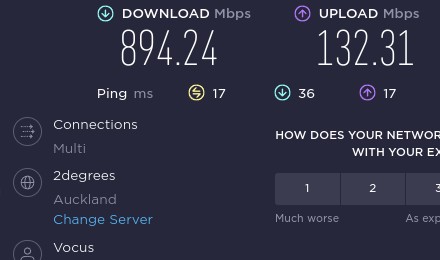
But when I connect to any Vocus, 2Degrees or Spark server in Auckland I get ~880 down and only 70-120mb up, so not much more than a regular 300/100 connection. The upload is so consistent, I am suspicious. 


Using Netflix's Fast.com I am getting 930/190, so a little better. Edit: Google Speed Test (Auckland Server): ~860/95.


The fact that within Christchurch I am getting reasonable speed, makes me suspicious about the speeds I am getting elsewhere.


Does anyone have any advice? Especially advice on getting "real" tech support from 2degrees. Half the time I have called I have gotten "Because we care about the long wait time, we have closed our queue, please try again later"




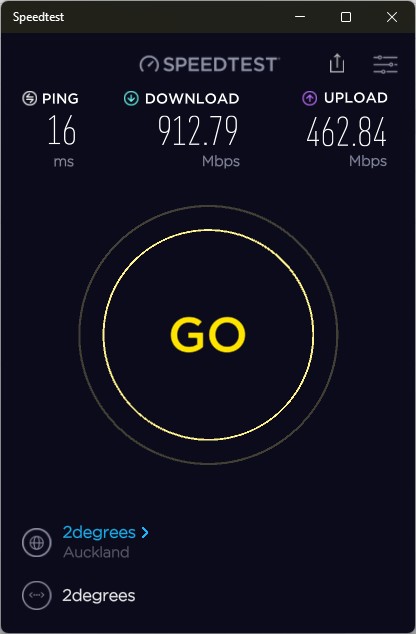
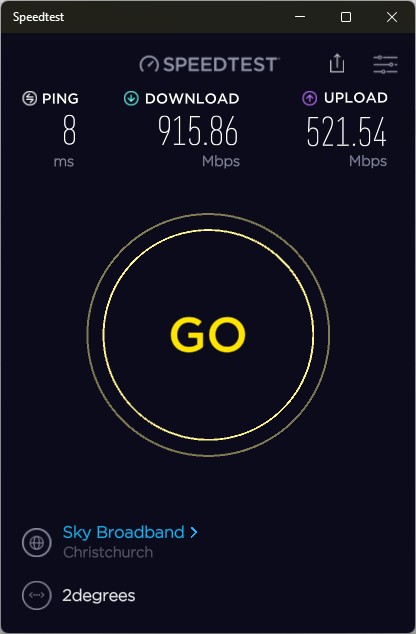
---


Voyager UFB. 100/20mb connection. 


Create new topic
wratterus
1687 posts

Uber Geek
+1 received by user: 678


  #3031314 3-Feb-2023 15:00
Send private message

I have found in the past upload speed to Spark from 2D often average, but recently it seems very good. Perhaps something has changed with the Vocus merger as ping times to Vocus servers seem really good now too. You on CGNat or static? Wonder if there is some different routing? 


I was uploading to OneDrive at over 400Mbps the other day. Seems to be performing really well. Fast.com gives me 850/380 or thereabouts. From top of SI. 


nzpaul

72 posts

Master Geek
+1 received by user: 4


  #3031320 3-Feb-2023 15:09
Send private message

I got a Static IP, high-end router, connected via Ethernet etc. Same poor speed to Vocus Auckland server (or servers listed as 2degrees in Auckland). I took this screenshot a few mins ago:


---


Voyager UFB. 100/20mb connection. 


wratterus
1687 posts

Uber Geek
+1 received by user: 678


  #3031327 3-Feb-2023 15:23
Send private message

What is your 'high end' router?


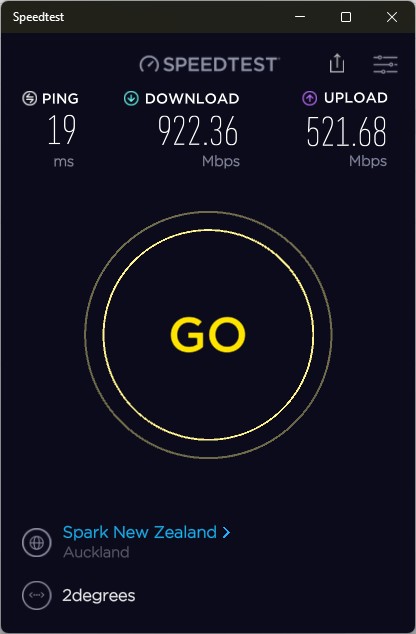
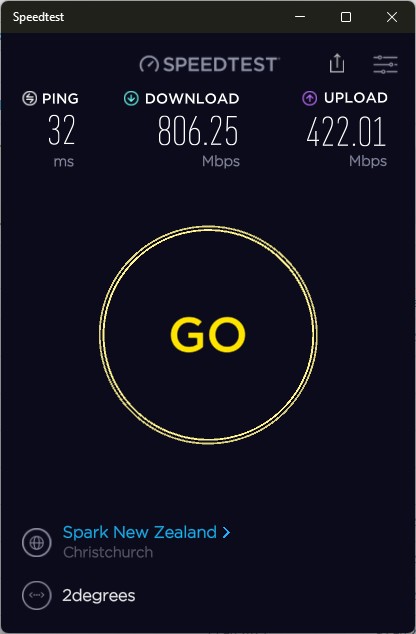
And test using the speedtest app for Windows, not the browser. Browser results are very unreliable with higher connection speeds. Even the app isn't perfect, but it's a lot better. 


nzpaul

72 posts

Master Geek
+1 received by user: 4


  #3031336 3-Feb-2023 15:43
Send private message

Custom built router with high-end hardware, it is not remotely under any stress. I have no problem getting full speeds on previous ISP and no problem getting full speeds to Vocus' speedtest server in Christchurch. It is not the hardware. 


I just can't get to the North Island on anything close to full speed. 


---


Voyager UFB. 100/20mb connection. 


wratterus
1687 posts

Uber Geek
+1 received by user: 678


  #3031338 3-Feb-2023 15:46
Send private message

Same speeds testing with the speedtest app? Were you using PPPoE on the previous ISP?


nzpaul

72 posts

Master Geek
+1 received by user: 4


  #3031340 3-Feb-2023 15:53
Send private message

Sadly yes it is the same, Auckland terrible upload, Christchurch normal. PPPoE on both.


      Server: Vocusgroup NZ - Auckland (id: 5749)


         ISP: Vocus New Zealand
Idle Latency:    15.03 ms   (jitter: 0.14ms, low: 14.99ms, high: 15.24ms)
    Download:   882.88 Mbps (data used: 1.4 GB)                                                   
                 20.25 ms   (jitter: 0.42ms, low: 13.81ms, high: 27.61ms)
      Upload:    98.67 Mbps (data used: 177.2 MB)                                                   
                 14.75 ms   (jitter: 0.34ms, low: 13.59ms, high: 15.83ms)
 Packet Loss:     0.0%


      Server: Vocusgroup NZ - Christchurch (id: 7317)
         ISP: Vocus New Zealand
Idle Latency:     2.28 ms   (jitter: 0.04ms, low: 2.20ms, high: 2.37ms)
    Download:   898.42 Mbps (data used: 1.1 GB)                                                   
                 11.16 ms   (jitter: 0.36ms, low: 2.56ms, high: 15.39ms)
      Upload:   454.42 Mbps (data used: 233.6 MB)                                                   
                  1.57 ms   (jitter: 10.38ms, low: 1.00ms, high: 210.56ms)
 Packet Loss:     0.0%


---


Voyager UFB. 100/20mb connection. 


Create new topic


Geekzone Live »

Try automatic live updates from Geekzone directly in your browser, without refreshing the page, with Geekzone Live now.


Are you subscribed to our RSS feed? You can download the latest headlines and summaries from our stories directly to your computer or smartphone by using a feed reader.