Geekzone: technology news, blogs, forums
Guest
Welcome Guest.
You haven't logged in yet. If you don't have an account you can register now.


Filter this topic showing only the reply marked as answer View this topic in a long page with up to 500 replies per page Create new topic
1 | 2 
woodson

234 posts

Master Geek
+1 received by user: 14


  #1651113 14-Oct-2016 14:49
Send private message

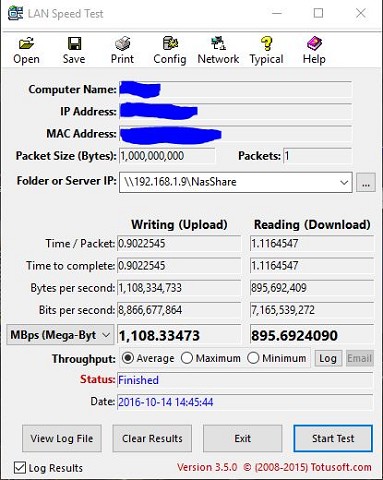
Still the same nonsense figures


dfnt
1553 posts

Uber Geek
+1 received by user: 1036

Trusted
Lifetime subscriber

  #1651116 14-Oct-2016 14:51
Send private message

Those speeds are fairly typical of powerline adapters, they degrade quite badly when you start pumping traffic through them


Be interesting to see what your latency is once you start initiating the transfer


Quic referral link https://account.quic.nz/refer/276294 free setup code R276294EBWOBK


SepticSceptic
2264 posts

Uber Geek
+1 received by user: 786

Trusted

  #1651169 14-Oct-2016 16:29
Send private message

Did those transfers really take only 1 second from click to finish ?


I regularly transfer 2-3GB recorded TV programs from a NUC to an ageing Windows server via a pair of AV500 EOP adapters, and it does take a few minutes to transfer these files around, not seconds like your numbers show.


Mine connect at 147-160Mb/s.


However, your pic of the Win10 network transfer is closer to the mark.


Do the log files show any more detail ?


I think that there is a decimal point out. Even on their forums the very best 1 Gb/s LAN read speed is 898Mb/s, not 7,165 Mb/s as you have ...


http://www.homenetworkenabled.com/content.php?177-Your-gigabit-network-what-kind-of-speed-should-you-really-expect


woodson

234 posts

Master Geek
+1 received by user: 14


  #1651172 14-Oct-2016 16:35
Send private message

No, the LAN speed utility test took more than a second, so who know where it is pulling it's figures from!


No, the logs just show what was in the screenshot, just in tabular form.


cynnicallemon
370 posts

Ultimate Geek
+1 received by user: 85


  #1651180 14-Oct-2016 16:53
Send private message

woodson:


No, the LAN speed utility test took more than a second, so who know where it is pulling it's figures from! 


No, the logs just show what was in the screenshot, just in tabular form.


If you want to test throughput reliably, try iperf and its Windows equivalent as per this FreeNAS document.


woodson

234 posts

Master Geek
+1 received by user: 14


  #1651213 14-Oct-2016 17:09
Send private message

cynnicallemon:


woodson:


No, the LAN speed utility test took more than a second, so who know where it is pulling it's figures from! 


No, the logs just show what was in the screenshot, just in tabular form.


If you want to test throughput reliably, try iperf and its Windows equivalent as per this FreeNAS document.


Thanks, I'll give that a shot.


Shop now for Dell laptops and other devices (affiliate link).
TwoSeven
1712 posts

Uber Geek
+1 received by user: 304

Subscriber

  #1651243 14-Oct-2016 18:32
Send private message

The difference is that your program is using SI units where 1000MB is used. I believe Windows uses disk file size, so both numbers are about the same


Software Engineer
   (the practice of real science, engineering and management)
A.I.  (Automation rebranded)
Gender Neutral
   (a person who believes in equality and who does not believe in/use stereotypes. Examples such as gender, binary, nonbinary, male/female etc.)


 ...they/their/them...


1 | 2 
Filter this topic showing only the reply marked as answer View this topic in a long page with up to 500 replies per page Create new topic


Geekzone Live »

Try automatic live updates from Geekzone directly in your browser, without refreshing the page, with Geekzone Live now.


Are you subscribed to our RSS feed? You can download the latest headlines and summaries from our stories directly to your computer or smartphone by using a feed reader.