Geekzone: technology news, blogs, forums
Guest
Welcome Guest.
You haven't logged in yet. If you don't have an account you can register now.


corvettesummer

3 posts

Wannabe Geek


#306182 3-Jul-2023 12:20
Send private message

Hi there,

I've finally had fibre installed but unfortunately my ONT had to be located in my garage which isn't ideal for wifi range.


I've been told I could connect the ethernet port from the ONT to one of the cables already wired up in the house. The ONT is right beside the phone line box, but the Chorus chap didn't have the tools on him to hook this up for me.


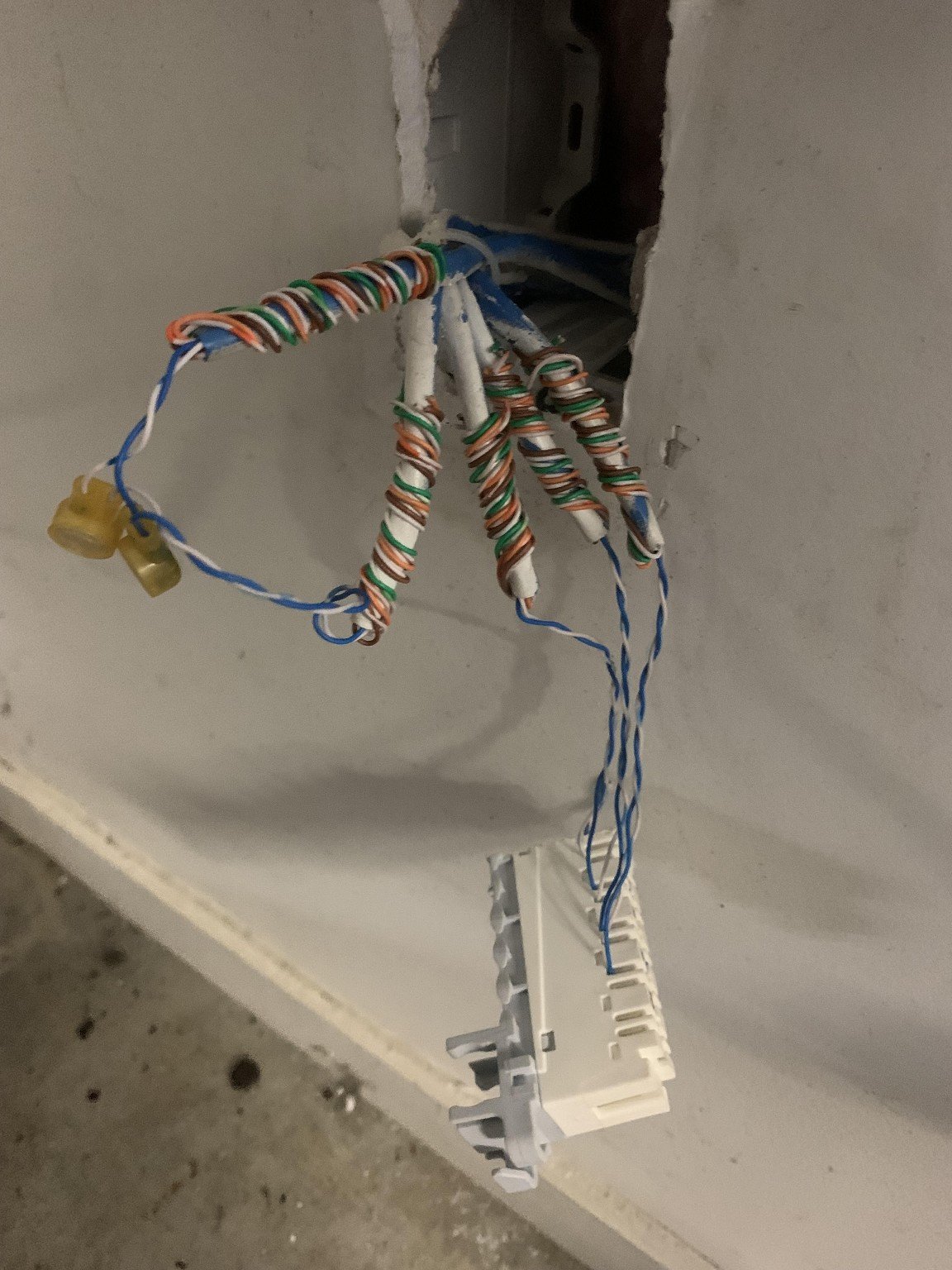
Previously was on VDSL, and only one port (of 4 in the house) worked. I'm going to take a wild guess that it's the one that is hooked up to the DSL lines in the photo, the other 3 appear to be unconnected.


My question - can I use some adaptors and plug the ONT's ethernet into the house ethernet line, then plug the router in at the other end? And is there any issue in having no working DSL connection to the house if I do this? (due to disconnecting the phone line to the house from the internal cables)



Create new topic
huckster
895 posts

Ultimate Geek
+1 received by user: 468

ID Verified
Lifetime subscriber

  #3098959 3-Jul-2023 12:35
Send private message

My question - can I use some adaptors and plug the ONT's ethernet into the house ethernet line, then plug the router in at the other end?


Yes. You just need to crimp some ethernet plugs on each end of the cable or wire that cable into some ethernet wall ports that you then plug patch cables into (from ONT to wall in garage and wall to router in house). 


And is there any issue in having no working DSL connection to the house if I do this? (due to disconnecting the phone line to the house from the internal cables)


This depends on how your phone line comes in after the fibre install. Is it via the ONT or via the Router? If it's the ONT then unless you have a 2nd cable running from it to the house you might have a problem. If it's the router, then you can patch the router's phone line to the other cables to hook up the other phone sockets.


Hope that makes sense.


EDIT: Can't spill


coffeebaron
6319 posts

Uber Geek
+1 received by user: 3581

Trusted
Lifetime subscriber

  #3098962 3-Jul-2023 12:40
Send private message

This cabling can be utilised no problem. Several options depending on whether you are keeping a landline and if that landline will come off the ONT or the router. You could leave the router at the ONT and use one of the cables to mount a wireless accesspoint nearer to where you need it. Are you looking at doing this yourself, or getting someone in to do it?


Rural IT and Broadband support.


Broadband troubleshooting and master filter installs.
Starlink installer - one month free: https://www.starlink.com/?referral=RC-32845-88860-71 
Wi-Fi and networking
Cel-Fi supply and installer - boost your mobile phone coverage legally


Need help in Auckland, Waikato or BoP? Click my email button, or email me direct: [my user name] at geekzonemail dot com


corvettesummer

3 posts

Wannabe Geek


  #3099047 3-Jul-2023 13:45
Send private message

Thanks for the replies! I'm not looking to keep a landline - no foreseeable use for one. I believe the landline is separate, as my VDSL connection was still working at the same time as the fibre connection.


Hoping to do the work myself if I can, the only thing I'm scratching my head on is which of those two connected blue blue/white cables leads inside the house, and which leads to the house connection. Might have to invest in a network tester?


huckster
895 posts

Ultimate Geek
+1 received by user: 468

ID Verified
Lifetime subscriber

  #3099054 3-Jul-2023 13:54
Send private message

Ok. My (somewhat limited) experience is that the fibre completely replaces the copper phone line/renders it redundant. Phone line is provided over the fibre but what you plug your phone into depends on the ISP - ONT or Router.


If the VDSL is still live, then be careful mucking around with the "phone box". Might be worth getting someone who knows what's what. E.g. the man above.


wired
193 posts

Master Geek
+1 received by user: 72


  #3099129 3-Jul-2023 16:16
Send private message

Yes having the router in a different location from the ONT is a standard way of connecting the equipment.


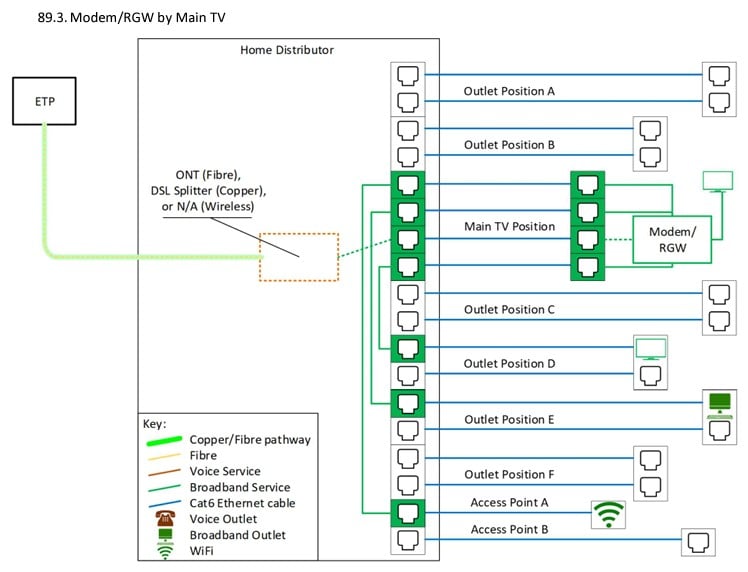
The TCF have some guidelines on their website of typical configurations https://www.tcf.org.nz/industry/standards-compliance/infrastructure-connections/premises-wiring/tcf-premises-wiring-cable-installers-guidelines-for-telecommunications-services.pdf ' target='_blank'> https://www.tcf.org.nz/industry/standards-compliance/infrastructure-connections/premises-wiring/tcf-premises-wiring-cable-installers-guidelines-for-telecommunications-services.pdf and your configuration is depicted in section 89.3 shown below except that the router and WiFi AP can be in the same place


froob
698 posts

Ultimate Geek
+1 received by user: 233

Lifetime subscriber

  #3099213 3-Jul-2023 20:14
Send private message

As others have said, if you're lucky, you'll just be able to replace each of your phone jacks with ethernet jacks and use them for data. At the point where all the cables meet (shown in your photo) you'll punch them down to a small patch panel (or just 5 individual ethernet jacks). Then you can test all the jacks, to map out which cable goes where.

If only one of your phone jacks works, you may be right that one of the pair joined together is the line in, and the other is the jack that worked. In that case, the other three joined together would obviously be the non-functional phone jacks.

If you do still have the outside phone line connected, ideally you want to figure out which line that is, before plugging in any IT equipment to the new jacks (to avoid the risk of damage).

Below is another diagram showing roughly the same as above, but overlaid on a house plan. There are some other diagrams in the guide linked in my signature showing other possible arrangements, if that's useful.


Shop now for Dell laptops and other devices (affiliate link).
corvettesummer

3 posts

Wannabe Geek


  #3099454 4-Jul-2023 09:28
Send private message

Thanks for the replies everyone, appreciate it! I'm going to have a go this weekend. I think the easiest option is going to be to set up the router/modem in the office which is more central and just find which of the cables is linking to that room, and leave the existing DSL line to the lounge alone. Good to know that in the future it wouldn't be too difficult to get all of the points going if I needed to.


Create new topic


Geekzone Live »

Try automatic live updates from Geekzone directly in your browser, without refreshing the page, with Geekzone Live now.


Are you subscribed to our RSS feed? You can download the latest headlines and summaries from our stories directly to your computer or smartphone by using a feed reader.