Geekzone: technology news, blogs, forums
Guest
Welcome Guest.
You haven't logged in yet. If you don't have an account you can register now.


tim0001

274 posts

Ultimate Geek
+1 received by user: 146


#318238 29-Dec-2024 13:13
Send private message

One of my mother’s friends was scammed on Facebook and ended up giving the scammers her Facebook password. However, it seems the scammers haven’t changed the password yet, as she still has access to her account.


Unfortunately  I couldn't change the password because of the following.   
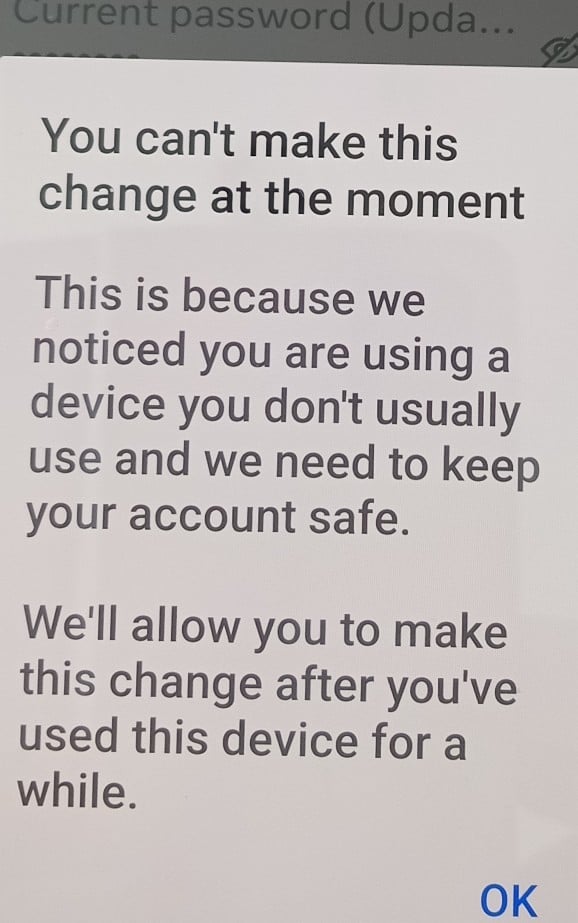


She only has one device (a Samsung phone) that she logs into fb with.  (Its currently at her home.)


Fb has her correct mobile number and email, but doesn't seem keen on using them in the password change process.  (I was reluctant to logout or say the password was forgotten in case we didn't get back in)


I'm not very familiar with fb, but I did the following for her: 


  • Went to facebook.com/hacked and reported the account as compromised. 
  • Checked the login activity and logged out a suspicious device from Nigeria.
  • Enabled notifications for new logins.
  • Posted a Facebook story informing her friends that the account was hacked.


I was hoping we’d be able to change the password quickly, but it’s been two days, and we still receive the same error message when trying.


Does anyone know how long it typically takes to regain full control of a hacked account? Is there anything else we can do to speed up the process?  Also curious on what factors fb uses to determine the real user (eg gps, cellid, IP, wifi mac, device,  etc)


Thanks


Create new topic
richms
29098 posts

Uber Geek
+1 received by user: 10208

Trusted
Lifetime subscriber

  #3325876 29-Dec-2024 13:18
Send private message

You will need to go and get the device that has an older cookie and change the password on that. You need to do that before this timeout happens and the person that they gave access to is able to do the same thing.


Richard rich.ms


tim0001

274 posts

Ultimate Geek
+1 received by user: 146


  #3325881 29-Dec-2024 13:33
Send private message

richms:


You will need to go and get the device that has an older cookie and change the password on that. You need to do that before this timeout happens and the person that they gave access to is able to do the same thing.


Sorry, should have mentioned that I tried to change the password from her only device. 


It was it my place at the time, so I was vaguely hopeful it might allow the password change when the device was returned to her home (it hasn't).


gehenna
8667 posts

Uber Geek
+1 received by user: 3883

Moderator
Trusted
Lifetime subscriber

  #3325883 29-Dec-2024 13:38
Send private message


tim0001

274 posts

Ultimate Geek
+1 received by user: 146


  #3325889 29-Dec-2024 14:01
Send private message

Thanks Gehenna.  I did attempt to find a solution on facebook help when she brought the phone over..  Unfortunately I still wasn't able to change the password when:


  • we are already logged into fb, and
  • we can access the email and phone number contacts.


gehenna:


Coincidentally, I posted this to another thread yesterday:


Have you followed this? https://www.facebook.com/help/105487009541643?ref=about_loginandpassword&helpref=about_content and this https://www.facebook.com/help/132243923516844?helpref=faq_content 


Oblivian
7345 posts

Uber Geek
+1 received by user: 2117

ID Verified

  #3325971 29-Dec-2024 16:39
Send private message

Setup 2fa. And fast. Before they do.

But that probably won't be a trusted security change either. Chances are they logged you out and made the remote device primary already.

tim0001

274 posts

Ultimate Geek
+1 received by user: 146


  #3326075 29-Dec-2024 21:23
Send private message

Update-  FB has finally allowed the password to be changed. 


So in this case it was about 48hrs between notifying fb (via facebook.com/hacked) that the password was compromised and fb allowing a password change.


Create new topic


Geekzone Live »

Try automatic live updates from Geekzone directly in your browser, without refreshing the page, with Geekzone Live now.


Are you subscribed to our RSS feed? You can download the latest headlines and summaries from our stories directly to your computer or smartphone by using a feed reader.