Geekzone: technology news, blogs, forums
Guest
Welcome Guest.
You haven't logged in yet. If you don't have an account you can register now.


concordnz

492 posts

Ultimate Geek
+1 received by user: 277

Trusted
EMT (R)

#310496 25-Oct-2023 10:00
Send private message

Hi
@VygrNetworkMonkey

Is there any way you can check in your back-end systems and see historical Bandwidth utilisation for a connection?

(NO I'm not talking data useage - end users can easily see that on a month basis & I know you can see that on a daily 7 day period internally)

I specifically want to know if I'm peaking & hitting my 'bandwidth limit' of my current plan.

(I know I 'can' upgrade to a higher plan - but I need to know if I'm hitting bandwidth limits of my current plan to know if it is money well spent or wasted at this time.)
There's no customer facing tools that I can see this, and the support CSR was only able to see data useage, not Bandwidth utilisation. [And it took a significant amount of explaining to get them to understand the difference]

Thks

View this topic in a long page with up to 500 replies per page Create new topic
 1 | 2
nzkc
1634 posts

Uber Geek
+1 received by user: 1041


  #3151982 25-Oct-2023 10:15
Send private message

No idea if Voyager offer anything... assuming not its going to depend on a few things:
* Whats your hardware?
* Whats your technical capabilities (because its likely you'll have to build something yourself)

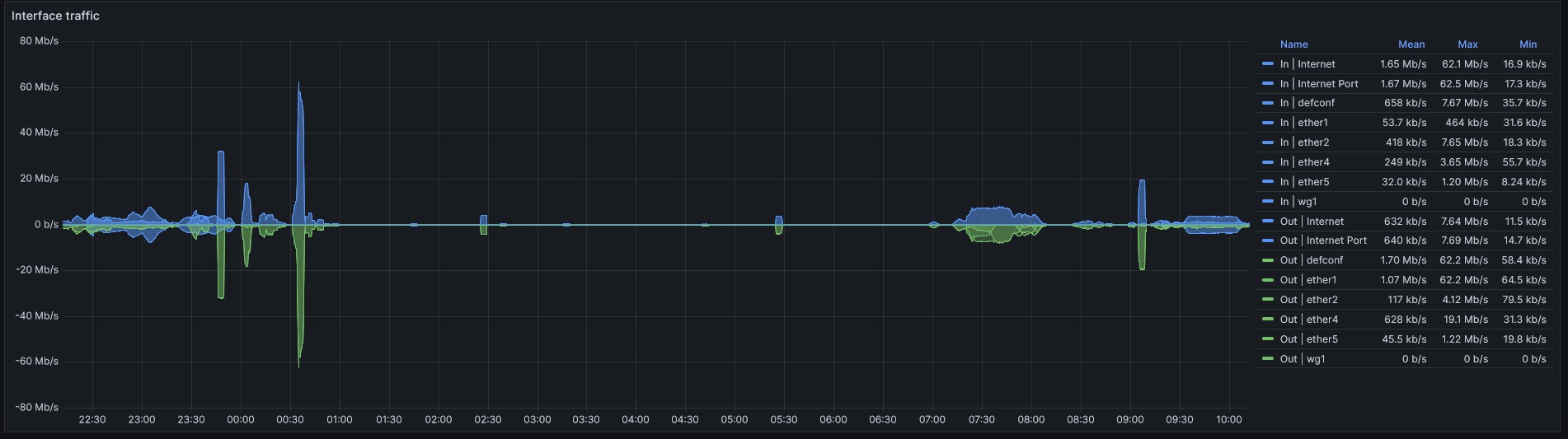
For example: I use a Mikrotik router and am using a Prometheus exporter to grab statistics. With grafana in front of Prometheus I can get this graph of network usage:


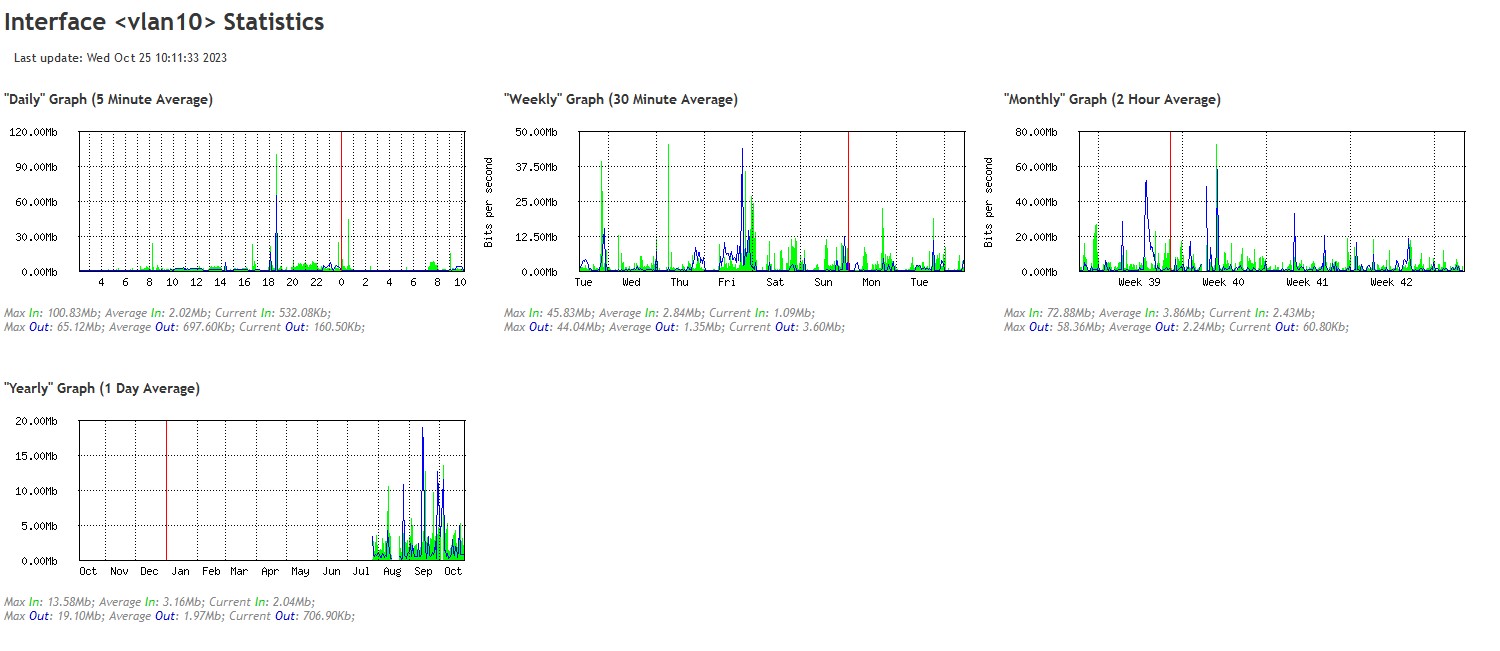
As it happens Mikrotik also grabs its own stats. So I also have these graphs: 


nztim
4012 posts

Uber Geek
+1 received by user: 2710

ID Verified
Trusted
TEAMnetwork
Subscriber

  #3152008 25-Oct-2023 11:05
Send private message

Those graphs prove that most people could get away with home fiber starter (90% of the time) 


Any views expressed on these forums are my own and don't necessarily reflect those of my employer. 


BMarquis
465 posts

Ultimate Geek
+1 received by user: 577

Trusted
Chorus
Lifetime subscriber

  #3152011 25-Oct-2023 11:16
Send private message

nztim:


Those graphs prove that most people could get away with home fiber starter (90% of the time) 


It doesn't prove that at all - if, as per the second screen shot, they are only 5minute averages.


freitasm
BDFL - Memuneh
80646 posts

Uber Geek
+1 received by user: 41030

Administrator
ID Verified
Trusted
Geekzone
Lifetime subscriber

  #3152016 25-Oct-2023 11:35
Send private message

@nztim:


Those graphs prove that most people could get away with home fiber starter (90% of the time) 


It's either Sturgeon's law - Wikipedia ("ninety percent of ...") or Pareto principle - Wikipedia ("80% of the people could live with 20% of the bandwidth")


Your choice.


Referral links: Quic Broadband (free setup code: R587125ERQ6VE) | Samsung | AliExpress | Wise | Sharesies 


Support Geekzone by subscribing (browse ads-free), or making a one-off or recurring donation through PressPatron.


concordnz

492 posts

Ultimate Geek
+1 received by user: 277

Trusted
EMT (R)

  #3152022 25-Oct-2023 12:11
Send private message

nzkc:

No idea if Voyager offer anything... assuming not its going to depend on a few things:
* Whats your hardware?
* Whats your technical capabilities (because its likely you'll have to build something yourself)

For example: I use a Mikrotik router and am using a Prometheus exporter to grab statistics. With grafana in front of Prometheus I can get this graph of network usage:


As it happens Mikrotik also grabs its own stats. So I also have these graphs: 


Thanks for thoes tips,
I'm running a Spark SmartModem - I'll check and see if I can find some stats in that like your Microtek.
I'm aware of graphana, but I've never played with it.
I am competent at a level of scripting, but not full-on app coding.

Spyware
3818 posts

Uber Geek
+1 received by user: 1366

Lifetime subscriber

  #3152031 25-Oct-2023 12:37
Send private message

Mikrotik (watch the spelling) graphs were created by https://oss.oetiker.ch/mrtg/


Spark Max Fibre using Mikrotik CCR1009-8G-1S-1S+, CRS125-24G-1S, Unifi UAP, U6-Pro, UAP-AC-M-Pro, Apple TV 4K (2022), Apple TV 4K (2017), iPad Air 1st gen, iPad Air 4th gen, iPhone 13, SkyNZ3151 (the white box). If it doesn't move then it's data cabled.


HP


Shop now for HP laptops and other devices (affiliate link).
BadCo
109 posts

Master Geek
+1 received by user: 29


  #3152060 25-Oct-2023 13:23
Send private message

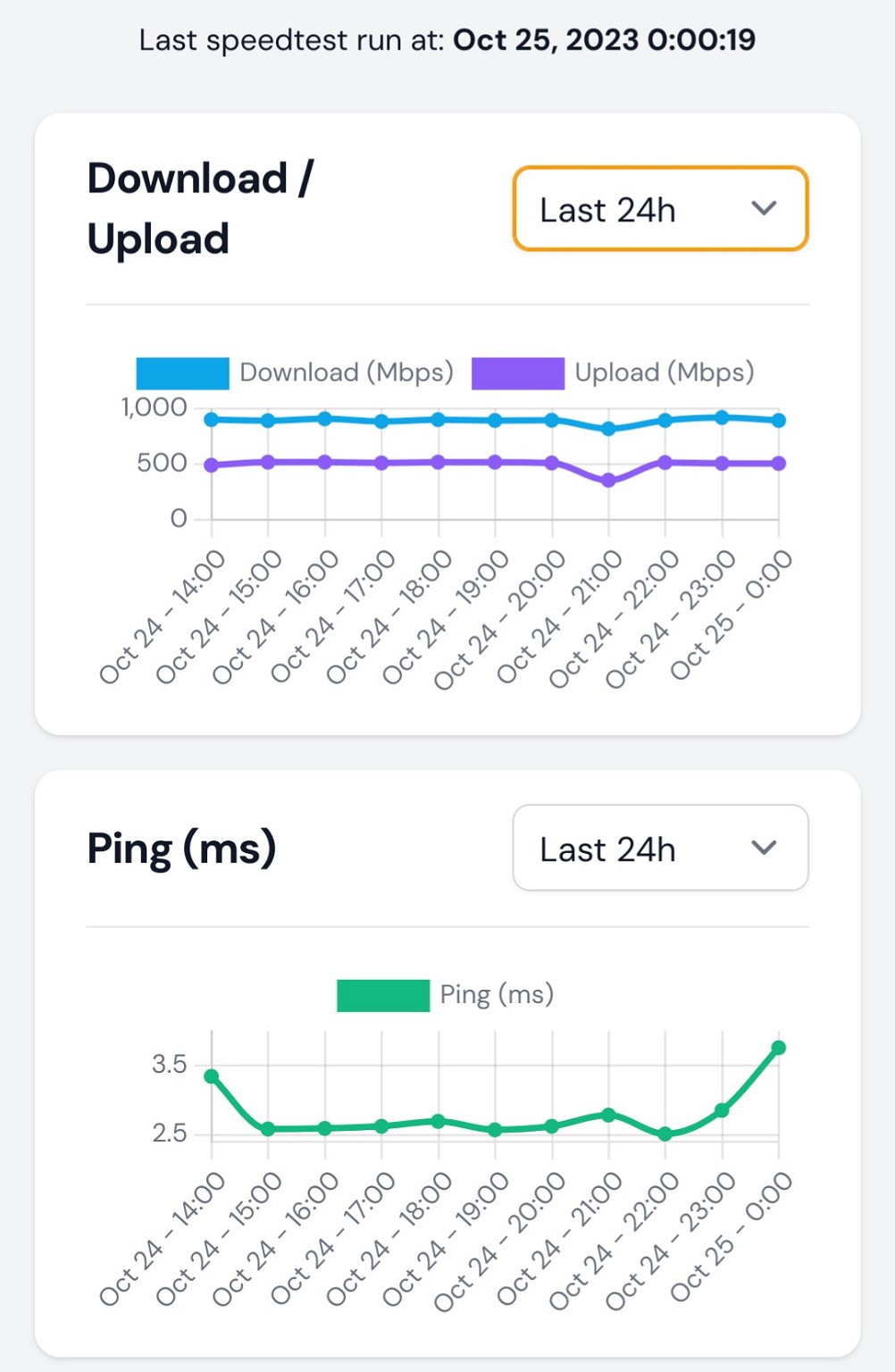
If you are into selfhosting/homelabbing or even just are comfortable with docker, you can monitor the bandwidth yourself.

https://github.com/alexjustesen/speedtest-tracker


freitasm
BDFL - Memuneh
80646 posts

Uber Geek
+1 received by user: 41030

Administrator
ID Verified
Trusted
Geekzone
Lifetime subscriber

  #3152065 25-Oct-2023 13:39
Send private message

I will have a look at installing the Docker on my NAS - but have in mind this tests speed, not track utilisation. 


Referral links: Quic Broadband (free setup code: R587125ERQ6VE) | Samsung | AliExpress | Wise | Sharesies 


Support Geekzone by subscribing (browse ads-free), or making a one-off or recurring donation through PressPatron.


PolicyGuy
1820 posts

Uber Geek
+1 received by user: 1769

ID Verified
Lifetime subscriber

  #3152079 25-Oct-2023 14:34
Send private message

BMarquis:


nztim:


Those graphs prove that most people could get away with home fiber starter (90% of the time) 


It doesn't prove that at all - if, as per the second screen shot, they are only 5minute averages.


This is actually important, in my long-ago experience.


What gets users grumpy quite quickly is short term peakiness, where bandwidth utilisation goes from the normal 15% - 20% and spikes up to fully saturated for 5 or even 10 seconds, then drops back to normal. A 5-minute based measurement (yes, I used MRTG) shows that everything is fine and bandwidth utilisation never goes above 22%, but the users are grinding their teeth because screens pause & stutter, VOIP calls get random stalls and the UX is generally🤬


If you can't measure with at least second-by-second resolution, you aren't going to pick up these micro-overloads.


allan
2073 posts

Uber Geek
+1 received by user: 899

ID Verified
Lifetime subscriber

  #3152082 25-Oct-2023 14:44
Send private message

freitasm:


I will have a look at installing the Docker on my NAS - but have in mind this tests speed, not track utilisation.


Correct - just runs a speed test at defined intervals


concordnz

492 posts

Ultimate Geek
+1 received by user: 277

Trusted
EMT (R)

  #3152092 25-Oct-2023 15:13
Send private message

I don't think Speed tests will tell me what I want to know.....
They won't indicate wether the link is 20% saturated or 80% saturated - and they won't really give me much of a longitudinal view.....
(and they will simply create a bandwidth bottleneck situation, whenever they are scheduled to run.....? )

@BMarquis may know if there is anything(stats) access able from the ONT perhaps?


Shop now for Lego sets and other gifts (affiliate link).
BMarquis
465 posts

Ultimate Geek
+1 received by user: 577

Trusted
Chorus
Lifetime subscriber

  #3152141 25-Oct-2023 15:18
Send private message

concordnz: I don't think Speed tests will tell me what I want to know.....
They won't indicate wether the link is 20% saturated or 80% saturated - and they won't really give me much of a longitudinal view.....
(and they will simply create a bandwidth bottleneck situation, whenever they are scheduled to run.....? )

@BMarquis may know if there is anything(stats) access able from the ONT perhaps?


No, there isn't anything accessible on the ONT


VygrNetworkMonkey
181 posts

Master Geek
+1 received by user: 193

Trusted
Voyager
Lifetime subscriber

  #3152178 25-Oct-2023 16:48
Send private message

concordnz: Hi
@VygrNetworkMonkey

Is there any way you can check in your back-end systems and see historical Bandwidth utilisation for a connection?

(NO I'm not talking data useage - end users can easily see that on a month basis & I know you can see that on a daily 7 day period internally)

I specifically want to know if I'm peaking & hitting my 'bandwidth limit' of my current plan.

(I know I 'can' upgrade to a higher plan - but I need to know if I'm hitting bandwidth limits of my current plan to know if it is money well spent or wasted at this time.)
There's no customer facing tools that I can see this, and the support CSR was only able to see data useage, not Bandwidth utilisation. [And it took a significant amount of explaining to get them to understand the difference]

Thks


Heya @concordnz 


Typically, no - we do not track individual user connections at the throughput level, as they are dynamically constructed within the BNG and nearly impossible to monitor via your traditional polling methods - however, I may have something I can lean on.


Flick me a PM with your username and I'll see if I can work some back-end magic.


Voyager Internet - Network Monkey

nzkc
1634 posts

Uber Geek
+1 received by user: 1041


  #3152190 25-Oct-2023 17:23
Send private message

nztim:


Those graphs prove that most people could get away with home fiber starter (90% of the time) 


I could too. Until I want to download a PS5 or steam game. That is when I need gigabit internet ;-)  And the ~400Mbps upload is handy with a Plex server.


As someone else pointed out the Mikrotik graphs are 5 minute averages. Which is why I ended up rolling my own with Prometheus and Grafana to get some more fine grain values.


nzkc
1634 posts

Uber Geek
+1 received by user: 1041


  #3152193 25-Oct-2023 17:25
Send private message

BMarquis:


It doesn't prove that at all - if, as per the second screen shot, they are only 5minute averages.


The mikrotik ones are - not found a way to change that. The prometheus/grafana stats are more fine grained. Something like every 10 or 15seconds its grabbing values (I forget what I set).


 1 | 2
View this topic in a long page with up to 500 replies per page Create new topic


Geekzone Live »

Try automatic live updates from Geekzone directly in your browser, without refreshing the page, with Geekzone Live now.


Are you subscribed to our RSS feed? You can download the latest headlines and summaries from our stories directly to your computer or smartphone by using a feed reader.