Geekzone: technology news, blogs, forums
Guest
Welcome Guest.
You haven't logged in yet. If you don't have an account you can register now.


baabits

56 posts

Master Geek
+1 received by user: 31

ID Verified
Lifetime subscriber

#312520 24-Apr-2024 12:00
Send private message

I had requested it a while back (and chatted about it in a different thread), but they said they weren't ready to give DHCP access- happy to say I got an email from Voyager today saying that they had enabled it for our connection!


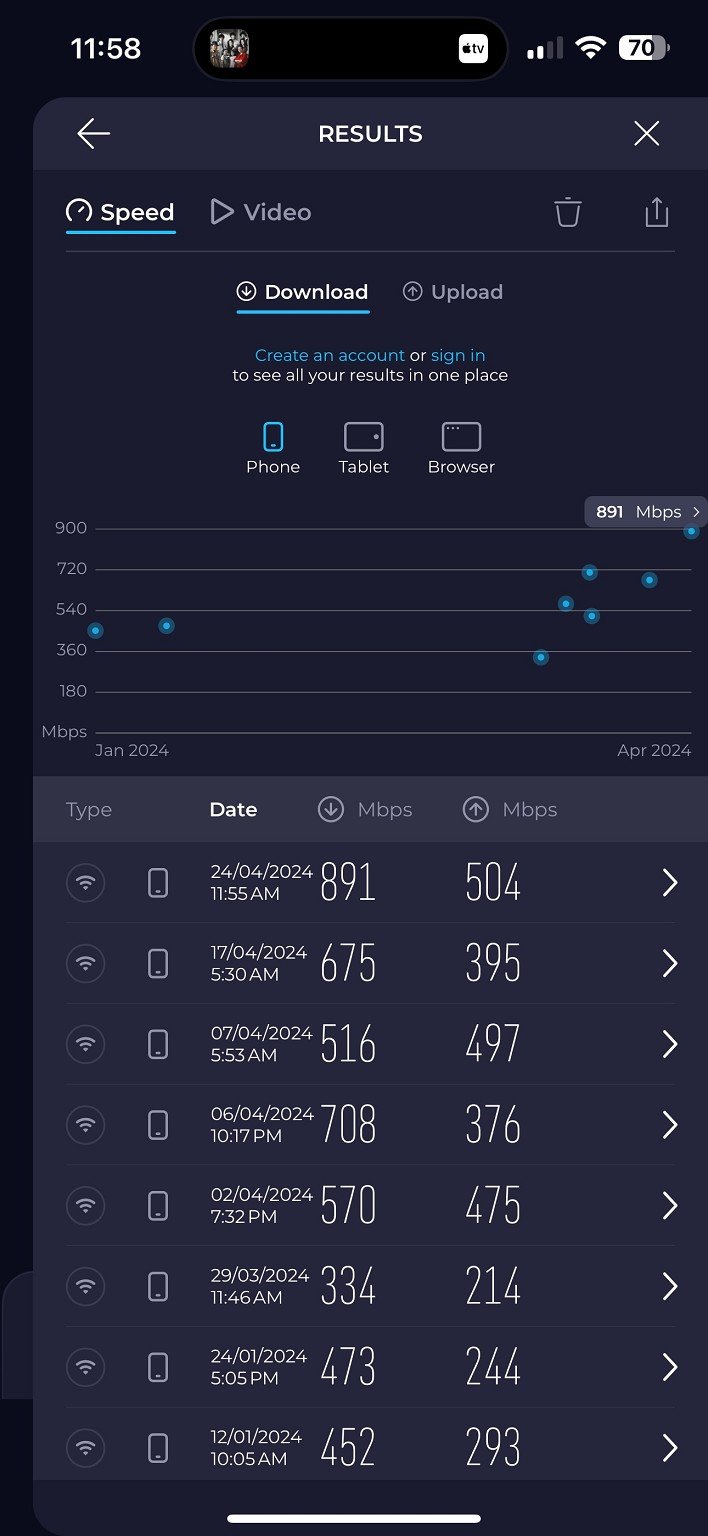
Even better, I've tested on two different gateways I have, a Unifi UDM-Pro-SE and a Cisco ASA 5525X and am happy to say that without the PPPoE overhead, I'm getting much better speeds (~700mbit down before to 890mbit now, still 500mbit up, testing on Wi-Fi though).


Thanks Voyager!


View this topic in a long page with up to 500 replies per page Create new topic
 1 | 2
allio
895 posts

Ultimate Geek
+1 received by user: 529


  #3222217 24-Apr-2024 12:14
Send private message

That's awesome news.


Is Voyager open to requests from other customers?


baabits

56 posts

Master Geek
+1 received by user: 31

ID Verified
Lifetime subscriber

  #3222219 24-Apr-2024 12:15
Send private message

I think so- all I did was ask about two months ago and they said they weren't ready yet and added me to the list.


Can't hurt to ask!


michaelmurfy
meow
13579 posts

Uber Geek
+1 received by user: 10910

Moderator
ID Verified
Trusted
Lifetime subscriber

  #3222222 24-Apr-2024 12:16
Send private message

Can you use either PPPoE and DHCP or is it once they've switched you to DHCP you can only use that going forward?


Michael Murphy | https://murfy.nz
Referral Links: Quic Broadband (use R122101E7CV7Q for free setup)

Are you happy with what you get from Geekzone? Please consider supporting us by subscribing.
Opinions are my own and not the views of my employer.


baabits

56 posts

Master Geek
+1 received by user: 31

ID Verified
Lifetime subscriber

  #3222223 24-Apr-2024 12:17
Send private message

Both they said, the only difference is that normally Voyager requires a specific PPPoE username and password, but going forward it's any username and password like Spark and others do.


michaelmurfy
meow
13579 posts

Uber Geek
+1 received by user: 10910

Moderator
ID Verified
Trusted
Lifetime subscriber

  #3222224 24-Apr-2024 12:19
Send private message

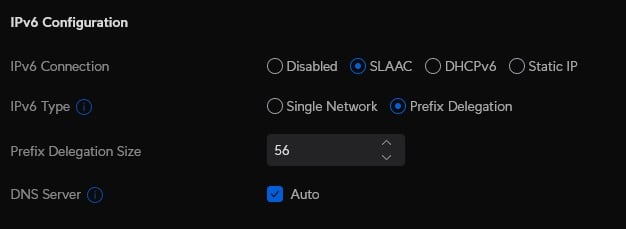
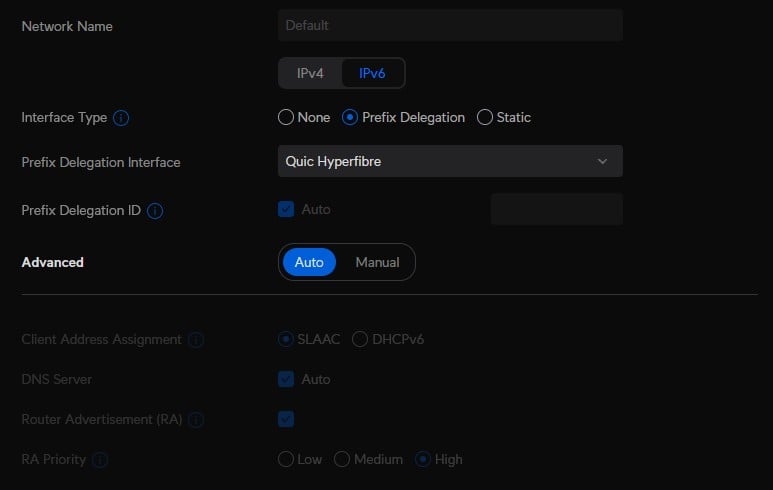
Interesting. You should also try and get IPv6 running. It should be pretty simple on the UDM Pro where you basically enable it in your WAN settings then enable SLAAC on the network level (like on Quic):


Michael Murphy | https://murfy.nz
Referral Links: Quic Broadband (use R122101E7CV7Q for free setup)

Are you happy with what you get from Geekzone? Please consider supporting us by subscribing.
Opinions are my own and not the views of my employer.


baabits

56 posts

Master Geek
+1 received by user: 31

ID Verified
Lifetime subscriber

  #3222225 24-Apr-2024 12:22
Send private message

I believe with Voyager you have to specifically request IPV6 first (I have a static IP) so will ask them and report back!


Shop now for Dyson appliances (affiliate link).
amanzi
Amanzi
1354 posts

Uber Geek
+1 received by user: 331

ID Verified
Trusted
Lifetime subscriber

  #3222282 24-Apr-2024 12:54
Send private message

Can anyone explain why this makes an improvement in this specific case? I would have thought the two routers mentioned should be able to handle PPPoE without issue?


I get near full-speed performance on Voyager with my Mikrotik router. I just did three speed tests using Voyager's Wellington server, and all three were close to full speed.


  1. 922 down 478 up
  2. 920 down 480 up
  3. 948 down 471 up

baabits

56 posts

Master Geek
+1 received by user: 31

ID Verified
Lifetime subscriber

  #3222285 24-Apr-2024 13:02
Send private message

Not really sure to be honest, perhaps testing at different times will reveal different speeds but I’ve never been able to test higher than 700 before. I don’t think it’s the device connection, we have unifi6 mesh pros in every bedroom, it’s 802.11ax to the device (~2gbit) and they are all connected with Ethernet.

I know PPPoE has overhead but the UDM should easily be able to do 1gbit on it. Just glad to be rid of it, seems to be really unnecessary these days.

SirHumphreyAppleby
2938 posts

Uber Geek
+1 received by user: 1860


  #3222299 24-Apr-2024 13:35
Send private message

I've had DHCP enabled on my connection since the beginning of March.


On my N4200-based router running pfSense, I now routinely see over 900Mbs^-1 results on fast.com. I believe the slowest result was 890Mbs^-1, with every other result being 900+. With PPPoE, results in the 800s were typical.


In case anyone else is using pfSense/OPNSense, I needed to make some minor configuration changes to the DHCP6 configuration to get IPv6 working. Specifically, I disabled "Use IPv4 connectivity as parent interface" and "Request only an IPv6 prefix" which were previously being used with PPPoE.


RunningMan
9184 posts

Uber Geek
+1 received by user: 4834


  #3222379 24-Apr-2024 15:28
Send private message

amanzi:


Can anyone explain why this makes an improvement in this specific case? I would have thought the two routers mentioned should be able to handle PPPoE without issue?


PPPoE is generally run as a single thread and can get to the point of saturating the single processor core it's running on.


BarTender
3629 posts

Uber Geek
+1 received by user: 2572

ID Verified
Trusted
Lifetime subscriber

  #3222619 25-Apr-2024 09:32
Send private message

Just sent you a PM @baabits as if you have an ASA internet facing with webvpn you probably want to patch it.


Shop now on Samsung phones, tablets, TVs and more (affiliate link).
baabits

56 posts

Master Geek
+1 received by user: 31

ID Verified
Lifetime subscriber

  #3222620 25-Apr-2024 09:33
Send private message

@BarTender thanks! My ASA is all patched but isn't really used anymore, I just pulled it out for testing. Too loud, too hot lol. We use the UDM Pro as our main gateway and it works a treat :)


baabits

56 posts

Master Geek
+1 received by user: 31

ID Verified
Lifetime subscriber

  #3223122 26-Apr-2024 17:04
Send private message

michaelmurfy:


Interesting. You should also try and get IPv6 running. It should be pretty simple on the UDM Pro where you basically enable it in your WAN settings then enable SLAAC on the network level (like on Quic):


Got my IPv6 /56 allocation today, just had to enable DHCPv6 and then turn the router off for ten mins so it could re-authenticate. Easy peasy :)


hamish225
1430 posts

Uber Geek
+1 received by user: 215

ID Verified

  #3223228 26-Apr-2024 23:27
Send private message

michaelmurfy:


Can you use either PPPoE and DHCP or is it once they've switched you to DHCP you can only use that going forward?


Just to confirm, If you would like DHCP / circuit based authentication enabled for your connection you'll just need to email support - support@voyager.nz to ask for it, once it's enabled you can then either use PPPoE or IPoE as you please :)


If it's not been switched on for you, you'll only be allowed to use PPPoE and the username and password do need to be valid.


*Insert big spe*dtest result here*


Firebirdnz
37 posts

Geek
+1 received by user: 66

Trusted
Voyager

  #3224642 30-Apr-2024 16:23
Send private message

Hi Geekzone,


IPoE is available to all users on request. We have to enable circuit based authentication for your connection. In the near future we plan to have then enabled automagically so you don't need to ask for it. It'll just be there. Enabling IPoE doesn't disable PPPoE as mentioned above. Both are available in an either/or setup. Your active session is locked to a single service type, PPP or DHCP. You won't be able to connect both at the same time!


In regards to IPv6 on IPoE we use DHCPv6 IANA on the CPE -> Voyager portion. We don't currently support SLAAC unfortunately. This is a limitation with our BNG hardware. If SLAAC is used you'll get a DHCPv6-PD range but it won't install as active on our side. Looked into a bunch and I can't seem to solve it... It's pending further investigation post a major software update we plan on doing in the next couple of months. Ideally I'd like to be able to support SLAAC and DHCPv6 IANA as we want the average customer to be able to plug it in and it "just works". In the mean time, DHCP for ipv4 and DHCPv6 for ipv6. For PPP we support both SLAAC and DHCPv6 IANA.


In terms of needing to turn your router off for 10mins... IPoE is a pain when it comes to sessions state awareness. Configuration currently is only applied on initial authentication. We don't make modifications to services while they are connected. PPP has keepalives built in so when you restart your router it builds a new session. IPoE is a DHCP lease. We have lease time currently set to 30mins which should mean CPEs complete a DHCP renew every 15mins. Beyond that we implement connectivity checking through arp probes and ndp discoveries. We have intervals for checking connectivity currently set to 2 minutes. If that check fails it'll retry every 30 seconds for the next 3 minutes. If the router doesn't come back online we clear the session. A new session will be built when the router either sends a DHCP discover or a renew. As we are only a week or so in open release of IPoE (been trialing it on a limited number of connections since December) and we don't yet know whether real world use matches our configuration. We may modify timers and behaviour if it doesn't work. Please let me know if something isn't working quite right and I may be able to fix it up. Lastly I did talk with our support desk yesterday about @baabits specific situation. I let the support team know about this behaviour and that they do have the power to clear the session from our management portal. The support team got access to all the portal features last week so it's going to be new for them. Training is taking place and they will become familiar in time.


Hope this is useful information. Let me know if you'd like to know anything else. Happy to share.


Regards,


~H


 1 | 2
View this topic in a long page with up to 500 replies per page Create new topic


Geekzone Live »

Try automatic live updates from Geekzone directly in your browser, without refreshing the page, with Geekzone Live now.


Are you subscribed to our RSS feed? You can download the latest headlines and summaries from our stories directly to your computer or smartphone by using a feed reader.