Geekzone: technology news, blogs, forums
Guest
Welcome Guest.
You haven't logged in yet. If you don't have an account you can register now.


Rickles

3107 posts

Uber Geek
+1 received by user: 445

Trusted

#33645 8-May-2009 15:01
Send private message

I've heard that some laptops have external monitor/vga ports that are "TV out".

How would one identify such a port (assuming the manual is silent on this)?

R.

Create new topic

mjb

mjb
996 posts

Ultimate Geek
+1 received by user: 67

Trusted

  #213479 8-May-2009 15:17
Send private message

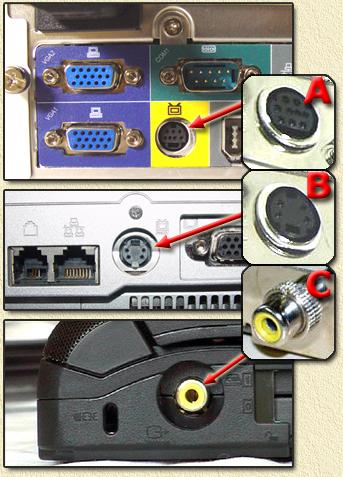
It'll usually be a yellow RCA connector.


contentsofsignaturemaysettleduringshipping


Rickles

3107 posts

Uber Geek
+1 received by user: 445

Trusted

  #213482 8-May-2009 15:37
Send private message

mjb,

Ummm, I'm talking about the 15-pin D-slot on the laptop, not the video "in" on the TV itself.

R.

mjb

mjb
996 posts

Ultimate Geek
+1 received by user: 67

Trusted

  #213484 8-May-2009 15:43
Send private message

So am I. If you have a tv out, it'll be a yellow RCA connector.

edit: 3rd post on: http://www.myp2pforum.eu/general-chat/3152-does-anyone-watch-streams-large-lcd-tv-7.html. third connector in this picture:


edit2: or an s-video connector as others state. Sorry, forgot about that :)


contentsofsignaturemaysettleduringshipping


grant_k
3539 posts

Uber Geek
+1 received by user: 124

Trusted

  #213486 8-May-2009 15:44
Send private message

Rickles: I've heard that some laptops have external monitor/vga ports that are "TV out".

How would one identify such a port (assuming the manual is silent on this)?

If the manual doesn't mention a TV Out port, it's unlikely that you have one.  I have yet to see any laptop with such a port.

Some Video Cards used in Desktop PCs have a TV Out port which usually appears as a 4-pin Mini-DIN connector.  This is the type of connector that is used for S-Video as shown here.

If you can see a 4-pin Mini-DIN connector then it's just possible you have a TV Out port, but I would doubt it.  Most laptops have had VGA (15-pin DSUB) connectors until recently, but many are now starting to appear with HDMI as well.

wellygary
8810 posts

Uber Geek
+1 received by user: 5287


  #213489 8-May-2009 15:49
Send private message

Rickles: mjb,


Ummm, I'm talking about the 15-pin D-slot on the laptop, not the video "in" on the TV itself.


R.


Any "TV out" on a laptop will either be in the form of S-Video or RCA connection, (or more recently HDMI or DVI), what ever goes out the D-sub VGA outlet will be component video (after a fashion)

Rickles

3107 posts

Uber Geek
+1 received by user: 445

Trusted

  #213496 8-May-2009 15:59
Send private message

Thanks to you all for replies ... appreciated.


The reason I'm stressing the VGA D-slot as being "tv out", is related to this item http://www.trademe.co.nz/Computers/Cables-adaptors/Monitor/auction-217284692.htm

and also like this
http://www.trademe.co.nz/Computers/Components/Video-cards/Other/auction-216516962.htm


Shop on-line at New World now for your groceries (affiliate link).
Pskonejott
24 posts

Geek


  #215219 16-May-2009 12:23
Send private message

Rickles, are you referring to s-video actually being carried on unused pins on the VGA D15?

Yes, some laptops do have this and you will need a dongle to convert the D15 into the s-video connector for the TV. If you have no info available in the manual I'd assume that you don't have one, if you really need to know buy the dongle for $15 and try it, then you'll know for sure.

Your other option would be to buy a VGA to s-video converter, that actually converts the regular VGA signal into s-video. You'd expect to pay $60-$80 for one of these, but they should work on anything with VGA out...

Rickles

3107 posts

Uber Geek
+1 received by user: 445

Trusted

  #215304 16-May-2009 22:15
Send private message

Just looked up the specs of my graphics chip and according to Intel it is TV-out capable for both S-video and composite, so yes I've invested $8 for the dongle to test it out .

R.

Create new topic


Geekzone Live »

Try automatic live updates from Geekzone directly in your browser, without refreshing the page, with Geekzone Live now.


Are you subscribed to our RSS feed? You can download the latest headlines and summaries from our stories directly to your computer or smartphone by using a feed reader.