Geekzone: technology news, blogs, forums
Guest
Welcome Guest.
You haven't logged in yet. If you don't have an account you can register now.


tanihera

22 posts

Geek
+1 received by user: 1


#311511 22-Jan-2024 22:33
Send private message

I have problems configuring a Spark Smart Modem 2 for fiber.  The SM2 works fine on mobile BB, and my Quic Internet is all working from the ONT to a TPLink/Archer VR300 to wifi, no problem.  I want to replace the TPL router with the SM2, but somehow can't get any SM2 config to work with the ONT.  I'm a bit of a noob but I easly configured the TPL from QUic's setup info, and believe I've copied this same config to the SM2, but no dice.


When they're connected, by only swapping the ONT CAT5 cable from the TPLink to the SM2, the ONT Auth light comes on and the SM2 lights are Power:green, Status:white, 4GLTE:off, Wifi:on, and both Internet and Phone lights:OFF. The CAT5 Fibre port light blinks a little as does the Auth light.


One difference is Quic requires VLAN:untagged, but the equivalent in the SM2 can't be empty so I've set it to 0.  I've tried various SM2 reboots and power-off waits, but still no change.


Is there something other than the ISP login parameters I've missed?  Can anyone advise all the SM2 config settings required to connect the SM2 to fibre, please?


Filter this topic showing only the reply marked as answer Create new topic
Zeusssy
39 posts

Geek
+1 received by user: 24

ID Verified

  #3185339 22-Jan-2024 23:17
Send private message

Change that 0 to a 10


My views aren't that of my employers and all the usual.


I know that I know nothing, so really, I know everything?


~~~~~~~~~~~~~~~~~~~~~~~~~~~~~~~~~~~~~~~~


michaelmurfy
meow
13579 posts

Uber Geek
+1 received by user: 10910

Moderator
ID Verified
Trusted
Lifetime subscriber

  #3185344 23-Jan-2024 00:15
Send private message

Zeusssy: Change that 0 to a 10


No, Quic uses no VLAN by default. I am not sure of the Smart Modem 2 as I don't have one but some screenshots of the current configuration could be handy.


Michael Murphy | https://murfy.nz
Referral Links: Quic Broadband (use R122101E7CV7Q for free setup)

Are you happy with what you get from Geekzone? Please consider supporting us by subscribing.
Opinions are my own and not the views of my employer.


tanihera

22 posts

Geek
+1 received by user: 1


  #3185361 23-Jan-2024 08:13
Send private message

Thanks guys, will post screenshots shortly


tanihera

22 posts

Geek
+1 received by user: 1


  #3185416 23-Jan-2024 09:13
Send private message

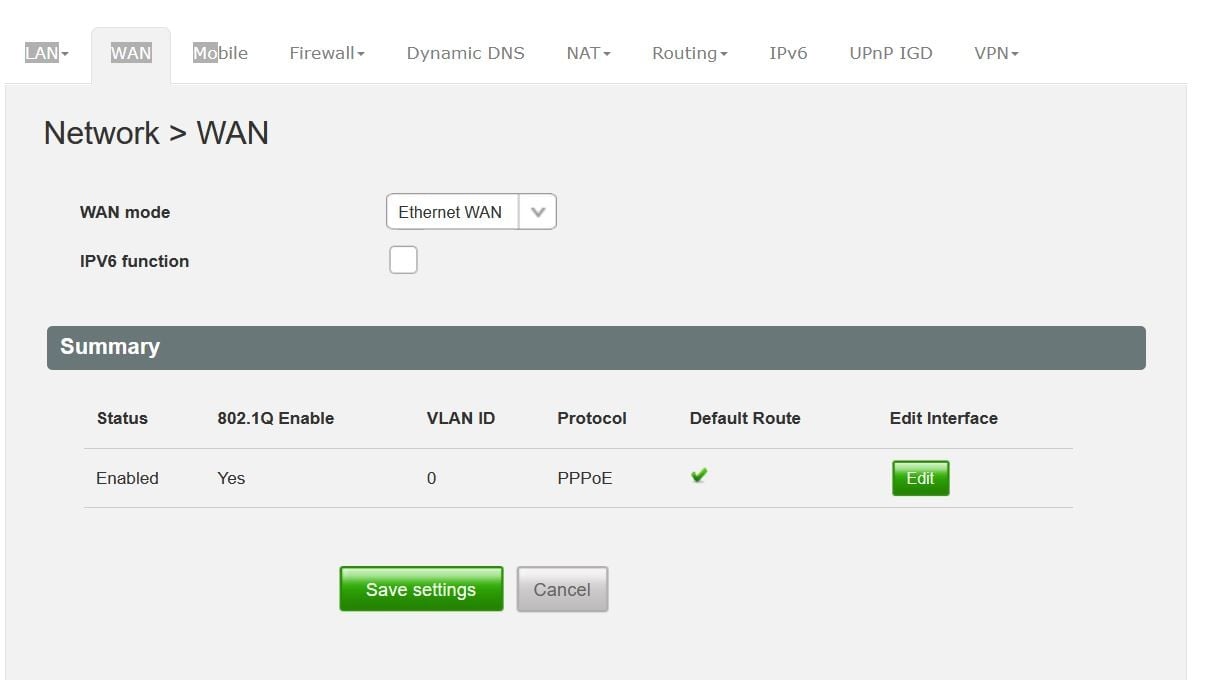
There's this initial Network>Wan mode overview screenshot:


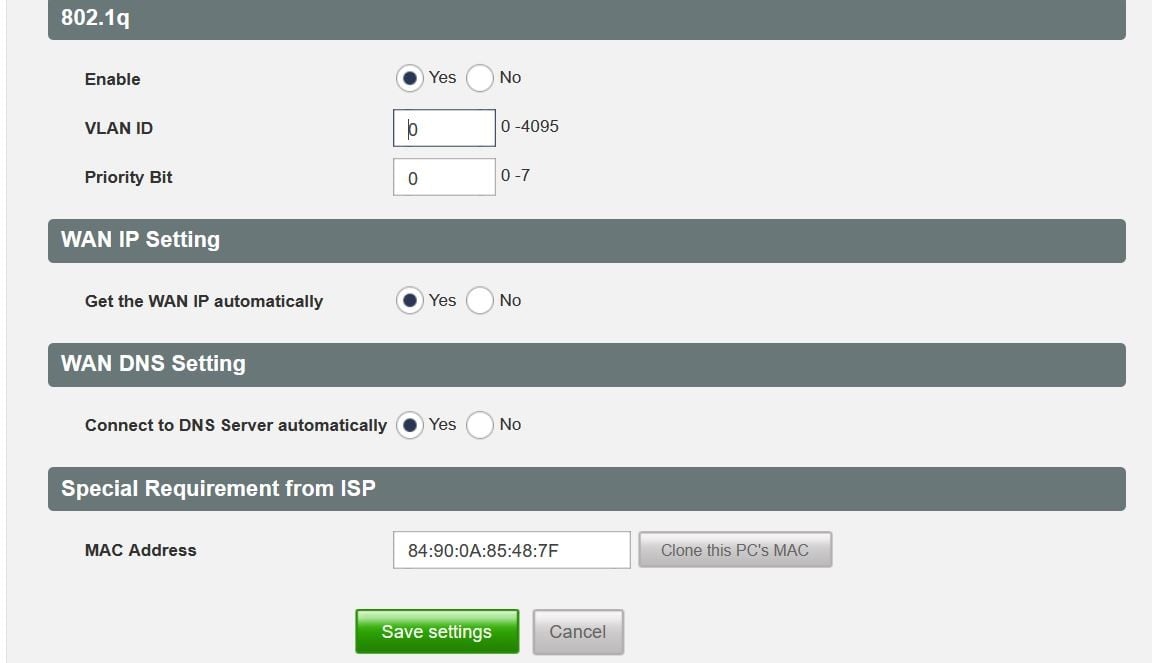
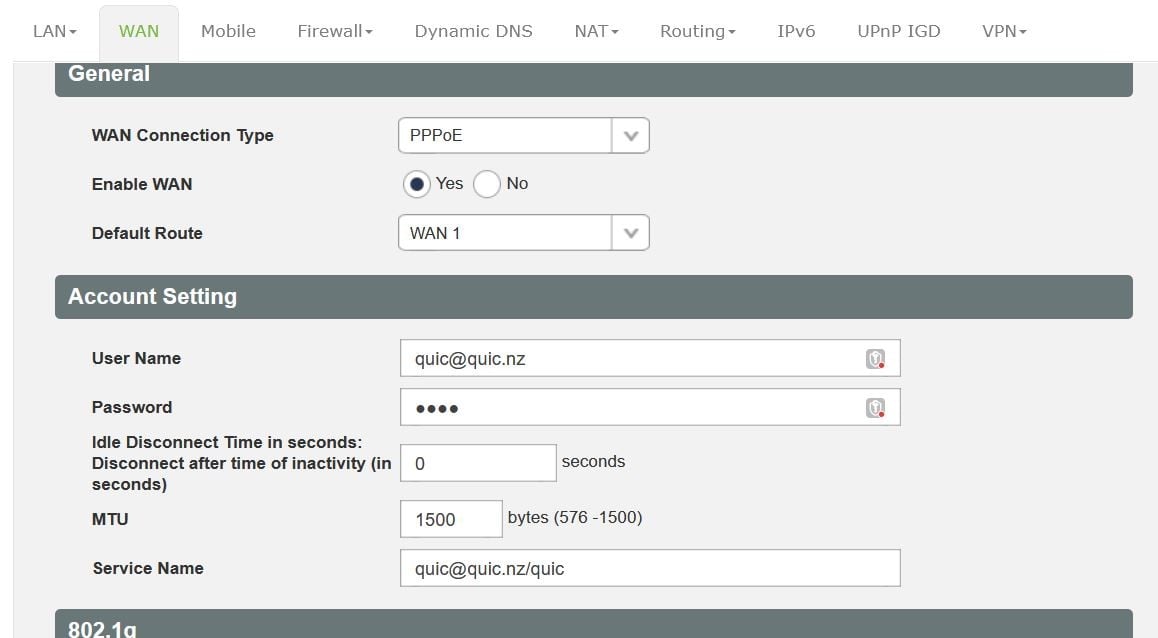
then under EDIT, the config is page has two screenshots a and b:
img]https://cdn.geekzone.co.nz/imagessubs/5ee339419e4c4e3163c1dd5fc85ade07.jpg[/img]


I'm not sure what most of it means...


tanihera

22 posts

Geek
+1 received by user: 1


  #3185418 23-Jan-2024 09:17
Send private message

...oops, that's the overview and screenshot b above, don't know where a went, here 'tis again:


mrgsm021
1538 posts

Uber Geek
+1 received by user: 310

ID Verified
Trusted

  #3185419 23-Jan-2024 09:20
Send private message

Try disabling VLAN tagging instead of setting it to 0?


HP


Shop now for HP laptops and other devices (affiliate link).
Zeusssy
39 posts

Geek
+1 received by user: 24

ID Verified

  #3185427 23-Jan-2024 09:50
Send private message

michaelmurfy:


No, Quic uses no VLAN by default. I am not sure of the Smart Modem 2 as I don't have one but some screenshots of the current configuration could be handy.


Oh I see, Spark modem but not Spark network, I just saw the forum it was in and somehow missed the rest. Yeah, if Quic is no VLAN, then just disable the "802.1Q"


My views aren't that of my employers and all the usual.


I know that I know nothing, so really, I know everything?


~~~~~~~~~~~~~~~~~~~~~~~~~~~~~~~~~~~~~~~~


tanihera

22 posts

Geek
+1 received by user: 1


  #3185439 23-Jan-2024 10:19
Send private message

Ahhhhh.....Clever bunny, mrgsm021!! All working, the gods have smiled! Sweet!


I had studied other forums involving the SM2 and in particular michaelmurfy helping niscoupe over on forumid=49&topicid=304260&page_no=2, where they had 802.1Q disabled, but VLAN still showing as 10, and I didn't recognise these two were connected.


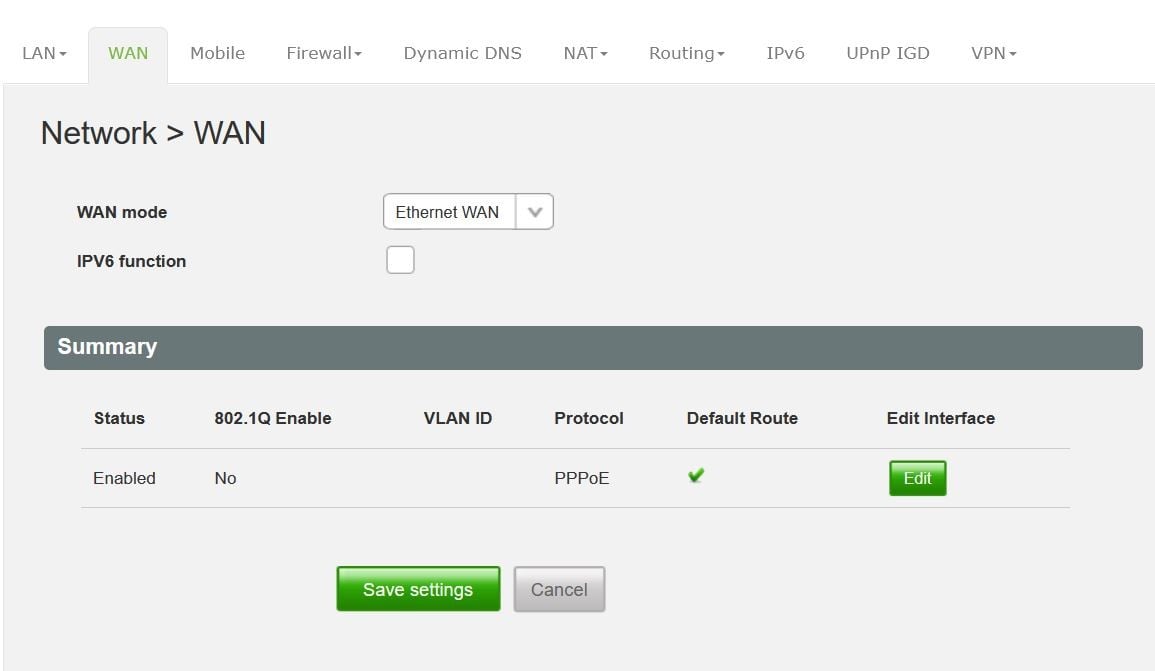
In addition to disabling 802.1Q, I also emptied the VLan box, so now my WAN overview looks like


So thanks michaelmurfy....I could see you could fix it, and can see Zeusssy's distinction between modem and network is at the heart of my misunderstanding, whatever SPK is....


Huge thanks guys!...So much to learn, so little time - John Lennon, I think....


Filter this topic showing only the reply marked as answer Create new topic


Geekzone Live »

Try automatic live updates from Geekzone directly in your browser, without refreshing the page, with Geekzone Live now.


Are you subscribed to our RSS feed? You can download the latest headlines and summaries from our stories directly to your computer or smartphone by using a feed reader.