Geekzone: technology news, blogs, forums
Guest
Welcome Guest.
You haven't logged in yet. If you don't have an account you can register now.


AndyT

166 posts

Master Geek
+1 received by user: 10


#319393 21-Apr-2025 12:56
Send private message

With Spark recently introducing DHCP as an option to the the previous PPPoE fibre broadband authorisation I thought I'd make the switch to DHCP in readiness for speeds greater than 1GbE (if hyperfibre arrives soon?), thinking it would be quite easy. I accept the arguments for "if it ain't broke don't fix it", and that 1GbE should be ample in our use case, but with Easter being so wet and cold and with time on my hands I thought I'd give it a go.


In UCG Max settings I deleted the PPPoE config and associated User and Password details, and then selected DHCP v4 and VLAN10 thinking that was all that was needed. I waited for 30 minutes or so to reconnect but was unable to do so.


I pulled out an old Spark Smart Modem and connected to the ONT and a spare laptop and it immediately fired up with DHCP credentials, so the switch appeared to have been made at Spark's end and the internet was up, indicating an issue with the UCG Max configuration, not the Spark's network.


I spoke to Spark about any Spark - specific configs who suggested I give up on Unifi and go back to their old modem, and / or call Unifi in the USA for guidance as they didn't know anything about Unifi. Neither of which is going to happen. Hence this posting.


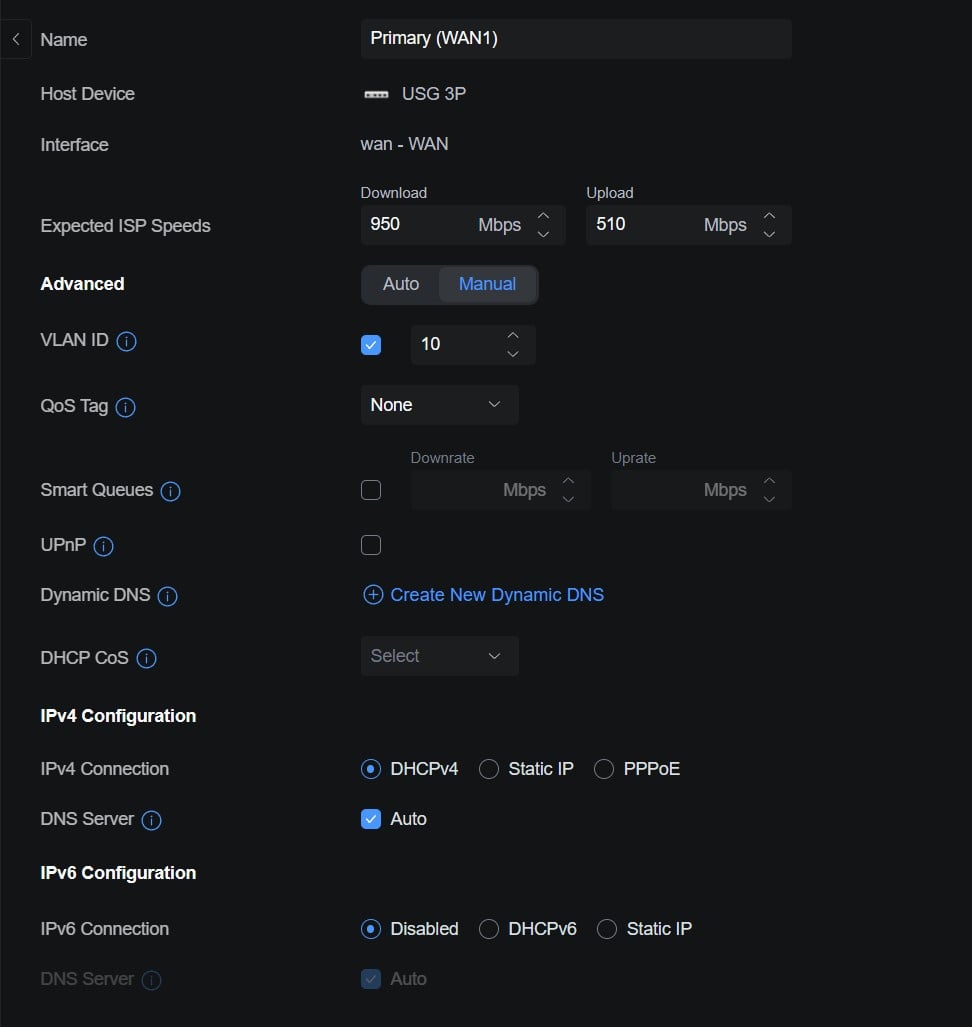
The question is, if anyone has experience configuring Unifi Cloud Gateways on the Spark network with DHCP authorisation, are there any specific config tweaks I need to make on the UCG Max in addition to those noted above, i.e. selecting DHCP v4 and VLAN10 on the WAN connection? I'm thinking of MTU (if different to 1500)?, QoS Tagging?, MAC address cloning?, DNS Server on auto v. custom 9.9.9.9 / 1.1.1.2?. IPv6 is disabled of course. 


Thank you in anticipation.


AndyTNZ



Rgds Andy T


Create new topic
l43a2
1784 posts

Uber Geek
+1 received by user: 591

ID Verified
Trusted

  #3366164 21-Apr-2025 13:05
Send private message


This is my USG config.


AndyT

166 posts

Master Geek
+1 received by user: 10


  #3366200 21-Apr-2025 13:50
Send private message

Thanks I43a2,


That config looks identical to the one I was using except your DNS Server is set to "Auto" whereas I was nominating Quad 9 and Cloudflare. 


Perhaps I ought to use "Auto" whilst securing a WAN connection, then once the connection is up and running I could change to nominated alternatives?


Rgds Andy T


l43a2
1784 posts

Uber Geek
+1 received by user: 591

ID Verified
Trusted

  #3366201 21-Apr-2025 13:57
Send private message

AndyT:


Thanks I43a2,


That config looks identical to the one I was using except your DNS Server is set to "Auto" whereas I was nominating Quad 9 and Cloudflare. 


Perhaps I ought to use "Auto" whilst securing a WAN connection, then once the connection is up and running I could change to nominated alternatives?


be worth a shot to see if that helps with troubleshooting.


CYaBro
4708 posts

Uber Geek
+1 received by user: 1182

ID Verified
Trusted

  #3366269 21-Apr-2025 15:41
Send private message

I had one Unifi Dream machine that I switched to DHCP and it wouldn’t work. 
Even after a power cycle and leaving it for about 12 hours. 
Switched back to PPPoE and it connected immediately. 

Two other UDMs I changed to dhcp worked fine and reconnected within a minute or two. 


Opinions are my own and not the views of my employer.


AndyT

166 posts

Master Geek
+1 received by user: 10


  #3366348 21-Apr-2025 22:47
Send private message

Thanks CYaBro.


Did you manage to figure out what was causing the one UDM not to switch to DHCP?


Were you on legacy firewall rules or the new zone based firewall policies? I read that sometimes the ZBF matrix doesn't properly configure an "Allow" policy for UDP on ports 67 src / 68 dst on the External:Gateway zone pairing, which is explicitly required to allow DHCP from the ISP?


Cheers, Andy T


Rgds Andy T


CYaBro
4708 posts

Uber Geek
+1 received by user: 1182

ID Verified
Trusted

  #3366351 21-Apr-2025 22:52
Send private message

AndyT:


Thanks CYaBro.


Did you manage to figure out what was causing the one UDM not to switch to DHCP?


Were you on legacy firewall rules or the new zone based firewall policies? I read that sometimes the ZBF matrix doesn't properly configure an "Allow" policy for UDP on ports 67 src / 68 dst on the External:Gateway zone pairing, which is explicitly required to allow DHCP from the ISP?


Cheers, Andy T


No, didn’t really take it any further as it’s working fine on PPPoE. 
All of the UDMs are still in the legacy firewall rules, even the one that didn’t work. 


Opinions are my own and not the views of my employer.


Want to support Geekzone and browse the site without the ads? Subscribe to Geekzone now (monthly, annual and lifetime options).
AndyT

166 posts

Master Geek
+1 received by user: 10


  #3366731 23-Apr-2025 12:31
Send private message

So, I've eventually cracked it and the UCG Max is now running on DHCP IPv4.


Long story short for any one with the same / similar problem and for which my experience might help.


  1. I resorted to an old Spark Smart Modem (SMM) and HP laptop set up as a completely different secondary system to the MacBook + UCG Max primary system to try and force the switch from PPPoE to DHCP on Spark equipment
  2. I configured the SSM for "Auto IP" (which is their old term for DHCP) and VLAN 10 of course. Crucially it seems, I also set the MAC Cloning to a required string set as default in the SMM. After a few minutes I secured an internet connection with a new WAN IP address.
  3. I then switched to the MacBook +UCG Max primary system which initially didn't want to connect to the internet even though configured for DHCP, VLAN 10 and Auto DNS; but I then:


    • Set MAC address cloning to the same string as the SMM had shown as default
    • Added a firewall rule in the ZBF External:Gateway matrix pairing to allow DHCP from the ISP by allowing UDP on ports 67 & 68
    • Rebooted the ONT
    • Rebooted the UCG Max


After a nervously waiting for a few minutes, the UCG Max reported an internet connection at a slightly higher speed than I've seen before.


It seems that the two things that resolved my issue were:


  1. MAC address cloning
  2. ZBF policy to explicitly allow DHCP from the ISP


Cheers, Andy T


Rgds Andy T


Create new topic


Geekzone Live »

Try automatic live updates from Geekzone directly in your browser, without refreshing the page, with Geekzone Live now.


Are you subscribed to our RSS feed? You can download the latest headlines and summaries from our stories directly to your computer or smartphone by using a feed reader.