Geekzone: technology news, blogs, forums
Guest
Welcome Guest.
You haven't logged in yet. If you don't have an account you can register now.


xbmcnut

501 posts

Ultimate Geek
+1 received by user: 49


#315747 12-Aug-2024 12:26
Send private message

Hi all,


About 10 days ago, I started having issues with various devices in the house having images loading very slowly on Instagram and TradeMe etc. along with apps on my Android device getting stuck when updating. I have a comprehensive UniFi network with three AP's and a dream router. I've tried changing the client DNS to Google, Cloudflare and now Control D without success. If I switch my Android device to 4G, apps download and install fine. Oddly, if I also spark up my VPN and connect my mobile to a server in AU, apps download and install fine too.


About four days ago, a friend of mine in Napier contacted me and said he's having the same issue on his Android phone and I found out last night, his ISP is Vodafone/One too so I'm thinking it's not my network but a One NZ issue. 


As you can imagine, phoning them with the above issue is going to be a total waste of my time with the usual "have you rebooted the router" BS so I'm wondering if anyone else who uses One NZ for Fibre is also having page loading and app installting issues?


P.S My friend in Napier is uisng the OneNZ mobile router, not Fibre.


RS820+, DS223, CoreELEC on Odroid N2+, 3 x Echo Dot & 7 x Google Homes connected to Home Assistant on Beelink SEi12.


View this topic in a long page with up to 500 replies per page Create new topic
 1 | 2 | 3 | 4 | 5 | 6
stevenn
32 posts

Geek
+1 received by user: 13


  #3270894 12-Aug-2024 17:45
Send private message

I thought it was just me but I'm having the same issues too, but on my One NZ mobile plan. Ever since About 10 ish days ago like you said, Instagram has been taking ages to load and short form content like YouTube shorts and Instagram reels just stop buffering out of nowhere. So I've just been using a VPN like you are.


Edit: I mean stop buffering as in the video will freeze part way through and not load.


xbmcnut

501 posts

Ultimate Geek
+1 received by user: 49


  #3270903 12-Aug-2024 19:02
Send private message

Good to know I'm not going mad. Be great if others weigh in so I've got something to go to OneNZ with.


RS820+, DS223, CoreELEC on Odroid N2+, 3 x Echo Dot & 7 x Google Homes connected to Home Assistant on Beelink SEi12.


StevieT
706 posts

Ultimate Geek
+1 received by user: 34


  #3270982 13-Aug-2024 11:18
Send private message

I'm also having issues.


liquidcore
187 posts

Master Geek
+1 received by user: 71

ID Verified

  #3271149 13-Aug-2024 17:07
Send private message

My in-laws are also having problems with videos/images not loading on Facebook.

I am on Kogan for mobile and have also been experiencing sporadic non-loading of images on Facebook, Instagram, etc. Unsure if this is related as well.

hat0912
10 posts

Wannabe Geek
+1 received by user: 3


  #3271323 14-Aug-2024 09:42
Send private message

+1 from me. Switching to mobile hotspot (via One) works fine.


Geekeneer
208 posts

Master Geek
+1 received by user: 23

ID Verified

  #3272097 15-Aug-2024 15:53
Send private message

I came to the OneNZ subforum to post about the same issue.


Have you had any luck trying to solve the issue?


Switching to Mobile data solves the issue (Mobile is OneNZ too)


It's frustrating, I thought my router was applying some Level of Service restriciton.


For anyone wondering, I'm using a Spark Smart Modem 2, so maybe we can rule out modem issues.


Pinging @NickR1


Has anyone reported this?


Move to New Zealand's best fibre broadband service (affiliate link). Free setup code: R587125ERQ6VE. Note that to use Quic Broadband you must be comfortable with configuring your own router.
xbmcnut

501 posts

Ultimate Geek
+1 received by user: 49


  #3272176 15-Aug-2024 16:58
Send private message

I sent a DM to OneNZ (with a link to this thread) and they responded today advising they have seen this thread and are going to escalate it. My family are driving me nuts telling me to fix the network but it's out of my hands and so frustrating.


RS820+, DS223, CoreELEC on Odroid N2+, 3 x Echo Dot & 7 x Google Homes connected to Home Assistant on Beelink SEi12.


NickR1
92 posts

Master Geek
+1 received by user: 114

One NZ

  #3272180 15-Aug-2024 17:15
Send private message

Geekeneer:


Pinging @NickR1


Has anyone reported this?


This is well out of my scope of knowledge but I annoyed a colleague about it.


A potentially related upgrade happened around 07/08 which doesn't seem to line up with posts suggesting this problem started around 02/08.


I'll keep digging but it's probably best to see what @xbmcnut's escalated message yields.


liquidcore
187 posts

Master Geek
+1 received by user: 71

ID Verified

  #3272186 15-Aug-2024 18:01
Send private message

Thanks Nick!

For what it’s worth, in-laws first made mention of it to me on the 3rd, so I suspect it’s in line with what xbmcnut is seeing.

xbmcnut

501 posts

Ultimate Geek
+1 received by user: 49


  #3272202 15-Aug-2024 18:57
Send private message

Yep, friend and I started seeing this around the 2nd or 3rd I think.


RS820+, DS223, CoreELEC on Odroid N2+, 3 x Echo Dot & 7 x Google Homes connected to Home Assistant on Beelink SEi12.


StevieT
706 posts

Ultimate Geek
+1 received by user: 34


  #3272317 16-Aug-2024 08:22
Send private message

I've been in contact with John Liu regarding this.


He advised the team pushed a reset to my modem to see if this rectified the issue. Unfortunately not.


I am testing whether using the WiFi from the Vodafone UltraHub (rather than our third party router (Synology)) could fix things.


Shop now on Samsung phones, tablets, TVs and more (affiliate link).
hamishf
6 posts

Wannabe Geek


  #3272322 16-Aug-2024 08:39
Send private message

I've got a customer who uses One NZ for their home connection who can't load any images on Facebook since 6/8. It only appears to be an issue when they are using IPv4, IPv6 connections work fine.


Eva888
2762 posts

Uber Geek
+1 received by user: 2426

Lifetime subscriber

  #3272345 16-Aug-2024 10:09
Send private message

No idea if this is related.


I was at an elderly couples last night in Hataitai who reported that their android smartvu dongle no longer worked since 14th. I checked it and it showed connected but no internet. My iphone and their other devices were connected with good signal. They are on One HFC with super wifi. I tried it on their other TV which is right next to a router and again it would not connect. Rebooted everything but made no difference.


I brought the dongle home to my place in Island Bay which is also on One NZ. Connected it and noticed when first in settings searching for my connection it showed internet 6 (assumed that was where it had tried to set itself at the friends house?) it then found my internet and everything worked perfectly so nothing wrong with the dongle here in Island Bay. Hataitai seems to be the problem.


hat0912
10 posts

Wannabe Geek
+1 received by user: 3


  #3272624 16-Aug-2024 17:04
Send private message

FWIW, I am based in Auckland and have disabled IPv6 on my router.


I tried two different routers (FritzBox 7530 and a Deco X50), both with the same outcome.


I remembered that when I had switched on to One, my router had connected using PPPoE. I tried using that instead of DHCP and although it connected, the Android issue remained. Switched back to DHCP.


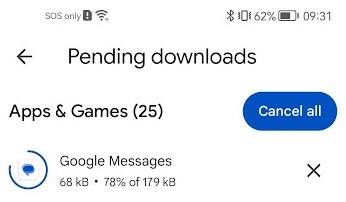
Here is a screenshot of how the apps look like.


ech3lon
386 posts

Ultimate Geek
+1 received by user: 123


  #3272626 16-Aug-2024 17:10
Send private message

Had this issue until enabling ipv6 on the router, it’s been a week and seems to fixed the issue.


 1 | 2 | 3 | 4 | 5 | 6
View this topic in a long page with up to 500 replies per page Create new topic


Geekzone Live »

Try automatic live updates from Geekzone directly in your browser, without refreshing the page, with Geekzone Live now.


Are you subscribed to our RSS feed? You can download the latest headlines and summaries from our stories directly to your computer or smartphone by using a feed reader.