Geekzone: technology news, blogs, forums
Guest
Welcome Guest.
You haven't logged in yet. If you don't have an account you can register now.


seoras

102 posts

Master Geek
+1 received by user: 22

ID Verified

#312123 19-Mar-2024 15:17
Send private message

The lovely EU want my business number so I can continue "trading" my Apps in Europe.


Not keen on giving my person numbers to then have to deal with cold callers (like the +223 one I got this morning!)


I've used Skype-to-go in the past for a business land line number. I thought of using them again but then decided best avoided.


So I need a number that no one of any importance will ever call, that should probably have a vmail box I can check when I remember, just in case someone does.


Anyone got any recommendations? Cheap preferably.


Sorry if VoIP is the wrong forum for this, I spent a while trying to pick the best place to ask and this seemed closest.



Create new topic
nicmair
250 posts

Master Geek
+1 received by user: 40


  #3208055 19-Mar-2024 15:25
Send private message

you could do a free 2-talk number? (then if you never registered a SIP device against it, you'd never get a call, spam or otherwise) 


Pricing (2talk.co.nz)


seoras

102 posts

Master Geek
+1 received by user: 22

ID Verified

  #3208066 19-Mar-2024 15:47
Send private message

nicmair:


you could do a free 2-talk number? (then if you never registered a SIP device against it, you'd never get a call, spam or otherwise) 


Pricing (2talk.co.nz)


Nice! Since this is VoIP is there a Linux SIP package I can install that'll answer and save voice messages?


I have an old Mac Mini that runs Ubuntu 22.04.3 LTS which is on permanently for development work.


I've got Fibre and I would assume my Orcon router will allow for port forwarding SIP to that server.


That would be the perfect solution I think.


shk292
2915 posts

Uber Geek
+1 received by user: 2040

Lifetime subscriber

  #3208069 19-Mar-2024 15:53
Send private message

You can configure 2talk to divert all calls to voicemail and then have the recordings automatically sent to your email address. I've set this up as an alternative VM system for 2degrees mobile


seoras

102 posts

Master Geek
+1 received by user: 22

ID Verified

  #3208075 19-Mar-2024 16:05
Send private message

shk292: You can configure 2talk to divert all calls to voicemail and then have the recordings automatically sent to your email address. I've set this up as an alternative VM system for 2degrees mobile


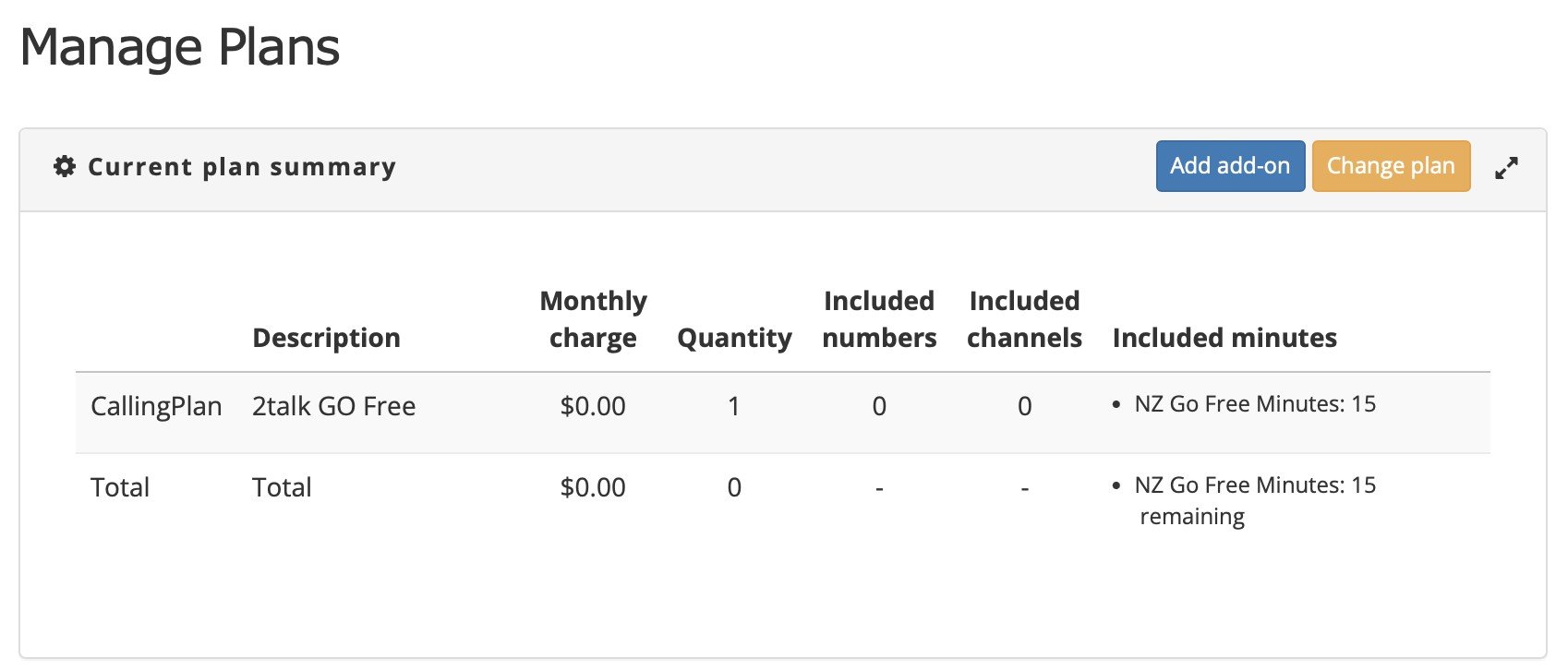
I've signed up, created an account. Now have a "CallingPlan 2talk GO Free". I assume I go to "Manage Numbers", and add a number for it? 


Which do I select, "2talk Non local DDI" or "2talk NZ Cloud"? ($6.90/month and $2.88/month respectively) to setup what you are suggesting?


bj99
169 posts

Master Geek
+1 received by user: 24


  #3208082 19-Mar-2024 16:21
Send private message

seoras:


shk292: You can configure 2talk to divert all calls to voicemail and then have the recordings automatically sent to your email address. I've set this up as an alternative VM system for 2degrees mobile


I've signed up, created an account. Now have a "CallingPlan 2talk GO Free". I assume I go to "Manage Numbers", and add a number for it? 


Which do I select, "2talk Non local DDI" or "2talk NZ Cloud"? ($6.90/month and $2.88/month respectively) to setup what you are suggesting?


To use the cloud based voicemail box choose the NZ Cloud option.


You could use procall.co.nz for $5.75/month which will also transcribe your voicemail messages and email them to you.


shk292
2915 posts

Uber Geek
+1 received by user: 2040

Lifetime subscriber

  #3208086 19-Mar-2024 16:27
Send private message

The one i set up is completely free but i can't remember the details, it's been a case of set and forget. I'll have a look this evening and post details

HP


Shop now for HP laptops and other devices (affiliate link).
nicmair
250 posts

Master Geek
+1 received by user: 40


  #3208103 19-Mar-2024 16:55
Send private message

Signing up to the free 2talk plan, will give you a new 028 number, (it should have been sent to you in one of the welcome emails, and or during the account setup, sorry been a while since I've used 2talk), you do not need to "add a number".


There are any number of Linux SIP softphones you can download for free, then just follow the 2talk SIP setting (Generic SIP Settings for 2talk) and add your number/account details and this will register the number and (assuming you get them right) will be active, e.g. you can call it and your softphone will ring, (most apps tell you they are happy by a displaying a green icon somewhere).


Cheers


seoras

102 posts

Master Geek
+1 received by user: 22

ID Verified

  #3208106 19-Mar-2024 16:59
Send private message

nicmair:


Signing up to the free 2talk plan, will give you a new 028 number, (it should have been sent to you in one of the welcome emails, and or during the account setup, sorry been a while since I've used 2talk), you do not need to "add a number".


There are any number of Linux SIP softphones you can download for free, then just follow the 2talk SIP setting (Generic SIP Settings for 2talk) and add your number/account details and this will register the number and (assuming you get them right) will be active, e.g. you can call it and your softphone will ring, (most apps tell you they are happy by a displaying a green icon somewhere).


Cheers


I checked the emails I got from them but no free number. Things might have changed since you signed up. The procall for $5 a month is looking best right now. Free would have been better! :)


richms
29098 posts

Uber Geek
+1 received by user: 10208

Trusted
Lifetime subscriber

  #3208111 19-Mar-2024 17:23
Send private message

What is wrong with a prepay sim that you just top up once a year to keep active?


Richard rich.ms

shk292
2915 posts

Uber Geek
+1 received by user: 2040

Lifetime subscriber

  #3208113 19-Mar-2024 17:37
Send private message

I've checked my 2talk setup.  I have two numbers as "2 talk Go Free" which allows CloudPBX features and appears to still be available for free according to this webpage: https://www.2talk.co.nz/pricing#voice


I've then set "do not disturb" to be always on, and in voicemail setup have set it up to send all messages to an email address.


I use this by diverting calls to this number instead of to the normal voicemail number, so messages arrive in email instead of having to access via calling VM and using the menu.


Hope that hekps


seoras

102 posts

Master Geek
+1 received by user: 22

ID Verified

  #3208164 19-Mar-2024 20:24
Send private message

richms: What is wrong with a prepay sim that you just top up once a year to keep active? 


In my experience the mobile prepays charge for listening to voice mail so I reckon there's a chance it could work out expensive.


If it turns out no one calls the number ever then that's certainly an option to move to.


Shop now for Dell laptops and other devices (affiliate link).
seoras

102 posts

Master Geek
+1 received by user: 22

ID Verified

  #3208166 19-Mar-2024 20:29
Send private message

shk292:


I've checked my 2talk setup.  I have two numbers as "2 talk Go Free" which allows CloudPBX features and appears to still be available for free according to this webpage: https://www.2talk.co.nz/pricing#voice


I've then set "do not disturb" to be always on, and in voicemail setup have set it up to send all messages to an email address.


I use this by diverting calls to this number instead of to the normal voicemail number, so messages arrive in email instead of having to access via calling VM and using the menu.


Hope that helps


That's the link I used to sign-up and setup. It created a plan but with no number. That's extra from what I can see. I think you've probably got a legacy freebie.


Create new topic


Geekzone Live »

Try automatic live updates from Geekzone directly in your browser, without refreshing the page, with Geekzone Live now.


Are you subscribed to our RSS feed? You can download the latest headlines and summaries from our stories directly to your computer or smartphone by using a feed reader.