Geekzone: technology news, blogs, forums
Guest
Welcome Guest.
You haven't logged in yet. If you don't have an account you can register now.


Devonboy

30 posts

Geek
+1 received by user: 6


#295973 10-May-2022 14:01
Send private message

My version of Microsoft Outlook (2013) has stopped saving my sent emails. This is what I've tried:


1. A Microsoft help entry suggests "Enable the Save copies of messages in the Sent Items folder option by following the steps below for your version of Outlook."


  1.  

    Click File, and then Options.


  2.  

    In the Outlook Options dialog, click Mail.


  3.  

    Under the Save messages section, enable the Save copies of messages in the Sent Items folder option.


  4.  

    Click OK.


The Save sent email box is already ticked. I've tried unticking, exiting and restarting Outlook then ticking the box again. No Change.


2. Microsoft also suggests: "The Save copies of messages in Sent Items folder option can be controlled using the Outlook Group Policy setting. You can find the policy setting below, depending on your version of Outlook. Policy Path: User Configuration/Administrative Templates/Microsoft Outlook 2013/Outlook Options/Preferences/E-mail Options"


I don't know where to find that policy path.


3. Microsoft also suggests: The Registry keys associated with the Save copies of messages in Sent Items folder option are as follows:

HKEY_CURRENT_USER\Software\Microsoft\Office\x.0\Outlook\Preferences
HKEY_CURRENT_USER\Software\Policies\Microsoft\Office\x.0\Outlook\Preferences


I've had a look and neither of those preferences show up in the tree.


Please can someone suggest a solution to this problem?


Create new topic

xpd

xpd
Geek of Coastguard
14115 posts

Uber Geek
+1 received by user: 4574

Retired Mod
ID Verified
Trusted
Lifetime subscriber

  #2912309 10-May-2022 14:07
Send private message

Tried a repair on the install ?


And IIRC theres a file/folder you can rename/remove and it rebuilds it correctly.....  will see if I can find it.


XPD / Gavin


LinkTree


freitasm
BDFL - Memuneh
80646 posts

Uber Geek
+1 received by user: 41030

Administrator
ID Verified
Trusted
Geekzone
Lifetime subscriber

  #2912316 10-May-2022 14:22
Send private message

What email service are you using?


Do the messages appear online (if it's a cloud-based service like O365 Exchange, Hotmail/Outlook, Gmail)?


Referral links: Quic Broadband (free setup code: R587125ERQ6VE) | Samsung | AliExpress | Wise | Sharesies 


Support Geekzone by subscribing (browse ads-free), or making a one-off or recurring donation through PressPatron.


Devonboy

30 posts

Geek
+1 received by user: 6


  #2912329 10-May-2022 14:42
Send private message

I am using isp xtramail.co.nz. My sent emails are not saved there either. I don't think there are any settings for this and what is saved is set by the Outlook application.


I haven't done a repair yet. That was going to be my fall back solution if there was no other option.


PolicyGuy
1820 posts

Uber Geek
+1 received by user: 1769

ID Verified
Lifetime subscriber

  #2912346 10-May-2022 15:06
Send private message

I can't help with your disappearing 'Sent Items', I've never seen that problem, but I thought I'd just point out that support for Office 2013 ends on 11 April 2023, so you might want to consider an update.


https://office-watch.com/2022/office-2013-countdown-has-begun-but-dont-panic/


1101
3141 posts

Uber Geek
+1 received by user: 1143


  #2912568 11-May-2022 10:05
Send private message

POP3 or imap ?


If imap, then Outlook can be  buggy
Add to that Outllook 2013 can be more buggy (new versions of Outlook seem to work better)

If IMAP
try another email program
emclient


Otherwise , delete the Outlook profile, resetup email in outlook


Devonboy

30 posts

Geek
+1 received by user: 6


  #2912576 11-May-2022 10:28
Send private message

Thank you for all your input.


I found a solution however last night without doing anything drastic.


I apologise for one misleading statement. It is in fact Office 2016 I have, updated earlier this year.


Solution: I looked for emails in the search box at the top, putting in a keyword, and changed the location box from CURRENT FOLDER to ALL MAILBOXES. All my emails, including the sent ones were there! These were all the sent emails, recent and past back to 2015. I was able to open the sent email  I was looking for to extract the information I needed. 


Where exactly the sent emails are located I have no idea. I can't seem to view a location for them but at this worked for me and I'm back in business.


If anyone knows where these sent emails are stored I'd be very grateful. I still find that any new sent emails are not saved to the SENT folder.


M.


Shop now for Lego sets and other gifts (affiliate link).
wellygary
8810 posts

Uber Geek
+1 received by user: 5287


  #2912594 11-May-2022 10:50
Send private message

Devonboy:


Where exactly the sent emails are located I have no idea. I can't seem to view a location for them but at this worked for me and I'm back in business.


If anyone knows where these sent emails are stored I'd be very grateful. I still find that any new sent emails are not saved to the SENT folder.


M.


They will all be sitting in a stonkingly big file called  "outlook.pst" that will be buried in the outlook folders on you HDD somewhere


allan
2073 posts

Uber Geek
+1 received by user: 899

ID Verified
Lifetime subscriber

  #2912597 11-May-2022 11:00
Send private message

Devonboy:


Thank you for all your input.


I found a solution however last night without doing anything drastic.


I apologise for one misleading statement. It is in fact Office 2016 I have, updated earlier this year.


Solution: I looked for emails in the search box at the top, putting in a keyword, and changed the location box from CURRENT FOLDER to ALL MAILBOXES. All my emails, including the sent ones were there! These were all the sent emails, recent and past back to 2015. I was able to open the sent email  I was looking for to extract the information I needed. 


Where exactly the sent emails are located I have no idea. I can't seem to view a location for them but at this worked for me and I'm back in business.


If anyone knows where these sent emails are stored I'd be very grateful. I still find that any new sent emails are not saved to the SENT folder.


M. 


Sounding like you are using IMAP, where Outlook's Sent Items folder is not necessarily the same as your IMAP server's Sent Items folder. Try looking to see if you have ay sub-folders under your Inbox. Some chance you might find it there.


freitasm
BDFL - Memuneh
80646 posts

Uber Geek
+1 received by user: 41030

Administrator
ID Verified
Trusted
Geekzone
Lifetime subscriber

  #2912611 11-May-2022 11:51
Send private message

Open one of the sent emails. Click "File" on top left and you should see something like this:


Make sure you have a full backup of your computer. If you are not using IMAP then your emails exist only on your computer and if it dies, they are gone.


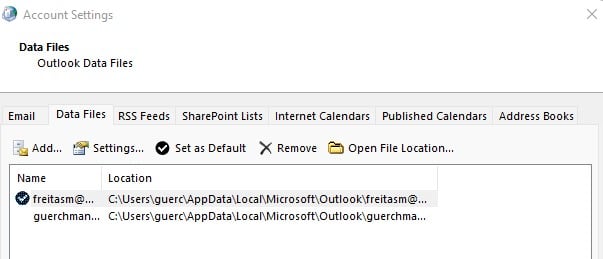
To find out where your Outlook email files live, open Control Panel and click Mail (Microsoft Outlook). Then click [Data Files] to see something like this:


Do not mess with these files but if Oulook is closed you can create backups. Also do not move these files to a network folder.


Referral links: Quic Broadband (free setup code: R587125ERQ6VE) | Samsung | AliExpress | Wise | Sharesies 


Support Geekzone by subscribing (browse ads-free), or making a one-off or recurring donation through PressPatron.


Devonboy

30 posts

Geek
+1 received by user: 6


  #2915556 18-May-2022 13:20
Send private message

A bit late in responding to the last emails.


Thanks for all feedback.


Turns out that there were two folders labelled sent. One was 'Sent Emails', the other just 'Sent'. Not sure how the first of these came to be as I didn't create it on purpose but that's where I was looking and it was empty. Instead the 'Sent' folder, in a different part of the list, had the sent emails all the time.


Baffling but solved.


Create new topic


Geekzone Live »

Try automatic live updates from Geekzone directly in your browser, without refreshing the page, with Geekzone Live now.


Are you subscribed to our RSS feed? You can download the latest headlines and summaries from our stories directly to your computer or smartphone by using a feed reader.