Geekzone: technology news, blogs, forums
Guest
Welcome Guest.
You haven't logged in yet. If you don't have an account you can register now.


rb99

3505 posts

Uber Geek
+1 received by user: 1830

Lifetime subscriber

#306967 8-Sep-2023 15:07
Send private message

Just bought a Samsung T7 portable SSD. Works fine on usb 2.0 (big connector), works fine using usb 3.0 (small connector). Won't work on usb 3.0 with big connector - its light lights up but not seen by PC in explorer.


Any thought maybe. Nothing obvious found google wise. Am on Windows 11.



“The modern conservative is engaged in one of man's oldest exercises in moral philosophy; that is, the search for a superior moral justification for selfishness.” -John Kenneth Galbraith


rb99


Create new topic
concordnz
492 posts

Ultimate Geek
+1 received by user: 277

Trusted
EMT (R)

  #3125025 8-Sep-2023 15:46
Send private message

Picture of connector which won't work please?

If it's a 'device connector' like the square one on a printer, then of course it won't work.


wellygary
8810 posts

Uber Geek
+1 received by user: 5287


  #3125035 8-Sep-2023 15:56
Send private message

Try a different USB3 port, and then with a different cable , report back on what the result is....


rb99

3505 posts

Uber Geek
+1 received by user: 1830

Lifetime subscriber

  #3125036 8-Sep-2023 16:08
Send private message

The connector is the standard large usb narrow but wide type. Have 4 on the front of the main PC, labelled usb2.0 and usb 3.0.


I've tried in both the usb 3.0 ports and one of the 2.0 ports. Nothing in either 3.0 but works in 2.0 port. The cable came with the SSD. I have used portable hdd's in those 3.0 ports before, no problem.


I'm copying stuff from the laptop to the ssd using the small reversible usb cable it came with, then from the ssd to the main PC using the normal big connector usb cable (that it came with).


Might be able to try with another cable later today or tomorrow.


“The modern conservative is engaged in one of man's oldest exercises in moral philosophy; that is, the search for a superior moral justification for selfishness.” -John Kenneth Galbraith


rb99


Qazzy03
545 posts

Ultimate Geek
+1 received by user: 492


  #3125037 8-Sep-2023 16:11
Send private message

Dumb question but you sure your front panel usb3 ports are hooked up?
I have don't that before lol.
Could be worth trying the USB 3.0 on the back up if your motherboard had dedicated.

rb99

3505 posts

Uber Geek
+1 received by user: 1830

Lifetime subscriber

  #3125040 8-Sep-2023 16:18
Send private message

Qazzy03: Dumb question but you sure your front panel usb3 ports are hooked up?
I have don't that before lol.
Could be worth trying the USB 3.0 on the back up if your motherboard had dedicated.


Well the ssd status light glows when plugged into the 3.0 ports (either one) and am (99%) sure they worked when trying with HDDs.


But yes I should try round the back connectors as well. Has to be later as the ssd is copying now, slowly but its working.


“The modern conservative is engaged in one of man's oldest exercises in moral philosophy; that is, the search for a superior moral justification for selfishness.” -John Kenneth Galbraith


rb99


rb99

3505 posts

Uber Geek
+1 received by user: 1830

Lifetime subscriber

  #3126389 12-Sep-2023 08:59
Send private message

Plugged ssd into usb round the back, not sure if its 2.0 or 3.0, but its about 3 times faster - 125MB/s vs 41MB/2 on the front usb 2.0.


I guess not all usb's are created equal.


“The modern conservative is engaged in one of man's oldest exercises in moral philosophy; that is, the search for a superior moral justification for selfishness.” -John Kenneth Galbraith


rb99


Shop now for Lego sets and other gifts (affiliate link).

xpd

xpd
Geek of Coastguard
14116 posts

Uber Geek
+1 received by user: 4578

Retired Mod
ID Verified
Trusted
Lifetime subscriber

  #3126393 12-Sep-2023 09:03
Send private message

Front USB ports generally don't pump through a lot of power, theyre fine for headsets etc but anything requiring a bit of a kick such as drives, appear to power on but not do anything else. Ive had many USB powered HDDs etc fail on front USB ports, plug them into the rear ones, and all good.


XPD / Gavin


LinkTree


rb99

3505 posts

Uber Geek
+1 received by user: 1830

Lifetime subscriber

  #3126409 12-Sep-2023 09:42
Send private message

Would that apply to solid state SSDs ? It looks like it could (as you say power on, do nothing), just a bit surprised.


“The modern conservative is engaged in one of man's oldest exercises in moral philosophy; that is, the search for a superior moral justification for selfishness.” -John Kenneth Galbraith


rb99


Mehrts
1112 posts

Uber Geek
+1 received by user: 984

Trusted

  #3126429 12-Sep-2023 10:59
Send private message

FYI, the physical USB ports don't determine the USB standard used.

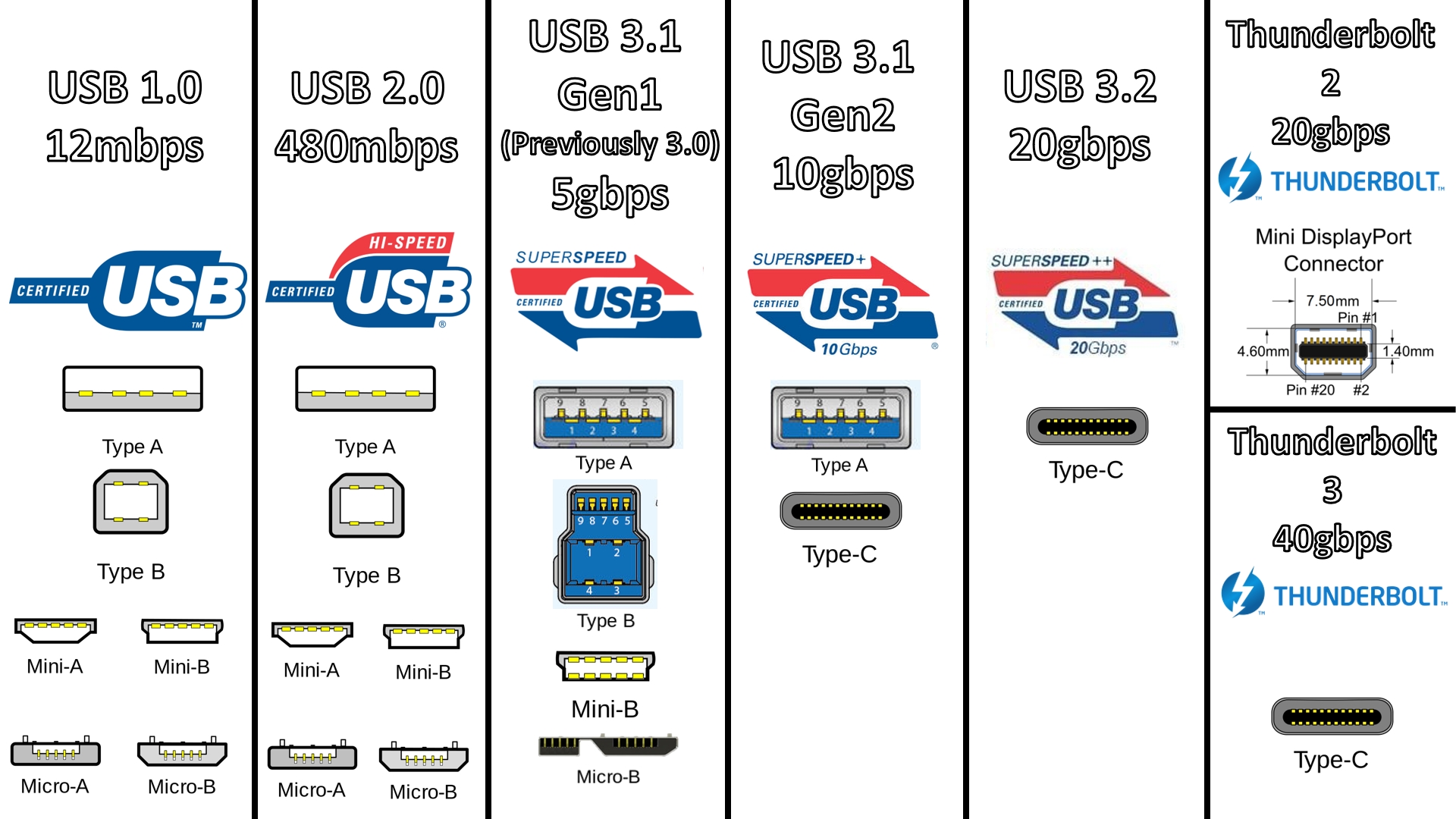
Here's a great image which shows which connectors would typically be used for each USB standard. As you can see, there is a crossover between the "classic" rectangular Type-A form factor, and the newer Type-C form factor.

Most of the USB terminology is confusing for anyone to get their head around, it's a proper mess.


Що таке USB Type-C? GECID.com. Сторінка 1


gehenna
8667 posts

Uber Geek
+1 received by user: 3883

Moderator
Trusted
Lifetime subscriber

  #3126430 12-Sep-2023 11:04
Send private message

rb99:


Would that apply to solid state SSDs ? It looks like it could (as you say power on, do nothing), just a bit surprised.


as opposed to not solid state ssds?


rb99

3505 posts

Uber Geek
+1 received by user: 1830

Lifetime subscriber

  #3126456 12-Sep-2023 12:06
Send private message

Mehrts:


FYI, the physical USB ports don't determine the USB standard used.

Here's a great image which shows which connectors would typically be used for each USB standard. As you can see, there is a crossover between the "classic" rectangular Type-A form factor, and the newer Type-C form factor.

Most of the USB terminology is confusing for anyone to get their head around, it's a proper mess.


Що таке USB Type-C? GECID.com. Сторінка 1


I'm sure its a very carefully thought out system...


“The modern conservative is engaged in one of man's oldest exercises in moral philosophy; that is, the search for a superior moral justification for selfishness.” -John Kenneth Galbraith


rb99


HP


Shop now for HP laptops and other devices (affiliate link).
rb99

3505 posts

Uber Geek
+1 received by user: 1830

Lifetime subscriber

  #3126457 12-Sep-2023 12:07
Send private message

gehenna:


rb99:


Would that apply to solid state SSDs ? It looks like it could (as you say power on, do nothing), just a bit surprised.


as opposed to not solid state ssds?


Its always good to emphasize things by repeating them 😀


“The modern conservative is engaged in one of man's oldest exercises in moral philosophy; that is, the search for a superior moral justification for selfishness.” -John Kenneth Galbraith


rb99


Behodar
11096 posts

Uber Geek
+1 received by user: 6075

Trusted
Lifetime subscriber

  #3126478 12-Sep-2023 12:59
Send private message

Mehrts:


FYI, the physical USB ports don't determine the USB standard used.

Here's a great image which shows which connectors would typically be used for each USB standard. As you can see, there is a crossover between the "classic" rectangular Type-A form factor, and the newer Type-C form factor.

Most of the USB terminology is confusing for anyone to get their head around, it's a proper mess.


Що таке USB Type-C? GECID.com. Сторінка 1


Nice and confusing. Also, as far as I know, wrong. The Mini connectors were introduced with USB 1.1, not 1.0 :)


Mehrts
1112 posts

Uber Geek
+1 received by user: 984

Trusted

  #3126482 12-Sep-2023 13:10
Send private message

Behodar:


Nice and confusing. Also, as far as I know, wrong. The Mini connectors were introduced with USB 1.1, not 1.0 :)


Most probably is wrong, but if you're still dealing with USB 1.0/1.1, then you've probably got other things to worry about haha.


Create new topic


Geekzone Live »

Try automatic live updates from Geekzone directly in your browser, without refreshing the page, with Geekzone Live now.


Are you subscribed to our RSS feed? You can download the latest headlines and summaries from our stories directly to your computer or smartphone by using a feed reader.