Geekzone: technology news, blogs, forums
Guest
Welcome Guest.
You haven't logged in yet. If you don't have an account you can register now.


bluegreville

2 posts

Wannabe Geek


#303618 23-Feb-2023 10:53
Send private message

I hope someone here will be able to help me.


I am down in the Hawkes Bay assisting some people who have been affected by the recent cyclone, set up a couple of starlink units.


Now the assembly of the units is fine and the router and dish power up. The dish connects to the satellites and router allows me to set up a WIFI SSID.


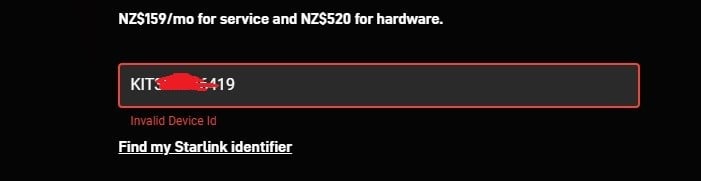
However, when it comes to activating the service i get an Invalid Device ID message. I have tried both the KIT number and the terminal ID from the settings inside the Starlink App.
I have checked that there are no trailing spaces after the KIT number and i have also tried from different devices and internet connections in case there was a problem with connectivity out there.


The Units were brought from Noel Leeming and Not directly from Starlink.


I have attached some screenshots of what i get.


Any help would be greatly appreciated.


Create new topic
djtOtago
1181 posts

Uber Geek
+1 received by user: 605


  #3040796 23-Feb-2023 11:03
Send private message

I've not set up Starlink before but.


Was does the "Find my Starlink identifier" link from your images tell you.


Have you tried your KIT number without the letters KIT?


robjg63
4161 posts

Uber Geek
+1 received by user: 1425

Subscriber

  #3040803 23-Feb-2023 11:08
Send private message

I presume you have an account on the Starlink site. Are there no support contact details?


I wonder if maybe its been previously activated???


Nothing is impossible for the man who doesn't have to do it himself - A. H. Weiler


djtOtago
1181 posts

Uber Geek
+1 received by user: 605


  #3040806 23-Feb-2023 11:12
Send private message

From Starlinks support page https://support.starlink.com/?topic=2802431a-135f-0671-4c1b-4cedb65b291a


Starlink Identifier formats:


 Kit Serial Number: Located on the Starlink Kit shipping label (ex. KIT00000000) 
 Dish Serial Number: Located on the bottom of the Starlink mast (ex. 2ABC000000000000)
 Terminal ID: Found in the Starlink App while your Starlink is powered on. App home screen > Settings > Advanced > STARLINK > ID (ex. 00000000-00000000-00000000 - do not include "ut" in front)


bluegreville

2 posts

Wannabe Geek


  #3041166 24-Feb-2023 08:08
Send private message

Have tried both KIT number and the terminal id from the settings in the App. Noel leeming stated that the units they are reselling were initially intended for a different region in the world, so i am wondering if Starlink need to activate them in this region.


They are currently running off generator power, so we don't want to leave them running all the time and chew through fuel. I will get them to a permanent power source and see if leaving them on overnight gets them to register with starlink so we can activate internet.


tim0001
274 posts

Ultimate Geek
+1 received by user: 146


  #3041195 24-Feb-2023 10:20
Send private message

Possibly returned units.  Initially when NL started selling SL, they gave incorrect instructions on how to enable the subscription.  The instructions put people on the RV plan (which most people don’t want).  You couldn’t transfer back to the residential sub, so people returned their dish and bought new ones.  At some point, NL had a stash of returned dishes. 


SL support is slow at the moment, so I'd suggest escalating through NL.


Create new topic


Geekzone Live »

Try automatic live updates from Geekzone directly in your browser, without refreshing the page, with Geekzone Live now.


Are you subscribed to our RSS feed? You can download the latest headlines and summaries from our stories directly to your computer or smartphone by using a feed reader.
