Geekzone: technology news, blogs, forums
Guest
Welcome Guest.
You haven't logged in yet. If you don't have an account you can register now.


K8Toledo

1018 posts

Uber Geek
+1 received by user: 311


#304431 3-May-2023 07:34
Send private message

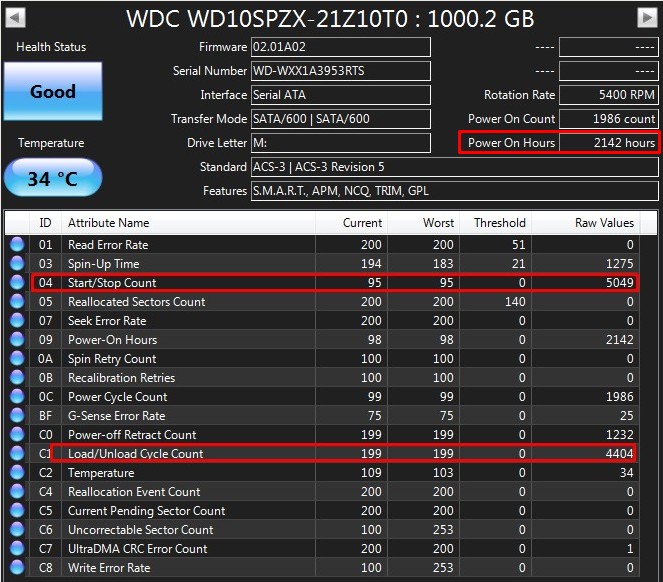
Figured this was worth posting - pulled from a (near) brand new Acer.   I can see these drives will all die an early death.


Edit:


Stats from identical drive - what gives?


Filter this topic showing only the reply marked as answer Create new topic
paulgr
1140 posts

Uber Geek
+1 received by user: 71


  #3070706 3-May-2023 08:06
Send private message

Power on count of 42 and start/stop count of 5831 don't make sense.
Maybe CrystalDiskInfo doesn't like the drive controller.


The main one to watch is the Reallocated Sector Count which is still zero.
That will bring down the health rating and show the drive is really on the way out.


K8Toledo

1018 posts

Uber Geek
+1 received by user: 311


  #3070716 3-May-2023 08:44
Send private message

paulgr:


Power on count of 42 and start/stop count of 5831 don't make sense.
Maybe CrystalDiskInfo doesn't like the drive controller.


The main one to watch is the Reallocated Sector Count which is still zero.
That will bring down the health rating and show the drive is really on the way out.


WD drives with High Load Cycle are notorious for dying early. The actuator wears out leading to mechanical failure.


xpd

xpd
Geek of Coastguard
14124 posts

Uber Geek
+1 received by user: 4590

Retired Mod
ID Verified
Trusted
Lifetime subscriber

  #3070722 3-May-2023 09:01
Send private message

Try with HDSentinel and see if it reports the same.


XPD / Gavin


LinkTree


K8Toledo

1018 posts

Uber Geek
+1 received by user: 311


  #3070723 3-May-2023 09:04
Send private message

paulgr:


Power on count of 42 and start/stop count of 5831 don't make sense.
Maybe CrystalDiskInfo doesn't like the drive controller.


The main one to watch is the Reallocated Sector Count which is still zero.
That will bring down the health rating and show the drive is really on the way out.


Toshiba MQ 2.5 series as well, from around 150,000 Load/Unload cycles they slowly grind to a halt. 


Here's average 3.5" drive for comparison: 


allio
895 posts

Ultimate Geek
+1 received by user: 529


  #3070748 3-May-2023 10:00
Send private message

Looking at the 4 WD drives in my server:


  • Red 3TB: 117 load cycles in 73,081 hours
  • Red 4TB: 22,025 load cycles in 33,782 hoiurs
  • White label 12TB: 7,202 load cycles in 20,748 hours
  • White label 14TB: 527 load cycles in 11,314 hours

Not sure what to make of that really, except the drive in your first post is behaving very very strangely.


I don't think these numbers are especially reliable. The 3TB red has 224 power cycles. How would it only have 117 load cycles?


openmedia
3456 posts

Uber Geek
+1 received by user: 880

Trusted

  #3070802 3-May-2023 12:41
Send private message

Not that unusual for laptop class drives. 


Generally known online as OpenMedia, now working for Red Hat APAC as a Technology Evangelist and Portfolio Architect. Still playing with MythTV and digital media on the side.


Shop now for Dell laptops and other devices (affiliate link).
Jase2985
13746 posts

Uber Geek
+1 received by user: 6230

ID Verified
Lifetime subscriber

  #3070829 3-May-2023 14:28
Send private message

allio:


Looking at the 4 WD drives in my server:


  • Red 3TB: 117 load cycles in 73,081 hours
  • Red 4TB: 22,025 load cycles in 33,782 hoiurs
  • White label 12TB: 7,202 load cycles in 20,748 hours
  • White label 14TB: 527 load cycles in 11,314 hours

Not sure what to make of that really, except the drive in your first post is behaving very very strangely.


I don't think these numbers are especially reliable. The 3TB red has 224 power cycles. How would it only have 117 load cycles?


similar here, 2TB WD Red, 85,252 hours and 1,087,287 load/unload cycles, still going fine, has 41,379 start stop counts.


K8Toledo

1018 posts

Uber Geek
+1 received by user: 311


  #3070894 3-May-2023 16:29
Send private message

openmedia:


Not that unusual for laptop class drives. 


It is for a 42hr old drive.  It's insanely high.


The Smart Load Cycle/Start Stop (same thing) attribute is down to 95 after just 2 days.


K8Toledo

1018 posts

Uber Geek
+1 received by user: 311


  #3070896 3-May-2023 16:31
Send private message

I'll look up the serial number, will report back....


Jase2985
13746 posts

Uber Geek
+1 received by user: 6230

ID Verified
Lifetime subscriber

  #3070908 3-May-2023 16:47
Send private message

i think you are reading to much into the results which are known to not be accurate 


KiwiSurfer
1732 posts

Uber Geek
+1 received by user: 999

ID Verified
Lifetime subscriber

  #3070978 3-May-2023 19:24
Send private message

Indeed. I've had drives reporting healthy SMART results running into issues reading/writing sectors when tested using utilities that test by reading/writing all sectors on a HDD (and still report a healthy SMART result!).


Unless the drive is definitely performing poorly or making any kind of trouble, I'd just take a note of the SMART results as a curiosity and keep an eye on it.


If you're running Linux there are some useful utliies you can use. Some can do non-destructive read tests. However I found the best test are destructive read/write tests as they test that every write is read back excatly the same. Bad drives seem to fail these sort of tests fairly quickly.


SMART is good only as one of many tools in your toolbox. And regardless you should always be backing up!


Shop now at Mighty Ape (affiliate link).
fe31nz
1295 posts

Uber Geek
+1 received by user: 423


  #3072059 3-May-2023 23:26
Send private message

That sounds like its idle timeout it set too low.  This was a problem back when the first WD green drives were released (2009?), and I can remember having to run a little 3rd party utility called wdidle3 to increase the timeout.  It would be worth trying to see if it can still set the idle timer of modern WD drive, or if there is another way to do that how.


K8Toledo

1018 posts

Uber Geek
+1 received by user: 311


  #3072495 4-May-2023 23:20
Send private message

fe31nz:


That sounds like its idle timeout it set too low.  This was a problem back when the first WD green drives were released (2009?), and I can remember having to run a little 3rd party utility called wdidle3 to increase the timeout.  It would be worth trying to see if it can still set the idle timer of modern WD drive, or if there is another way to do that how.


Hi thanks I'm familiar with wdiddle, and the greens.


The drive in question averages 142 cycles per hour.  That extrapolates to 264,000 at 2,000hrs and 1,320,000 at 10,000hrs.....


I have a stack of maybe 30 problem drives on a shelf, many with high Load/Unload counts - but nowhere near this high (relative to power on time). 


The SMART report in the second screenshot I posted is an identical drive, same firmware, but with radically different numbers - what I'd consider to be within normal range.


Why such a big difference between the two drives, I have no idea. So far it seems to be an anomaly. 


Jase2985
13746 posts

Uber Geek
+1 received by user: 6230

ID Verified
Lifetime subscriber

  #3072744 5-May-2023 16:27
Send private message

Jase2985:


i think you are reading to much into the results which are known to not be accurate 


this


Filter this topic showing only the reply marked as answer Create new topic


Geekzone Live »

Try automatic live updates from Geekzone directly in your browser, without refreshing the page, with Geekzone Live now.


Are you subscribed to our RSS feed? You can download the latest headlines and summaries from our stories directly to your computer or smartphone by using a feed reader.
