Geekzone: technology news, blogs, forums
Guest
Welcome Guest.
You haven't logged in yet. If you don't have an account you can register now.


dukester

477 posts

Ultimate Geek
+1 received by user: 48

ID Verified
Lifetime subscriber

#295332 22-Mar-2022 10:20
Send private message

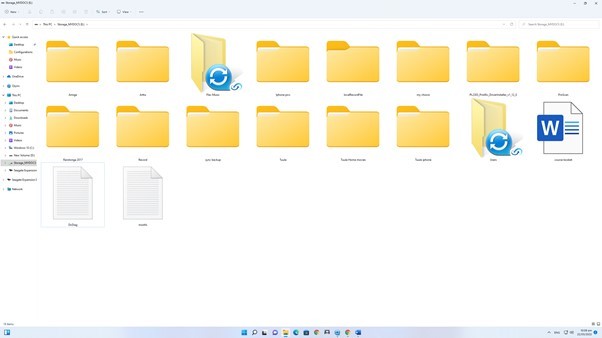
I have just reinstalled windows 11. Having an issue with setting up Qsync to backup to my NAS box again. It worked fine before I reinstalled. When I try to select the folders on computer I want to backup I get a error message, This folder does not support sync. It seems I can select any folder I want except for the 3 I had previously been syncing. 


As shown in the picture, the folder Icon has a Qsync symbol on it. 


Create new topic
dukester

477 posts

Ultimate Geek
+1 received by user: 48

ID Verified
Lifetime subscriber

  #2890419 23-Mar-2022 08:07
Send private message

I found a work around on qnap forums. 


Create a new folder on second drive


copy contents of problem folder to new folder


rename old folder


copy new folder and contents back to drive I needed it on


Took about 6 hours due to size of folder but it solve the problem


frankv
5705 posts

Uber Geek
+1 received by user: 3666

Lifetime subscriber

  #2890420 23-Mar-2022 08:17
Send private message

Doo you really need/want QSync? Try FreeFileSync instead?


Create new topic


Geekzone Live »

Try automatic live updates from Geekzone directly in your browser, without refreshing the page, with Geekzone Live now.


Are you subscribed to our RSS feed? You can download the latest headlines and summaries from our stories directly to your computer or smartphone by using a feed reader.
