Geekzone: technology news, blogs, forums
Guest
Welcome Guest.
You haven't logged in yet. If you don't have an account you can register now.


OldGeek

989 posts

Ultimate Geek
+1 received by user: 409

ID Verified
Lifetime subscriber

#311831 18-Feb-2024 13:43
Send private message

I recently had a problem logging on to My 2D (the logon reverted back to the logon screen with a 'your session has timed out' error message).  I tried Firefox and said logon worked.  The solution in Edge was to clear cache (Settings/Privacy Search and Services/clear browsing data) but there is no ability to limit this to items from a particular URL (such as My 2D).  Using this logged me out of everything (including Geekzone).  This is not a biggie but I wondered if I could limit the extent of what is cleared so as to allow unaffected URLs to retain cookies etc.




-- 

OldGeek.


Quic referal code: https://account.quic.nz/refer/581402 and use this code for free setup: R581402E48MJA


Create new topic
gehenna
8667 posts

Uber Geek
+1 received by user: 3883

Moderator
Trusted
Lifetime subscriber

  #3197125 18-Feb-2024 14:59
Send private message

Keep cookies if you don't want to be logged out, clear everything else.


ANglEAUT
altered-ego
2436 posts

Uber Geek
+1 received by user: 842

Trusted
Lifetime subscriber

  #3197252 18-Feb-2024 21:07
Send private message

OldGeek: ... but I wondered if I could limit the extent of what is cleared so as to allow unaffected URLs to retain cookies etc. 


Yes, there is.


Sorry, can't provide screenshots for easy assistance


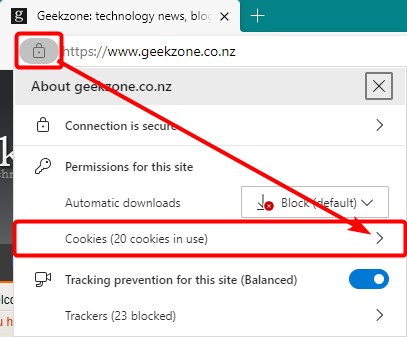
  1. Visit the required site


    1. Click the SSL lock in the address bar
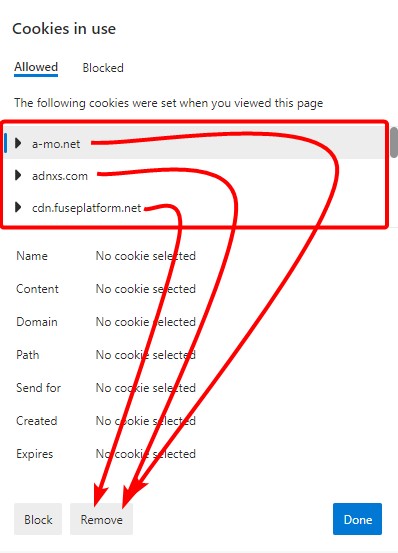
    2. Click site data
    3. Delete cookies


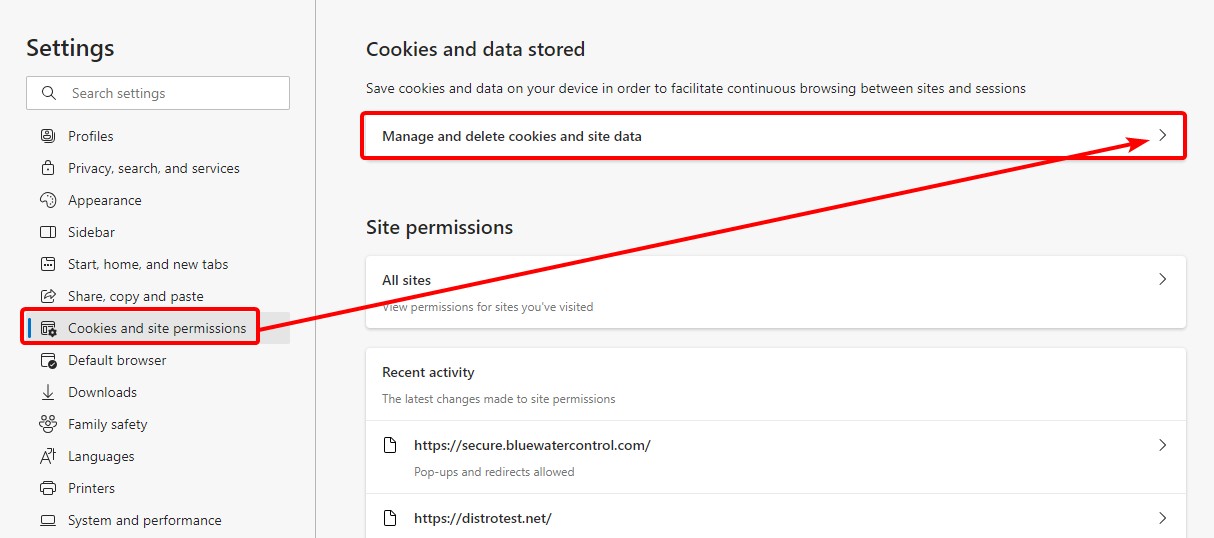
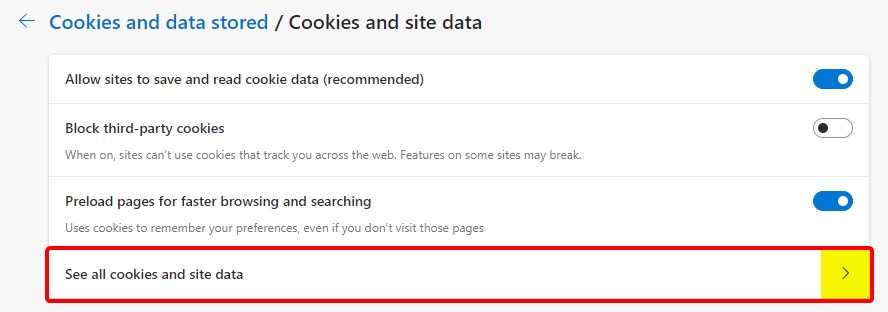
  2. Via Settings


    1. Cookies and site permissions
    2. Manage and delete cookies and site data
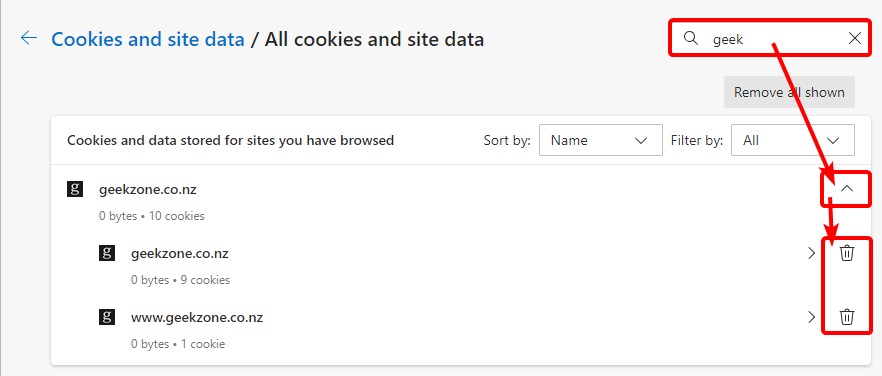
    3. See all cookies and site data
    4. Search for site
    5. Expand site
    6. Click trash can to delete cookies & cached site content


Edit: Via Settings updated process. See screenshots below.


Please keep this GZ community vibrant by contributing in a constructive & respectful manner.


ANglEAUT
altered-ego
2436 posts

Uber Geek
+1 received by user: 842

Trusted
Lifetime subscriber

  #3197253 18-Feb-2024 21:08
Send private message

gehenna: Keep cookies if you don't want to be logged out, clear everything else.


I believe it's the cookies that cause the login loop. Had a similar experience with AWS AppStream. This login loop happened when people didn't log out but closed the browser over & over again.


Please keep this GZ community vibrant by contributing in a constructive & respectful manner.


freitasm
BDFL - Memuneh
80654 posts

Uber Geek
+1 received by user: 41050

Administrator
ID Verified
Trusted
Geekzone
Lifetime subscriber

  #3197274 18-Feb-2024 22:51
Send private message

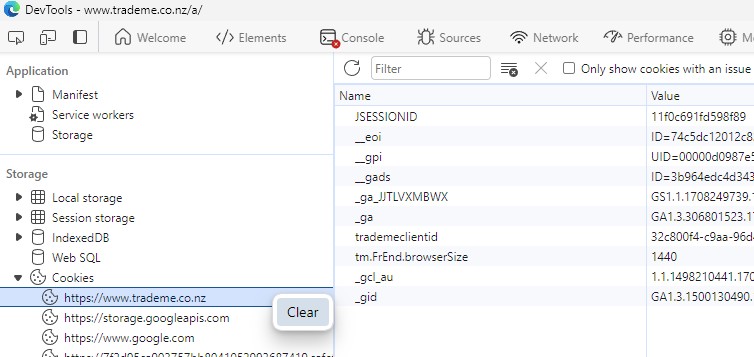
  • CTRL-SHIFT-I
  • Select the Appplication tab
  • Right-click the site name under Cookies and select Clear


Referral links: Quic Broadband (free setup code: R587125ERQ6VE) | Samsung | AliExpress | Wise | Sharesies 


Support Geekzone by subscribing (browse ads-free), or making a one-off or recurring donation through PressPatron.


OldGeek

989 posts

Ultimate Geek
+1 received by user: 409

ID Verified
Lifetime subscriber

  #3197348 19-Feb-2024 08:24
Send private message

Many thanks to all - I will certainly try some of those suggestions.


-- 

OldGeek.


Quic referal code: https://account.quic.nz/refer/581402 and use this code for free setup: R581402E48MJA


ANglEAUT
altered-ego
2436 posts

Uber Geek
+1 received by user: 842

Trusted
Lifetime subscriber

  #3197453 19-Feb-2024 11:56
Send private message

1. Visit the required site ...


2. Via Settings


Please keep this GZ community vibrant by contributing in a constructive & respectful manner.


Create new topic


Geekzone Live »

Try automatic live updates from Geekzone directly in your browser, without refreshing the page, with Geekzone Live now.


Are you subscribed to our RSS feed? You can download the latest headlines and summaries from our stories directly to your computer or smartphone by using a feed reader.