Geekzone: technology news, blogs, forums
Guest
Welcome Guest.
You haven't logged in yet. If you don't have an account you can register now.


OldGeek

989 posts

Ultimate Geek
+1 received by user: 409

ID Verified
Lifetime subscriber

#315936 31-Aug-2024 09:38
Send private message

I have occasionally experienced problems with a website, and then been advised by the website support to 'clear cache' or use another browser.  I am using a Windows 11 laptop with Edge as my preferred browser but Firefox also installed.  Clearing Cache (even if just cookies) in its entirety is very disruptive.  Every website that has a requirement to log on (including Geekzone) requires the user to log on again and some websites go through a 'new device' dialog.


Is there a way to 'clear cache' for a specific website?  I am aware that in Edge there is an option in Developer Tools with ctrl-R but the feedback on whether this has even run is insufficient.  I am looking for a way to do this that is intended for use by non-techies.



-- 

OldGeek.


Quic referal code: https://account.quic.nz/refer/581402 and use this code for free setup: R581402E48MJA


Create new topic
ANglEAUT
altered-ego
2436 posts

Uber Geek
+1 received by user: 841

Trusted
Lifetime subscriber

  #3277357 31-Aug-2024 10:39
Send private message

Yes, there is.


Click the SSL lock icon at the beginning of the address bar, & from there you can clear the cookies. From there, you should also be able to see "website data" & clear the cache for that specific site. Sorry for not providing screenshots.


Please keep this GZ community vibrant by contributing in a constructive & respectful manner.


OldGeek

989 posts

Ultimate Geek
+1 received by user: 409

ID Verified
Lifetime subscriber

  #3277358 31-Aug-2024 10:51
Send private message

Perfect.  Many thanks - an explanation I did not find on Google.


-- 

OldGeek.


Quic referal code: https://account.quic.nz/refer/581402 and use this code for free setup: R581402E48MJA


OldGeek

989 posts

Ultimate Geek
+1 received by user: 409

ID Verified
Lifetime subscriber

  #3277364 31-Aug-2024 11:52
Send private message

It is interesting that when I cleared cookies for marksandspenser.com, I was also forced to log on again to geekzone but not gmail.  So it looks like the suggestion of using the SSL lock symbol to remove cookies can remove cookies for other websites.


-- 

OldGeek.


Quic referal code: https://account.quic.nz/refer/581402 and use this code for free setup: R581402E48MJA


freitasm
BDFL - Memuneh
80646 posts

Uber Geek
+1 received by user: 41030

Administrator
ID Verified
Trusted
Geekzone
Lifetime subscriber

  #3277367 31-Aug-2024 12:11
Send private message

CTRL-SHIFT-DELETE will clear all cookies for all websites (plus other options).


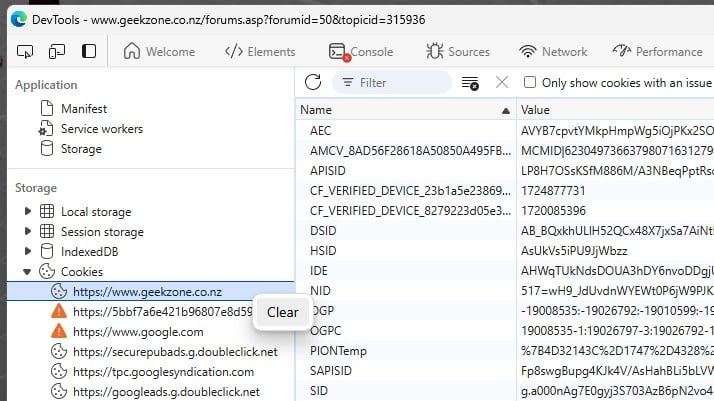
If you want to delete for one website only, the easiest way is to open Developer Tools (CTRL-SHIFT-I on Chrome/Edge) and switch to the Application tab.


Then expand the Cookies and right-click on the website name. That will clear cookies for that site only.


Note that some websites use the "Storage" items in that list too, so sometimes clearing cookies is not enough, but this is a good start.


Referral links: Quic Broadband (free setup code: R587125ERQ6VE) | Samsung | AliExpress | Wise | Sharesies 


Support Geekzone by subscribing (browse ads-free), or making a one-off or recurring donation through PressPatron.


yitz
2238 posts

Uber Geek
+1 received by user: 594


  #3277369 31-Aug-2024 12:37
Send private message

Be careful with partially clearing though some SSO sites might break and if you clear Google cookies your reCAPTCHA score may be affected so the challenges get harder or your IP gets marked for bad reputation.


MadEngineer
4591 posts

Uber Geek
+1 received by user: 2570

Trusted

  #3277393 31-Aug-2024 14:47
Send private message

The better option is to open an incognito window as it won’t carry over the cache/cookies etc

If someone tells you to clear cookies etc, try that first.


You're not on Atlantis anymore, Duncan Idaho.


Support Geekzone with one-off or recurring donations Donate via PressPatron.
OldGeek

989 posts

Ultimate Geek
+1 received by user: 409

ID Verified
Lifetime subscriber

  #3277679 1-Sep-2024 09:01
Send private message

I tried the solution suggested by @freitasm and this worked initially, however since I turned the laptop on again this morning I had to log into everything again.


-- 

OldGeek.


Quic referal code: https://account.quic.nz/refer/581402 and use this code for free setup: R581402E48MJA


OldGeek

989 posts

Ultimate Geek
+1 received by user: 409

ID Verified
Lifetime subscriber

  #3277808 1-Sep-2024 13:43
Send private message

OldGeek:


I tried the solution suggested by @freitasm and this worked initially, however since I turned the laptop on again this morning I had to log into everything again.


This was no doubt caused by a setting to clear cookies when closing edge.  I don't recall ever turning this on, but it is off now.


-- 

OldGeek.


Quic referal code: https://account.quic.nz/refer/581402 and use this code for free setup: R581402E48MJA


FineWine
3111 posts

Uber Geek
+1 received by user: 2440

Trusted
Nurse (R)
Lifetime subscriber

  #3277820 1-Sep-2024 14:59
Send private message

Firefox > Preferences > Privacy & Security > Cookies and Site Data > Manage Data... > then use the Search web sites box > Remove Selected > Save Changes


Whilst the difficult we can do immediately, the impossible takes a bit longer. However, miracles you will have to wait for.


Create new topic


Geekzone Live »

Try automatic live updates from Geekzone directly in your browser, without refreshing the page, with Geekzone Live now.


Are you subscribed to our RSS feed? You can download the latest headlines and summaries from our stories directly to your computer or smartphone by using a feed reader.