Geekzone: technology news, blogs, forums
Guest
Welcome Guest.
You haven't logged in yet. If you don't have an account you can register now.


kiwifidget

"Cookie"
3640 posts

Uber Geek
+1 received by user: 1969

Lifetime subscriber

#317988 4-Dec-2024 12:25
Send private message

I would like to set up a Powerpoint slideshow to pretty much run itself until I stop it.


This means slide 1 is a title slide and will sit until I click.


Then slides 2 through 30 will move through automatically every 10 seconds (this bit I can do).


Then I would like the slideshow to automatically restart at slide2, and run through to slide 30, and so on and so on until I stop it.


This bit is eluding me, and it may well be that it cant be done in Powerpoint. I dont know.


I know you can loop a slideshow, but that will go back to slide 1 and stop I imagine. Can I loop back to slide 2 from slide 30?


Any help or pointers would be much appreciated. Thx.


PS if all else fails I will simply make slide 1 have a 10s transition and loop the whole thing.



Delete cookies?! Are you insane?!


Create new topic
kiwifidget

"Cookie"
3640 posts

Uber Geek
+1 received by user: 1969

Lifetime subscriber

  #3315855 4-Dec-2024 12:48
Send private message

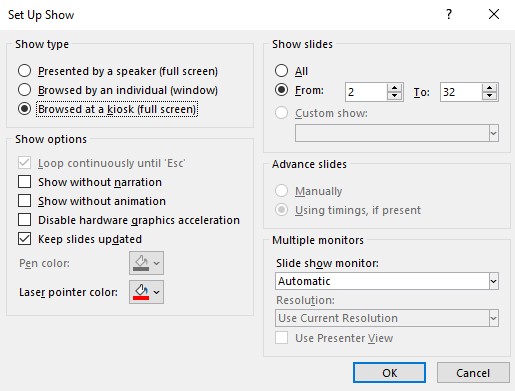
Typical, I've worked out how to do it.


Loop is ticked, and show slides 2-32 (I've added a couple).


Slideshow opens at Slide 1 and sits until I click it, then the rest autoplay to the end and restart from Slide 2 ad nauseum until I hit Esc.


An almost hands-free presentation! 


Delete cookies?! Are you insane?!


Create new topic


Geekzone Live »

Try automatic live updates from Geekzone directly in your browser, without refreshing the page, with Geekzone Live now.


Are you subscribed to our RSS feed? You can download the latest headlines and summaries from our stories directly to your computer or smartphone by using a feed reader.