Geekzone: technology news, blogs, forums
Guest
Welcome Guest.
You haven't logged in yet. If you don't have an account you can register now.


AndyT

166 posts

Master Geek
+1 received by user: 10


#287135 8-Jun-2021 22:05
Send private message

Has anyone experienced USW Flex Mini VLAN issues following the recent controller update to 6.2.25?


I'm aware of (and accept for the price of the units) the seriously limited VLAN functionality of the USW FM, but I used to be able to set the switch port profile feeding the Apple TV 4K per the profile for that particular VLAN, configured in both the upstream Edgerouter ER-X and Unifi Controller Network settings.


However, since the update to 6.2.25, I have to set the switch port profile to "All" i.e. trunk to get any connectivity on the Apple TV, but then of course I lose network segmentation and VLAN firewall configuration.


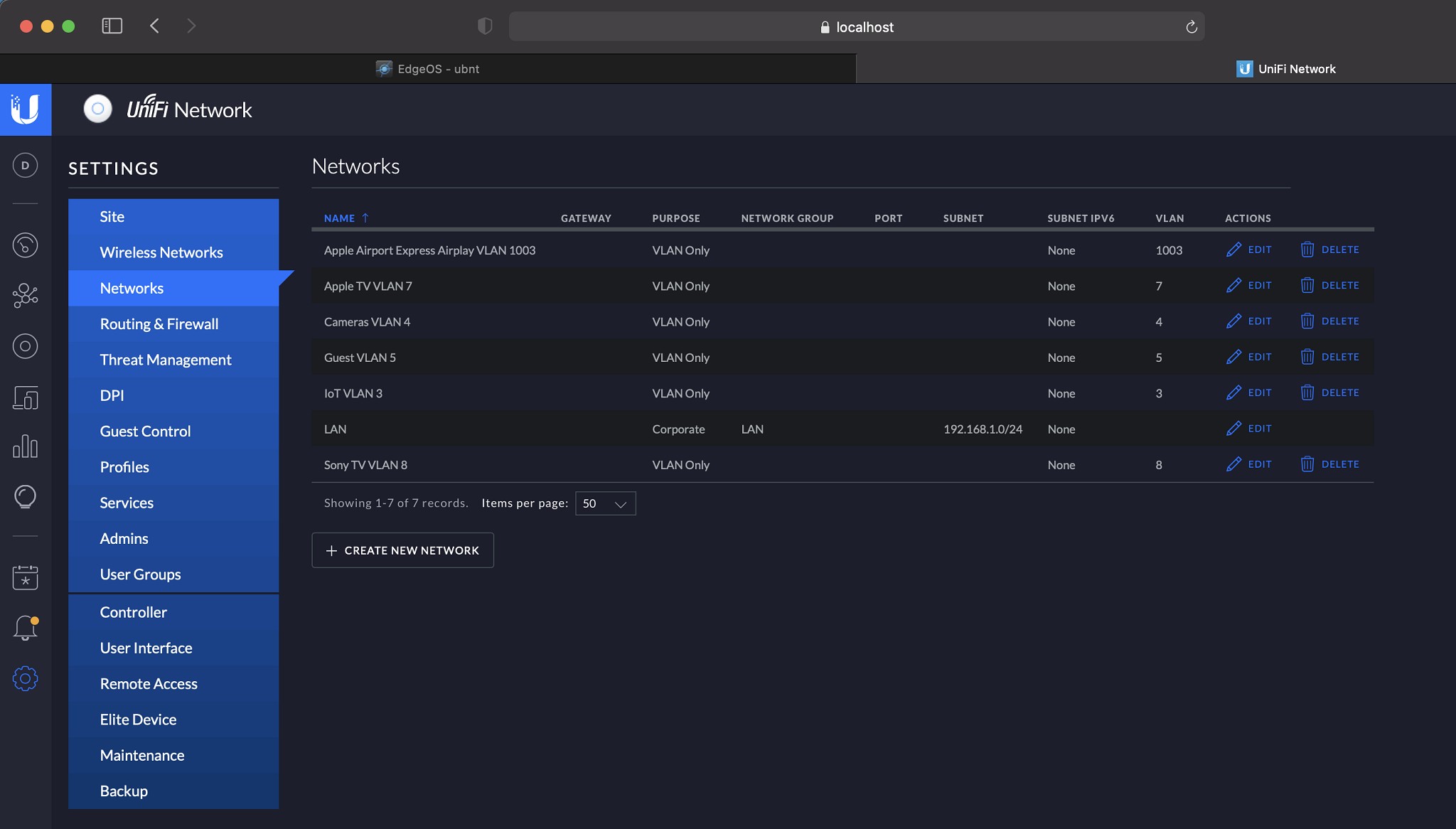
A further quirk is that the 6.2.25 controller shows all VLANs as having the native network to be the same as the VLAN rather than the main LAN - which I don't recall in earlier controller versions? i.e. in the case of the Apple TV, the VLAN name is "Apple TV VLAN 7" and the native network is also "Apple TV VLAN 7", not "LAN", which doesn't seem correct?


Any thoughts and insights that get me back on track are welcome ... as otherwise I'm confused and lacking confidence in Unifi controller updates.


Thanks & regards,


Andy T



Rgds Andy T


Create new topic
Zeon
3926 posts

Uber Geek
+1 received by user: 759

Trusted

  #2721535 9-Jun-2021 23:09
Send private message

Can you provide screenshots of your config for VLAN and the switch port config?


I just bought a USW flex mini (without realising the limitations on VLAN) in the weekend and only after found that you can't use custom switch profiles :(


I take it your strategy is to have the AppleTV on its own VLAN? You should be able to have a trunk port into the switch and then have a port which is untag specifically for the VLAN you want it on.


In my use case I want to run a wireless access point from it with only a couple of VLANs trunked for the WIFI networks but will probably end up just trunking all VLANs considering thats all you seem to be able to do.....


Speedtest 2019-10-14


AndyT

166 posts

Master Geek
+1 received by user: 10


  #2727536 11-Jun-2021 23:03
Send private message

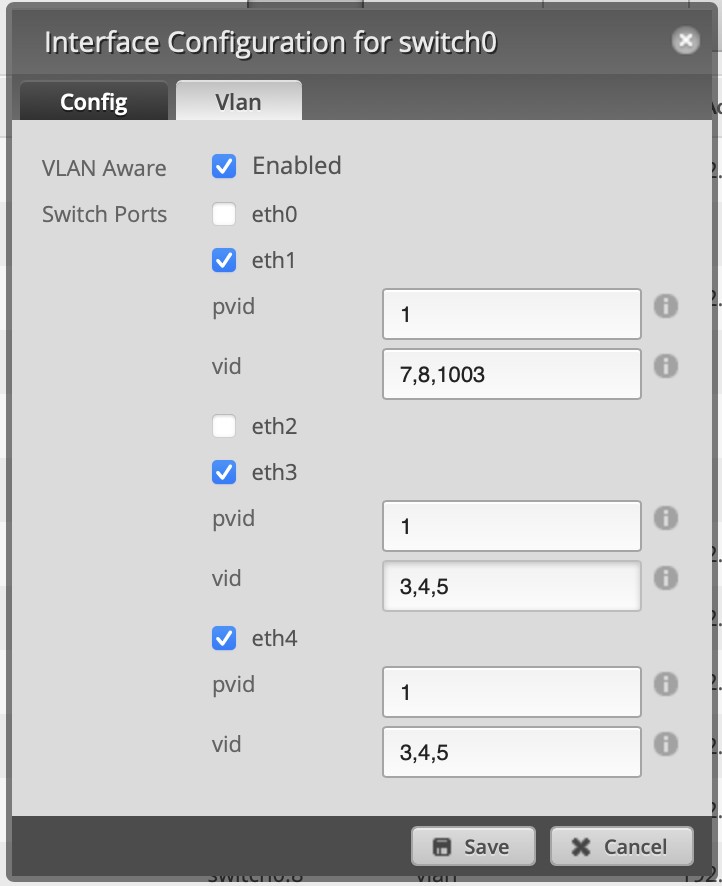
Screenshots attached as requested.


Correct on strategy.


USW FMs are pretty useful providing their limitations are acceptable. I have six of them in various networks. The current issue is with VLAN 7 on wired connect from ER-X eth1 via two daisy Chained USW FMs


Hardware may have been fried and / or software corrupted in recent storms & floods here in North Canterbury.


Rgds Andy T


Spyware
3818 posts

Uber Geek
+1 received by user: 1366

Lifetime subscriber

  #2727550 12-Jun-2021 08:27
Send private message

vlan id=7 is tagged on eth1 hence why it doesn't work. You want to present id=7 as untagged.


Spark Max Fibre using Mikrotik CCR1009-8G-1S-1S+, CRS125-24G-1S, Unifi UAP, U6-Pro, UAP-AC-M-Pro, Apple TV 4K (2022), Apple TV 4K (2017), iPad Air 1st gen, iPad Air 4th gen, iPhone 13, SkyNZ3151 (the white box). If it doesn't move then it's data cabled.


AndyT

166 posts

Master Geek
+1 received by user: 10


  #2727798 13-Jun-2021 00:32
Send private message

Resolved.


Audit of entire set up showed-up that the router IP for VLAN 7 was incorrect in the ER-X VLAN DHCP settings. Once reconfigured, VLAN 7 works fine.


Not sure how it happened as used to be fine.


Anyway, now resolved.


Rgds Andy T


Create new topic


Geekzone Live »

Try automatic live updates from Geekzone directly in your browser, without refreshing the page, with Geekzone Live now.


Are you subscribed to our RSS feed? You can download the latest headlines and summaries from our stories directly to your computer or smartphone by using a feed reader.