Geekzone: technology news, blogs, forums
Guest
Welcome Guest.
You haven't logged in yet. If you don't have an account you can register now.


rscole86

4999 posts

Uber Geek
+1 received by user: 462

Moderator
Trusted
Lifetime subscriber

#300819 6-Oct-2022 14:40
Send private message

I would like to be able to use different DNS servers and thought the easiest way to switch would be to change SSIDs.


I want a high WAF way to utilise different DNS servers that could? be as simple as changing SSID.


  • SSID_1 that uses piholes
  • SSID_2 isolated and using ISP DNS, eg work wifi or guest wifi
  • SSID_3 using custom DNS servers

Bonus is if SSID_3 connected devices can still be Chromecast to/from. Ideally SSID_2 would be unable to.


I have an Edgerouter 4, a TP-link switch TL-SG1016PE and a GWN7610 AP x2.


I currently have eth1 serving all devices, wired and wireless, and two piholes for DNS. The router does the DHCP and some basic blocking of some ethernet devices.


The only way I think I could get it to work would be to put the AP on eth2, disable DHCP on the router, and get the AP to assign DHCP. I assume I would need some static routes for the piholes on eth1, from eth2? The problem I see here is that I would have to daisy chain the AP's to get them on eth2 (no spare swtich) and need power to the second device (unsightly and may not be possible).


I would still want all devices on SSID_1 and 3 to ideally see eth1 devices and Chromecasting to work. 


To get this to work am I needing to look into VLAN tagging?


Any guidance apprecriated.


Create new topic
michaelmurfy
meow
13580 posts

Uber Geek
+1 received by user: 10910

Moderator
ID Verified
Trusted
Lifetime subscriber

  #2978326 6-Oct-2022 14:55
Send private message

VLAN Tagging would be what you'll do.


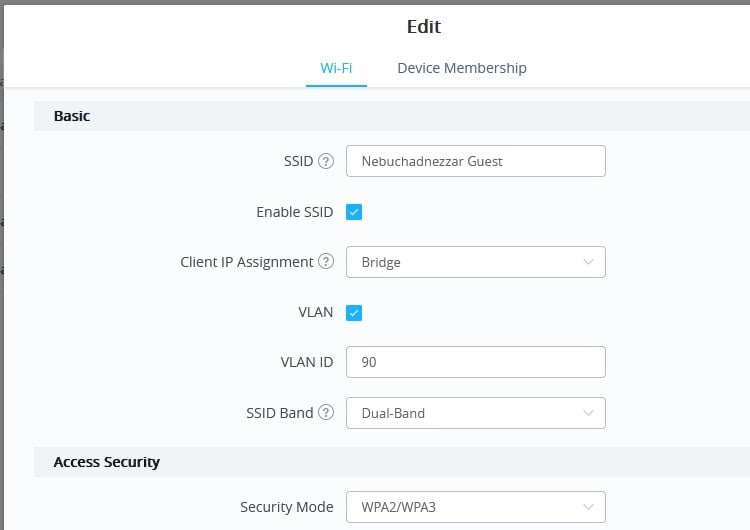
I personally have multiple VLAN's. With your Edgerouter you'd make multiple VLAN networks each with their own DHCP pool (it has been years since I've touched an Edgerouter though) On your Grandstream you'll tag this:


As you've got a smart switch you may need to either create "trunk ports" or allow the VLAN's over to your configured ports (router + access points). You can also tag ports to force them onto a particular VLAN.


Michael Murphy | https://murfy.nz
Referral Links: Quic Broadband (use R122101E7CV7Q for free setup)

Are you happy with what you get from Geekzone? Please consider supporting us by subscribing.
Opinions are my own and not the views of my employer.


shim99
108 posts

Master Geek
+1 received by user: 25

ID Verified

  #2978350 6-Oct-2022 16:44
Send private message

https://blog.gruby.com/2015/07/05/setting-up-a-guest-network-with-the-edgerouter-lite/

I used this blog to do something very similar.

openmedia
3449 posts

Uber Geek
+1 received by user: 878

Trusted

  #2978356 6-Oct-2022 17:14
Send private message

I have freshtomato running on my firewall with multiple VLANs. Each VLAN can have its own DHCP and DNS.


Then each SSID is allocated to a different VLAN on my Aruba APs.


Generally known online as OpenMedia, now working for Red Hat APAC as a Technology Evangelist and Portfolio Architect. Still playing with MythTV and digital media on the side.


Earbanean
1110 posts

Uber Geek
+1 received by user: 377


  #2978555 7-Oct-2022 12:19
Send private message

I do almost exactly what you're after.  I VLAN tag our tenants' network on Cambium WAPs, then set up separate DHCP and DNS server on an Edgerouter Lite.  In this case, the DNS server is ISP.  For everything else I use a Smart DNS service proving geo-unblocking.  I also implement firewall rules on the ERL to separate the tenant network from everything else.  It all seems to work well.  


Create new topic


Geekzone Live »

Try automatic live updates from Geekzone directly in your browser, without refreshing the page, with Geekzone Live now.


Are you subscribed to our RSS feed? You can download the latest headlines and summaries from our stories directly to your computer or smartphone by using a feed reader.