Geekzone: technology news, blogs, forums
Guest
Welcome Guest.
You haven't logged in yet. If you don't have an account you can register now.


FritzFun

10 posts

Wannabe Geek
+1 received by user: 1


#319315 13-Apr-2025 01:26
Send private message

Hi all,


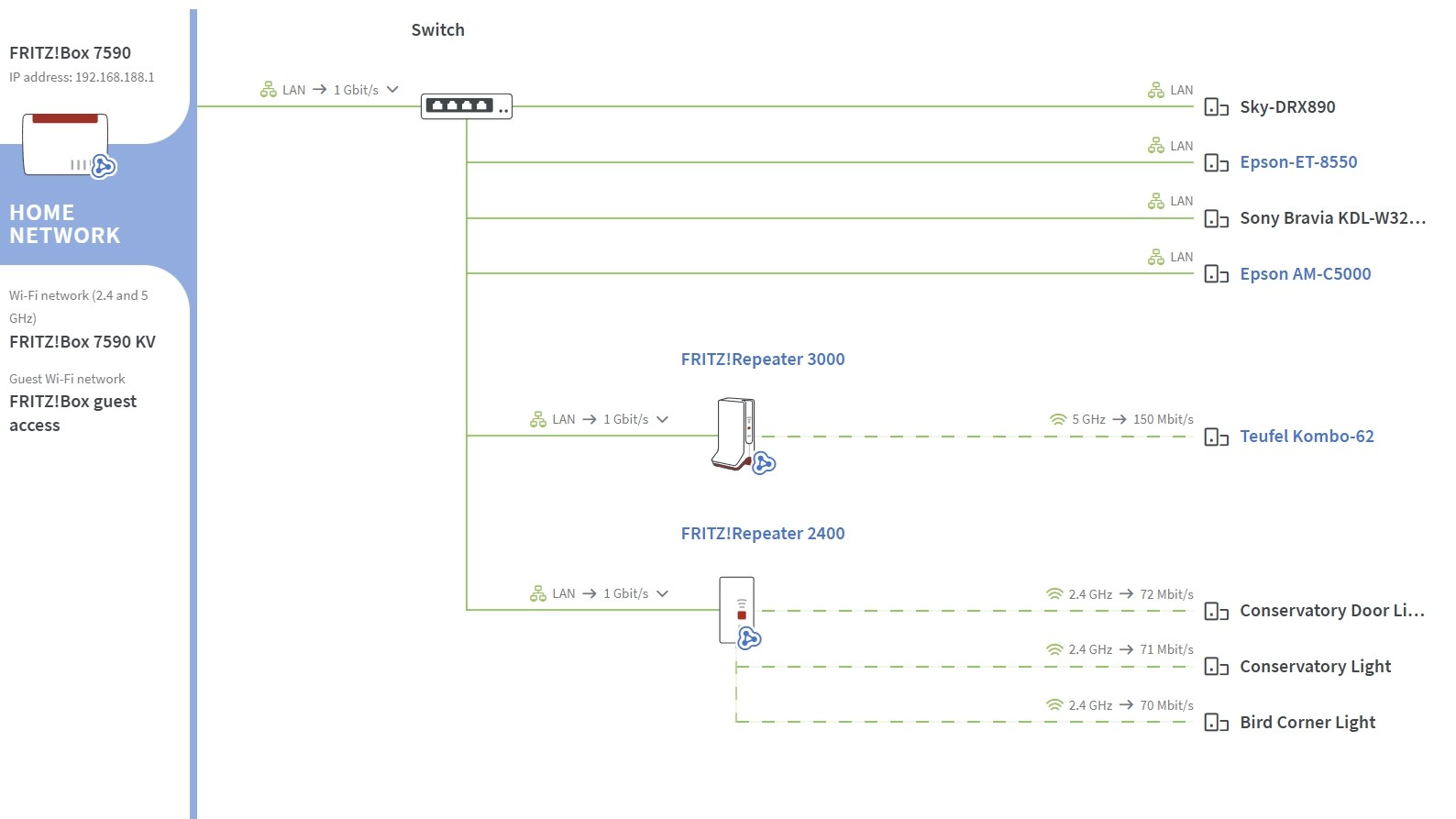
I'm hoping someone might be able to offer some insight into a repeater problem. I've been using a Fritz 3000 as a LAN bridge (to a 7590) with no problems for a couple of years, with 2 or 3 items connecting to it via wifi. Today I tried connecting something to it via the second LAN port, as I wanted a really fast, stable connection, but not only did it not work, the repeater dropped out all together, no longer showing on the Fritzbox Home Network page. As soon as I unplugged it all was well again. Am I missing something here?


Thanks for any help


Create new topic
Tinkerisk
4798 posts

Uber Geek
+1 received by user: 3660


  #3363480 13-Apr-2025 03:45
Send private message

Are you using mesh mode (light blue mesh logo in the network overview) and if so, is it correctly coupled? Is it clearly defined who is the master (7590?) and who is the slave (3000AX)?


- NET: FTTH & VDSL, OPNsense, 10G backbone, GWN APs
- SRV: 12 RU HA server cluster, 0.1 PB storage on premise
- IoT:   thread, zigbee, tasmota, BidCoS, LoRa, WX suite, IR
- 3D:    two 3D printers, 3D scanner, CNC router, laser cutter


FritzFun

10 posts

Wannabe Geek
+1 received by user: 1


  #3363481 13-Apr-2025 04:27
Send private message

Yes, mesh enabled, with 7590 as master. Both the repeaters connect via ethernet to a Netgear switch, which in turn connects via ethernet to the Fritzbox. It's always been painless and bulletproof until I tried to use that second Lan socket today.


Tinkerisk
4798 posts

Uber Geek
+1 received by user: 3660


  #3363645 13-Apr-2025 13:42
Send private message

In wireless repeater mode, you can connect two LAN devices to the repeater.


In LAN mode linked TO the router, you only can use 1 LAN port. Like an access point. When you connect the second LAN, it can‘t handle the device in both modes at the same time. So either this or that, but not both at the same time.


- NET: FTTH & VDSL, OPNsense, 10G backbone, GWN APs
- SRV: 12 RU HA server cluster, 0.1 PB storage on premise
- IoT:   thread, zigbee, tasmota, BidCoS, LoRa, WX suite, IR
- 3D:    two 3D printers, 3D scanner, CNC router, laser cutter


FritzFun

10 posts

Wannabe Geek
+1 received by user: 1


  #3363816 14-Apr-2025 00:33
Send private message

So as it stands the second LAN port is ostensibly useless, and the only option for clients is wifi? I could change to wireless bridge, but that would defeat the object, as the repeater is a long way from the router, with only a weak signal.


Oh well, it's irksome, but not a huge deal, a wifi connection should still get it done.


Thanks for the info.


Tinkerisk
4798 posts

Uber Geek
+1 received by user: 3660


  #3363818 14-Apr-2025 01:50
Send private message

FritzFun:


So as it stands the second LAN port is ostensibly useless, and the only option for clients is wifi? I could change to wireless bridge, but that would defeat the object, as the repeater is a long way from the router, with only a weak signal.


Oh well, it's irksome, but not a huge deal, a wifi connection should still get it done.


Thanks for the info.


Yes, seems to be either wireless bridge with 2 additional eth for wired devices or LAN bridge with 1 eth to the router.


- NET: FTTH & VDSL, OPNsense, 10G backbone, GWN APs
- SRV: 12 RU HA server cluster, 0.1 PB storage on premise
- IoT:   thread, zigbee, tasmota, BidCoS, LoRa, WX suite, IR
- 3D:    two 3D printers, 3D scanner, CNC router, laser cutter


Create new topic


Geekzone Live »

Try automatic live updates from Geekzone directly in your browser, without refreshing the page, with Geekzone Live now.


Are you subscribed to our RSS feed? You can download the latest headlines and summaries from our stories directly to your computer or smartphone by using a feed reader.