Geekzone: technology news, blogs, forums
Guest
Welcome Guest.
You haven't logged in yet. If you don't have an account you can register now.


peejayw

1913 posts

Uber Geek
+1 received by user: 123


#271905 31-May-2020 19:52
Send private message

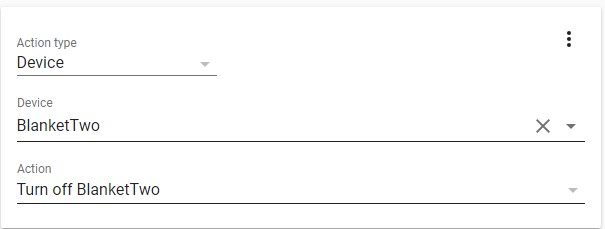
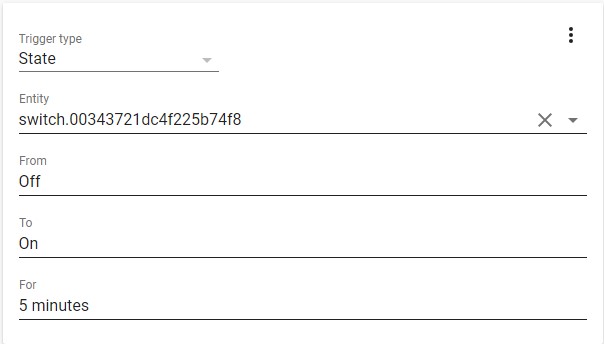
I have a simple (I thought) requirement. I want to turn off a Sonoff wifi switch if it has been on for 5 minutes.


So, here is my config............


- id: '1590906894888'
  alias: Switch Off After 5Min
  description: ''
  trigger:
  - entity_id: switch.00343721dc4f225b74f8
    for: 5 minutes
    from: 'Off'
    platform: state
    to: 'On'
  condition: []
  action:
  - device_id: 428fc41b503e4d2aa8aa0ec49821999f
    domain: switch
    entity_id: switch.00343721dc4f225b74f8
    type: turn_off


The entity_id is the sonoff switch in question. Trouble is, the switch never turns off. If I manually execute, it does so at least I know the Sonoff is the correct one.


Any thoughts?


 I'm supposed to respect my elders, but it's getting harder and harder for me to find one now.


Create new topic
hairy1
3352 posts

Uber Geek
+1 received by user: 644

ID Verified
Trusted
Lifetime subscriber

  #2495918 31-May-2020 19:56
Send private message

To be honest I gave up on native automations and switched to Node Red... Amazing and much easier to debug.

Sorry this doesn't answer your question.

Cheers, Matt.


My views (except when I am looking out their windows) are not those of my employer.


hio77
'That VDSL Cat'
13036 posts

Uber Geek
+1 received by user: 3896

ID Verified
Trusted
Lizard Networks
Subscriber

  #2495923 31-May-2020 20:03
Send private message

sonoff on a hotblanket... .now that's an idea...


#include <std_disclaimer>


Any comments made are personal opinion and do not reflect directly on the position my current or past employers may have. 


peejayw

1913 posts

Uber Geek
+1 received by user: 123


  #2495924 31-May-2020 20:03
Send private message

Thanks, will have a look at Node Red but I would still like to find out where I am going wrong with this setup, frustrating.


 I'm supposed to respect my elders, but it's getting harder and harder for me to find one now.


hairy1
3352 posts

Uber Geek
+1 received by user: 644

ID Verified
Trusted
Lifetime subscriber

  #2495939 31-May-2020 21:42
Send private message

There seems to be so many examples floating around of incorrect / outdated formats for automation. This is the problem. Even the ordering of elements in YAML is "fickle". I highly recommend Node Red for automation. I spent hours on native automations and found there was just no language consistency and ability to debug.


My views (except when I am looking out their windows) are not those of my employer.


muppet
2643 posts

Uber Geek
+1 received by user: 1660

Trusted

  #2495950 31-May-2020 21:59
Send private message

First of all, Node-Red is so much easier. You will honestly feel like a chump when you realise the hours you spent figuring out what's what with your YAML would have been 2 minutes of click and drop in Node-Red.


Regardless:


action:
  - device_id: 428fc41b503e4d2aa8aa0ec49821999f
    domain: switch
    entity_id: switch.00343721dc4f225b74f8
    type: turn_off


You don't seem to be calling a service?  Usually to get a light to turn off you'd call a service:


From my old backed up before-i-moved-to-node-red autmational.yaml (gosh I just SO miss yaml)


- id: hallway_light_auto_on
  alias: Hallway Light Auto On Mode
  trigger:
  - entity_id: binary_sensor.motion_sensor_158d0002274d4d
    platform: state
    to: 'on'
  condition:
  - after: sunset
    before: sunrise
    condition: sun
  action:
  - entity_id: light.gateway_light_7811dcfd599a
    service: homeassistant.turn_on


See how I call a service of homeassistant.turn_on?  I would guess you need to call some sort of service of turn_off.  You have an action of turn_off, maybe that's a new way to do it?  But that's what I used to have to do, call a service.


peejayw

1913 posts

Uber Geek
+1 received by user: 123


  #2496000 1-Jun-2020 06:28
Send private message

Thanks, looks like I should start learning Node-Red then. Any suggestions on a good place to start?


 I'm supposed to respect my elders, but it's getting harder and harder for me to find one now.


Shop now for Dell laptops and other devices (affiliate link).
hairy1
3352 posts

Uber Geek
+1 received by user: 644

ID Verified
Trusted
Lifetime subscriber

  #2496009 1-Jun-2020 08:34
Send private message

Great choice. I offer a 100% money back guarantee. The thing about Node Red is that it is very intuitive. Either of these guides will get you going:


https://www.youtube.com/watch?v=SuoSXVqjyfc


https://www.youtube.com/watch?v=dYN1Lp-XYKA


Here is your flow to turn your blanket off after 5 minutes. The reason for the switch is that you only want to wait 5 minutes if the blanket is set to on.


Click to see full size


More than happy to help with flows if required.


Cheers, Matt.


My views (except when I am looking out their windows) are not those of my employer.


peejayw

1913 posts

Uber Geek
+1 received by user: 123


  #2496010 1-Jun-2020 08:37
Send private message

Many thanks, will start bashing the brain cells into order 😄


 I'm supposed to respect my elders, but it's getting harder and harder for me to find one now.


Nate001
677 posts

Ultimate Geek
+1 received by user: 465


  #2496033 1-Jun-2020 09:48
Send private message

This is what I use to turn off a fan after it has been on for 1 hour. Just as others have posted above.


muppet
2643 posts

Uber Geek
+1 received by user: 1660

Trusted

  #2496153 1-Jun-2020 14:43
Send private message

Nate001:


This is what I use to turn off a fan after it has been on for 1 hour. Just as others have posted above.


Yup, you're calling a service.


I suspect that's what's missing in OP's post.


Create new topic


Geekzone Live »

Try automatic live updates from Geekzone directly in your browser, without refreshing the page, with Geekzone Live now.


Are you subscribed to our RSS feed? You can download the latest headlines and summaries from our stories directly to your computer or smartphone by using a feed reader.