Geekzone: technology news, blogs, forums
Guest
Welcome Guest.
You haven't logged in yet. If you don't have an account you can register now.


corksta

2405 posts

Uber Geek
+1 received by user: 382

Trusted
Subscriber

#303395 7-Feb-2023 19:12
Send private message

2degrees’ support pages for using your own modem with fibre now say to use DHCP whereas it used to be PPPoE, obviously related to the merger. 


It doesn’t work for me if I try to change mine to DHCP, so will it become dual stack or will everyone be moved over to using DHCP? Can anyone else change to DHCP?


I tried changing because using DHCP on my Amplifi Alien system, on previous ISPs, gives better performance than PPPoE, but I think I might have read somewhere in the past that that is typical with using DHCP over PPPoE anyway. 



2024 Mac mini M4 | 2025 iPad Air 13" M3 (Blue) | 2025 iPad Air 11" M3 (Starlight) | iPhone 15 Pro Max (Natural Titanium) | HomePod (Space Grey) | 10x HomePod mini (Space Grey, White, Yellow, Blue, Orange) | 4x Apple TV 4K | Apple Watch Ultra 2


Create new topic
skewt
752 posts

Ultimate Geek
+1 received by user: 215


  #3033067 7-Feb-2023 20:07
Send private message

My understanding is they are currently running two networks, the existing 2degrees network and the new vocus one


DHCP only works on the new signups/vocus connections, unsure if you can request to switch your account over to the vocus side


I also see the new network comes with port filtering,
Port Filtering | 2degrees


nztim
4012 posts

Uber Geek
+1 received by user: 2710

ID Verified
Trusted
TEAMnetwork
Subscriber

  #3033074 7-Feb-2023 20:44
Send private message

if they have moved onto the Vocus network they are dual stack PPPoE or DHCP


which means you can use either PPPoE with anything@anything with a password of anything or IPoE (DHCP)


Any views expressed on these forums are my own and don't necessarily reflect those of my employer. 


corksta

2405 posts

Uber Geek
+1 received by user: 382

Trusted
Subscriber

  #3033081 7-Feb-2023 20:56
Send private message

I tried changing to DHCP though and it didn’t work, it won’t assign an IP address. 


2024 Mac mini M4 | 2025 iPad Air 13" M3 (Blue) | 2025 iPad Air 11" M3 (Starlight) | iPhone 15 Pro Max (Natural Titanium) | HomePod (Space Grey) | 10x HomePod mini (Space Grey, White, Yellow, Blue, Orange) | 4x Apple TV 4K | Apple Watch Ultra 2


Dochart
827 posts

Ultimate Geek
+1 received by user: 284


  #3033084 7-Feb-2023 21:00
Send private message

nztim:

if they have moved onto the Vocus network they are dual stack PPPoE or DHCP


which means you can use either PPPoE with anything@anything with a password of anything or IPoE (DHCP)


To the ISP’s that still use PPPoE why don’t they switch to DHCP?

michaelmurfy
meow
13579 posts

Uber Geek
+1 received by user: 10910

Moderator
ID Verified
Trusted
Lifetime subscriber

  #3033095 7-Feb-2023 21:28
Send private message

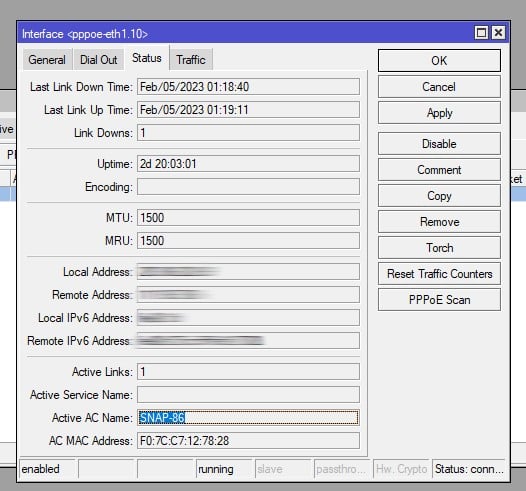
So here is my PPPoE information. You can see under "Active AC Name" it is still "Snap" so still on the 2degrees network. There is no DHCP server.


They're currently migrating but understandably this is a huge undertaking. The 2degrees network isn't exactly small. I guess they're onboarding new customers to the Vocus network and have sunset the 2degrees network which is a shame as it is a really solid network otherwise.


The goal is customers will see no change other than suddenly being on a Vocus BNG so no need to update router settings.


Michael Murphy | https://murfy.nz
Referral Links: Quic Broadband (use R122101E7CV7Q for free setup)

Are you happy with what you get from Geekzone? Please consider supporting us by subscribing.
Opinions are my own and not the views of my employer.


andysh
229 posts

Master Geek
+1 received by user: 16


  #3033096 7-Feb-2023 21:30
Send private message

Interesting.. Will give it a go with my Omada gear tomorrow.


Referrals:


Tesla: https://ts.la/andrew897313


Sharesies: https://sharesies.com/r/XRGS77 


Shop now for Dell laptops and other devices (affiliate link).
michaelmurfy
meow
13579 posts

Uber Geek
+1 received by user: 10910

Moderator
ID Verified
Trusted
Lifetime subscriber

  #3033098 7-Feb-2023 21:33
Send private message

Dochart:

To the ISP’s that still use PPPoE why don’t they switch to DHCP?


There are advantages to having PPPoE over DHCP and one of those being you're able to simply kill a session to get an end device to renew it's IP address or to reconnect with new settings (eg - new DNS servers). With DHCP you need to wait for the DHCP lease to expire so there are no real controls from the providers end.


Personally I prefer PPPoE for the stability side. You're able to see if your ISP is alive or dead based on the PPPoE status but with DHCP it'll still show as having an IP but with nobody home on the other end (I remember the times on a previous ISP diagnosing if it was my screw-up or a problem with Chorus / my ISP).


There is also bugger all performance hit if people configure their routers correctly with an interface MTU of 1508 (baby jumbo packets) and the PPPoE interface set with a MTU of 1500. Most ISP's support this also. Personally I don't understand the full hate for PPPoE.


Michael Murphy | https://murfy.nz
Referral Links: Quic Broadband (use R122101E7CV7Q for free setup)

Are you happy with what you get from Geekzone? Please consider supporting us by subscribing.
Opinions are my own and not the views of my employer.


darylblake
1172 posts

Uber Geek
+1 received by user: 410

Trusted

  #3033237 8-Feb-2023 09:32
Send private message

They are migrating a lot of customers. If you were an existing 2d customer, use PPPoE. 

If your account has been migrated (you shouldn't even notice it). Then you can use both DHCP and PPPoE. 

There is a lot of integration work going on at the moment from LFC's, merging Autonomous Systems etc with the outcome being easier for combined business to manage itself. Currently there is a lot of transition work happening behind the scenes. I dare say try DHCP again in a month or two.


wlgspotter
334 posts

Ultimate Geek
+1 received by user: 40

ID Verified
Lifetime subscriber

  #3033243 8-Feb-2023 09:50
Send private message

darylblake:


They are migrating a lot of customers. If you were an existing 2d customer, use PPPoE. 

If your account has been migrated (you shouldn't even notice it). Then you can use both DHCP and PPPoE. 

There is a lot of integration work going on at the moment from LFC's, merging Autonomous Systems etc with the outcome being easier for combined business to manage itself. Currently there is a lot of transition work happening behind the scenes. I dare say try DHCP again in a month or two.


This may be slightly OT, I'm an existing 2D customer (actually legacy Snap customer from back in the day when it was still Snap Internet) with a static IP.  Currently should still be on PPPoE - at least I've not touched my router config.  I also have a Static IP.  If I get migrated to DHCP would that affect the static IP?


Thanks.


Dratsab
3964 posts

Uber Geek
+1 received by user: 1728

Trusted
Lifetime subscriber

  #3033247 8-Feb-2023 10:06
Send private message

wlgspotter: This may be slightly OT, I'm an existing 2D customer (actually legacy Snap customer from back in the day when it was still Snap Internet) with a static IP.  Currently should still be on PPPoE - at least I've not touched my router config.  I also have a Static IP.  If I get migrated to DHCP would that affect the static IP? 


They should be (and likely are) setting up DHCP reservations which would mean no effect on your static IP.


corksta

2405 posts

Uber Geek
+1 received by user: 382

Trusted
Subscriber

  #3033250 8-Feb-2023 10:13
Send private message

darylblake:


They are migrating a lot of customers. If you were an existing 2d customer, use PPPoE. 

If your account has been migrated (you shouldn't even notice it). Then you can use both DHCP and PPPoE. 

There is a lot of integration work going on at the moment from LFC's, merging Autonomous Systems etc with the outcome being easier for combined business to manage itself. Currently there is a lot of transition work happening behind the scenes. I dare say try DHCP again in a month or two.


I'll keep trying DHCP then. When I moved from Spark to Slingshot, staying on PPPoE worked but performance wasn't that great but when I changed it to DHCP it was solid. Same thing when changing to 2degrees from Slingshot, performance has taken a slight hit again so it'll be good to try DHCP again once it's available.


2024 Mac mini M4 | 2025 iPad Air 13" M3 (Blue) | 2025 iPad Air 11" M3 (Starlight) | iPhone 15 Pro Max (Natural Titanium) | HomePod (Space Grey) | 10x HomePod mini (Space Grey, White, Yellow, Blue, Orange) | 4x Apple TV 4K | Apple Watch Ultra 2


Shop now on AliExpress (affiliate link).
michaelmurfy
meow
13579 posts

Uber Geek
+1 received by user: 10910

Moderator
ID Verified
Trusted
Lifetime subscriber

  #3033259 8-Feb-2023 10:41
Send private message

Networks can get rather grumpy if you try both DHCP and PPPoE. If you have a router that can see PPPoE session information as well as the BNG you're connected to then you'll be able to see when you're on a Vocus BNG.


Michael Murphy | https://murfy.nz
Referral Links: Quic Broadband (use R122101E7CV7Q for free setup)

Are you happy with what you get from Geekzone? Please consider supporting us by subscribing.
Opinions are my own and not the views of my employer.


Create new topic


Geekzone Live »

Try automatic live updates from Geekzone directly in your browser, without refreshing the page, with Geekzone Live now.


Are you subscribed to our RSS feed? You can download the latest headlines and summaries from our stories directly to your computer or smartphone by using a feed reader.