Geekzone: technology news, blogs, forums
Guest
Welcome Guest.
You haven't logged in yet. If you don't have an account you can register now.


xpd

xpd

Geek of Coastguard
14115 posts

Uber Geek
+1 received by user: 4574

Retired Mod
ID Verified
Trusted
Lifetime subscriber

#303527 16-Feb-2023 12:40
Send private message

Been running selfhosted servers etc for a number of years now, no issues really until now....  on 2D with static IP and the 2DM FritzBox.


Everything running fine except a new server I'm wanting to put online - it uses UDP only. So I have enabled forwarding the required ports etc but for some reason noone can connect. Been chatting with the devs and they cant see anything wrong on the server side of things via the logs. 


Anyone else run UDP only servers on a Fritz and encountered any issues like this ?



XPD / Gavin


LinkTree


Create new topic
michaelmurfy
meow
13579 posts

Uber Geek
+1 received by user: 10910

Moderator
ID Verified
Trusted
Lifetime subscriber

  #3037554 16-Feb-2023 12:55
Send private message

Just remember - port forwarding does open up your network. I'm just remembering the time you had a server compromised.


But it is honestly as simple as opening it up via Permit Access just like how you forward TCP. If you have been migrated over to the Vocus network then you'll also have Port Filtering: https://www.2degrees.nz/help/broadband-help/troubleshooting/port-filtering


In your Fritz!Box logs you can see if you've been migrated by either the broadband PoP showing "SNAP-xx" (meaning you're on the old 2degrees network) else a Vocus broadband PoP:


Michael Murphy | https://murfy.nz
Referral Links: Quic Broadband (use R122101E7CV7Q for free setup)

Are you happy with what you get from Geekzone? Please consider supporting us by subscribing.
Opinions are my own and not the views of my employer.


xpd

xpd

Geek of Coastguard
14115 posts

Uber Geek
+1 received by user: 4574

Retired Mod
ID Verified
Trusted
Lifetime subscriber

  #3037621 16-Feb-2023 13:48
Send private message

LOL, that time I had issues was due to an update changing a SMTP relay setting on the hMail server back to default :D Youve got a good memory ;)


Yeah, used the Permit Access to open them up, but anytime anyone tries to connect, just gives server not responding message. Yet server responding fine on LAN.


If I have no joy, no biggie, will get someone else to host it (hopefully) :)  Might even fire up another PC just to test it with to ensure its not a Windows issue.


XPD / Gavin


LinkTree


michaelmurfy
meow
13579 posts

Uber Geek
+1 received by user: 10910

Moderator
ID Verified
Trusted
Lifetime subscriber

  #3037622 16-Feb-2023 13:51
Send private message

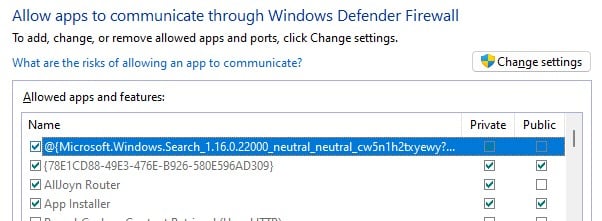
You ensured it is opened up in Windows Firewall? :)


Make sure both are ticked for the service you're opening up.


Michael Murphy | https://murfy.nz
Referral Links: Quic Broadband (use R122101E7CV7Q for free setup)

Are you happy with what you get from Geekzone? Please consider supporting us by subscribing.
Opinions are my own and not the views of my employer.


xpd

xpd

Geek of Coastguard
14115 posts

Uber Geek
+1 received by user: 4574

Retired Mod
ID Verified
Trusted
Lifetime subscriber

  #3037793 16-Feb-2023 16:47
Send private message

Either something weird going on with this router, or some update has changed things......


Figured I'd remove all permits/sharing, and start afresh. Did that, but now when I add a port, its only opening IPv6, and not IPv4.


Or at least thats what its showing.


Arghhh....


XPD / Gavin


LinkTree


xpd

xpd

Geek of Coastguard
14115 posts

Uber Geek
+1 received by user: 4574

Retired Mod
ID Verified
Trusted
Lifetime subscriber

  #3037797 16-Feb-2023 16:53
Send private message

Oh ffs.... now whats it doing....  The desktop is my main PC. Its got nothing to do with the port forwarding.


XPD / Gavin


LinkTree


xpd

xpd

Geek of Coastguard
14115 posts

Uber Geek
+1 received by user: 4574

Retired Mod
ID Verified
Trusted
Lifetime subscriber

  #3037800 16-Feb-2023 17:03
Send private message

Change it to IPv4 only, and it maps to my desktop. Change to 4 and 6, 4 goes to desktop and 6 goes to server.


XPD / Gavin


LinkTree


Shop now for Lenovo laptops and other devices (affiliate link).
Spyware
3818 posts

Uber Geek
+1 received by user: 1366

Lifetime subscriber

  #3037832 16-Feb-2023 18:34
Send private message

xpd:


Oh ffs.... now whats it doing....  The desktop is my main PC. Its got nothing to do with the port forwarding.


One would think that you are in the wrong section.


Spark Max Fibre using Mikrotik CCR1009-8G-1S-1S+, CRS125-24G-1S, Unifi UAP, U6-Pro, UAP-AC-M-Pro, Apple TV 4K (2022), Apple TV 4K (2017), iPad Air 1st gen, iPad Air 4th gen, iPhone 13, SkyNZ3151 (the white box). If it doesn't move then it's data cabled.


michaelmurfy
meow
13579 posts

Uber Geek
+1 received by user: 10910

Moderator
ID Verified
Trusted
Lifetime subscriber

  #3037833 16-Feb-2023 18:41
Send private message

xpd:


Change it to IPv4 only, and it maps to my desktop. Change to 4 and 6, 4 goes to desktop and 6 goes to server.


If you've got UPnP enabled there is a chance that it is mapped to the desktop already by that. As you know with IPv4 you can only map a port once on NAT.


Try disabling UPnP if you've got that turned on and give it another shot.


Michael Murphy | https://murfy.nz
Referral Links: Quic Broadband (use R122101E7CV7Q for free setup)

Are you happy with what you get from Geekzone? Please consider supporting us by subscribing.
Opinions are my own and not the views of my employer.


xpd

xpd

Geek of Coastguard
14115 posts

Uber Geek
+1 received by user: 4574

Retired Mod
ID Verified
Trusted
Lifetime subscriber

  #3037921 16-Feb-2023 20:34
Send private message

Right, fixed the issue, back to my original problem :D


Issue was that for some reason, the Fritz was using my desktop name to do access rules, but after I went into the network settings and removed the desktop, it came right....... weird. 


XPD / Gavin


LinkTree


xpd

xpd

Geek of Coastguard
14115 posts

Uber Geek
+1 received by user: 4574

Retired Mod
ID Verified
Trusted
Lifetime subscriber

  #3037996 17-Feb-2023 07:23
Send private message

All fixed. Looks like removing all devices from the Fritz network sorted it out - existing forwards were fine, but anything new was getting mapped to my desktop and not the server - why ? Who knows. :)


XPD / Gavin


LinkTree


Create new topic


Geekzone Live »

Try automatic live updates from Geekzone directly in your browser, without refreshing the page, with Geekzone Live now.


Are you subscribed to our RSS feed? You can download the latest headlines and summaries from our stories directly to your computer or smartphone by using a feed reader.