Geekzone: technology news, blogs, forums
Guest
Welcome Guest.
You haven't logged in yet. If you don't have an account you can register now.


aaronaaron

69 posts

Master Geek
+1 received by user: 3

ID Verified

#306469 25-Jul-2023 22:02
Send private message

Up until a few weeks ago our VDSL has been running fine, about 70-80 mbps down and 28 mbps up.


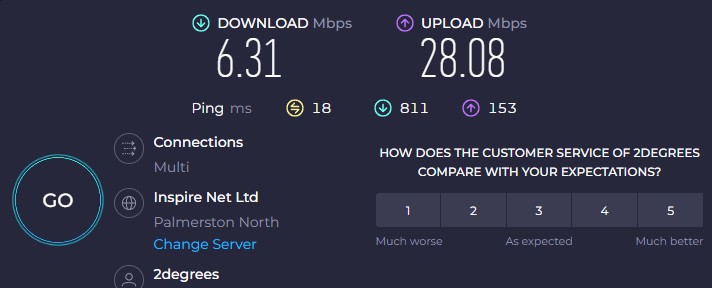
Then suddenly the download speed has dropped to 6.3mbps but the upload speed is still good at around 28 mbps (according to speedtest.net)


Have called their technical support line many times over the last 3 weeks, each time being told that they have logged a fault and something will be done within 72hrs but when I call back nothing has been done.


Yesterday when I called they said they booked chorus to check it out tomorrow (today). Then late last night I got an email saying the fault was resolved (it wasn't)


I called back today and was told fault was resolved as chorus remotely tested the line as OK and they don't need to check it. 


Today they have sent out a new modem to test but I am not hopeful as I tested our old spark modem and its giving the same speeds


Is there anything else I can do or ask for; or do I just have to keep calling them everyday?


speedtest-


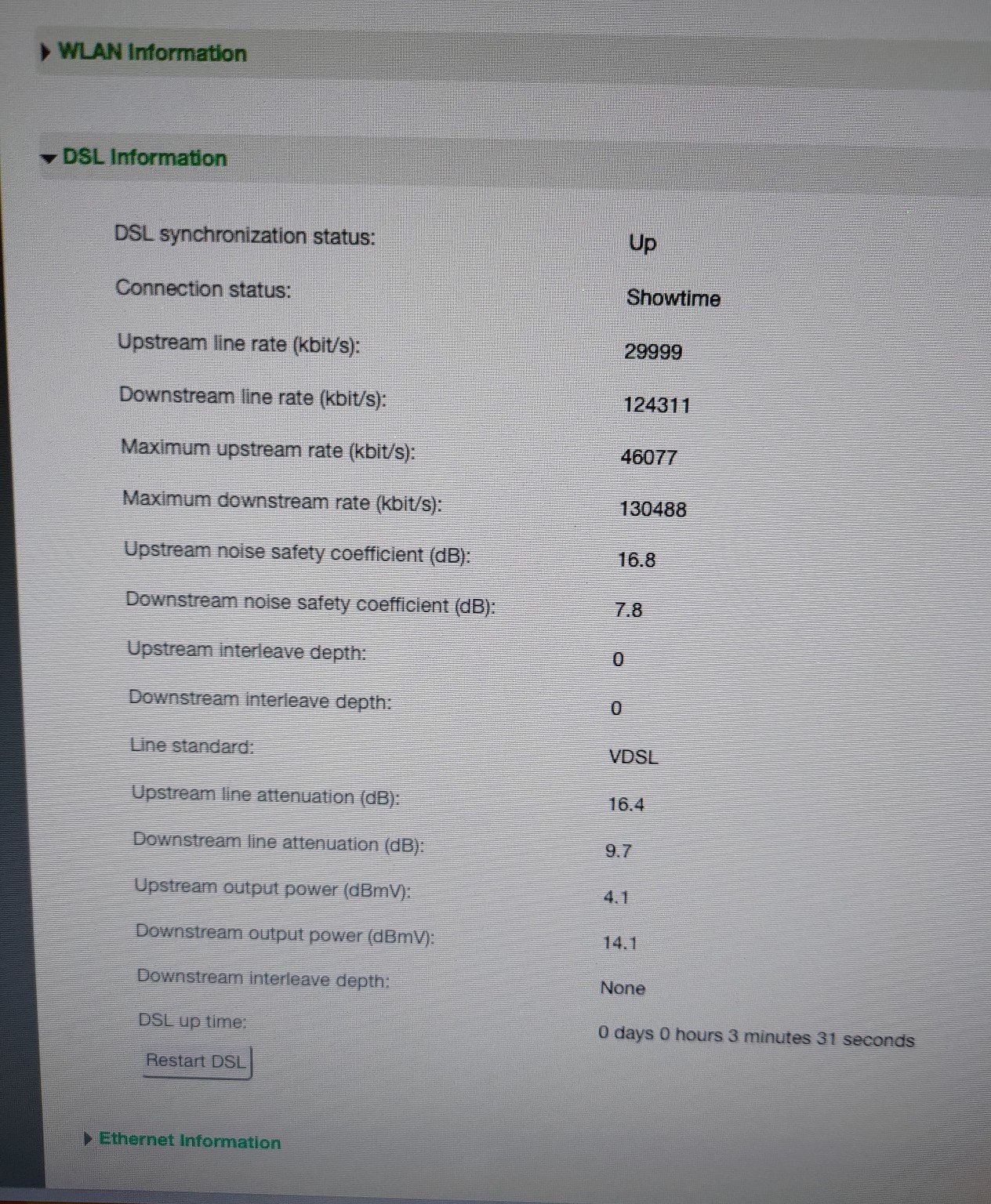
orcon supplied modem -
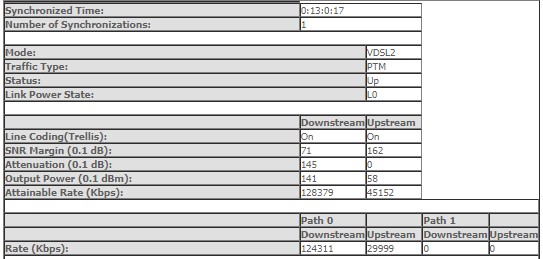


old spark modem -


Filter this topic showing only the reply marked as answer View this topic in a long page with up to 500 replies per page Create new topic
 1 | 2
Jase2985
13730 posts

Uber Geek
+1 received by user: 6202

ID Verified
Lifetime subscriber

  #3108114 26-Jul-2023 05:43
Send private message

well you apear to be connecte at 124mbps down and 30mbps up on both modems so i can see why they say the issue is resolved


sure you dont have any issues in your own network?


aaronaaron

69 posts

Master Geek
+1 received by user: 3

ID Verified

  #3108123 26-Jul-2023 07:48
Send private message

Yea I'm pretty sure it's not my network, I've done lots of speed tests over the last few weeks with only one computer connected directly to the modem (by ethernet) and it's always the same 6.3mbps

cddt
1965 posts

Uber Geek
+1 received by user: 1904


  #3108178 26-Jul-2023 10:16
Send private message

Just for the sake of being thorough and to rule everything possible out, try testing with a different computer, operating system, and cable. 


yitz
2238 posts

Uber Geek
+1 received by user: 594


  #3108179 26-Jul-2023 10:27
Send private message

Could be worth asking for a port reset? Basically a restart of the 'modem' at the exchange end.


aaronaaron

69 posts

Master Geek
+1 received by user: 3

ID Verified

  #3108195 26-Jul-2023 11:11
Send private message

cddt:

Just for the sake of being thorough and to rule everything possible out, try testing with a different computer, operating system, and cable. 


Yep, have tried Mac mini M1, windows 11 PC and my Asus router ac86u has a speed test built in as well.
The orcon modem has a speed test you can run from the account section on the website but that gives me an error everytime I try.
It says to ask them about it but when I did they had no idea lol.

yitz:

Could be worth asking for a port reset? Basically a restart of the 'modem' at the exchange end.


Will ask them when I call them tonight after testing the new modem

aaronaaron

69 posts

Master Geek
+1 received by user: 3

ID Verified

  #3108538 26-Jul-2023 18:24
Send private message

The new modem (same model as the old one, NF18ACV) made no difference as expected.


The person I spoke to today said they will escalate it with the network engineers (heard that one before) and get back to me tomorrow.


Asked about the port reset and they said that's something that the network engineers can do if needed so have to wait for them.


The waiting game continues.


Shop now for Dyson appliances (affiliate link).
nztim
4012 posts

Uber Geek
+1 received by user: 2710

ID Verified
Trusted
TEAMnetwork
Subscriber

  #3108548 26-Jul-2023 18:48
Send private message

Line stats are excellent, I think that this is another issue of migration to the Vocus network, I doubt it is anything to do with Chorus


Any views expressed on these forums are my own and don't necessarily reflect those of my employer. 


Jase2985
13730 posts

Uber Geek
+1 received by user: 6202

ID Verified
Lifetime subscriber

  #3108550 26-Jul-2023 18:57
Send private message

it might be that all the disconnections and testing has borked something and the reset fixes it, but it might not either.


sscribenz
22 posts

Geek
+1 received by user: 10

ID Verified

  #3108645 27-Jul-2023 08:19
Send private message

Im currently experiencing the exact same issue with 2degrees.


I was geting ~100mbps down then sudenly its dropped to ~6 but upload is still sitting at 28.


Tried multiple modems, all showing good sync to the cabinet two doors down, but throughput stays at ~6.


Currently awaiting a Chorus tech, hopefully I can convince him to speedtest at the port, but keen to see if you get a resolution.


aaronaaron

69 posts

Master Geek
+1 received by user: 3

ID Verified

  #3108650 27-Jul-2023 08:29
Send private message

How long has it been for you?
I wonder how many others there are

sscribenz
22 posts

Geek
+1 received by user: 10

ID Verified

  #3108659 27-Jul-2023 08:46
Send private message

Near as I can tell midday last Friday when the modem resynced.


Shop now on Samsung phones, tablets, TVs and more (affiliate link).
networkn
Networkn
32862 posts

Uber Geek
+1 received by user: 15453

ID Verified
Trusted
Lifetime subscriber

  #3108662 27-Jul-2023 09:02
Send private message

Yeah, when you can see two people with exactly the same issue and the tests that have been done are as thorough, it definitely looks to be an issue at the ISP end (as opposed to Chorus or local network). 


Unfortunately, these things can be a right pain to try and find, and fix. As frustrating as it is, patience will win the day. One thing I'd definitely be asking them to do is involve a manager and have them copied into all communication, so at least management is aware of the issue as is being reminded it's still an issue over time. The other potential thing is that if they are busy moving lots of people around, and there is a very small percentage of people affected, the commercial realities are they will prioritize the significant issues over the ones that affect a few people, despite it being significant for them. 


nztim
4012 posts

Uber Geek
+1 received by user: 2710

ID Verified
Trusted
TEAMnetwork
Subscriber

  #3108686 27-Jul-2023 10:26
Send private message

Guys don't constantly reboot your modem, this will cause DDLM to detect instability on the line, instead just log support cases with 2D saying that your sync is 100+mbps but your data rate is xx mbps


There is a lot of work going on in the background affecting speeds of all Vocus (now 2degrees) brands and it's affecting not only VDSL speeds but fibre also.


Any views expressed on these forums are my own and don't necessarily reflect those of my employer. 


Jase2985
13730 posts

Uber Geek
+1 received by user: 6202

ID Verified
Lifetime subscriber

  #3108754 27-Jul-2023 13:01
Send private message

@Sounddude something you could have the team look at?


aaronaaron

69 posts

Master Geek
+1 received by user: 3

ID Verified

  #3109334 28-Jul-2023 16:08
Send private message

Latest update from today

"I have followed up with our Assurance team and have been advised this issue is still active and being worked on by our Network Outages team.
We are requesting updates daily from them; however, they are still working on a resolution"

 1 | 2
Filter this topic showing only the reply marked as answer View this topic in a long page with up to 500 replies per page Create new topic


Geekzone Live »

Try automatic live updates from Geekzone directly in your browser, without refreshing the page, with Geekzone Live now.


Are you subscribed to our RSS feed? You can download the latest headlines and summaries from our stories directly to your computer or smartphone by using a feed reader.
