Geekzone: technology news, blogs, forums
Guest
Welcome Guest.
You haven't logged in yet. If you don't have an account you can register now.


MonolithNZZ

20 posts

Geek
+1 received by user: 9


#310460 21-Oct-2023 13:47
Send private message

Hi guys,


I switched from Slingshot to 2degrees fibre, with my new connection going live this morning. I have an Asus RT-AC59U V2 modem.


I am able to connect, however it is extremely patchy and within minutes after rebooting the modem, I intermittently lose connection. Websites won't load etc.


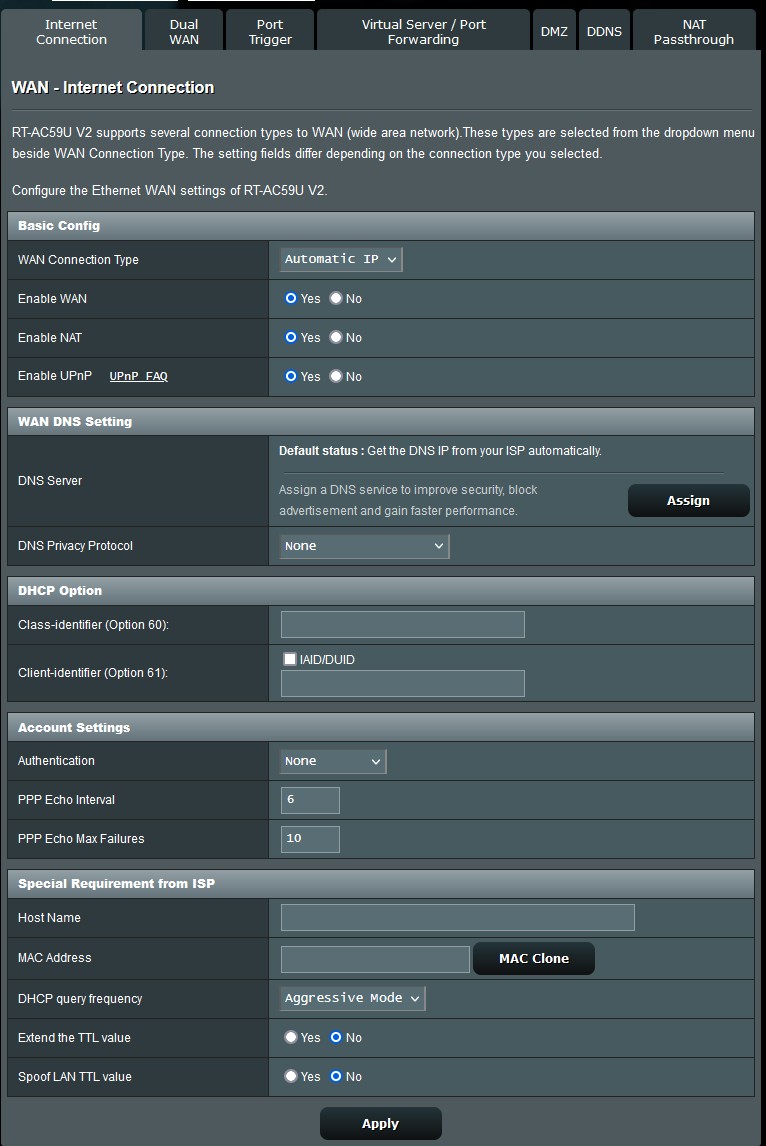
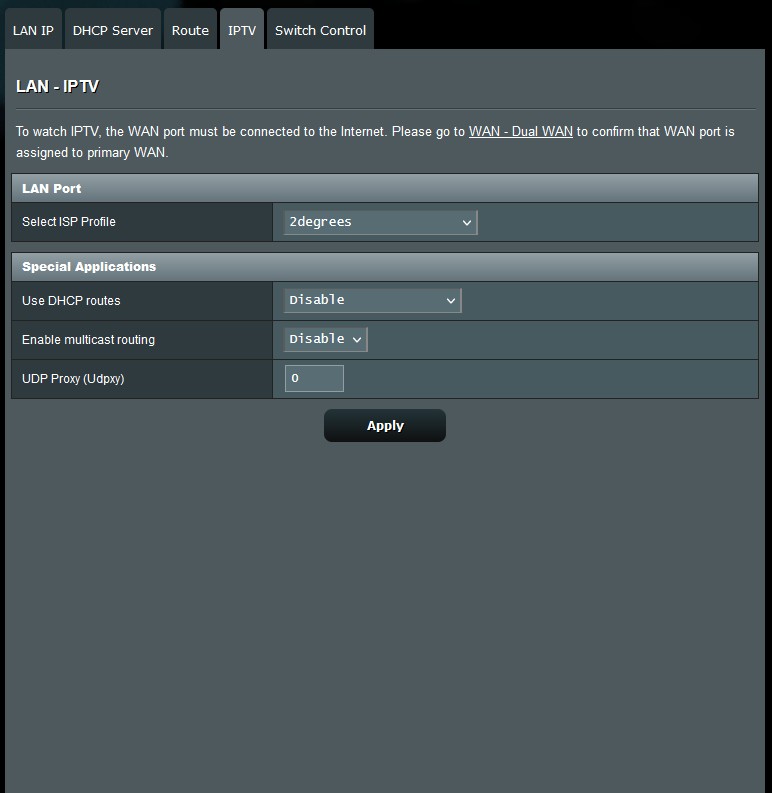
I have configured the modem using "automatic IP", NAT enabled, no authentication. Under IPTV I have selected 2degrees as the ISP profile. I've also tried VLAN tagging 10 with no luck. PPPoE behaves in the exact same manner. 


Currently in the queue to talk with 2degrees.. Any ideas?


Many thanks


Filter this topic showing only the reply marked as answer Create new topic
l43a2
1784 posts

Uber Geek
+1 received by user: 591

ID Verified
Trusted

  #3150800 21-Oct-2023 13:49
Send private message

whats the MTU set too

2Degrees setting for their Fibre


  • WAN Connection Type: DHCP (Automatic IP/Dynamic IP/IP over Ethernet)
  • 802.1Q: Enabled
  • VLAN ID (802.1Q): 10
  • 802.1P (Priority): 0
  • IP Version: IPv4 or IPv6
  • MTU Size: 1492 or 1500


MonolithNZZ

20 posts

Geek
+1 received by user: 9


  #3150801 21-Oct-2023 13:57
Send private message

Thanks for the reply,


I can only set MTU when I select PPPoE. I've only tried 1492, will try 1500 and report back.


MonolithNZZ

20 posts

Geek
+1 received by user: 9


  #3150802 21-Oct-2023 14:06
Send private message

2Degrees helpdesk confirms I require DHCP rather than PPPoE. Meaning I cannot manually adjust the MTU setting. Other than that he was of absolutely zero help.


l43a2
1784 posts

Uber Geek
+1 received by user: 591

ID Verified
Trusted

  #3150803 21-Oct-2023 14:11
Send private message

they really dont enjoy helping with modems they don't support.


MonolithNZZ

20 posts

Geek
+1 received by user: 9


  #3150804 21-Oct-2023 14:11
Send private message

When I'm able to connect, speed is abysmal.


rscole86
4999 posts

Uber Geek
+1 received by user: 462

Moderator
Trusted
Lifetime subscriber

  #3150806 21-Oct-2023 14:19
Send private message

Have you tested over wifi or wired connection?


Tried another router?


Tested via a direct cable from the ONT to your computer?


Shop on-line at New World now for your groceries (affiliate link).
MonolithNZZ

20 posts

Geek
+1 received by user: 9


  #3150810 21-Oct-2023 14:32
Send private message

Over both wired and wireless. I don't have another modem or the knowledge on how to connect directly to the ONT.


I've previously used 2degrees as a provider with this modem with no issue..


Linux
12173 posts

Uber Geek
+1 received by user: 8467

Trusted
Lifetime subscriber

  #3150817 21-Oct-2023 15:32
Send private message

@MonolithNZZ You should only test over Ethernet also as you were only connected this morning the speed profile still may not be set correct on the ISP side. This can take a day or 2


MonolithNZZ

20 posts

Geek
+1 received by user: 9


  #3150833 21-Oct-2023 16:52
Send private message

I backed-up the router config and then went ahead and reverted to factory settings. In an interesting turn of events, I'm now getting 800Mbps down and a stable connection. I combed the settings and can't find the culprit! Restoring my settings brings back the slow speed and dodgy connection.

Ah well, great turn out! Thanks to all who offered their assistance.

MonolithNZZ

20 posts

Geek
+1 received by user: 9


  #3152953 28-Oct-2023 08:57
Send private message

Well, success was short lived. The connection became totally unstable once more. I gave up on the Asus and purchased a Mikrotik RB5009 router + Grandstream AP after digging around on the forums here. All problems resolved and a nice increase in performance. Woot!


Filter this topic showing only the reply marked as answer Create new topic


Geekzone Live »

Try automatic live updates from Geekzone directly in your browser, without refreshing the page, with Geekzone Live now.


Are you subscribed to our RSS feed? You can download the latest headlines and summaries from our stories directly to your computer or smartphone by using a feed reader.