Geekzone: technology news, blogs, forums
Guest
Welcome Guest.
You haven't logged in yet. If you don't have an account you can register now.


afalout

14 posts

Geek
+1 received by user: 2


#312592 30-Apr-2024 03:32
Send private message

Hello all,


I moved overseas and took my 2degrees FritzBox 7530 with me. 


My new ISP is IPv6 enabled, but I dont get the IPv6 address, so I RTFM to find I should have IPv6 tab under "Account Information":


https://fritzhelp.avm.de/help/en/FRITZ-Box-7530-avme/avme/021/hilfe_internet_ipv6_aktivieren


But I don't have it.


I seem to remember someone here talking about 2degrees intentionally removing this tab to prevent people from changing IPv6 configuration - is this correct?


In any case - my question is:


How do I get IPv6 tab back?


Any suggestions gratefully received!


Andrej


View this topic in a long page with up to 500 replies per page Create new topic
 1 | 2
mrgsm021
1568 posts

Uber Geek
+1 received by user: 321

ID Verified
Trusted

  #3224447 30-Apr-2024 07:30
Send private message

If it was indeed intentionally removed by 2D, then maybe flashing non 2D firmware should bring the tab back?


Sorry I have no idea where you could find non 2D firmware.


nzkc
1638 posts

Uber Geek
+1 received by user: 1043


  #3224505 30-Apr-2024 10:29
Send private message

mrgsm021:


If it was indeed intentionally removed by 2D, then maybe flashing non 2D firmware should bring the tab back?


Sorry I have no idea where you could find non 2D firmware.


Instructions to manually update here: https://en.avm.de/service/knowledge-base/dok/FRITZ-Box-7530/1574_Updating-FRITZ-OS-manually/


schmoogol
77 posts

Master Geek
+1 received by user: 16

ID Verified

  #3224521 30-Apr-2024 10:43
Send private message

I don’t use a Fritzbox anymore so can’t check, but I’m pretty sure there is an advanced mode toggle in the top right somewhere which might make the tab appear for you.


afalout

14 posts

Geek
+1 received by user: 2


  #3224850 1-May-2024 02:17
Send private message

mrgsm021:


If it was indeed intentionally removed by 2D, then maybe flashing non 2D firmware should bring the tab back?


Thanks for your response; did the update from AVM web site, no change.


afalout

14 posts

Geek
+1 received by user: 2


  #3224851 1-May-2024 02:18
Send private message

schmoogol: I don’t use a Fritzbox anymore so can’t check, but I’m pretty sure there is an advanced mode toggle in the top right somewhere which might make the tab appear for you.


Thanks for your response; unfortunately I dont see anything like that on mine...


afalout

14 posts

Geek
+1 received by user: 2


  #3224852 1-May-2024 02:23
Send private message

nzkc:


Instructions to manually update here: https://en.avm.de/service/knowledge-base/dok/FRITZ-Box-7530/1574_Updating-FRITZ-OS-manually/


Thanks for your response; I did the update from AVM web site, no change.


Maybe I should try recovery? https://download.avm.de/fritzbox/fritzbox-7530/other/recover/


Or will that brick my 2degrees issued 7530....??


Thanks for your advice


Andrej


Shop now for Dell laptops and other devices (affiliate link).
Spyware
3826 posts

Uber Geek
+1 received by user: 1374

Lifetime subscriber

  #3224864 1-May-2024 07:05
Send private message

Enable advanced view.


Spark Max Fibre using Mikrotik CCR1009-8G-1S-1S+, CRS125-24G-1S, Unifi UAP, U6-Pro, UAP-AC-M-Pro, Apple TV 4K (2022), Apple TV 4K (2017), iPad Air 1st gen, iPad Air 4th gen, iPhone 13, SkyNZ3151 (the white box). If it doesn't move then it's data cabled.


afalout

14 posts

Geek
+1 received by user: 2


  #3225402 2-May-2024 05:04
Send private message

Spyware:


Enable advanced view.


Thanks for your suggestion, ehem ... Spyware. :)  Unfortunately I do not have that option:


Also, from https://en.avm.de/service/knowledge-base/dok/FRITZ-Box-7530/1652_Enabling-the-Advanced-View-in-the-user-interface/


"Starting with FRITZ!OS 7.50, the Advanced View no longer exists and additional settings options for advanced users are displayed in the Standard View."


Thanks


Andrej


Wombat1
586 posts

Ultimate Geek
+1 received by user: 409
Inactive user


  #3225422 2-May-2024 08:50
Send private message

Advanced view is no longer a feature in newer releases.

From what I recall it's very difficult to get rid of the built-in ISP control, and their back doors into your router. Just installing AVM firmware will not remove the control, I had a similar problem on mine when I came to Aus, except I was trying to disable IPv6. I just cannot remember what I did as its a good few years ago. pretty sure it needed different firmware and a factory reset (not a recovery). 


Wombat1
586 posts

Ultimate Geek
+1 received by user: 409
Inactive user


  #3225438 2-May-2024 09:58
Send private message

Did a little more digging, you want to make sure TR-069 is disabled:

Does the FRITZ!Box support TR-069? | FRITZ!Box 7590 | AVM International


MartinGZ
376 posts

Ultimate Geek
+1 received by user: 128

Subscriber

  #3225719 2-May-2024 22:20
Send private message

Not much help to the OP, but my 2D 7530 does have the IPv6 tab. Modem supplied early 2020.


on mine, TR-069 is disabled - Wombat1's suggestion.


Move to New Zealand's best fibre broadband service (affiliate link). Free setup code: R587125ERQ6VE. Note that to use Quic Broadband you must be comfortable with configuring your own router.
afalout

14 posts

Geek
+1 received by user: 2


#3225726 3-May-2024 03:24
Send private message

Wombat1:


Did a little more digging, you want to make sure TR-069 is disabled:

Does the FRITZ!Box support TR-069? | FRITZ!Box 7590 | AVM International


I was wondering about that ... however:


"It may not be possible to adjust these settings on FRITZ!Boxes supplied by internet service providers. If this is the case, the options are grayed out."


Needles to say, mine is grayed out and enabled so I cannot turn it off.


All your base are belong to us.


😞


afalout

14 posts

Geek
+1 received by user: 2


  #3225727 3-May-2024 03:30
Send private message

Wombat1:


...pretty sure it needed different firmware and a factory reset (not a recovery). 


I tried re-installing current version from AVM, and downgrading is not possible.


You say, no recovery.


So what "different firmware" can I try?


Much appreciated,


Andrej


Wombat1
586 posts

Ultimate Geek
+1 received by user: 409
Inactive user


  #3225785 3-May-2024 09:15
Send private message

afalout:


Wombat1:


...pretty sure it needed different firmware and a factory reset (not a recovery). 


I tried re-installing current version from AVM, and downgrading is not possible.


You say, no recovery.


So what "different firmware" can I try?


Much appreciated,


Andrej


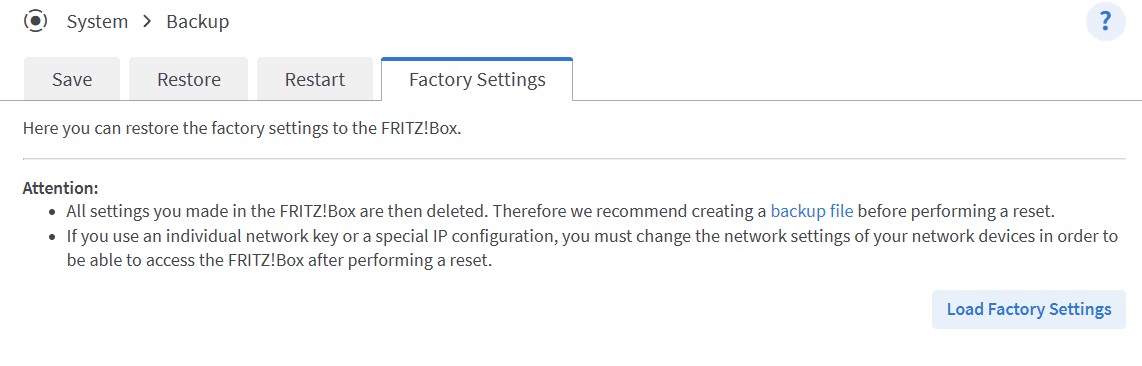
You dont want to try downgrade you want to factory reset:


Wombat1
586 posts

Ultimate Geek
+1 received by user: 409
Inactive user


  #3225788 3-May-2024 09:18
Send private message

I think this menu will become available after you have installed the AVM firmware. If its not, try installing the AVM Beta SW or try the analog phone method. Good luck

Loading the FRITZ!Box factory settings | FRITZ!Box 7590 | AVM International


 1 | 2
View this topic in a long page with up to 500 replies per page Create new topic


Geekzone Live »

Try automatic live updates from Geekzone directly in your browser, without refreshing the page, with Geekzone Live now.


Are you subscribed to our RSS feed? You can download the latest headlines and summaries from our stories directly to your computer or smartphone by using a feed reader.