Geekzone: technology news, blogs, forums
Guest
Welcome Guest.
You haven't logged in yet. If you don't have an account you can register now.


freitasm

BDFL - Memuneh
80657 posts

Uber Geek
+1 received by user: 41062

Administrator
ID Verified
Trusted
Geekzone
Lifetime subscriber

#318656 8-Feb-2025 11:57
Send private message

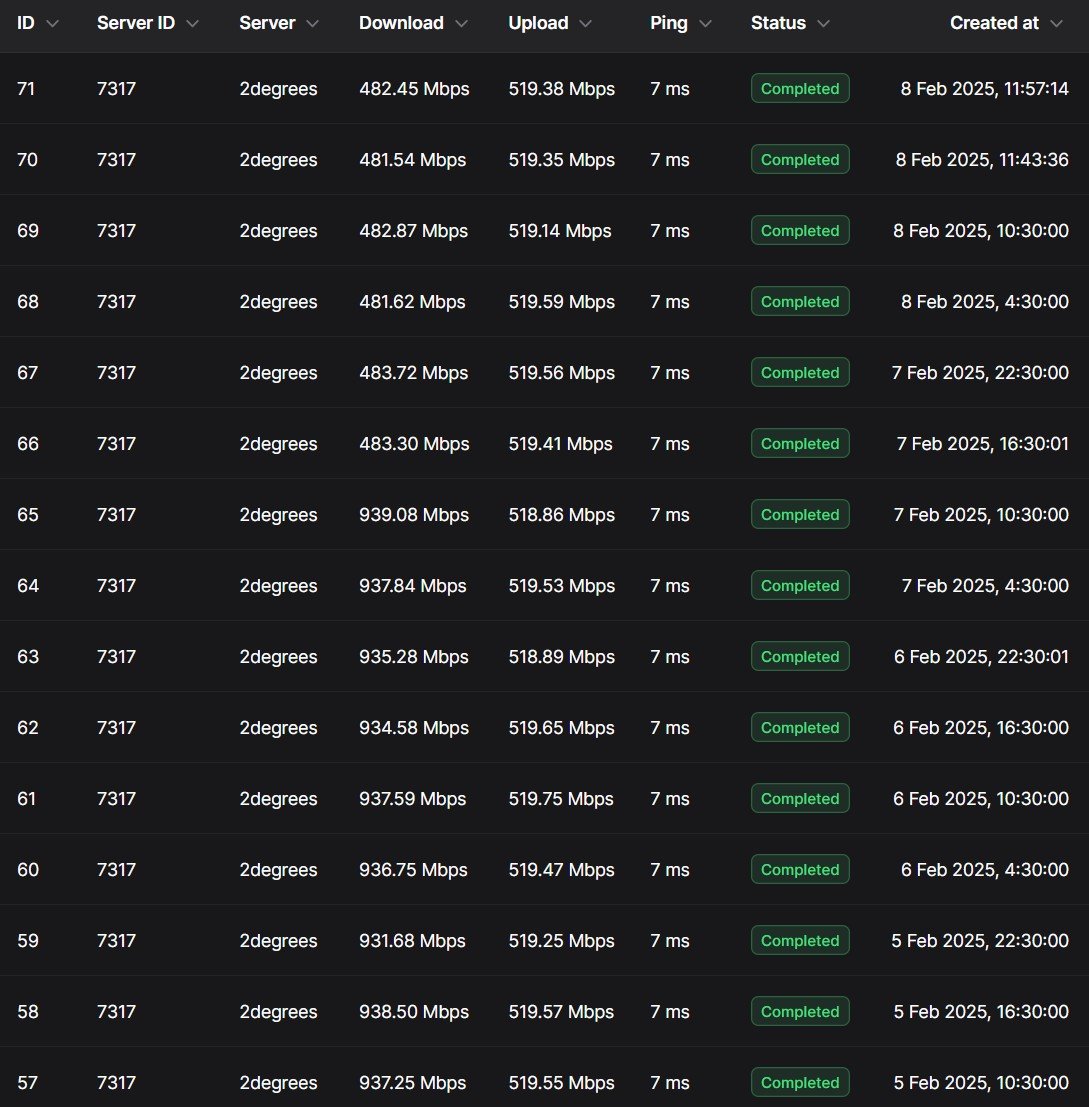
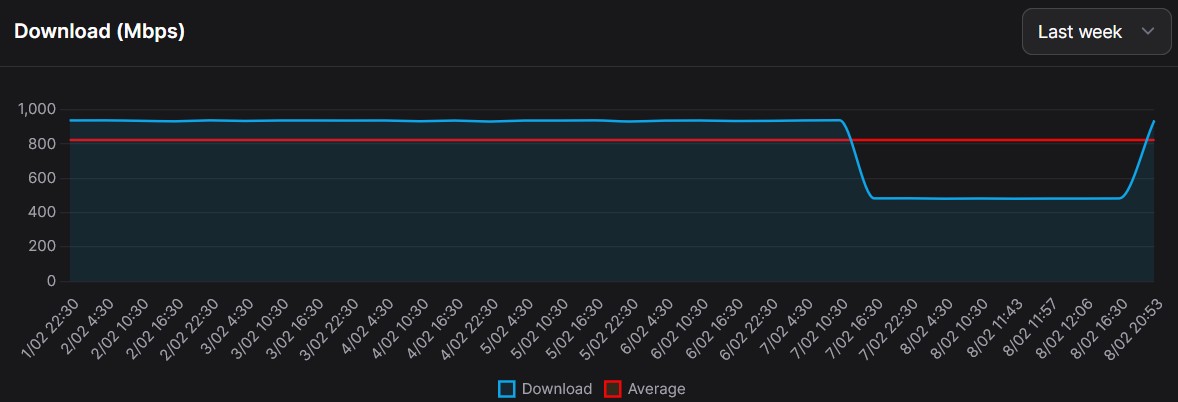
I've noticed a speed drop in downloads.


This chart shows testing to the 2degrees Christchurch speed test server from my Wellington fibre connection (900/500):


This is tested from a NAS connected via Ethernet to the router. 


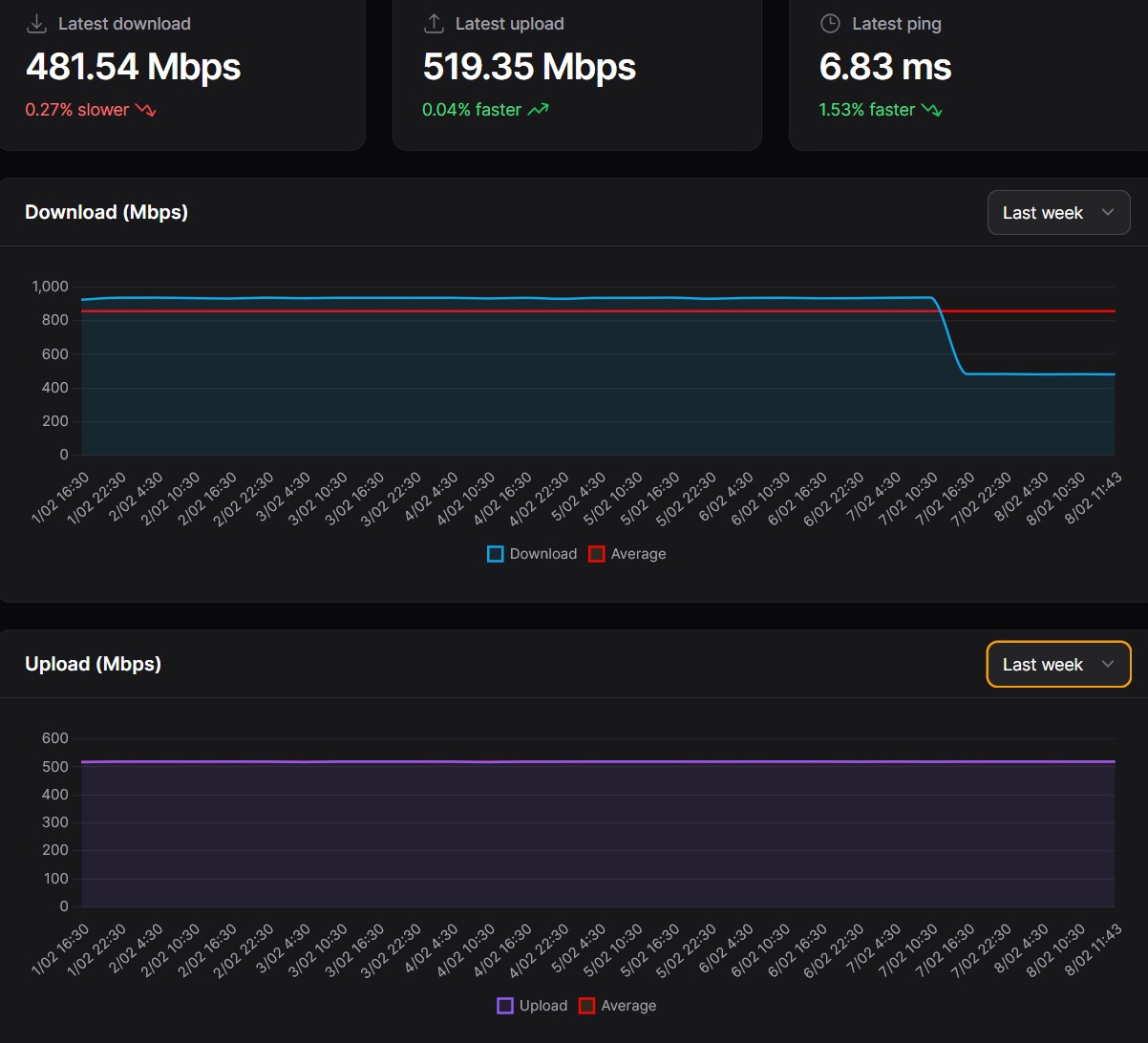
I tested again at 11:43 AM (as per chart). Nothing much else going on at the moment: 
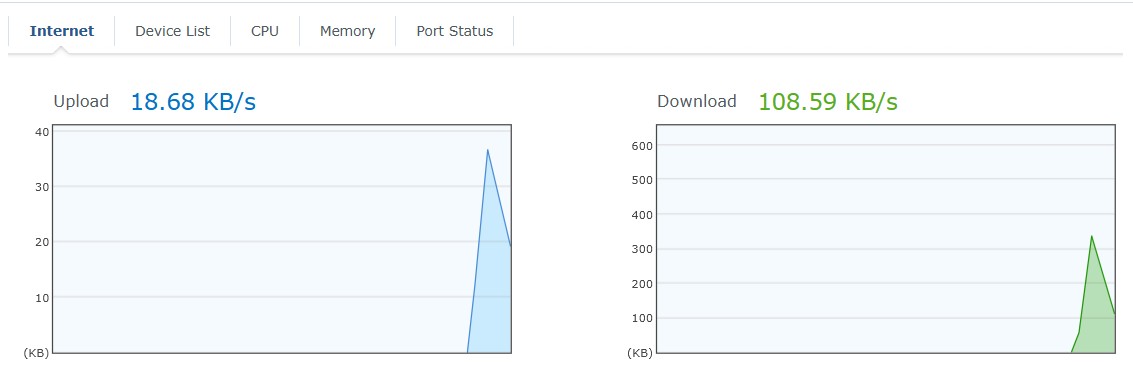


I have tested from my desktop to the same server and different servers with different providers. The results are consistent with a 50% drop in speed.


I have restarted both the router and switch.


This is still ongoing on Saturday at the time of this post. Is anyone else seeing this?



Referral links: Quic Broadband (free setup code: R587125ERQ6VE) | Samsung | AliExpress | Wise | Sharesies 


Support Geekzone by subscribing (browse ads-free), or making a one-off or recurring donation through PressPatron.


Filter this topic showing only the reply marked as answer Create new topic
timmmay
20859 posts

Uber Geek
+1 received by user: 5350

Trusted
Lifetime subscriber

  #3340503 8-Feb-2025 12:05
Send private message

The 300Mbps plan is working ok. I have noticed some latency opening websites the past few days, but that could be something on my network or something about my computer.


Jase2985
13734 posts

Uber Geek
+1 received by user: 6209

ID Verified
Lifetime subscriber

  #3340504 8-Feb-2025 12:10
Send private message

Restarted the ONT?


freitasm

BDFL - Memuneh
80657 posts

Uber Geek
+1 received by user: 41062

Administrator
ID Verified
Trusted
Geekzone
Lifetime subscriber

  #3340507 8-Feb-2025 12:17
Send private message

No, but I will try it after the half hour - I have a job that runs before that.


Referral links: Quic Broadband (free setup code: R587125ERQ6VE) | Samsung | AliExpress | Wise | Sharesies 


Support Geekzone by subscribing (browse ads-free), or making a one-off or recurring donation through PressPatron.


freitasm

BDFL - Memuneh
80657 posts

Uber Geek
+1 received by user: 41062

Administrator
ID Verified
Trusted
Geekzone
Lifetime subscriber

  #3340508 8-Feb-2025 12:23
Send private message


Tracing route to speed.snap.net.nz [202.37.100.186]
over a maximum of 30 hops:


  1    <1 ms    <1 ms    <1 ms  SYNOLOGYROUTER [192.168.2.1] 
  2     2 ms     1 ms     2 ms  v3.cpcak3-bng1.tranzpeer.net [101.98.0.96] 
  3     2 ms     1 ms     1 ms  default-rdns.vocus.co.nz [101.98.5.212] 
  4     4 ms     2 ms     2 ms  default-rdns.vocus.co.nz [101.98.5.213] 
  5  2020 ms     *        *     185.100.37.202.static.snap.net.nz [202.37.100.185] 
  6     *        *        *     Request timed out.
  7     *        *        *     Request timed out.
  8     *        *        *     Request timed out.
  9     *        *        *     Request timed out.
 10     *        *        *     Request timed out.
 11     *        *        *     Request timed out.
 12     *        *        *     Request timed out.
 13     *        *        *     Request timed out.
 14     *        *        *     Request timed out.
 15     *        *        *     Request timed out.
 16     *        *        *     Request timed out.
 17     *        *        *     Request timed out.
 18     *        *        *     Request timed out.
 19     *        *        *     Request timed out.
 20     *        *        *     Request timed out.
 21     *        *        *     Request timed out.
 22     *        *        *     Request timed out.
 23     *        *        *     Request timed out.
 24     *        *        *     Request timed out.
 25     *        *        *     Request timed out.
 26     *        *        *     Request timed out.
 27     *        *        *     Request timed out.
 28     *        *        *     Request timed out.
 29     *        *        *     Request timed out.
 30     *        *        *     Request timed out.


Trace complete.


Referral links: Quic Broadband (free setup code: R587125ERQ6VE) | Samsung | AliExpress | Wise | Sharesies 


Support Geekzone by subscribing (browse ads-free), or making a one-off or recurring donation through PressPatron.


freitasm

BDFL - Memuneh
80657 posts

Uber Geek
+1 received by user: 41062

Administrator
ID Verified
Trusted
Geekzone
Lifetime subscriber

  #3340510 8-Feb-2025 12:35
Send private message

Jase2985:


Restarted the ONT?


Restarted ONT, same results.


Referral links: Quic Broadband (free setup code: R587125ERQ6VE) | Samsung | AliExpress | Wise | Sharesies 


Support Geekzone by subscribing (browse ads-free), or making a one-off or recurring donation through PressPatron.


geek3001
221 posts

Master Geek
+1 received by user: 331

ID Verified
Subscriber

  #3340520 8-Feb-2025 13:09
Send private message


FWIW, given your result to speed.snap.net.nz I tried from Spark, and the latency and packet loss seems a bit high...


                                    My traceroute  [v0.93]
sage (10.10.10.139)                                                  2025-02-08T13:06:01+1300
Keys:  Help   Display mode   Restart statistics   Order of fields   quit
                                                     Packets               Pings
 Host                                              Loss%   Snt   Last   Avg  Best  Wrst StDev
 1. _gateway                                        0.0%   167    0.2   0.2   0.1   0.4   0.1
 2. []-vdsl.sparkbb.co.nz                 3.6%   167    2.2   1.9   1.3   2.7   0.4
 3. 222.152.41.143                                 47.6%   167    2.4  13.1   1.4 138.8  33.7
 4. 122.56.113.6                                    0.0%   167    2.9   3.1   1.7  29.9   3.1
 5. default-rdns.vocus.co.nz                        0.0%   167    3.5   5.8   2.1  41.2   5.0
 6. default-rdns.vocus.co.nz                        0.0%   166    4.5   3.8   2.1  21.2   3.2
 7. 185.100.37.202.static.snap.net.nz              93.3%   166  2033. 2030. 2023. 2045.   6.3
 8. (waiting for reply)


Shop now on Samsung phones, tablets, TVs and more (affiliate link).
timmmay
20859 posts

Uber Geek
+1 received by user: 5350

Trusted
Lifetime subscriber

  #3340545 8-Feb-2025 15:08
Send private message

timmmay:


The 300Mbps plan is working ok. I have noticed some latency opening websites the past few days, but that could be something on my network or something about my computer.


I found a DNS problem in my network causing the issue, so it's all working fine for me.


nzkc
1634 posts

Uber Geek
+1 received by user: 1041


  #3340557 8-Feb-2025 15:30
Send private message

Ok from Auckland (also 2degrees 900/500 connection).


Here's results from a wired PC: https://www.speedtest.net/result/c/3c845461-4ed2-4544-91d2-f9358610cc54


And MTR results to speed.snap.net.nz


                                                 My traceroute  [v0.95]
xxxx (192.168.1.4) -> speed.snap.net.nz (202.37.100.186)                                       2025-02-08T15:29:32+1300
Keys:  Help   Display mode   Restart statistics   Order of fields   quit
                                                                               Packets               Pings
 Host                                                                        Loss%   Snt   Last   Avg  Best  Wrst StDev
 1. router.xxxx.xxxx.xxxx                                                    0.0%    60    0.4   0.6   0.3   5.6   0.7
 2. v2.cpchn-hn-bng1.tranzpeer.net                                            0.0%    60    1.3   2.0   1.2  13.6   1.6
 3. default-rdns.vocus.co.nz                                                  0.0%    60    1.9   2.1   1.4   7.7   0.8
 4. default-rdns.vocus.co.nz                                                  0.0%    60    3.3   3.7   2.3  18.3   2.8
 5. 185.100.37.202.static.snap.net.nz                                        93.2%    60  2036. 2034. 2030. 2040.   4.8
 6. (waiting for reply)


freitasm

BDFL - Memuneh
80657 posts

Uber Geek
+1 received by user: 41062

Administrator
ID Verified
Trusted
Geekzone
Lifetime subscriber

  #3340653 8-Feb-2025 20:37
Send private message

Problem solved. Stay on, it's a ride.


The problem was identified around Friday at 4:30 PM.


I tested a lot of stuff on my side, including removing the switch (I've seen a packet storm before), the NAS, and everything else. I plugged my PC directly into the router and the problem persisted.


At the same time, I was due to move to Quic. So while I did not see anything from other users I thought why not? So I put in a port request on Saturday 4:20 PM and the connection was moved from 2degrees to Quic at 6 PM. That was fast!


The problem persisted, so this was evidence it was on my network. 


I plugged my PC directly into the ONT and the speeds were as expected.


I replaced all cables, and I was about to factory reset the router and restore a configuration backup when I looked at... Traffic Control.


Some time ago I decided to try Traffic Control to see if anything would be impacted. Nothing good came out of that.


The only device in the Priority group was the Panasonic TV. Around that time I swapped the old Panasonic for the new Panasonic 2024 for review.


And I turned Traffic Control off. Or so I thought.


Panasonic advised me they're sending a new model sometime, so I'm sending the 2024 model back. I put my old Panasonic back until the new one arrives.


When my old TV connected to the network the router turned Traffic Control on again (or I never turned it off really).


It doesn't matter. The speed slowdown coincides with the time of the TV swap.


Anyway. Problem solved now.


Thanks to anyone who replied or looked into it.


Referral links: Quic Broadband (free setup code: R587125ERQ6VE) | Samsung | AliExpress | Wise | Sharesies 


Support Geekzone by subscribing (browse ads-free), or making a one-off or recurring donation through PressPatron.


freitasm

BDFL - Memuneh
80657 posts

Uber Geek
+1 received by user: 41062

Administrator
ID Verified
Trusted
Geekzone
Lifetime subscriber

  #3340658 8-Feb-2025 20:54
Send private message

Result:


Referral links: Quic Broadband (free setup code: R587125ERQ6VE) | Samsung | AliExpress | Wise | Sharesies 


Support Geekzone by subscribing (browse ads-free), or making a one-off or recurring donation through PressPatron.


Filter this topic showing only the reply marked as answer Create new topic


Geekzone Live »

Try automatic live updates from Geekzone directly in your browser, without refreshing the page, with Geekzone Live now.


Are you subscribed to our RSS feed? You can download the latest headlines and summaries from our stories directly to your computer or smartphone by using a feed reader.