Geekzone: technology news, blogs, forums
Guest
Welcome Guest.
You haven't logged in yet. If you don't have an account you can register now.


turtleattacks

1008 posts

Uber Geek
+1 received by user: 305

Trusted

#285866 22-May-2021 08:33
Send private message

Hi guys, 

We have a paid subscription to Google Workspace and have been sending emails to an Outlook email that's not arriving. (I assume it's a company using O365 with their own domain).


Emails from a generic free Gmail account arrives straightaway.


We are not getting any error messages on both ends and was wondering what's the best way to troubleshoot? 


View this topic in a long page with up to 500 replies per page Create new topic
 1 | 2 | 3
timmmay
20858 posts

Uber Geek
+1 received by user: 5350

Trusted
Lifetime subscriber

  #2711208 22-May-2021 09:25
Send private message

First things to check are the email DNS settings - SPF and DKIM.


turtleattacks

1008 posts

Uber Geek
+1 received by user: 305

Trusted

  #2711224 22-May-2021 10:53
Send private message

timmmay:


First things to check are the email DNS settings - SPF and DKIM.


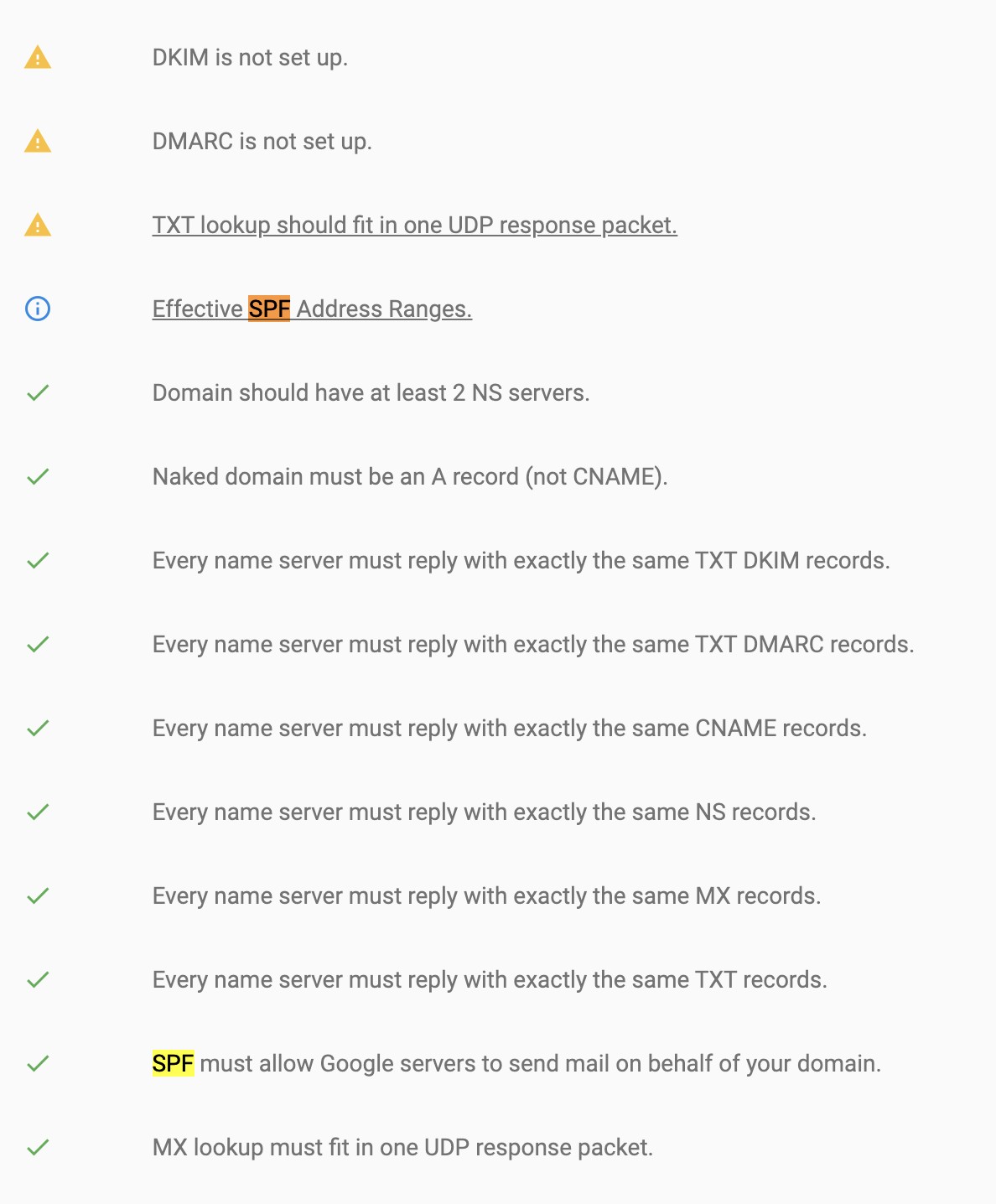
Looks like SPF is set up and not DKIM. 


Could this be a reason why? 


freitasm
BDFL - Memuneh
80646 posts

Uber Geek
+1 received by user: 41030

Administrator
ID Verified
Trusted
Geekzone
Lifetime subscriber

  #2711230 22-May-2021 11:14
Send private message

You should have SPF, DKIM and DMARC. With these three the recipient servers should be able to identify spam cases and act according to your policy (as set in DMARC).


Referral links: Quic Broadband (free setup code: R587125ERQ6VE) | Samsung | AliExpress | Wise | Sharesies 


Support Geekzone by subscribing (browse ads-free), or making a one-off or recurring donation through PressPatron.


turtleattacks

1008 posts

Uber Geek
+1 received by user: 305

Trusted

  #2711231 22-May-2021 11:21
Send private message

freitasm:


You should have SPF, DKIM and DMARC. With these three the recipient servers should be able to identify spam cases and act according to your policy (as set in DMARC).


Looks like I'm missing DMARC now, I think I have SPF and DKIM now set up. 


According to Google, I just need to add the following TXT record in my DNS: 


v=DMARC1; p=none; rua=mailto:dmarc-reports@solarmora.com


I assume I just need to replace solarmora.com above to my domain name? 


freitasm
BDFL - Memuneh
80646 posts

Uber Geek
+1 received by user: 41030

Administrator
ID Verified
Trusted
Geekzone
Lifetime subscriber

  #2711244 22-May-2021 11:40
Send private message

The RUA is optional and tells where recipient servers should report about your emails being accepted or rejected. If you don't have reporting capabilities on your domain domain then you can use third-party options - but they all cost money.


Most important is "p=" which tells what the recipient should do if the SPF and DKIM checks fail.


  • None means the server will accept the mail anyway.
  • Quarantine will move to quarantine.
  • Reject will simply not accept emails that fail.

The RUA email address accepts the reports and you should then calculate how many pass/fail - as I said if you don't have that capability either skip it or use a third-party.


Run DMARC with none at first and see if your emails arrive now that SPF and DKIM are set. If they do, change to Quarantine mode after a while and make sure your recipients aren't missing anything important. Lastly move to Reject - this will ensure spam sent from other servers pretending to be you will never arrive at the recipients (because they will fail SPF/DKIM) while your emails go through (because they pass SPF/DKIM). 


Referral links: Quic Broadband (free setup code: R587125ERQ6VE) | Samsung | AliExpress | Wise | Sharesies 


Support Geekzone by subscribing (browse ads-free), or making a one-off or recurring donation through PressPatron.


turtleattacks

1008 posts

Uber Geek
+1 received by user: 305

Trusted

  #2711246 22-May-2021 11:46
Send private message

freitasm:


The RUA is optional and tells where recipient servers should report about your emails being accepted or rejected. If you don't have reporting capabilities on your domain domain then you can use third-party options - but they all cost money.


Most important is "p=" which tells what the recipient should do if the SPF and DKIM checks fail.


  • None means the server will accept the mail anyway.
  • Quarantine will move to quarantine.
  • Reject will simply not accept emails that fail.

The RUA email address accepts the reports and you should then calculate how many pass/fail - as I said if you don't have that capability either skip it or use a third-party.


Run DMARC with none at first and see if your emails arrive now that SPF and DKIM are set. If they do, change to Quarantine mode after a while and make sure your recipients aren't missing anything important. Lastly move to Reject - this will ensure spam sent from other servers pretending to be you will never arrive at the recipients (because they will fail SPF/DKIM) while your emails go through (because they pass SPF/DKIM). 


Thanks, looks like DKIM,DMARC and SPF are now all set up. 


Just spoke to Google support and they said there's no issues with any of the deliveries. They confirmed that DKIM is set up fine. 


I've just noticed that it's O365 email servers that's not accepting the emails. I've sent it it to my work O365 email address and that's not arriving either, the wife's work email with O365 too and that's not arriving. 


Support Geekzone with one-off or recurring donations Donate via PressPatron.
turtleattacks

1008 posts

Uber Geek
+1 received by user: 305

Trusted

  #2711252 22-May-2021 11:57
Send private message

Ok I've just used MX Tool to send a test email and everything looks fine. https://mxtoolbox.com/deliverability/cf5de99b-379e-4318-a607-7e473bc6661a


Can someone please have a quick glance over to see why emails are not arriving at two different O365 email boxes? 


freitasm
BDFL - Memuneh
80646 posts

Uber Geek
+1 received by user: 41030

Administrator
ID Verified
Trusted
Geekzone
Lifetime subscriber

  #2711277 22-May-2021 13:25
Send private message

Send me an email to freitasm at here.


Referral links: Quic Broadband (free setup code: R587125ERQ6VE) | Samsung | AliExpress | Wise | Sharesies 


Support Geekzone by subscribing (browse ads-free), or making a one-off or recurring donation through PressPatron.


turtleattacks

1008 posts

Uber Geek
+1 received by user: 305

Trusted

  #2711279 22-May-2021 13:27
Send private message

freitasm: Send me an email to freitasm at here.


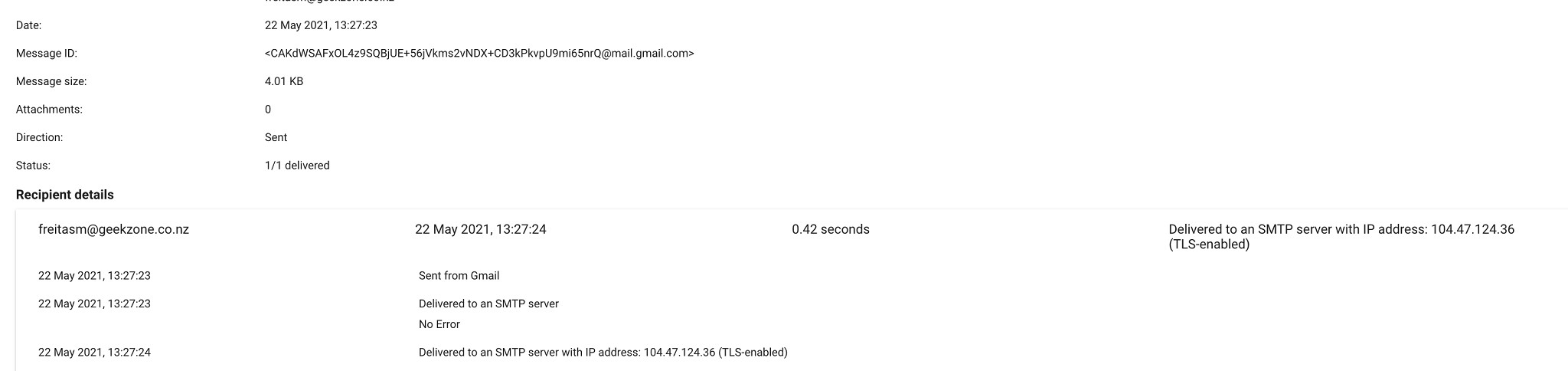
Done. Let me know if you get it. 


freitasm
BDFL - Memuneh
80646 posts

Uber Geek
+1 received by user: 41030

Administrator
ID Verified
Trusted
Geekzone
Lifetime subscriber

  #2711286 22-May-2021 13:30
Send private message

Nothing yet but out and about. Will check Quarantine later when home.


Referral links: Quic Broadband (free setup code: R587125ERQ6VE) | Samsung | AliExpress | Wise | Sharesies 


Support Geekzone by subscribing (browse ads-free), or making a one-off or recurring donation through PressPatron.


turtleattacks

1008 posts

Uber Geek
+1 received by user: 305

Trusted

  #2711290 22-May-2021 13:38
Send private message

Here you go - Google said delivered. 


Stream your favourite shows now on Apple TV (affiliate link).
Dolts
214 posts

Master Geek
+1 received by user: 76


  #2711291 22-May-2021 13:40
Send private message

May have something to do with the SORBS spam blacklist


https://www.reddit.com/r/msp/comments/nh2pkk/microsoft_365_exchange_ip_listed_in_backscatterer/


Effecting some M365 and Google Workspace IPs


turtleattacks

1008 posts

Uber Geek
+1 received by user: 305

Trusted

  #2711293 22-May-2021 13:46
Send private message

Dolts:


May have something to do with the SORBS spam blacklist


https://www.reddit.com/r/msp/comments/nh2pkk/microsoft_365_exchange_ip_listed_in_backscatterer/


Effecting some M365 and Google Workspace IPs


Arg this is far from ideal and it's been a couple of days now. 

We have medically sensitive/important emails being sent from this specific Google Workspace address and now have no idea which one has arrived or not. 


turtleattacks

1008 posts

Uber Geek
+1 received by user: 305

Trusted

  #2711328 22-May-2021 14:24
Send private message

Dolts:


May have something to do with the SORBS spam blacklist


https://www.reddit.com/r/msp/comments/nh2pkk/microsoft_365_exchange_ip_listed_in_backscatterer/


Effecting some M365 and Google Workspace IPs


Thanks - looks like our outgoing email IP is on a blacklist. https://mxtoolbox.com/SuperTool.aspx?action=blacklist%3a209.85.218.54&run=emailheaders 


freitasm
BDFL - Memuneh
80646 posts

Uber Geek
+1 received by user: 41030

Administrator
ID Verified
Trusted
Geekzone
Lifetime subscriber

  #2711433 22-May-2021 16:51
Send private message

Right, the message was delivered straight to the quarantine. I am sending a PM with the headers but you pretty much know why now.


Referral links: Quic Broadband (free setup code: R587125ERQ6VE) | Samsung | AliExpress | Wise | Sharesies 


Support Geekzone by subscribing (browse ads-free), or making a one-off or recurring donation through PressPatron.


 1 | 2 | 3
View this topic in a long page with up to 500 replies per page Create new topic


Geekzone Live »

Try automatic live updates from Geekzone directly in your browser, without refreshing the page, with Geekzone Live now.


Are you subscribed to our RSS feed? You can download the latest headlines and summaries from our stories directly to your computer or smartphone by using a feed reader.