Geekzone: technology news, blogs, forums
Guest
Welcome Guest.
You haven't logged in yet. If you don't have an account you can register now.


Paul1977

5229 posts

Uber Geek
+1 received by user: 2221


#318667 10-Feb-2025 10:57
Send private message

Not sure if this is the best forum for this or not.


We have several multifunction printers than relay emails (scan to email) via a Microsoft Exchange Online connector that has our external IP addresses configured as allowed senders. Some time on Friday morning scan to email stopped working on all of our MFP devices.


I’ve discovered that if I disable the “Use Secure Connection (SSL)” option in the SMTP settings on the MFP it starts working again, but this isn’t an ideal solution since it means it will be sending insecurely.


I can’t find any specific info, but my best guess is that Microsoft must have deprecated some older SSL/TLS versions and that our devices (which are several years old) don’t support more recent versions.


Has anyone else come across this, or have info to confirm whether my theory is correct?


Thanks


Create new topic
bagheera
545 posts

Ultimate Geek
+1 received by user: 190


  #3340988 10-Feb-2025 11:04
Send private message

office 365 "Cannot connect to SMTP server" "SSL negotiation failed" - Microsoft Q&A


Dear all, I just got a reply from Ricoh technician: "It looks to me as if Microsoft has disabled the cipher suites WITHOUT elliptic curves for TLS1.2. ECDHE is only possible with newer controllers from 18S onwards".


Dynamic
4037 posts

Uber Geek
+1 received by user: 1862

ID Verified
Trusted
Lifetime subscriber

  #3340991 10-Feb-2025 11:08
Send private message

We found using SMTP2GO significantly reduced setup and 'ongoing change' hassles.


If strong security is required, scan to SMB or FTP (FTP client on a server) may be the between way to go so it stays in house.


“Don't believe anything you read on the net. Except this. Well, including this, I suppose.” Douglas Adams


Paul1977

5229 posts

Uber Geek
+1 received by user: 2221


  #3340999 10-Feb-2025 11:10
Send private message

bagheera:


office 365 "Cannot connect to SMTP server" "SSL negotiation failed" - Microsoft Q&A


Dear all, I just got a reply from Ricoh technician: "It looks to me as if Microsoft has disabled the cipher suites WITHOUT elliptic curves for TLS1.2. ECDHE is only possible with newer controllers from 18S onwards".


Well, shit.....


Paul1977

5229 posts

Uber Geek
+1 received by user: 2221


  #3341003 10-Feb-2025 11:16
Send private message

Dynamic:


We found using SMTP2GO significantly reduced setup and 'ongoing change' hassles.


If strong security is required, scan to SMB or FTP (FTP client on a server) may be the between way to go so it stays in house.


Users complaining that scan to SMB is a hassle. We don't need higher than standard security, but just don't want to be sending things completely unencrypted!


Have never had any hassles before, it's always just worked. Will have a look at SMTP2GO in case Microsoft don't resolve the issue, but looking at the thread that @bagheera linked they might be rolling back the change in some instances.


ANglEAUT
altered-ego
2472 posts

Uber Geek
+1 received by user: 865

Trusted
Lifetime subscriber

  #3341008 10-Feb-2025 11:22
Send private message

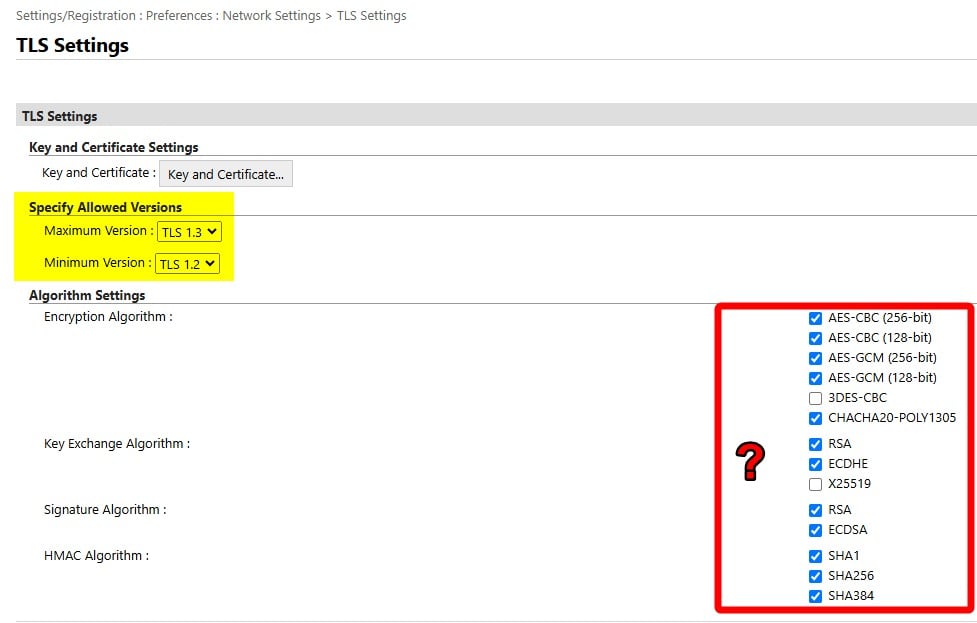
Our Canon printers have got these settings you can adjust


Please keep this GZ community vibrant by contributing in a constructive & respectful manner.


robjg63
4173 posts

Uber Geek
+1 received by user: 1442

Subscriber

  #3341009 10-Feb-2025 11:23
Send private message

Aw crap - Do I have that joy to look at tomorrow when I am in the office?


We have a Canon office printer/scanner that is set up using that connector mechanism.


😠


EDIT: Ah - someone with some advice for Canon printers - Great!!!!


Nothing is impossible for the man who doesn't have to do it himself - A. H. Weiler


HP


Shop now for HP laptops and other devices (affiliate link).
Paul1977

5229 posts

Uber Geek
+1 received by user: 2221


  #3341012 10-Feb-2025 11:40
Send private message

ANglEAUT:


Our Canon printers have got these settings you can adjust


Our Ricoh devices have fewer settings, and ECDHE doesn't appear to be one of them unfortunately.


Have logged a job with both Ricoh & Microsoft.


networkn
Networkn
33022 posts

Uber Geek
+1 received by user: 15610

ID Verified
Trusted
Lifetime subscriber

  #3341073 10-Feb-2025 12:44
Send private message

Just use SMTP2GO. Set it up once, forget worrying about Microsofts constantly changing, poorly communicated configurations. 


iainwyatt
1 post

Wannabe Geek


  #3350830 7-Mar-2025 06:30
Send private message

Anyone had any joy resolving this?


I am still facing the issue of not being able to use SSL with our Ricoh devices. We are using SMTP relay, through M365. It works fine if we turn off SSL, but really not happy with that solution and would prefer not to have to set up a third party relay.


Thanks.


SirHumphreyAppleby
2962 posts

Uber Geek
+1 received by user: 1888


  #3350836 7-Mar-2025 07:36
Send private message

iainwyatt:


Anyone had any joy resolving this?


I am still facing the issue of not being able to use SSL with our Ricoh devices. We are using SMTP relay, through M365. It works fine if we turn off SSL, but really not happy with that solution and would prefer not to have to set up a third party relay.


Unless the printer can be configured or upgraded to support the requirements, there is no fix.


If there is a handshake failure after issuing the STARTTLS command, the connection will be aborted. The only way around it is not use STARTTLS or to relay via a third-party.


acsylaa
86 posts

Master Geek
+1 received by user: 66

Just Internet

  #3350845 7-Mar-2025 08:00
Send private message

I was in the same boat a year or 2 ago, gave up and just went with SMTP2GO, it solved all my issues.


Once you get in to it its pretty simple to setup and get going, you will need to link your domain to it using some CNAME records, but that's about it, once its setup it just works!


I would Highly recommend doing this as you will save countless hours faffing about trying to get 365 working again.


Shop now on Samsung phones, tablets, TVs and more (affiliate link).
jhsol
102 posts

Master Geek
+1 received by user: 27


  #3351134 7-Mar-2025 19:02
Send private message

Internal sending only


If you only scan to email internally you can use an inbound connector (Exchange Admin Center -> Mail Flow -> Connectors).
Verify via IP address (your site external IP Address) and it will relay anything internally from that IP. Note that this requires you to trust that your users don't know about this as it opens your organisation to internal email spams.


Internal and external sending


Alternatively (and you may need to contact a Systems Engineer for this).


  1. Create a shared mailbox in M365 Exchange Admin Center (ie scanner@yourdomain.co.nz)


    1. Reset the password in the M365 Admin Center (not exchange) to a password you know (make sure its not set to change at first login)


  2. Powershell into your M365 Exchange tenant and do the following


    1. Disable SMTP for the tenand (Set-TransportConfig -SmtpClientAuthenticationDisabled $true)
    2. Enable SMTP for the requested account (Set-CASMailbox -Identity sean@contoso.com -SmtpClientAuthenticationDisabled $false)


  3. Create a Conditional Access Policy to block all legacy authentication


    1. ensure the scanner account is excluded from this rule


  4. Create a Conditional Access Policy to enforce 2FA


    1. ensure scanner account is excluded from this rule


On the scanner set the authentication settings to the following


  • LoginName scanner@yourdomain.co.nz
  • password: yourPassword1234
  • server: smtp.office365.com
  • SSL/TLS: STARTTLS
  • Auth:  Auto
  • Port: 587


Make sure your organisation is set for passwords to never expire, or create an exclusion for this (yep, powershell only).


Outcome


Yes, I know this is not for the faint-hearted, but the result is that your scan-to-emails will now be encrypted and authenticated emails for DMARC, DKIM, etc. to internal and external receivers. The license is a free license (so no additional MS licensing required) and 2FA bypass and SMTP authentication will be allowed only for that account (meaning the rest of your organisation is still protected by your baseline security)


SirHumphreyAppleby
2962 posts

Uber Geek
+1 received by user: 1888


  #3351141 7-Mar-2025 19:20
Send private message

jhsol:


On the scanner set the authentication settings to the following


  • LoginName scanner@yourdomain.co.nz
  • password: yourPassword1234
  • server: smtp.office365.com
  • SSL/TLS: STARTTLS
  • Auth:  Auto
  • Port: 587


TLS negotiation will occur before authentication and authentication shouldn't be permitted without TLS. Unless Microsoft applies different TLS settings when an IP address is verified, this won't fix TLS negotiation failure (E.g. Ricoh above).


jhsol
102 posts

Master Geek
+1 received by user: 27


  #3351149 7-Mar-2025 20:05
Send private message

SirHumphreyAppleby:


jhsol:


On the scanner set the authentication settings to the following


  • LoginName scanner@yourdomain.co.nz
  • password: yourPassword1234
  • server: smtp.office365.com
  • SSL/TLS: STARTTLS
  • Auth:  Auto
  • Port: 587


TLS negotiation will occur before authentication and authentication shouldn't be permitted without TLS. Unless Microsoft applies different TLS settings when an IP address is verified, this won't fix TLS negotiation failure (E.g. Ricoh above).


StartTLS basically is a "try TLS, if it fails fall back to nonsecured transmission". All comms to M365 on port 587 is encrypted as its TLS by default. Microsoft also requires authentication on port 587 so hence why you need all of those credentials. If your device does not support the TLS standard by M365, I'm assuming it will fail but I haven't come across a device so far yet that has failed in the past 5 years.


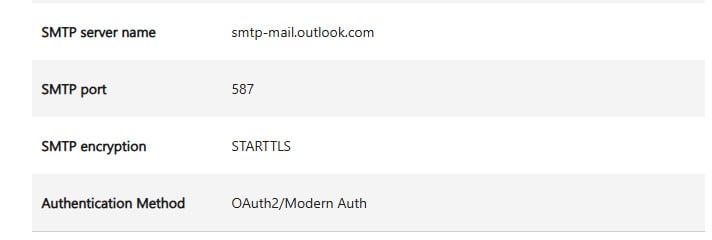
This page sums it up best
POP, IMAP, and SMTP settings for Outlook.com - Microsoft Support


Effectively Microsoft only allows SMTP communications on port 587 which is TLS. 


Im not too sure if this works on Canon specifically but this has been our process for the past 4 years for enabling Scan To Email function from our printers. Currently in use on about 12ish odd printers (Ricoh, KonicaMinolta, Toshiba and Fujitsu) and 4 or 5 websites as it works for Website To SMTP mailers too.


Summary


So in short STARTTLS is still encrypted to Microsoft over port 587, you just need to get all the configurations in line. This method is for where the MFC authenticates and sends directly to the recipient via Exchange Online (rather than using a relay connector method as per the original post). 


Create new topic


Geekzone Live »

Try automatic live updates from Geekzone directly in your browser, without refreshing the page, with Geekzone Live now.


Are you subscribed to our RSS feed? You can download the latest headlines and summaries from our stories directly to your computer or smartphone by using a feed reader.