Geekzone: technology news, blogs, forums
Guest
Welcome Guest.
You haven't logged in yet. If you don't have an account you can register now.


View this topic in a long page with up to 500 replies per page Create new topic
1 | ... | 44 | 45 | 46 | 47 | 48 | 49 | 50 | 51 | 52 | 53 | 54 | ... | 57

mdf

mdf
3566 posts

Uber Geek
+1 received by user: 1519

Trusted

  #2460900 14-Apr-2020 09:43
Send private message

Troy Hunt is posting UBNT pr0n on Twitter. Looks _very_ nice:


https://twitter.com/troyhunt/status/1248168221120712705


Apteryxc6
5 posts

Wannabe Geek
+1 received by user: 1


  #2463603 16-Apr-2020 16:48
Send private message

ER-3 Lite: Not starting fully, Boot Message: “Enter runlevel”


Short story: Using a Cisco-type rollover cable, serial connect w/PuTTY. It happily runs through the boot process then stops with the above message. I know from a ‘spare’ ERL that it should get a ‘Run level 2’ command from somewhere.


Longer story: The ERL was running fine as part of my setup: BP basic 100/20 UFB, ERL, TP-Link simple switch, Ubiquiti AP AC LR. Cisco ATA. It was turned off so I could exercise my backup system (HG659).


While it was down I decided to have a look at the config.boot to compare hence the PuTTY exercise. Nothing was touched/opened/changed.


Could it have flipped the proverbial ’bit’ in the inittab file?


Disclaimer: My networking skills are basic, I can plod through things like setup a Linux box, find, run ‘mkeosimg’ on Github and recover the USB stick on the ‘spare’ ERL. But slowly!


This is the area of code:


-


-


VFS: Mounted root (aufs filesystem) on device 0:11.


Freeing unused kernel memory: 276K (ffffffffc053b000 - ffffffffc0580000)


Algorithmics/MIPS FPU Emulator v1.5


INIT: version 2.88 booting


INIT: No inittab file found


Enter runlevel:


Any direction much appreciated


fe31nz
1295 posts

Uber Geek
+1 received by user: 423


  #2463824 17-Apr-2020 00:40
Send private message

Apteryxc6:


ER-3 Lite: Not starting fully, Boot Message: “Enter runlevel”


How old is the ER-3?  Two things happen to them with age.


The first is the power pack dies.  The router powers up but will not actually do much.  I had to replace both my ER-3's power packs with Jaycar wall warts, and they were both fine afterwards.


The second is that the internal USB stick dies.  You can cause this to happen rapidly if you make the router write to the USB stick too much, such as getting it to put a log file on the USB stick instead of in RAM.  But the USB stick can just die anyway.  When this happens, the boot loader in ROM still works, but it is unable to load the rest for the firmware from the USB stick.  The USB stick can be replaced, if you can find a compatible one.  It needs to be physically small enough to fit, as well as electronically compatible.  Check the Ubiquiti forums for suggested replacements.  Once you have a new USB stick, you will need to go through the "bricked device" recovery procedure, which should be available in one of the Ubiquiti blogs or forums.  It involves setting up a tftp server on one of your PCs and doing commands to the bootloader over the serial port to get it to burn new firmware to the USB stick from it.  I had to do this when my first USB stick died - my first ER-3 was from an early batch and that batch had a number of bad USB sticks.  It is a fiddly process - you have to get everything exactly right.  But it does work.  You can also burn the firmware into the new USB stick before you put it in the ER-3.  I have never done that, but the instructions should be on the forums or the Internet somewhere.


michaelmurfy

meow
13581 posts

Uber Geek
+1 received by user: 10914

Moderator
ID Verified
Trusted
Lifetime subscriber

  #2463825 17-Apr-2020 01:09
Send private message

@Apteryxc6 Looks like your flash drive has died.

I do have some older firmware available on my web server (for the Edgerouter Lite only): https://files.murfy.nz/ER-e100.v1.10.9.5166937.img.tar.gz from the last time I had to create an image.


Basically, extract using 7zip, use Etcher (https://www.balena.io/etcher/) to "flash" the *.img file inside the archive onto a flash drive (4gb or higher, however only 2gb will be usable unless if you resize the ext4 partition) and replace the existing flash drive inside the Edgerouter with the one you created. Once you've verified it has booted just upgrade the Edgerouter the normal way.


Michael Murphy | https://murfy.nz
Referral Links: Quic Broadband (use R122101E7CV7Q for free setup)

Are you happy with what you get from Geekzone? Please consider supporting us by subscribing.
Opinions are my own and not the views of my employer.


Apteryxc6
5 posts

Wannabe Geek
+1 received by user: 1


  #2466608 20-Apr-2020 20:01
Send private message

Thank you both for the prompt replies. I replied earlier but I must mucked it up.


Upshot of my query. Using both tutorials I've got one of the ERL's back into home usage. Great to have the AP AC LR in action again. It really is a great AP for our purposes.


fe31nz: Power packs - I'd not thought of that being a problem, the current one works fine on the 'spare' at the moment. But I'll get a spare as a 'just in case'.


The first ERL was bought April 2016, failed April 2018. The second ERL was bought April 2018, failed April 2020. Interestingly both were made in 2016, the first has a factory test date 02/03/16, the second 11/20/16. Must have purchased lots of crappy USB sticks to cover 9 months production...


michaelmurfy: I join the legion of grateful GZ'ers who have followed your tutorial. Thank you, thank you..! As a BTW, I followed the Tutorial recently at another place and set up a VF VDSL connection with a Draytek V130 and a new ERX. Took awhile but got there. More thanks..!


iamsammajor
379 posts

Ultimate Geek
+1 received by user: 27

Lifetime subscriber

  #2466717 20-Apr-2020 23:52
Send private message

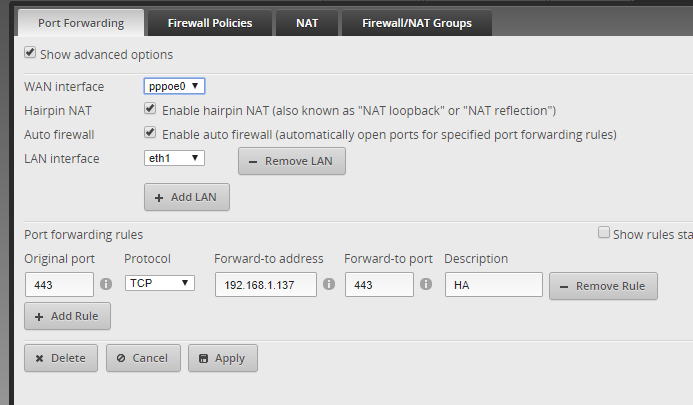
im with 2degree, and the internet is vlan tag 10, so does it mean when i do port forwarding, my WAN interface will be "eth0.10"?


try to set external access for my HA, but had no luck at all


cheers,


Sam


Want to support Geekzone and browse the site without the ads? Subscribe to Geekzone now (monthly, annual and lifetime options).
iamsammajor
379 posts

Ultimate Geek
+1 received by user: 27

Lifetime subscriber

  #2466718 20-Apr-2020 23:52
Send private message

im with 2degree, and the internet is vlan tag 10, so does it mean when i do port forwarding, my WAN interface will be "eth0.10"?


try to set external access for my HA, but had no luck at all


cheers,


Sam


stocksp
721 posts

Ultimate Geek
+1 received by user: 355

ID Verified
Lifetime subscriber

  #2466755 21-Apr-2020 07:05
Send private message

iamsammajor:


im with 2degree, and the internet is vlan tag 10, so does it mean when i do port forwarding, my WAN interface will be "eth0.10"?


try to set external access for my HA, but had no luck at all


cheers,


Sam


you may find that you are on CGnat which could prevent external access.  A static IP might help


michaelmurfy

meow
13581 posts

Uber Geek
+1 received by user: 10914

Moderator
ID Verified
Trusted
Lifetime subscriber

  #2466835 21-Apr-2020 09:34
Send private message

@iamsammajor Your WAN interface will be your PPPoE interface - you need to enter this manually into the port forwarding page as per the tutorial.


Michael Murphy | https://murfy.nz
Referral Links: Quic Broadband (use R122101E7CV7Q for free setup)

Are you happy with what you get from Geekzone? Please consider supporting us by subscribing.
Opinions are my own and not the views of my employer.


BlinkyBill
1443 posts

Uber Geek
+1 received by user: 1100
Inactive user


  #2466911 21-Apr-2020 10:52
Send private message

Michael. I read your review of the Dream Machine, noting the setup issue. If one has an Edgerouter today, is it possible to set up the DreamMachine using the configuration from the Edgerouter?


dfnt
1553 posts

Uber Geek
+1 received by user: 1036

Trusted
Lifetime subscriber

  #2466966 21-Apr-2020 11:16
Send private message

BlinkyBill:


Michael. I read your review of the Dream Machine, noting the setup issue. If one has an Edgerouter today, is it possible to set up the DreamMachine using the configuration from the Edgerouter?


No, they're two completely seperate product lines, I believe the UDM uses Unifi OS as well


Shop now for Dell laptops and other devices (affiliate link).
iamsammajor
379 posts

Ultimate Geek
+1 received by user: 27

Lifetime subscriber

  #2466979 21-Apr-2020 11:31
Send private message

michaelmurfy:


@iamsammajor Your WAN interface will be your PPPoE interface - you need to enter this manually into the port forwarding page as per the tutorial.


i have this setup on edgerouter, but when i did a port scan, it said 443 is closed.


mentalinc
3384 posts

Uber Geek
+1 received by user: 1023

Trusted

  #2467011 21-Apr-2020 12:15
Send private message

Try another external port mapped internally to 443, the webui on the edgerouter is running on port 443 i think it stops it from working...


CPU: AMD 5900x | RAM: GSKILL Trident Z Neo RGB F4-3600C16D-32GTZNC-32-GB | MB:  Asus X570-E | GFX: EVGA FTW3 Ultra RTX 3080Ti| Monitor: LG 27GL850-B 2560x1440


Quic: https://account.quic.nz/refer/473833 R473833EQKIBX 


michaelmurfy

meow
13581 posts

Uber Geek
+1 received by user: 10914

Moderator
ID Verified
Trusted
Lifetime subscriber

  #2467012 21-Apr-2020 12:18
Send private message

dfnt:


BlinkyBill:


Michael. I read your review of the Dream Machine, noting the setup issue. If one has an Edgerouter today, is it possible to set up the DreamMachine using the configuration from the Edgerouter?


No, they're two completely seperate product lines, I believe the UDM uses Unifi OS as well


Yep - UniFi OS so not linked anymore. I have a port on my Edgerouter simulating a CG-NAT PPPoE connection w/ VLAN 10 and this was where my problems came in. No way to skip the setup unless if it detects an internet connection. Thankfully, this won't be an issue for most people assuming they first set it up using their existing router.


Michael Murphy | https://murfy.nz
Referral Links: Quic Broadband (use R122101E7CV7Q for free setup)

Are you happy with what you get from Geekzone? Please consider supporting us by subscribing.
Opinions are my own and not the views of my employer.


michaelmurfy

meow
13581 posts

Uber Geek
+1 received by user: 10914

Moderator
ID Verified
Trusted
Lifetime subscriber

  #2467015 21-Apr-2020 12:19
Send private message

@iamsammajor It looks like you're on CG-NAT. Give 2degrees a call and state you've been trying to set up some port forwards and it isn't working.


Michael Murphy | https://murfy.nz
Referral Links: Quic Broadband (use R122101E7CV7Q for free setup)

Are you happy with what you get from Geekzone? Please consider supporting us by subscribing.
Opinions are my own and not the views of my employer.


1 | ... | 44 | 45 | 46 | 47 | 48 | 49 | 50 | 51 | 52 | 53 | 54 | ... | 57
View this topic in a long page with up to 500 replies per page Create new topic


Geekzone Live »

Try automatic live updates from Geekzone directly in your browser, without refreshing the page, with Geekzone Live now.


Are you subscribed to our RSS feed? You can download the latest headlines and summaries from our stories directly to your computer or smartphone by using a feed reader.